
HYPERLITE HP-JL-AU01
HYPERLITE LED Work Light with Stand
Model: HP-JL-AU01
1. Introduction
This manual provides instructions for the safe and efficient operation of your HYPERLITE LED Work Light with Stand, Model HP-JL-AU01. This product is designed to provide bright, adjustable illumination for various indoor and outdoor tasks, including workshops, construction sites, garages, and general maintenance. Please read this manual thoroughly before use and retain it for future reference.
2. Safety Information
Always observe the following safety precautions to reduce the risk of injury or damage:
- Ensure the power source matches the voltage requirements (120 Volts).
- Do not operate the light with a damaged cord or plug.
- Keep the work light away from flammable materials.
- Avoid direct eye exposure to the LED light, as it is extremely bright.
- Ensure the stand is placed on a stable, level surface to prevent tipping.
- Do not immerse the product in water, despite its splash-proof design.
- Unplug the unit before cleaning or performing any maintenance.
- This product is not a toy. Keep out of reach of children.
3. Package Contents
Verify that all components are present:
- 3 x LED Lamp Heads
- 1 x Adjustable Tripod Stand
- 1 x Power Cord (integrated)

Figure 3.1: Overview of components and features, including the non-slip grip, removable lamp heads, height adjustment mechanism, waterproof switch, and integrated power cord.
4. Setup and Assembly
- Unpack Components: Carefully remove all parts from the packaging.
- Assemble Tripod Stand: Extend the legs of the tripod stand to a stable position. Ensure all locking mechanisms are secure.
- Attach Lamp Heads: Mount the three LED lamp heads onto the horizontal bar of the stand. Use the manual twist-lock knobs to secure them firmly.
- Adjust Height: Loosen the locking collar on the main pole of the stand, extend it to the desired height (between 45.7 and 81 inches), and then tighten the collar securely.
- Position Lamp Heads: Adjust the angle of each lamp head as needed. They can rotate 360° horizontally and tilt 270° vertically. Tighten the adjustment knobs to fix their position.
- Connect Power: Plug the 10ft power cord into a standard 120V electrical outlet.
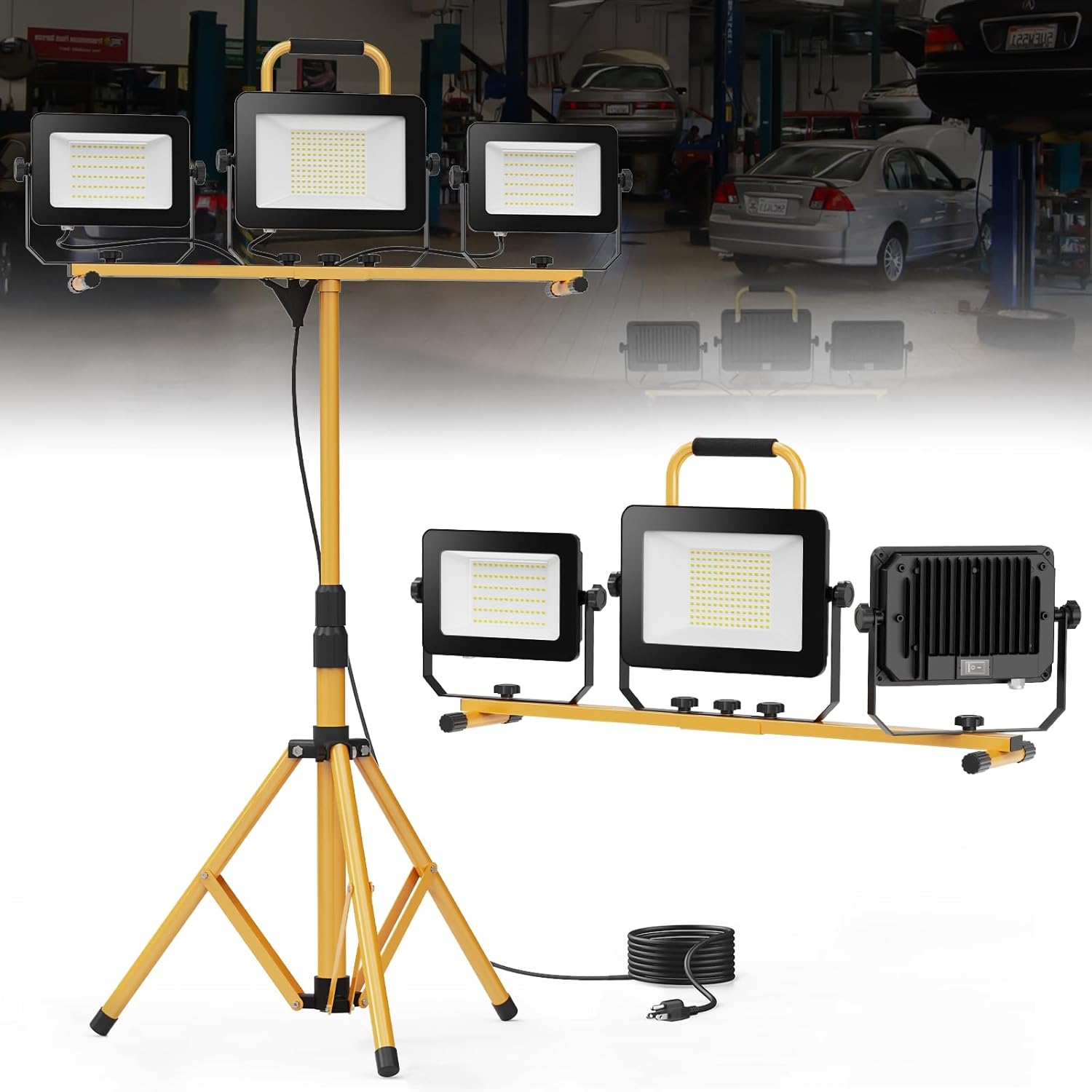
Figure 4.1: The HYPERLITE 3-Head LED Work Light fully assembled on its adjustable stand.

Figure 4.2: Detailed view of the lamp head adjustment mechanism, allowing for 360° horizontal rotation and 270° vertical tilt.
5. Operating Instructions
- Power On/Off: Once plugged in, use the main switch on the power cord or the individual switches on each lamp head to turn the lights on or off.
- Individual Lamp Control: Each of the three lamp heads features its own ON/OFF switch. This allows for flexible lighting configurations, such as using one, two, or all three heads simultaneously.
- Adjusting Light Direction: Loosen the twist-lock knobs on the lamp heads to adjust their horizontal and vertical angles. Tighten the knobs once the desired position is achieved.
- Detached Use: The lamp heads can be detached from the tripod stand for use as individual, portable work lights. Simply loosen the twist-lock knobs completely to remove them from the horizontal bar.
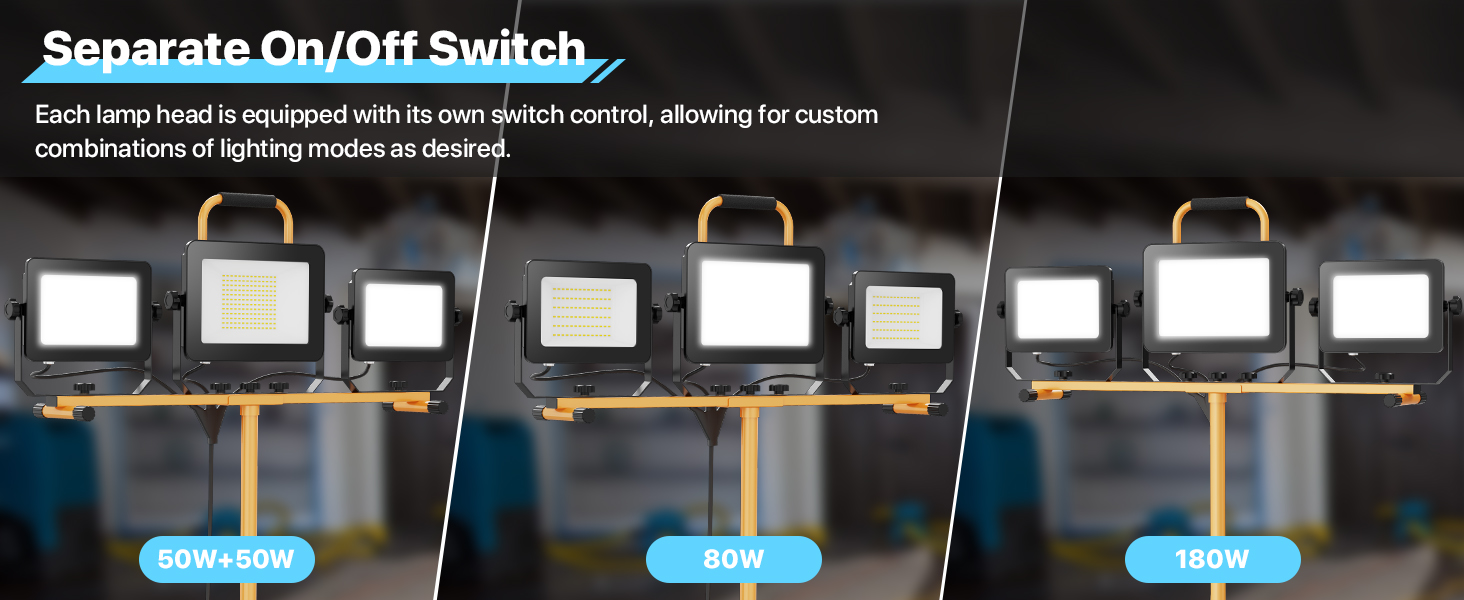
Figure 5.1: Illustration of the individual on/off switches located on each lamp head, enabling customized lighting modes.

Figure 5.2: Demonstrates the versatility of the work light, usable on its stand or with detached lamp heads for various applications.
6. Features Overview
- High Brightness: Equipped with 288 high-efficiency LED chips, delivering 20,000 lumens of 6500K cool white light.
- Energy Efficient: Replaces traditional halogen bulbs, saving up to 80% on electricity costs.
- Adjustable Illumination: Lamp heads rotate 360° horizontally and tilt 270° vertically for precise light positioning.
- Durable Construction: Die-cast aluminum housing for superior heat transfer and extended component lifespan. Tempered glass lens and sealed switch for protection against water, dust, and rust.
- Waterproof Design: Airtight and splash-proof construction suitable for various environments.
- Flexible Use: Can be used on the adjustable tripod stand (45.7" - 81" height) or with individual lamp heads detached for portable use.
- Individual Switches: Each lamp head has its own switch for independent control.
- Efficient Heat Dissipation: Alloy heat dissipation fins maintain optimal operating temperature.

Figure 6.1: Detail of the LED light panel, showcasing the 288 high-brightness light beads.
Figure 6.2: The work light's waterproof capabilities are highlighted, showing its resilience in wet conditions.

Figure 6.3: Rear view of the lamp heads, illustrating the alloy heat dissipation fins for optimal thermal management.
7. Maintenance
- Cleaning: Disconnect the power before cleaning. Wipe the lamp heads and stand with a soft, damp cloth. Do not use abrasive cleaners or solvents.
- Storage: When not in use, store the work light in a dry, cool place. Ensure the stand is collapsed and secured to prevent damage.
- Cord Inspection: Periodically inspect the power cord for any signs of damage. If damaged, discontinue use and contact customer support.
8. Troubleshooting
| Problem | Possible Cause | Solution |
|---|---|---|
| Light does not turn on. | No power to the outlet; power cord not fully plugged in; individual switch off; main switch off. | Check power outlet with another device; ensure power cord is securely plugged in; turn on individual lamp switches and main switch. |
| Light is dim or flickers. | Unstable power supply; damaged LED chips (unlikely). | Try a different power outlet; if problem persists, contact customer support. |
| Stand is unstable. | Legs not fully extended; locking collars not tightened. | Ensure tripod legs are fully extended and all locking collars are securely tightened on a level surface. |
9. Specifications
| Model Number | HP-JL-AU01 |
| Power Source | Corded Electric |
| Voltage | 120 Volts |
| Wattage | 180 Watts |
| Luminous Flux | 20,000 Lumens |
| Color Temperature | 6500 Kelvin (Cool White) |
| Bulb Type | LED (288 pieces) |
| Material | Aluminum |
| Item Weight | 13 pounds |
| Product Dimensions | 17.7 x 13.8 x 7.8 inches (packaged) |
| Stand Height Adjustment | 45.7" - 81" |
| Power Cord Length | 10 feet |
10. Warranty and Support
The HYPERLITE LED Work Light with Stand (Model HP-JL-AU01) is covered by a 2-year warranty from the date of purchase. This warranty covers defects in materials and workmanship under normal use.
For warranty claims, technical support, or any questions regarding your product, please contact HYPERLITE customer service. Refer to the product packaging or the official HYPERLITE website for current contact information.
Related documentsHP-JL-AU01


Ask a question about this manual
Ask about setup, troubleshooting, compatibility, parts, safety, or missing instructions. Manuals+ will review the question and use this page’s manual context to help answer it.