
Introduction
This manual provides detailed instructions for the operation and maintenance of your KOZWAY Lomeho AM-AKS1 6-Channel Audio Mixer. Please read this manual thoroughly before using the device to ensure proper functionality and to prevent damage.
Product Features
- 6-Channel Mixer: Supports 4 mono and 1 stereo input channels.
- USB Player and Recorder: Allows direct playback from and recording to USB devices.
- Bluetooth Connectivity: Seamlessly connect mobile devices for audio streaming.
- Phantom Power: Built-in +48V phantom power for condenser microphones.
- Effects Processor: Integrated effects with Repeat and Delay functions.
- High Definition Headset Output: Dedicated port for monitoring audio.
- Compact and Portable: Lightweight design, powered directly via PC USB port or mobile power bank, eliminating the need for an external adapter.
- Sound Card Functionality: Connects to PC as a sound card.
Setup and Connections
Powering the Mixer
The mixer can be powered via a PC's USB port or a mobile power bank using the USB power input port. No external power adapter is required for basic operation.
Caution: Ensure the power source provides stable 5V DC.
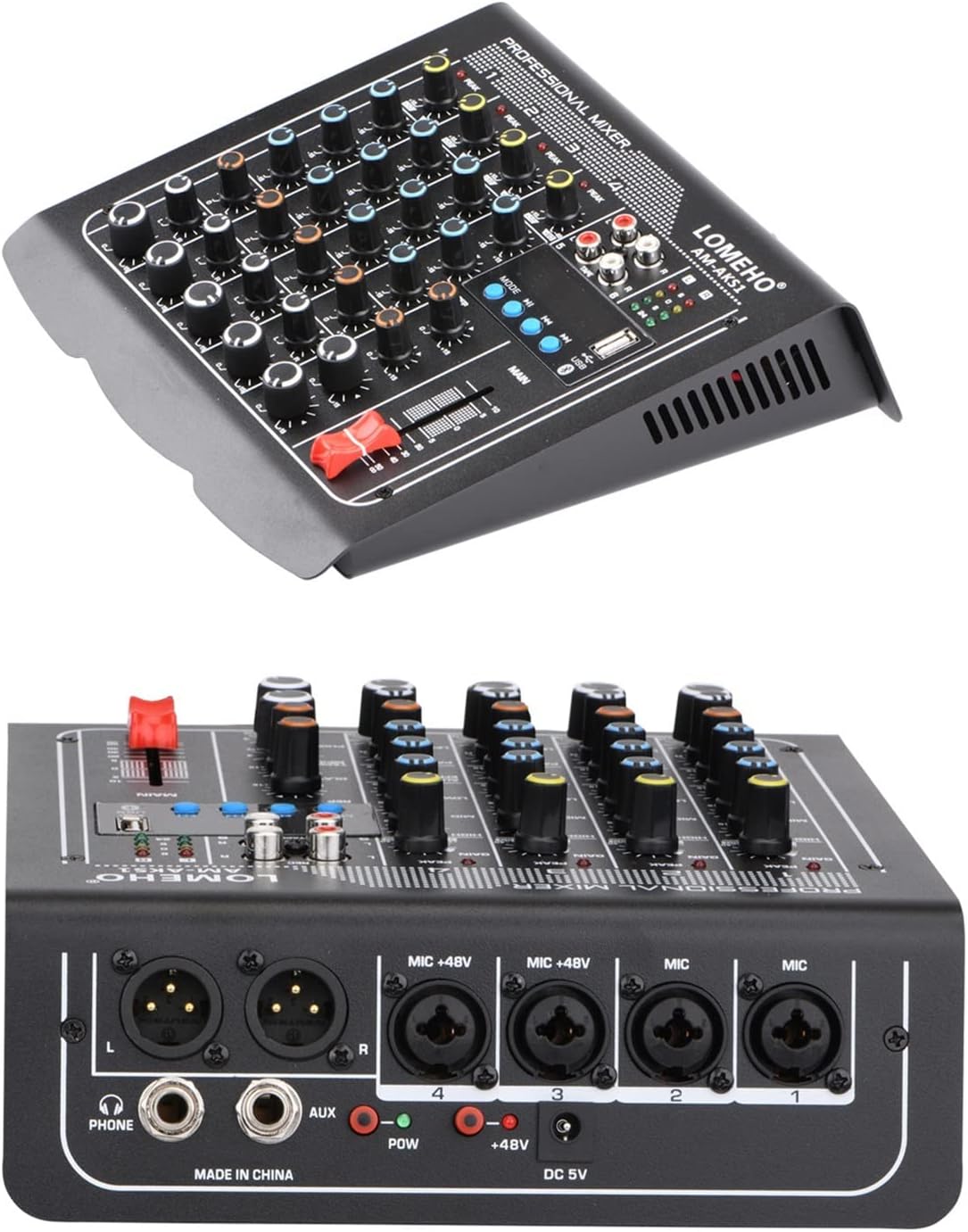
Image: Rear panel of the mixer, illustrating the various input and output connections including XLR, AUX, Phone, and power input.
Power Switch
The main power switch is located on the rear panel of the mixer. Use this switch to turn the device on or off. Always ensure all connections are secure before powering on the mixer.
Connecting Microphones and Other Inputs
The mixer provides various input options for microphones and line-level sources.
- XLR Inputs (Channels 3 & 4) with +48V Phantom Power: Use these balanced XLR connections for condenser microphones that require external power. Activate the +48V phantom power using the dedicated switch on the rear panel.
- XLR Inputs (Channels 1 & 2) without +48V Phantom Power: Use these balanced XLR connections for dynamic microphones. Note that channels 1 and 2 do not provide +48V phantom power.
- 1/4-inch (6.35mm) Jack Inputs (Channels 1-4): Connect line-level devices or dynamic microphones using 1/4-inch TS/TRS cables. The Gain control determines the input sensitivity for these connections as well.

Image: Connection diagram illustrating how to connect different types of microphones (condenser, dynamic, wireless) and output devices (power amplifier, passive speakers, headphones) to the mixer.
Main Output (XLR)
These balanced XLR MAIN OUTPUTS are used to connect the mixer to external devices such as power amplifiers or active monitor speakers.
Headphones Connection
Connect standard headphones to the TELEPHONES jack for monitoring the audio output.
AUX Send
The AUX SEND connector provides a monitor signal from your machine, suitable for driving a monitor amplifier or active monitor speaker.
Operating Instructions

Image: Top panel of the mixer, displaying all channel controls, master controls, and the USB/Bluetooth module.
Bluetooth Connectivity
- Press the "MODE" button on the mixer's USB/Bluetooth module until "Bluetooth" is selected.
- Enable Bluetooth on your mobile device or other transmitting equipment.
- Scan for available devices and select the mixer's Bluetooth name (usually displayed on the mixer's screen or indicated in the product specifications).
- Once connected, audio from your mobile device will stream to the mixer.

Image: Illustration of a smartphone wirelessly connecting to the mixer via Bluetooth, indicated by a blue signal icon.
Phantom Power (+48V)
The +48V phantom power switch, located on the rear panel, activates power for condenser microphones connected to XLR inputs on channels 3 and 4. Ensure this switch is only enabled when using condenser microphones that require phantom power. Do not activate phantom power for dynamic microphones or ribbon microphones, as this may cause damage.
Effects (Repeat and Delay)
The mixer includes an effects processor. Use the EFF control to adjust the effect level for each channel and the dedicated effect controls (e.g., Repeat, Delay) to fine-tune the effect parameters.
USB Playback and Recording
Insert a USB storage device into the USB port. Use the controls on the USB module to play audio files or record the mixer's output directly to the USB device.
Channel Controls
- Gain Control: Adjusts the input sensitivity for each channel, accommodating various microphone and line-level sources.
- Peak Light: Illuminates to indicate that the input signal is approaching clipping. Reduce the Gain if the peak light frequently illuminates.
- 3-Band Equalizer (HIGH, MID, LOW):
- HIGH: Controls the high-frequency range of the channel.
- MID: Adjusts the mid-frequency range of the channel.
- LOW: Boosts or cuts the bass frequency range of the channel.
- AUX/EFF Control: Determines the channel volume sent to the AUX mix bus (for monitoring) and adjusts the effect send level for the channel.
- PAN Control: Adjusts the stereo position of the channel's signal (left to right).
- LEVEL Control: Sets the overall output level of the channel to the main mix.
Specifications
| Feature | Detail |
|---|---|
| Model Number | AM-AKS1 (Internal: 1005004217101153) |
| Brand | KOZWAY |
| Number of Channels | 6 (4 Mono, 1 Stereo) |
| Connectivity | Bluetooth, USB |
| Phantom Power | +48V (selectable for specific XLR inputs) |
| Equalizer | 3-Band (High, Mid, Low) per channel |
| Effects | Repeat, Delay |
| Power Supply | USB 5V DC |
| Item Weight | 10 Grams |
| Package Dimensions | 3 x 2 x 1 cm |
| First Available Date | January 24, 2024 |
Troubleshooting
This section provides solutions to common issues you might encounter with your mixer.
- No Sound Output:
- Check all cable connections (inputs, outputs, power).
- Ensure all channel LEVEL controls and the MAIN fader are raised.
- Verify that the correct input source is selected (e.g., USB, Bluetooth, XLR).
- If using phantom power, ensure it is activated for condenser microphones.
- Distorted Sound:
- Reduce the GAIN control for the affected channel if the PEAK light is illuminating.
- Check input source levels to ensure they are not too high.
- Ensure cables are not damaged.
- Bluetooth Connection Issues:
- Ensure the mixer is in Bluetooth mode.
- Restart Bluetooth on both the mixer and your mobile device.
- Ensure no other devices are currently connected to the mixer via Bluetooth.
- USB Playback/Recording Failure:
- Ensure the USB device is properly formatted and contains compatible audio files.
- Check if the USB device has sufficient free space for recording.
Maintenance
To ensure the longevity and optimal performance of your KOZWAY Lomeho AM-AKS1 mixer, follow these maintenance guidelines:
- Cleaning: Use a soft, dry cloth to clean the exterior of the mixer. Avoid using liquid cleaners or solvents, as they may damage the finish or internal components.
- Storage: Store the mixer in a cool, dry place away from direct sunlight, excessive heat, and moisture.
- Handling: Handle the mixer with care. Avoid dropping it or subjecting it to strong impacts.
- Ventilation: Ensure proper ventilation around the mixer to prevent overheating. Do not block any ventilation openings.
- Cable Management: Regularly check all cables for signs of wear or damage. Replace damaged cables immediately to prevent signal loss or electrical hazards.
Warranty and Support
For warranty information and technical support, please refer to the documentation provided at the time of purchase or contact KOZWAY customer service directly. Keep your purchase receipt as proof of purchase for warranty claims.
Manufacturer: KOZWAY
First Available Date: January 24, 2024