
BANTI B-XW
BANTI Electric Standing Desk User Manual
Model: B-XW
Introduction
Thank you for choosing the BANTI Electric Standing Desk. This manual provides essential information for the safe and efficient assembly, operation, and maintenance of your new desk. Please read these instructions thoroughly before beginning assembly or using the product. Keep this manual for future reference.
Safety Information
Important Safety Warnings:
- The recommended maximum weight capacity for this product is 165 pounds (75 kg). Do not exceed this limit.
- Ensure the desk is placed on a level surface and, if possible, properly anchored to the floor to prevent tipping, especially when fully extended.
- The lifting mechanism is electric. Operate with caution, keeping hands and objects clear of moving parts to prevent injury or damage.
- Keep children and pets away from the desk during operation.
- Do not sit or stand on the desk.
- Disconnect power before cleaning or performing any maintenance.
- If any parts are missing, damaged, or worn, stop assembly and contact customer support. Do not use damaged parts.
Package Contents
Before assembly, please verify that all components are present and undamaged:
- Desk Frame (Legs and Crossbar)
- Desktop (Splice Board)
- Control Panel
- Power Adapter and Cable
- Assembly Hardware (Screws, Allen Wrenches, etc.)
- Accessories: 1 x Headphone Hook, 2 x Cable Clamps, 1 x Cup Holder
- Instruction Manual
Assembly Instructions
The BANTI Electric Standing Desk is designed for straightforward assembly. All necessary tools and detailed instructions are included in the package. Please follow the step-by-step guide provided in your assembly manual.

Figure 1: Product Dimensions. This diagram shows the overall dimensions of the desk, including the height adjustment range from 28.3 inches to 46.2 inches, and the desktop size of 44 inches by 23.6 inches. Refer to this for space planning and assembly.

Figure 2: Assembled Desk Example. An example of the BANTI Electric Standing Desk fully assembled in a modern office setting, equipped with a monitor, tablet, keyboard, and mouse, demonstrating its functional design.
Key Assembly Steps:
- Unpack all components and verify against the package contents list.
- Assemble the desk frame according to the provided diagrams, ensuring all screws are tightened securely.
- Attach the desktop sections to the assembled frame.
- Install the control panel and connect all necessary cables to the motor and power supply.
- Attach the headphone hook, cable clamps, and cup holder as desired.
Operating Your Desk
Your BANTI Electric Standing Desk features an intuitive control panel for easy height adjustment and memory functions.

Figure 3: Control Panel. The desk's control panel includes buttons for height adjustment, memory presets, and a reset function.
Height Adjustment:
- Use the Up (▲) and Down (▼) buttons to manually adjust the desk height. The desk can be adjusted from 28.3 inches to 46 inches.
Memory Presets:
- The desk features two preset buttons (labeled 1 and 2) to save your preferred sitting and standing heights.
- To save a height: Adjust the desk to your desired height, then press and hold one of the preset buttons (1 or 2) until you hear a beep or see the display flash, indicating the height is saved.
- To recall a saved height: Press the corresponding preset button (1 or 2). The desk will automatically move to the saved position.
Reset Function:
- If the desk encounters an error or does not move smoothly, you may need to perform a reset.
- To reset: Press and hold the Reset (↺) button until the desk moves to its lowest position and then slightly rises, indicating a successful reset.
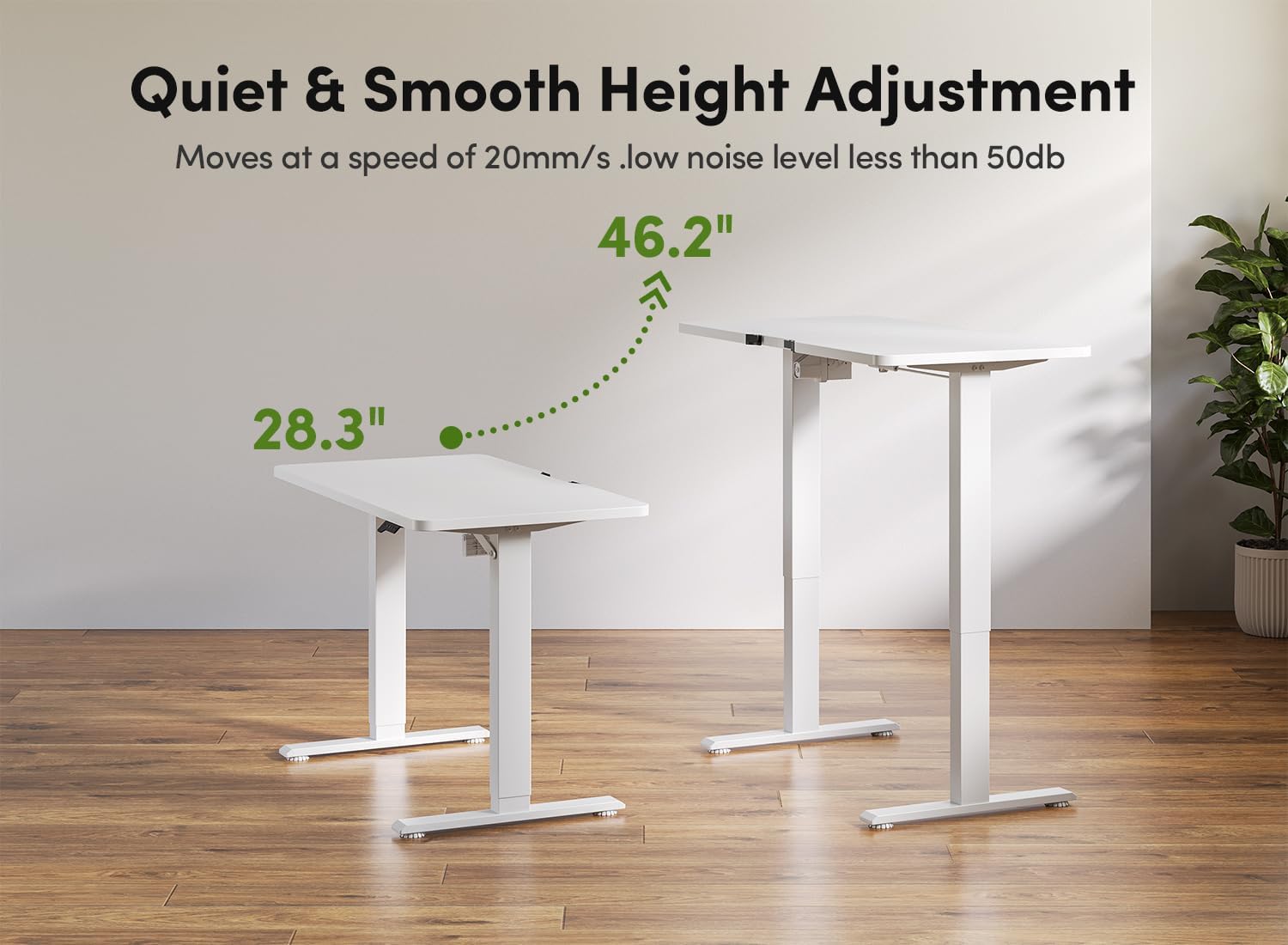
Figure 4: Quiet and Smooth Height Adjustment. The desk adjusts height smoothly at a speed of 20mm/s with a low noise level of less than 50dB, transitioning between 28.3 inches and 46.2 inches.

Figure 5: Load Capacity and Noise Level. The desk supports a load capacity of up to 132 lbs (60 kg) and operates with a quiet lift, producing less than 50dB of noise.

Figure 6: Cable Management. The integrated cable management system helps keep your workspace tidy by routing cables discreetly through the desk grommet.
Care and Maintenance
Regular care will help maintain the appearance and functionality of your BANTI Electric Standing Desk.
- Cleaning: Wipe the desk surface and frame with a soft, damp cloth. Avoid harsh chemicals or abrasive cleaners that could damage the finish.
- Inspection: Periodically check all screws and connections to ensure they remain tight. Retighten if necessary.
- Cable Management: Ensure cables are not pinched or tangled, which could affect desk operation or cause damage.
- Power Cord: Inspect the power cord for any signs of damage. If damaged, discontinue use and contact customer support.
Troubleshooting
If you encounter issues with your BANTI Electric Standing Desk, refer to the following common solutions:
- Desk not moving: Check if the power cord is securely plugged into both the desk and a working power outlet. Ensure no objects are obstructing the desk's movement. Try performing a reset (see Operating Instructions).
- Uneven movement: Perform a reset to recalibrate the desk's height sensors. Ensure the desk is not overloaded and weight is evenly distributed.
- Error codes on display: Refer to your specific assembly manual for a list of error codes and their corresponding solutions. Often, a reset can resolve minor errors.
- Unusual noises: If you hear grinding or loud noises, immediately stop operation and disconnect power. Inspect for any loose parts or obstructions. Contact customer support if the issue persists.
If these steps do not resolve the issue, please contact BANTI customer support for further assistance.
Product Specifications
| Brand | BANTI |
| Model Number | B-XW |
| Color | White Frame & White Top |
| Material | Wood, Alloy Steel |
| Number of Items | 1 |
| Size | 43 inch x 24 inch (Desktop) |
| Product Dimensions | 60.96 x 111.76 x 71.88 cm (24 x 44 x 28.3 inches); 18.1 kg (39.9 lbs) |
| Height Adjustment Range | 28.3 inches to 46 inches |
| Maximum Load Capacity | 165 pounds (75 kg) |
| Noise Level | Less than 50dB |
| Included Accessories | Cup Holder, Headphone Hook |
| Special Features | Ergonomic, Home Office, Adjustable, Electric, Memory Presets |
Warranty and Customer Support
BANTI products are manufactured to high-quality standards. For warranty information, technical support, or any questions regarding assembly or use, please refer to the warranty card included with your product or contact BANTI customer service through the retailer where you purchased the desk. Please have your model number (B-XW) and purchase date available when contacting support.
Related documentsB-XW


Ask a question about this manual
Ask about setup, troubleshooting, compatibility, parts, safety, or missing instructions. Manuals+ will review the question and use this page’s manual context to help answer it.