
1. Introduction and Compatibility
The ESR Ascend Keyboard Case is designed to enhance your iPad experience by providing a versatile keyboard and protective case. It transforms your tablet into a functional workstation, offering both protection and productivity.
1.1. Compatibility
This keyboard case is compatible with the following iPad models:
- iPad Air 11 inch (M3/M2 2025/2024)
- iPad Pro 11 inch (2022/2021/2020/2018)
- iPad Air 5th Generation (2022)
- iPad Air 4th Generation (2020)
Supported model numbers include: A3266, A3267, A3270, A2902, A2903, A2904, A2588, A2589, A2591, A2316, A2324, A2325, A2072, A2759, A2761, A2435, A2762, A2377, A2459, A2301, A2460, A2228, A2068, A2230, A2231, A1980, A2013, A1934, A1979.
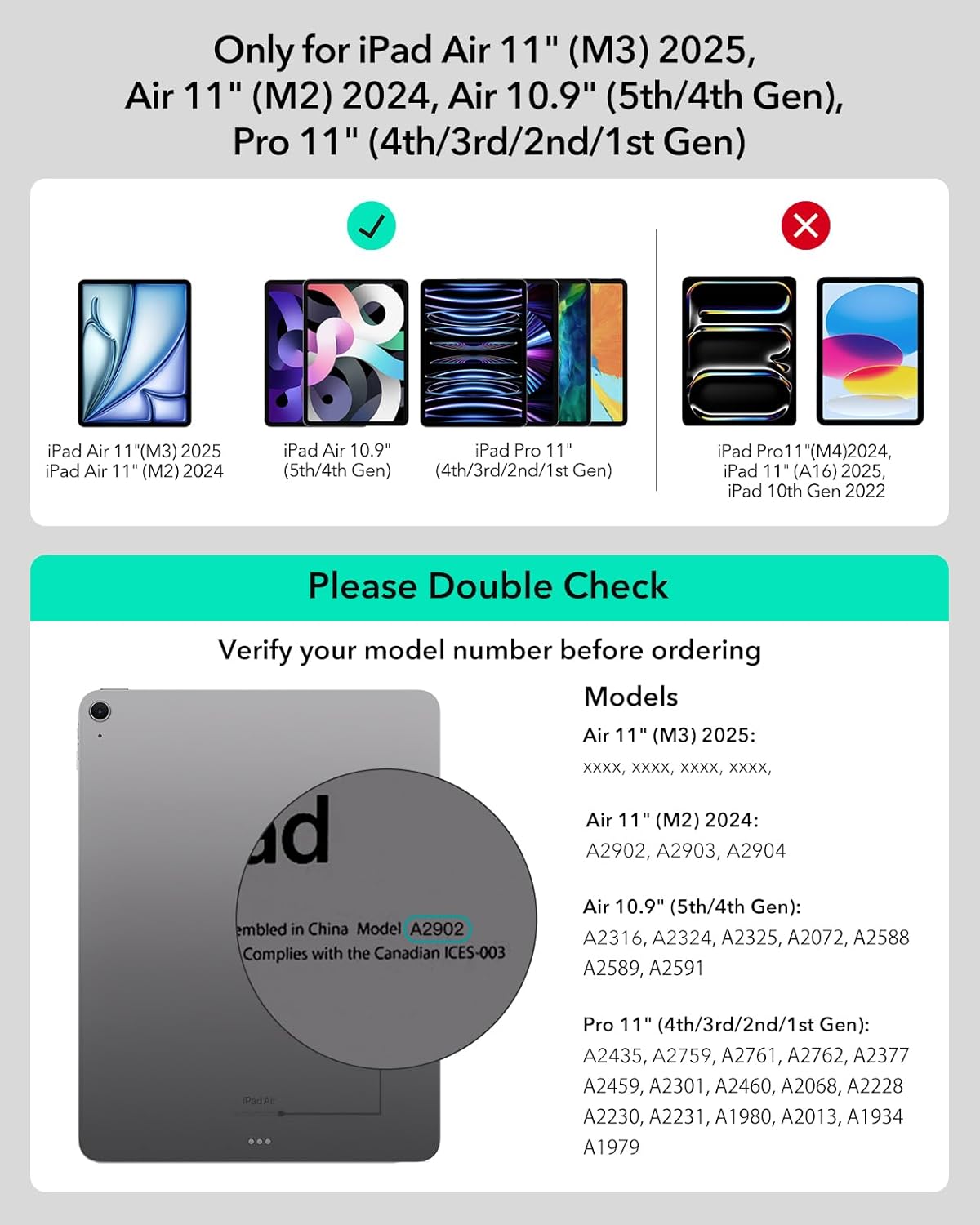
Image: A visual guide detailing the specific iPad models and their corresponding model numbers that are compatible with the ESR Ascend Keyboard Case.
2. Setup Guide
2.1. Unboxing and Initial Inspection
Upon opening the package, you will find the ESR Ascend Keyboard Case and a USB-C charging cable. Please inspect all components for any signs of damage before proceeding with setup.

Image: The ESR Ascend Keyboard Case displayed with an iPad, showcasing its versatility in both landscape and portrait orientations, alongside the detachable back case.
2.2. Attaching Your iPad
The case features a strong magnetic attachment system, ensuring your iPad is firmly held, providing adaptive protection whether the keyboard is attached or not. Simply align your iPad with the magnetic back case until it securely snaps into place.
2.3. Bluetooth Pairing
To connect the keyboard to your iPad via Bluetooth:
- Ensure the keyboard is charged.
- Turn on the keyboard using the power switch (usually located on the side or back of the keyboard).
- On your iPad, go to Settings.
- Tap on Bluetooth and ensure Bluetooth is enabled.
- Look for "ESR Keyboard" in the "OTHER DEVICES" list and tap to connect.
- Once connected, the keyboard will be ready for use.
3. Operating Instructions
3.1. Adjustable Stand and Viewing Modes
The ESR Ascend Keyboard Case offers a fully adjustable stand, allowing you to find the optimal viewing angle for any task. The stand can be adjusted from 15° to 180°.
- Landscape Mode: Ideal for typing, browsing, and media consumption. The iPad can be positioned horizontally for a traditional laptop-like experience.
- Portrait Mode: Easily switch your iPad to a vertical orientation, which is beneficial for reading documents, browsing social media, or video calls.
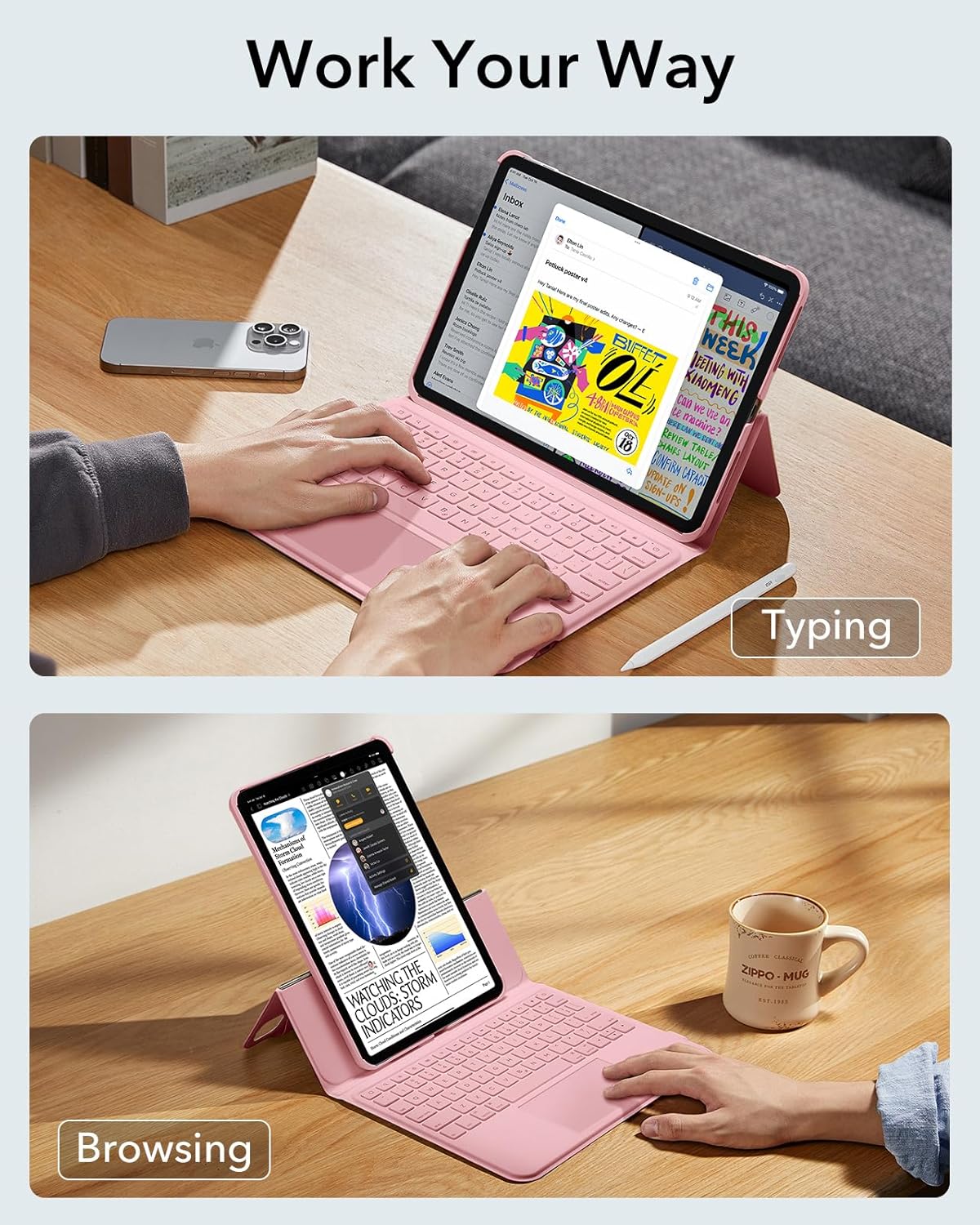
Image: The ESR Ascend Keyboard Case demonstrating its flexibility, allowing the iPad to be used for typing in landscape mode and browsing in portrait mode.
3.2. Keyboard Usage
The keyboard features premium laptop-style keys with an ideal bounce for smooth and accurate typing. It includes customizable backlit keys, allowing you to type comfortably day or night.

Image: The ESR Ascend Keyboard Case with its backlit keys glowing, illustrating comfortable typing in low-light conditions.
3.3. Precision Multi-touch Trackpad
The integrated multi-touch trackpad supports full gesture control, enhancing your productivity and navigation on the iPad. Refer to your iPad's settings for specific multi-touch gestures.

Image: A detailed view of the multi-touch trackpad on the ESR keyboard case, emphasizing its responsiveness and support for various gestures.
3.4. Apple Pencil Protection
The case includes a dedicated slot for your Apple Pencil, ensuring it is securely stored and protected when not in use.

Image: The ESR Ascend Keyboard Case featuring a secure magnetic slot designed for storing and protecting the Apple Pencil.
4. Maintenance
To ensure the longevity and optimal performance of your ESR Ascend Keyboard Case, follow these maintenance guidelines:
- Cleaning: Use a soft, damp cloth to wipe down the exterior of the case and keyboard. Avoid harsh chemicals or abrasive materials.
- Storage: When not in use, store the case in a cool, dry place away from direct sunlight and extreme temperatures.
- Charging: Charge the keyboard using the provided USB-C cable. Avoid overcharging or using damaged cables.
5. Troubleshooting
If you encounter any issues with your ESR Ascend Keyboard Case, please try the following steps:
- Keyboard Not Connecting:
- Ensure Bluetooth is enabled on your iPad.
- Check if the keyboard is powered on and fully charged.
- Forget the device in iPad Bluetooth settings and try pairing again.
- Restart both your iPad and the keyboard.
- Keys Not Responding:
- Ensure the keyboard is properly connected via Bluetooth.
- Check battery level and charge if necessary.
- Clean any debris from around the keys.
- Trackpad Issues:
- Ensure the trackpad is enabled in your iPad's settings (Settings > General > Trackpad).
- Clean the trackpad surface.
- Restart the keyboard and iPad.
If the issue persists after trying these steps, please contact ESR customer support for further assistance.
6. Specifications
| Feature | Detail |
|---|---|
| Model Name | 6B005 |
| Package Dimensions | 11.42 x 8.19 x 1.02 inches |
| Item Weight | 2.2 pounds |
| Batteries | 1 Lithium Ion batteries required (included) |
| OS Compatibility | Mac OS (iPadOS) |
| Color | Air 11(2024&2025)/5/4/Pro 11(4/3/2/1 Gen) Pink |
| Material | Aluminum, Polycarbonate, Polyurethane (PU) |
| Included Components | USB Cable |
| Keyboard Backlighting | Single Color |
| Power Source | Battery Powered |
| Manufacturer | Electronic Silk Road Corp |
| Date First Available | January 23, 2024 |

Image: An illustration detailing the impressive battery life of the ESR Ascend Keyboard Case, including standby time, daytime use, and nighttime use with backlit keys.
7. Warranty and Support
ESR offers an upgraded 24-month warranty for the Ascend Keyboard Case. For warranty claims, technical support, or any product-related inquiries, please visit the official ESR website or contact their customer service directly.
You can also find more information and exclusive access to newly launched products by scanning the QR code provided in the product packaging or visiting the ESR website.
