1. Introduction
This manual provides detailed instructions for the installation, operation, and maintenance of the Argon Forty Argon ONE V3 M.2 NVME PCIE Case, specifically designed for the Raspberry Pi 5. This case integrates an NVMe base, active and passive cooling, and a power button for enhanced functionality and performance.

Image 1.1: The Argon ONE V3 M.2 NVME PCIE Case. This image displays the sleek, black aluminum enclosure designed to house the Raspberry Pi 5 and an M.2 NVMe drive.
2. Setup and Assembly
2.1 Package Contents
Verify that all components are present in the package:
- Argon ONE V3 Case (Top and Bottom sections)
- M.2 NVMe Base
- FPC Impedance Controlled Cable
- Thermal Pads
- Screws and Standoffs
- Instruction Manual (this document)
2.2 Raspberry Pi 5 Installation
- Carefully open the Argon ONE V3 case by separating the top and bottom sections.
- Align the Raspberry Pi 5 with the standoffs in the bottom section of the case. Ensure the GPIO pins and other ports are correctly oriented.
- Gently press the Raspberry Pi 5 onto the standoffs and secure it with the provided screws.
- Apply the thermal pads to the designated areas on the Raspberry Pi 5's CPU and other heat-generating components, as indicated in the diagram.

Image 2.1: Raspberry Pi 5 installed in the Argon ONE V3 case. This view shows the internal layout, including the GPIO pins and the area for thermal pad application.
2.3 M.2 NVMe Drive Installation
The Argon ONE V3 case supports M.2 NVMe drives with M-Key up to 2280 size.
- Locate the M.2 NVMe slot on the base of the Argon ONE V3 case.
- Insert your M.2 NVMe drive into the slot at an angle, then gently push it down to secure it with the provided screw.
- Attach the included aluminum heatsink to the M.2 NVMe drive using the thermal pad to ensure optimal cooling.
- Connect the FPC impedance controlled cable from the Raspberry Pi 5's PCIe port to the M.2 NVMe base. Ensure the cable is seated firmly and correctly on both ends.

Image 2.2: M.2 NVMe drive installation. This diagram illustrates the process of inserting an M.2 NVMe drive into the case's base and securing it with a heatsink.

Image 2.3: Thermal cooling for NVMe drive. This image highlights the airflow and heatsink mechanism designed to keep the M.2 NVMe drive cool.
2.4 Case Closure
Once the Raspberry Pi 5 and M.2 NVMe drive are installed, carefully place the top section of the Argon ONE V3 case onto the bottom section, ensuring all ports align and the case closes securely.
3. Operating Instructions
3.1 Power Button Functionality
The Argon ONE V3 case features a power button for safe shutdown and power management. To enable full functionality, install the Argon script for Raspberry Pi 5. This script allows for:
- Safe shutdown of the Raspberry Pi 5.
- Forced shutdown (hold button for several seconds).
- Reboot functionality.
Refer to the official Argon Forty website for the latest script installation instructions.
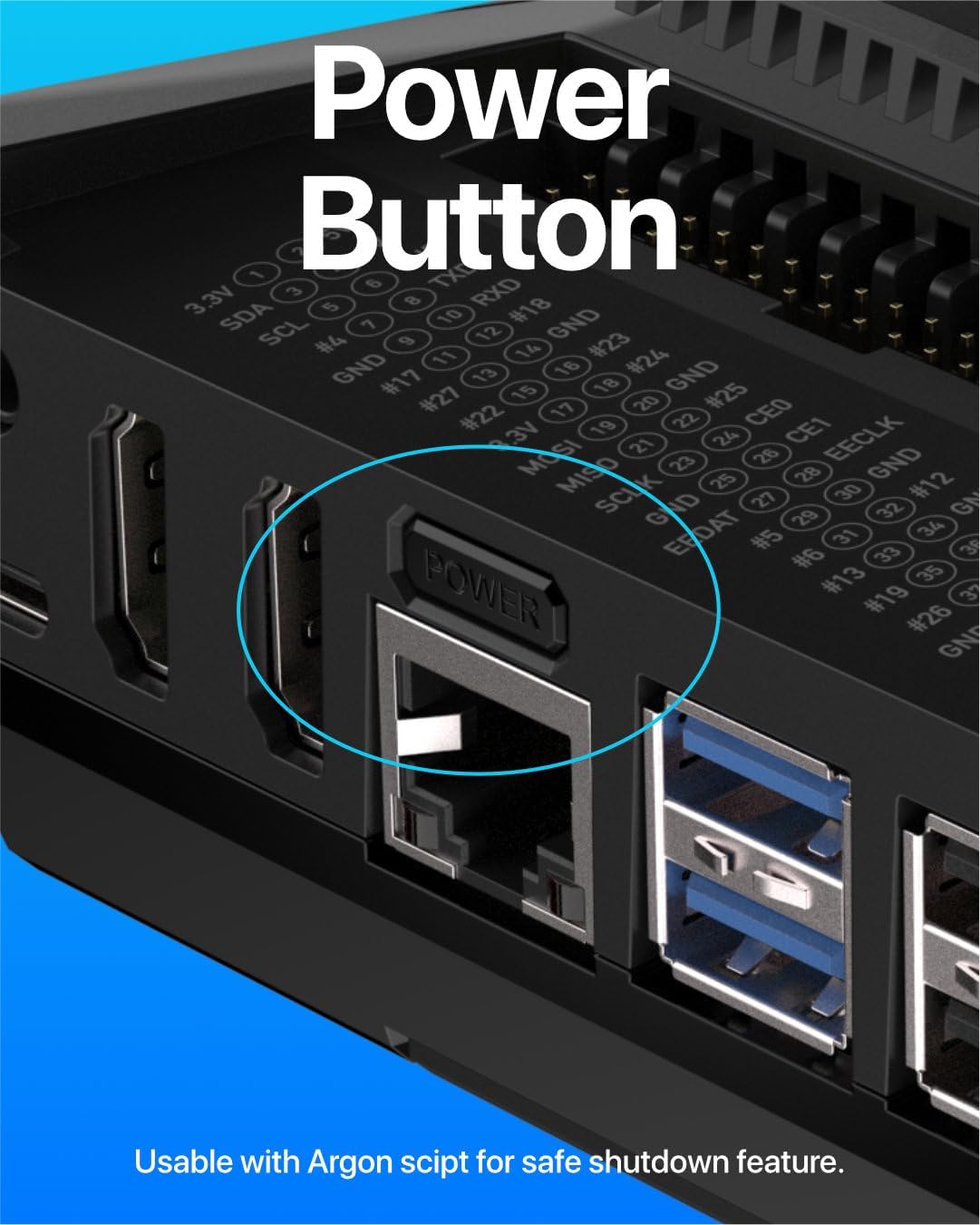
Image 3.1: Power button location. This image shows the integrated power button adjacent to the Ethernet port on the case.
3.2 Cooling System
The case employs a dual cooling system:
- Passive Cooling: The aluminum case acts as a large heatsink, dissipating heat from the Raspberry Pi 5.
- Active Cooling: A 30mm PWM fan is integrated to provide active airflow, further enhancing heat dissipation, especially under heavy workloads. The fan speed is controllable via software after installing the Argon script.

Image 3.2: 30mm PWM fan. This close-up view shows the fan positioned above the Raspberry Pi 5's CPU for efficient active cooling.
3.3 NVMe Storage Access
The integrated M.2 NVMe base allows for faster and higher storage access compared to traditional microSD cards. Once the NVMe drive is installed and configured in your Raspberry Pi 5 operating system, it can be used for booting or as additional storage.
3.4 Port Accessibility
The Argon ONE V3 case provides access to all essential Raspberry Pi 5 ports, including:
- Dual full-sized HDMI ports.
- USB 2.0 and USB 3.0 ports.
- Ethernet port.
- USB-C power input.
- GPIO pins (accessible under a magnetic cover).
4. Maintenance
4.1 Cleaning
To maintain optimal performance and appearance, periodically clean the case. Use a soft, dry cloth to wipe down the exterior. For dust accumulation in vents or around the fan, use compressed air. Ensure the Raspberry Pi 5 is powered off and disconnected from power before cleaning.
4.2 Thermal Pad Inspection
Over time, thermal pads may degrade or shift. If you notice increased operating temperatures, it is recommended to open the case and inspect the thermal pads on both the Raspberry Pi 5 and the NVMe drive. Replace them if they appear worn or damaged. Handle with care during reassembly to avoid tearing the pads.
5. Troubleshooting
5.1 Power Issues
- No Power/Unit Dead: Ensure you are using a compatible 5V USB-C power supply with sufficient amperage (e.g., 5V 5A for Raspberry Pi 5). Verify all connections are secure. If the power button script is not installed, the unit may require manual power cycling.
- Power Button Not Working: Confirm the Argon script for power management is correctly installed and configured. Check the physical connection of the power button to the Raspberry Pi's GPIO pins.
5.2 NVMe Drive Not Detected
- Physical Connection: Ensure the M.2 NVMe drive is fully seated in its slot and secured. Verify the FPC impedance controlled cable is properly connected to both the Raspberry Pi 5 and the NVMe base.
- Compatibility: Not all NVMe drives are compatible with the Raspberry Pi 5's PCIe interface. Refer to Argon Forty's official website for a list of recommended and tested NVMe drives.
- Software Configuration: Ensure your Raspberry Pi OS is updated and configured to recognize and boot from NVMe drives. This may involve specific kernel modules or bootloader settings.
5.3 Overheating/Fan Issues
- Fan Not Spinning: Verify the Argon script for fan control is installed and running. Check the fan's physical connection to the Raspberry Pi's fan header.
- High Temperatures: Ensure thermal pads are correctly placed and making good contact with the CPU, other chips, and the NVMe drive. Clean any dust accumulation from the fan and vents.
6. Specifications
| Feature | Detail |
|---|---|
| Brand | Argon Forty |
| Model Name | A23-012 AR-ONE-Pi5-V3-M.2-NVME |
| Compatibility | Raspberry Pi 5 |
| M.2 NVMe Support | M-Key up to 2280 size |
| Cooling Method | Passive (Aluminum Case) & Active (30mm PWM Fan) |
| Material | Aluminum |
| Color | Black |
| Item Weight | 9.9 ounces (approx. 280 grams) |
| Product Dimensions (LxWxH) | 3.76 x 4.19 x 1.73 inches (approx. 9.55 x 10.64 x 4.39 cm) |
| USB 2.0 Ports | 1 (via Raspberry Pi 5) |
| Recommended Use | Advanced Single-Board Computer Use |
7. Warranty Information
For detailed warranty information regarding the Argon ONE V3 M.2 NVME PCIE Case, please refer to the official Argon Forty website or contact their customer support directly. Warranty terms and conditions may vary by region and purchase location.
8. Customer Support
If you encounter any issues or have questions not covered in this manual, please visit the Argon Forty support page on their official website for FAQs, troubleshooting guides, and contact information. You can also reach out to the retailer from whom you purchased the product.
Official Website: www.argon40.com


