
Aptkdoe HD65
Aptkdoe HD65 Wireless Earbuds User Manual
Model: HD65 | Brand: Aptkdoe
Wireless Earbuds with 75-hour Playtime, Bluetooth 5.4, Deep Bass, ENC Noise Cancelling Mic, and IPX7 Waterproofing.
1. Product Overview
The Aptkdoe HD65 Wireless Earbuds are designed for an immersive audio experience with extended battery life and robust features. They are equipped with advanced Bluetooth 5.4 technology for stable connections, ENC noise-cancelling microphones for clear calls, and an IPX7 waterproof rating, making them suitable for various activities including sports.

Image: The Aptkdoe HD65 Wireless Earbuds, white in color, are shown inside their transparent charging case. The case displays digital battery percentages for both the case and individual earbuds.
2. Package Contents
- Aptkdoe HD65 Wireless Earbuds (Left and Right)
- Charging Case
- USB-C Charging Cable
- User Manual
- Eartips (3 sizes: Small, Medium, Large)
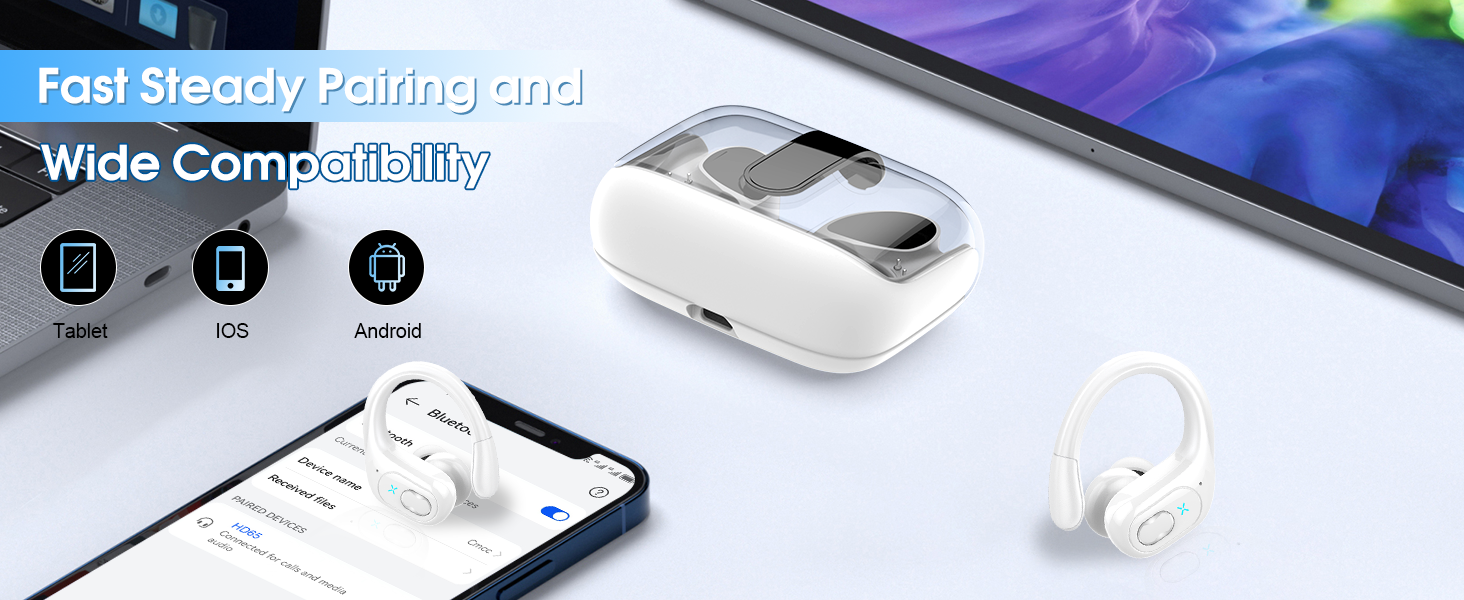
Image: An illustration showing all items included in the package: the charging case with earbuds, a USB-C charging cable, the user manual, and a set of eartips in various sizes.
3. Setup and Initial Use
3.1 Charging the Earbuds and Case
Before first use, fully charge the earbuds and the charging case. The case features a dual LED display to show the remaining power of the charging case and the charging progress of each earbud.
- Place the earbuds into the charging case.
- Connect the USB-C charging cable to the charging port on the case and plug the other end into a USB power source (e.g., wall adapter, computer USB port).
- The LED display will indicate charging status. A full charge for the case takes approximately 1.5 hours.

Image: The Aptkdoe HD65 charging case displaying battery percentages for both the case and the individual earbuds, along with icons indicating fast charging and total playtime.
3.2 Pairing with a Device
The earbuds utilize advanced Bluetooth 5.4 technology for quick and stable pairing.
- Ensure the earbuds are charged and inside the charging case.
- Open the charging case. The earbuds will automatically enter pairing mode.
- On your device (smartphone, tablet, laptop), enable Bluetooth.
- Search for "HD65" in the list of available Bluetooth devices and select it to connect.
- Once connected, the earbuds will automatically pair with this device when the case is opened in the future.

Image: A visual representation of the Bluetooth 5.4 pairing process, showing a smartphone screen with "HD65" listed as a connected device, alongside the earbuds and charging case.
4. Operating Instructions
4.1 Wearing the Earbuds
The HD65 earbuds feature ergonomic ear hooks for a secure and comfortable fit, especially during physical activity.
- Select the appropriate eartip size (S, M, L) for a snug fit.
- Gently place the earbud into your ear canal.
- Adjust the flexible ear hook over your ear to secure the earbud in place.

Image: A composite image demonstrating the ergonomic design, flexible ear hooks, and different eartip sizes (L, M, S) of the Aptkdoe HD65 earbuds, highlighting their suitability for sports.
4.2 Button Controls
The earbuds feature sensitive button controls for easy management of music and calls without needing to operate your phone.
| Function | Action | Earbud (L/R) |
|---|---|---|
| Volume Up | Long press 2s | Right (R) |
| Volume Down | Long press 2s | Left (L) |
| Previous Track | Double tap | Left (L) |
| Next Track | Double tap | Right (R) |
| Answer Call | One tap | Left/Right (L/R) |
| Hang Up Call | One tap | Left/Right (L/R) |
| Play/Pause | One tap | Left/Right (L/R) |
| Voice Assistant | Quick triple tap | Left/Right (L/R) |

Image: An illustration of the earbud's button control area, detailing various touch gestures for functions like volume control, track navigation, call management, and voice assistant activation.
5. Maintenance
5.1 Waterproofing
The HD65 earbuds are IPX7 waterproof, meaning they can withstand sweat and rain. This makes them ideal for workouts and outdoor activities. However, they are not designed for swimming or prolonged submersion.

Image: An image depicting the IPX7 waterproof rating of the earbuds, with water splashing around them, indicating resistance to sweat and rain.
5.2 Cleaning
To maintain optimal performance and hygiene:
- Regularly clean the eartips with a soft, damp cloth.
- Wipe the earbuds and charging case with a dry, lint-free cloth.
- Avoid using abrasive cleaners or solvents.
6. Troubleshooting
- No Sound: Ensure earbuds are charged, connected to your device, and volume is up on both the earbuds and your device.
- Earbuds Not Pairing: Make sure Bluetooth is enabled on your device. Try resetting the earbuds by placing them back in the case and closing it, then reopening. Ensure no other devices are actively connected to the earbuds.
- Poor Call Quality: Ensure the earbuds are properly seated in your ears. Check for obstructions around the microphone.
- Charging Issues: Verify the charging cable is securely connected to both the case and the power source. Ensure the power source is active.
7. Specifications
| Feature | Detail |
|---|---|
| Model Name | HD65 |
| Connectivity Technology | Wireless (Bluetooth) |
| Bluetooth Version | 5.4 |
| Bluetooth Range | Up to 33 Feet (10 meters) |
| Battery Life (Earbuds) | Up to 15 hours (single charge) |
| Total Playtime (with case) | Up to 75 hours |
| Earbud Charging Time | Approx. 1.5 hours (in case) |
| Audio Driver Size | 14.2 mm |
| Noise Control | Passive Noise Cancellation (ENC Mic for calls) |
| Water Resistance Level | IPX7 Waterproof |
| Control Type | Button Control |
| Ear Placement | In Ear with Over Ear Hooks |
| Item Weight | 5.6 ounces |
| Manufacturer | Aptkdoe |
8. Warranty and Support
Aptkdoe provides a 2-year warranty for the HD65 Wireless Earbuds, ensuring peace of mind regarding product quality and performance.
For customer service inquiries or technical support, please refer to the contact information provided in the included user manual or visit the official Aptkdoe website.
A digital version of the user guide is available for download: Aptkdoe HD65 User Guide (PDF).

Image: An image highlighting Aptkdoe's commitment to customer satisfaction, including a 2-year warranty and 24-hour customer service response.
Related documentsHD65

Ask a question about this manual
Ask about setup, troubleshooting, compatibility, parts, safety, or missing instructions. Manuals+ will review the question and use this page’s manual context to help answer it.