1. Introduction
This manual provides essential information for the safe and efficient operation of your RHM S8 Karaoke Machine. Please read it thoroughly before use and retain it for future reference.

Image: The RHM S8 Karaoke Machine, showcasing its wooden finish, front speaker grille, and two wireless microphones docked on top.
2. Package Contents
Ensure all items are present upon unpacking:
- 1 x RHM S8 Karaoke Machine
- 2 x Wireless Handheld Microphones
- 1 x USB-C Charging Cable
- 1 x User Manual
- 1 x Warranty Card
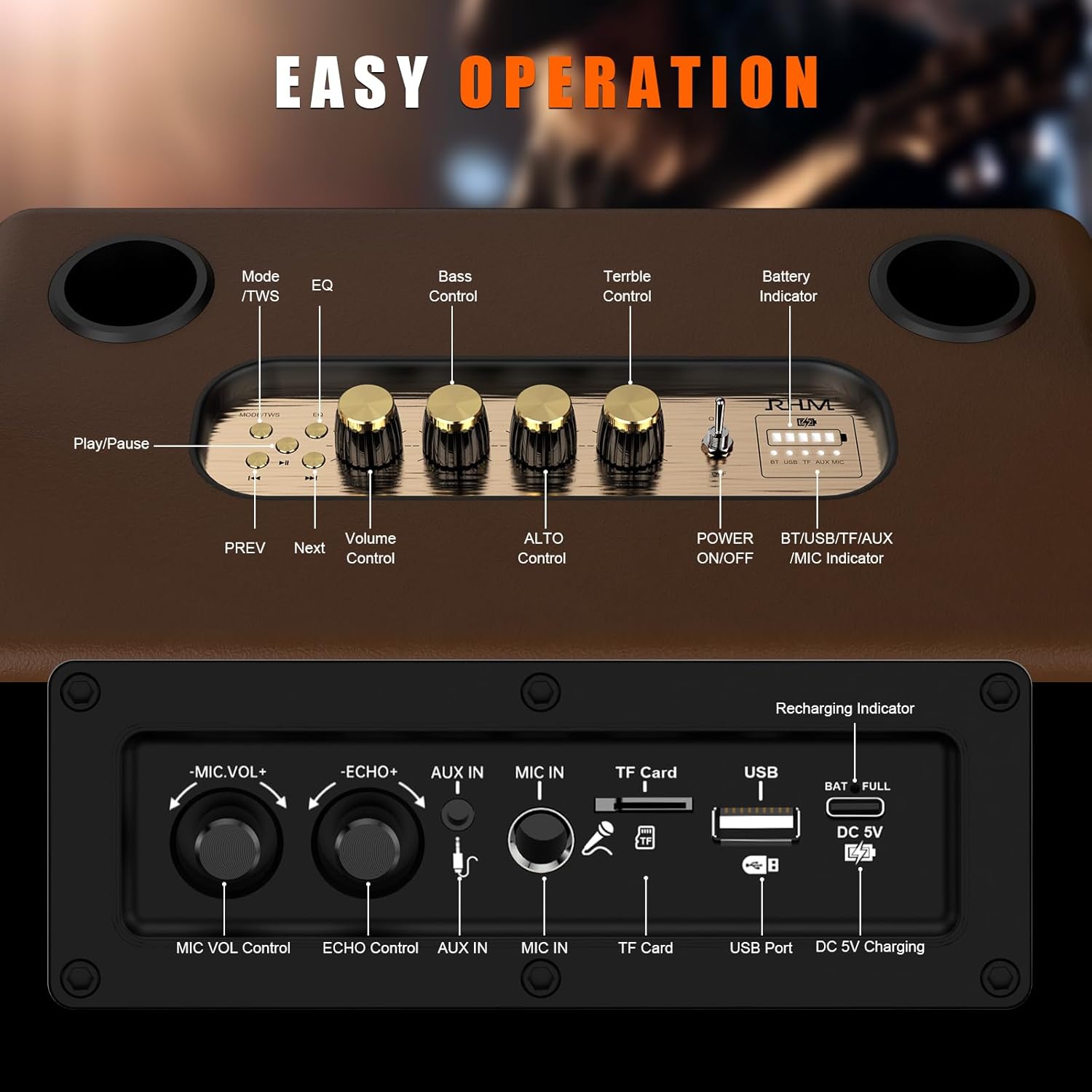
Image: Detailed view of the RHM S8 Karaoke Machine's control panel, showing various buttons and knobs for operation.
3. Product Overview
3.1. Audio System
- Powerful Sound: Equipped with 2 x 5.25-inch subwoofers and 2 x 1.5-inch tweeters for clear, rich sound.
- Wooden Structure: The shell is crafted from wooden material for enhanced audio quality.
- Sound Adjustment: Supports independent adjustment for Treble, Alto, Bass, and Echo.
- Music Modes: Features 6 distinct music modes: NOR (Normal), POP (Pop), ROC (Rock), JAZ (Jazz), CLA (Classical), and CUT (Cut).

Image: Diagram illustrating the internal components of the RHM S8 Karaoke Machine, highlighting two 5.25-inch subwoofers and two 1.5-inch tweeters, emphasizing its powerful stereo sound and wooden internal structure.
3.2. Microphones
- Wireless Microphones: Includes 2 wireless handheld microphones with LED displays.
- Long Playtime: Microphones offer up to 20 hours of working time on 2AA batteries.
- Wired Input: A built-in jack allows for an additional wired microphone or guitar connection (wired mic/guitar not included).

Image: Highlighting the RHM S8's wireless microphones, detailing support for up to 3 mics (two UHF wireless mics included), with close-ups of the mental mesh cover and LED display screen, and mentioning UHF chips.
3.3. Connectivity & Portability
- Bluetooth 5.0: Seamless wireless connection to smartphones, tablets, and other Bluetooth-enabled devices.
- Multiple Inputs: Supports TF Card, USB, and AUX IN for various external devices.
- TWS Mode: Pair two RHM S8 units for synchronized stereo sound.
- Long Battery Life: Equipped with a 5400mAh rechargeable battery providing up to 8 hours of playtime.
- Portable Design: Features a cool retro design with a leather case and includes a shoulder strap for easy transport.

Image: Depicting various connectivity options for the RHM S8 Karaoke Machine, including Bluetooth 5.0, Aux In, USB Port, TF Card, Wired Microphone Port, Wireless Microphone, and TWS, shown with people enjoying music.
4. Controls and Interfaces
The RHM S8 features an intuitive control panel on top and various input/output ports on the rear.
4.1. Top Panel Controls
- MODE/TWS Button: Switches between input modes (Bluetooth, AUX, USB, TF Card) and activates TWS pairing.
- EQ Button: Cycles through 6 music modes (NOR, POP, ROC, JAZ, CLA, CUT).
- Bass Control Knob: Adjusts the bass level.
- Treble Control Knob: Adjusts the treble level.
- Alto Control Knob: Adjusts the alto level.
- Play/Pause Button: Controls media playback.
- Previous/Next Buttons: Navigates tracks.
- Volume Control Knob: Adjusts the main volume.
- Power ON/OFF Switch: Turns the unit on or off.
- Battery Indicator: Displays current battery level.
4.2. Rear Panel Ports
- USB Port: For USB drive playback.
- TF Card Slot: For TF card playback.
- AUX IN Port: 3.5mm input for external audio devices.
- MIC IN Port: 6.35mm input for wired microphone or guitar.
- DC 5V Charging Port: For charging the unit.
5. Setup
5.1. Charging the Unit
Connect the provided USB-C charging cable to the DC 5V port on the rear of the karaoke machine and plug the other end into a compatible USB power adapter (not included). A full charge takes approximately 3 hours.
5.2. Microphone Setup
Insert 2AA batteries into each wireless microphone. The microphones will automatically pair with the karaoke machine when powered on. For optimal voice effect, keep the microphone within 10 feet of the machine.
5.3. Connecting via Bluetooth
- Power on the RHM S8 Karaoke Machine.
- Press the MODE/TWS button until
Related Documents - S8

RHM K-112 Portable Karaoke Speaker User Manual
User manual for the RHM K-112 portable karaoke speaker, detailing features, Bluetooth pairing, recording, device controls, remote operation, and Karaoke functions.
RHM RM-K222 Karaoke Home Theater System User Manual
Comprehensive user manual for the RHM RM-K222 Karaoke Home Theater System. This guide details product features, specifications, basic operation, connectivity options (Bluetooth, USB, Line In, PC), microphone functions, pairing, and troubleshooting for this home KTV setup.
RHM RM-K666 All-In-One Bluetooth Sound System User Manual
This user manual provides instructions for the RHM RM-K666 All-In-One Bluetooth Sound System, covering setup, features, and technical specifications for the portable mobile phone karaoke speaker.
RHM RM-2838 Portable Bluetooth Speaker User Manual
Comprehensive user manual for the RHM RM-2838 portable Bluetooth speaker, detailing its features, operational controls, remote functions, and mobile app integration for enhanced audio experience.
RHM RM-K222 Karaoke Home Theater System User Manual
User manual for the RHM RM-K222 Karaoke Home Theater System, detailing its features, functions, and operation.
RHM RM-K666 PLUS Portable Karaoke Bluetooth Speaker User Manual
User manual for the RHM RM-K666 PLUS Portable Karaoke Bluetooth Speaker, detailing safety precautions, technical specifications, product introduction, operation, functions, microphone usage, troubleshooting, and FCC compliance.