
Introduction
Thank you for choosing the SEDETA 65.7-inch Gaming Desk. This manual provides essential information for the safe assembly, operation, and maintenance of your new desk. Please read these instructions carefully before beginning assembly and retain this manual for future reference.
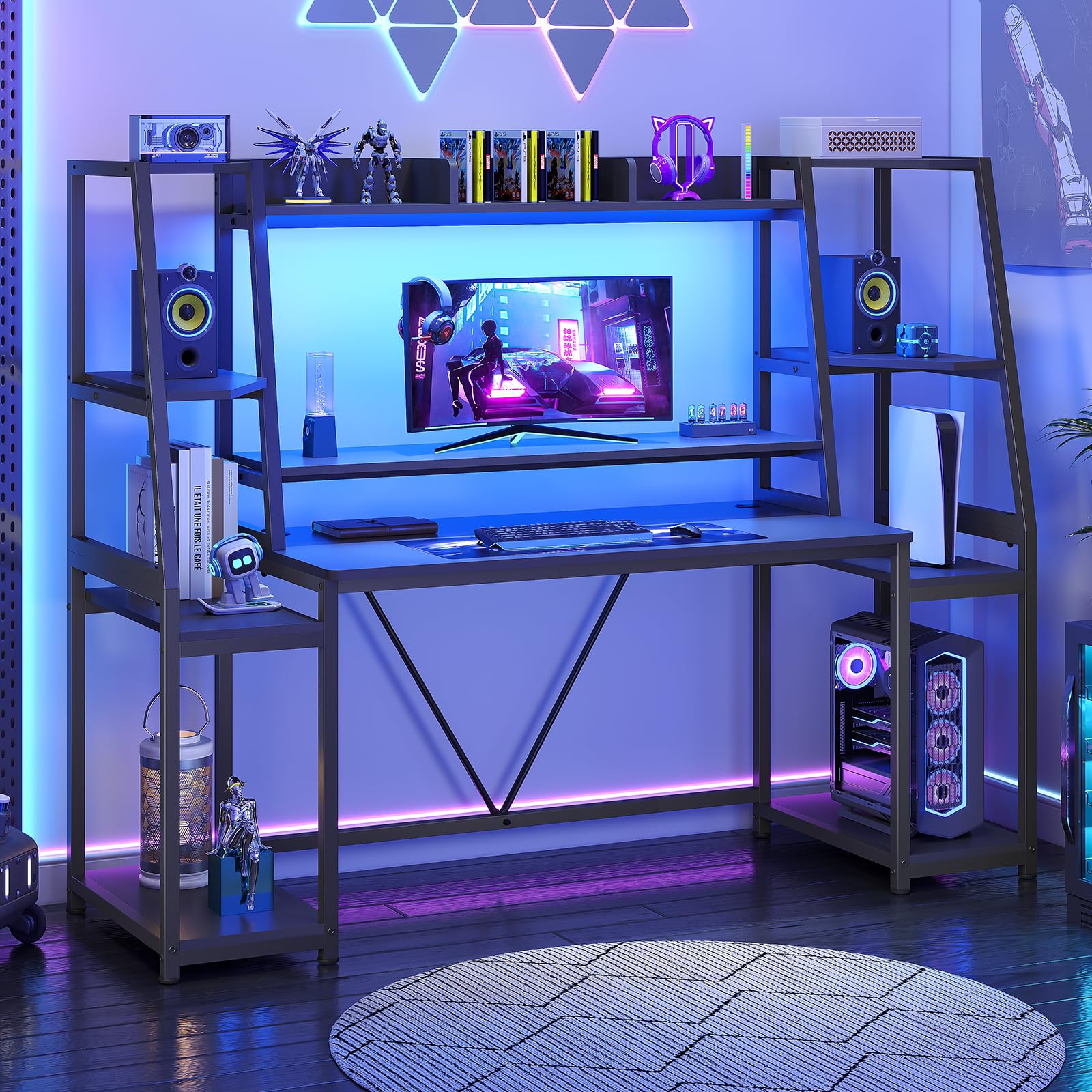
Image: The SEDETA 65.7-inch Gaming Desk, showcasing its overall design with LED lights, hutch, and storage shelves.
Safety Information
Please observe the following safety guidelines to ensure safe use and prevent injury:
- This desk is designed for a maximum weight capacity of [INSERT WEIGHT CAPACITY, if specified]. Do not exceed this limit.
- It is recommended to anchor the desk to a wall if children or pets are present to prevent tipping.
- Improper assembly may lead to stability issues or risk of injury. Follow all instructions carefully during assembly.
- Keep small parts away from children during assembly to avoid choking hazards.
- Ensure all connections are secure before use. Periodically check and tighten fasteners.
Package Contents
Before assembly, verify that all components are present and undamaged. If any parts are missing or damaged, please contact customer support.
- Desk Panels (Engineered Wood)
- Metal Frame Components
- Monitor Stand
- LED Lights Strip
- Two Large Storage Shelves
- Hutch
- CPU Holder
- Assembly Hardware (screws, bolts, etc.)
- Assembly Tools (L-shaped wrench, screwdriver recommended)
Setup and Assembly
Assembly of this gaming desk requires careful attention to detail. It is recommended that two people perform the assembly to ensure stability and ease of construction. All parts are numbered for easy identification.
Assembly Steps:
- Unpack and Identify Parts: Carefully unpack all components and lay them out. Refer to the included parts list to ensure all pieces are present.
- Review Instructions: Read the entire instruction manual before beginning. Pay close attention to diagrams and hole orientations.
- Assemble Base Frame: Begin by assembling the main metal frame components according to the diagrams. Ensure all screws are finger-tightened initially.
- Attach Desk Panels: Secure the main desktop and shelves to the frame. Ensure proper alignment before fully tightening screws.
- Install Hutch and Monitor Stand: Attach the hutch and monitor stand components. These are crucial for ergonomic positioning.
- Install Storage Shelves and CPU Holder: Place the storage shelves and CPU holder in their designated positions.
- Final Tightening: Once all components are in place, systematically tighten all screws and fasteners. Do not overtighten.
- Attach Adjustable Feet: Screw in the adjustable feet to the bottom of the desk legs. These protect your floor and allow for minor leveling adjustments.
Helpful Tips:
- Use a screwdriver with an adapter for screws, as the included L-shaped wrench may be time-consuming for all fasteners.
- Ensure the desk is on a flat, stable surface during assembly.

Image: A diagram illustrating the detailed dimensions of the SEDETA Gaming Desk, including height, width, and depth of various sections and shelves.

Image: A close-up view highlighting the stable, thick metal frame and secure connections, demonstrating the desk's durability.

Image: An illustration of the adjustable feet, designed to protect floors and provide stability on uneven surfaces.
Installation Video:
Video: Official installation guide for the SEDETA Gaming Desk, demonstrating step-by-step assembly instructions.
Operating Instructions
LED Light Strips:
The SEDETA Gaming Desk features integrated RGB LED light strips to enhance your gaming or working environment.
- Control: The LED lights can be controlled via a dedicated mobile application.
- Color and Modes: Choose from over 60,000 colors and 29 flashing modes to customize your lighting.
- Music Sync: A built-in sensitivity-adjustable microphone allows the LED light color to change with the rhythm of sound and music.
- Timer Function: Utilize the timer function for automated lighting schedules.

Image: The gaming desk illuminated by its LED light strips, showcasing the customizable color options and dynamic lighting effects.
Desk Features:
- Monitor Stand: The integrated monitor stand positions your screens at an ergonomic height, reducing neck and head fatigue. This also frees up desktop space.
- Storage Shelves: Two large storage shelves are provided for your CPU/PC tower, books, speakers, gaming consoles (PS4, Xbox), gamepads, and other accessories. The top hutch can hold figures, books, or plants.
- Spacious Desktop: The 45.2"(L) x 21.6"(W) desktop accommodates keyboards, mice, and other accessories, and can hold two computers simultaneously.
- Cable Management: Integrated cable management grommets help organize wires for a tidy setup.

Image: A user seated at the desk, demonstrating the ergonomic benefits of the monitor stand in maintaining correct posture and reducing neck strain.

Image: The desk highlighting its ample storage capabilities, including the hutch and side shelves, designed to organize gaming gear and decorative items.

Image: A close-up of the desktop surface, emphasizing its spaciousness and waterproof properties, ideal for a gaming setup.

Image: A detailed view of the cable management grommets, illustrating how they help maintain an organized and clutter-free workspace.
Maintenance
Proper care will extend the life and appearance of your SEDETA Gaming Desk.
- Cleaning: The desk surface is made from P2 MDF with a carbon fiber texture, which is waterproof and easy to clean. Use a soft, damp cloth to wipe down surfaces. Avoid harsh chemicals or abrasive cleaners.
- Spills: Wipe up spills immediately to prevent water damage, although the surface is designed to be waterproof.
- Heat Resistance: The desk surface is heat-resistant. However, it is advisable to use coasters for hot beverages or protective pads for very hot items to prevent potential damage.
- Scratch Prevention: While anti-scratch, avoid dragging sharp or heavy objects across the surface to maintain its finish.
- Fasteners: Periodically check all screws and bolts to ensure they remain tight. Retighten as necessary to maintain stability.

Image: A hand wiping water droplets from the desk surface, demonstrating its waterproof and easy-to-clean properties.
Troubleshooting
If you encounter any issues with your SEDETA Gaming Desk, refer to the following common solutions:
| Problem | Possible Cause | Solution |
|---|---|---|
| Desk is wobbly or unstable | Loose fasteners; uneven floor; incorrect assembly | Ensure all screws and bolts are securely tightened. Adjust the leveling feet to compensate for uneven flooring. Review assembly steps. |
| LED lights not working | Power connection issue; app malfunction; damaged strip | Check if the LED strip is properly connected to its power source. Restart the control app. If issues persist, contact customer support. |
| Parts do not align during assembly | Incorrect orientation of parts; manufacturing defect | Double-check the diagrams in the instruction manual for correct part orientation. Do not force parts together. If a defect is suspected, contact customer support. |
Specifications
Key specifications for the SEDETA 65.7-inch Gaming Desk:
- Brand: SEDETA
- Model Name: SEDETA Gaming Desk
- Color: Black
- Product Dimensions: 21.6"D x 65.7"W x 60.2"H
- Desktop Surface Dimensions: 45.2"L x 21.6"W
- Material Type: Engineered Wood (P2 MDF with carbon fiber texture surface)
- Base Material: Metal
- Finish Type: Powder Coated
- Number of Shelves: 3 (including hutch and side shelves)
- Special Features: Monitor Stand, LED Lights, CPU Holder, Two Large Storage Shelves, Cable Management Grommets, Adjustable Feet
- Recommended Number of People for Assembly: 2
Warranty
The SEDETA 65.7-inch Gaming Desk comes with a Limited Warranty. This warranty covers manufacturing defects in materials and workmanship under normal use. Please retain your proof of purchase for warranty claims. For specific details regarding coverage and duration, refer to the warranty card included with your product or contact SEDETA customer support.
Support
For further assistance, missing parts, or warranty inquiries, please contact SEDETA customer support through the following channels:
- Email: [Insert Customer Support Email Here]
- Phone: [Insert Customer Support Phone Number Here]
- Website: Visit the SEDETA Store on Amazon
When contacting support, please have your product model name (SEDETA 65.7'' Gaming Desk) and purchase information ready.
