
comfheat Wrist Heating Wrap (Model B0CT28MCW)
comfheat Heating Wrist Brace User Manual
Model: Wrist Heating Wrap (B0CT28MCW)
1. Introduction
Thank you for choosing the comfheat Heating Wrist Brace. This device is designed to provide support and heat compression to the wrist, aiding in the relief of pain and inflammation associated with conditions such as carpal tunnel syndrome, arthritis, tendonitis, and sprains. This manual contains important information regarding the safe and effective use of your heating wrist brace. Please read it thoroughly before first use and retain it for future reference.
2. Important Safety Information
To ensure safe operation and prevent injury or damage to the product, please observe the following precautions:
- DO NOT use the heating function while sleeping. Prolonged direct contact with heat can cause burns.
- Consult a physician before use if you have any pre-existing medical conditions, particularly those affecting circulation, sensation, or skin integrity.
- Do not use on broken, irritated, or insensitive skin.
- Keep out of reach of children and pets.
- Do not use if the product appears damaged or if the USB cable is frayed.
- Use only with a 5V2A USB power source. Using an incompatible power source may damage the device or pose a safety risk.
- Unplug the device when not in use or before cleaning.
- Do not immerse the product in water.
3. Product Overview and Components
The comfheat Heating Wrist Brace is designed for comfort and effective support. Familiarize yourself with its key components:
- Main Brace Body: The fabric wrap that secures around the wrist.
- Heating Element: Integrated within the brace to provide therapeutic warmth.
- Heat Control Button: Located on the brace for adjusting temperature settings.
- Removable Metal Splints: Two rigid supports (one for the palm, one for the back of the hand) that provide stability.
- Adjustable Straps: Velcro straps for a customizable and secure fit.
- USB Power Cable: Connects the brace to a power source.

Image 3.1: Overview of the comfheat Heating Wrist Brace, showing the main body, heating area, and USB connection.

Image 3.2: Detailed view highlighting the ergonomic removable metal splint, the heat control button, and the adjustable straps.
4. Setup and Application
Follow these steps to prepare and apply your heating wrist brace:
- Splint Configuration: The brace comes with two metal splints for maximum support. If greater flexibility is desired, these splints can be removed. To remove, locate the pockets on the inside of the brace and slide the splints out.
- Positioning: Place your hand through the brace, ensuring the main support aligns with your wrist. The brace is universally designed for both left and right hands.
- Securing the Brace: Wrap the adjustable straps around your wrist and secure them using the Velcro fasteners. Adjust the straps to achieve a snug, comfortable fit that provides adequate support without being too tight.
- Connecting Power: Connect the USB cable from the brace to a 5V2A USB power source. Compatible sources include a PC USB port, a power bank, a USB wall adapter, or a car cigarette lighter adapter (power sources not included).

Image 4.1: Demonstrating the removal of a metal splint from its pocket within the brace.

Image 4.2: Close-up view of the durable Velcro fasteners for secure adjustment.
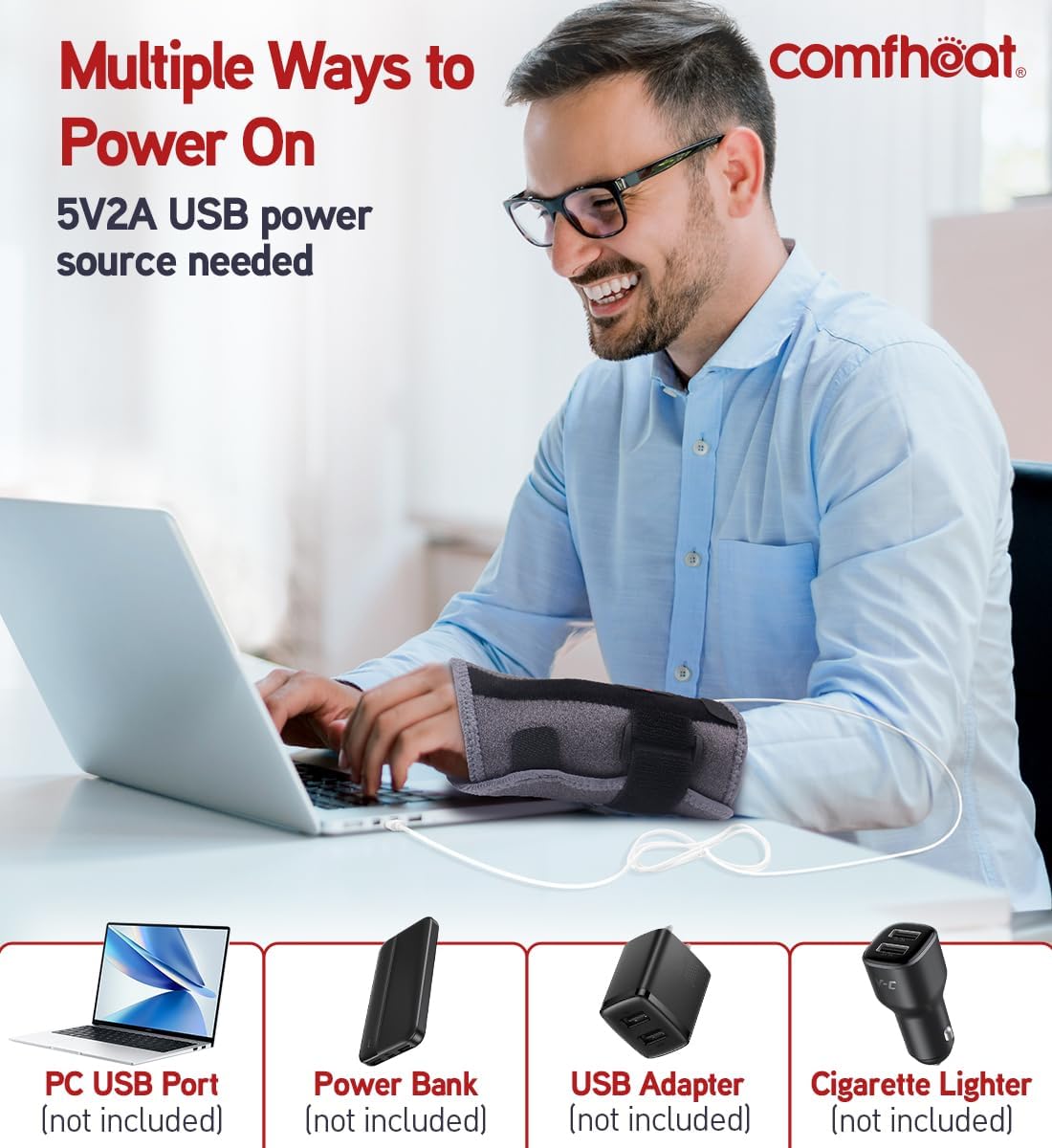
Image 4.3: Examples of compatible 5V2A USB power sources for the heating wrist brace.
5. Operating Instructions
Once the brace is applied and connected to a power source, you can activate and adjust the heating function:
- Power On: Press and hold the heat control button for approximately 3 seconds to turn on the heating function. The button will illuminate, indicating the current heat level.
- Adjusting Temperature: Short press the heat control button to cycle through the three temperature levels:
- High Temperature: 130 - 140℉ (54 - 60℃)
- Medium Temperature: 112 - 122℉ (44 - 50℃)
- Low Temperature: 94 - 104℉ (34 - 40℃)
- Automatic Shut-off: The brace features a built-in intelligent control chip that automatically turns off the heating function after 45 minutes to ensure safety and conserve energy. You can restart the heating cycle by pressing the control button again.
- Power Off: Press and hold the heat control button for approximately 3 seconds to turn off the heating function.

Image 5.1: Visual representation of the three customizable heat settings and their corresponding temperature ranges.
6. Care and Maintenance
Proper care will extend the life of your comfheat Heating Wrist Brace:
- Cleaning: Disconnect the USB cable before cleaning. Hand wash the brace gently with mild soap and cold water. Do not machine wash, bleach, or iron.
- Drying: Air dry completely before reconnecting to power or storing. Do not tumble dry.
- Storage: Store the brace in a cool, dry place away from direct sunlight and moisture. Ensure the USB cable is not kinked or damaged during storage.
- Splint Care: If removed, store the metal splints safely to prevent loss or damage.

Image 6.1: The breathable fabric of the brace, designed for comfort and ease of cleaning.
7. Troubleshooting
If you encounter issues with your heating wrist brace, refer to the following common solutions:
- Brace is not heating:
- Ensure the USB cable is securely connected to both the brace and the power source.
- Verify that the power source is active and providing 5V2A output. Try a different USB port or adapter.
- Press and hold the heat control button for 3 seconds to ensure it is powered on.
- Check if the 45-minute auto-off timer has activated. If so, restart the heating cycle.
- Heat is too low or too high:
- Short press the heat control button to cycle through the three temperature settings (Low, Medium, High) until the desired level is reached.
- Brace feels uncomfortable:
- Adjust the Velcro straps to loosen or tighten the fit.
- Consider removing the metal splints if you prefer more flexibility.
- Ensure the brace is positioned correctly on your wrist.
If the issue persists after attempting these solutions, please contact customer support.
8. Product Specifications
| Model | Wrist Heating Wrap (B0CT28MCW) |
| Brand | comfheat |
| Power Input | 5V2A USB |
| Wattage | 10 watts |
| Bulb Voltage | 5 volts |
| Temperature Levels | Low (94-104℉), Medium (112-122℉), High (130-140℉) |
| Auto-Off Timer | 45 minutes |
| Package Dimensions | 7.56 x 4.25 x 1.85 inches |
| Weight | 6.38 ounces |
| Color | Grey |
9. Warranty and Customer Support
Your comfheat Heating Wrist Brace comes with a 1-YEAR WARRANTY and a hassle-free replacement process.
If you experience any problems or have questions regarding your product, please do not hesitate to contact our customer support team. We are committed to resolving any issues within 12 hours to ensure your satisfaction.
For support, please visit the official comfheat store or contact us through the platform where you purchased the product.
Online Store: comfheat Official Store
Ask a question about this manual
Ask about setup, troubleshooting, compatibility, parts, safety, or missing instructions. Manuals+ will review the question and use this page’s manual context to help answer it.