
1. Introduction
1.1 Product Overview
The FibroPool FH285-i is a state-of-the-art full inverter electric heat pump designed for efficient heating of swimming pools and spas. Utilizing advanced technology, it transfers heat from the air to the water, offering an energy-efficient alternative to traditional gas or propane heaters. This manual provides essential information for the safe and effective installation, operation, and maintenance of your FH285-i heat pump.
1.2 Key Features
- Full Inverter Technology: Allows for efficient heating even at lower ambient temperatures, optimizing energy consumption.
- Eco-Friendly Operation: Powered by electricity, reducing reliance on fossil fuels and minimizing environmental impact.
- Wide Compatibility: Suitable for in-ground pools up to 17,500 gallons and above-ground pools up to 27 feet round or 18 by 33 feet oval.
- Durable Construction: Features a weather-resistant chassis designed for outdoor elements.
- User-Friendly Controls: Equipped with a digital control panel for easy temperature setting and monitoring.
- Smart Connectivity: Wi-Fi and app integration enable remote adjustments from your smartphone.
- High Efficiency: Engineered with high-pressure differential compressors and titanium heat exchangers for superior energy performance.

Figure 1: Front view of the FibroPool FH285-i Heat Pump, showcasing its compact design and digital display.
2. Safety Information
Read all safety instructions carefully before installing, operating, or performing maintenance on the heat pump. Failure to follow these instructions could result in serious injury, death, or property damage.
2.1 General Safety Precautions
- Professional Installation: Installation and electrical wiring must be performed by a qualified professional in accordance with all local and national electrical codes.
- Electrical Hazard: Ensure the unit is properly grounded. Do not operate if the power cord or plug is damaged. Disconnect power before servicing.
- Water and Electricity: Keep the heat pump away from direct water spray from hoses or sprinklers. Never immerse the unit in water.
- Children and Pets: Keep children and pets away from the unit during operation.
- Ventilation: Ensure adequate airflow around the unit. Do not block air intake or exhaust vents.
- Refrigerant: This unit contains refrigerant. Only qualified personnel should handle refrigerant.
- Weight: The unit is heavy (175 pounds). Use proper lifting techniques or equipment during installation to prevent injury.
3. Setup & Installation
Proper installation is crucial for the performance and longevity of your heat pump. It is highly recommended that installation be performed by a certified pool professional or electrician.
3.1 Unpacking and Inspection
- Carefully remove the heat pump from its packaging.
- Inspect the unit for any signs of shipping damage. Report any damage to your supplier immediately.
- Verify that all included accessories (unions, drain plug adapter) are present.
3.2 Placement Considerations
The heat pump should be installed outdoors in a location with adequate air circulation, away from direct sunlight and corrosive environments. Maintain minimum clearances around the unit as specified in the diagram below.
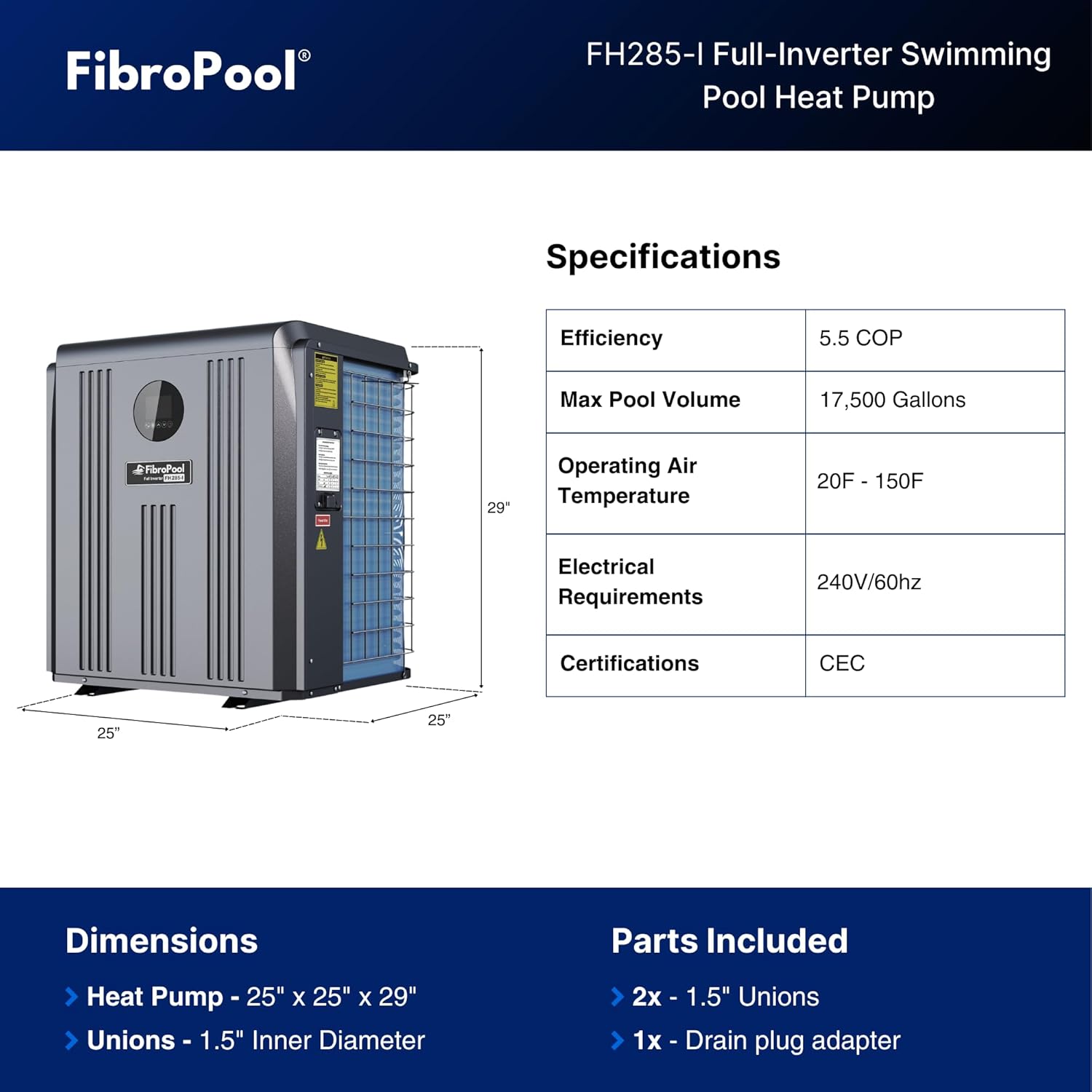
Figure 2: Product dimensions and basic specifications for placement planning.
3.3 Electrical Connections
The FH285-i requires a dedicated 240V/60Hz electrical circuit. Consult a qualified electrician to ensure proper wiring, breaker sizing, and compliance with all local electrical codes. The unit's electrical requirements are critical for safe and efficient operation.
3.4 Plumbing Connections
The heat pump should be plumbed into your pool's filtration system after the filter and before any chemical feeders. Use the included 1.5-inch unions for connection. Ensure all connections are watertight to prevent leaks.
4. Operating Instructions
Once installed, operating your FibroPool heat pump is straightforward thanks to its intuitive digital control panel and smart app integration.
4.1 Control Panel Overview
The digital control panel on the front of the unit allows for easy temperature setting and monitoring. It displays the current water temperature, desired set temperature, and operational status.
4.2 Initial Startup
- Ensure the pool pump is running and water is flowing through the heat pump.
- Turn on the electrical power to the heat pump at the breaker.
- The unit will perform a self-diagnostic check.
- Use the digital controls to set your desired water temperature.
4.3 Temperature Setting
Use the up and down arrows on the control panel to adjust the target water temperature. The heat pump will automatically operate to reach and maintain this temperature.
4.4 Wi-Fi and App Integration
The FH285-i supports Wi-Fi connectivity, allowing you to control and monitor your heat pump remotely via a dedicated smartphone application (e.g., Smart Life app). Download the app from your device's app store and follow the in-app instructions to connect your heat pump.

Figure 3: Remote control and monitoring via the Smart Life app.
5. Maintenance
Regular maintenance ensures optimal performance and extends the lifespan of your FibroPool heat pump.
5.1 Routine Cleaning
- Coil Cleaning: Periodically inspect and clean the evaporator coil (fins) to remove leaves, dirt, and debris. Use a soft brush or low-pressure water.
- Clear Obstructions: Ensure no objects are blocking the air intake or exhaust vents.
- Exterior Cleaning: Wipe down the exterior casing with a damp cloth to keep it clean.
5.2 Winterization
If you live in an area with freezing temperatures, proper winterization is essential to prevent damage:
- Disconnect electrical power to the unit.
- Drain all water from the heat pump's plumbing lines using the drain plug.
- Store the unit under a protective cover or indoors if possible.
5.3 Seasonal Startup
Before starting the unit for the swimming season:
- Remove any winterization covers.
- Reconnect plumbing and ensure all connections are secure.
- Ensure the pool pump is running and water is flowing through the heat pump before restoring electrical power.
6. Troubleshooting
This section provides solutions to common issues you might encounter. For problems not listed here, or if solutions do not resolve the issue, contact FibroPool customer support.
| Problem | Possible Cause | Solution |
|---|---|---|
| Heat pump not turning on | No power; tripped breaker; low water flow. | Check power supply and breaker; ensure pool pump is running and filter is clean. |
| Insufficient heating | Ambient temperature too low; dirty evaporator coil; incorrect temperature setting; undersized unit for pool volume. | Verify operating temperature range; clean coil; check set temperature; ensure unit is appropriately sized for your pool. |
| Unit making unusual noise | Loose components; fan obstruction; refrigerant issue. | Inspect for loose parts or obstructions; if noise persists, contact professional service. |
| Water leaks | Loose plumbing connections; damaged O-rings. | Tighten connections; inspect and replace O-rings if necessary. |
| Wi-Fi connection issues | Poor Wi-Fi signal; incorrect network settings; app issues. | Ensure strong Wi-Fi signal; reconfigure network settings in app; restart app or unit. |
7. Specifications
Detailed technical specifications for the FibroPool FH285-i heat pump.
| Specification | Value |
|---|---|
| Model Number | FH285-i |
| Product Dimensions (L x W x H) | 28 x 26 x 37 inches |
| Item Weight | 175 pounds |
| Max Pool Volume (In-ground) | Up to 17,500 Gallons |
| Max Pool Size (Above-ground) | Up to 27 foot round or 18 by 33 foot oval |
| Electrical Requirements | 240V/60Hz |
| Thermal Efficiency | 5.50 COP (Coefficient of Performance) |
| Manufacturer | FibroPool |

Figure 4: EnergyGuide label indicating the thermal efficiency of the FH285-i.
8. Warranty & Support
FibroPool stands behind the quality of its products. For specific warranty details, including coverage period and terms, please refer to the warranty card included with your product or visit the official FibroPool website. Keep your proof of purchase for warranty claims.
8.1 Customer Support
If you have any questions, require technical assistance, or need to report an issue, please contact FibroPool customer support. Contact information can typically be found on the product packaging, the official FibroPool website, or your purchase documentation.
For the most up-to-date information and support resources, please visit the FibroPool Store on Amazon.


