1. Introduction
Welcome to the user manual for your new Disney LAS4088 Lilo & Stitch Angel Interactive Digital Smartwatch. This guide provides essential information on setting up, operating, and maintaining your device to ensure optimal performance and enjoyment. Please read this manual thoroughly before using the smartwatch.

Image 1.1: Front view of the Disney Lilo & Stitch Angel Smartwatch, showing the digital display with an Angel character eating ice cream and the current time.
2. Package Contents
Please verify that all items listed below are included in your package:
- Disney LAS4088 Lilo & Stitch Angel Interactive Digital Smartwatch
- USB Charging Cable
- User Manual (this document)

Image 2.1: The smartwatch packaging, illustrating the device and its key features such as camera, games, and fitness tracker.
3. Setup
3.1 Charging the Smartwatch
Before initial use, fully charge your smartwatch. A full charge typically takes approximately 2 hours.
- Connect the small end of the provided USB charging cable to the charging port on the side or back of the smartwatch.
- Connect the larger end of the USB cable to a standard USB power adapter (not included) or a computer's USB port.
- The screen will display a charging indicator.
- Once fully charged, disconnect the USB cable.
3.2 Powering On/Off
- To Power On: Press and hold the power button (usually located on the side of the watch) for a few seconds until the screen lights up.
- To Power Off: Press and hold the power button for a few seconds. A power-off option may appear on the screen; tap to confirm.
4. Operating Instructions
Your smartwatch features a touch screen for navigation and interaction. Swipe left/right or up/down to access different functions and tap to select.
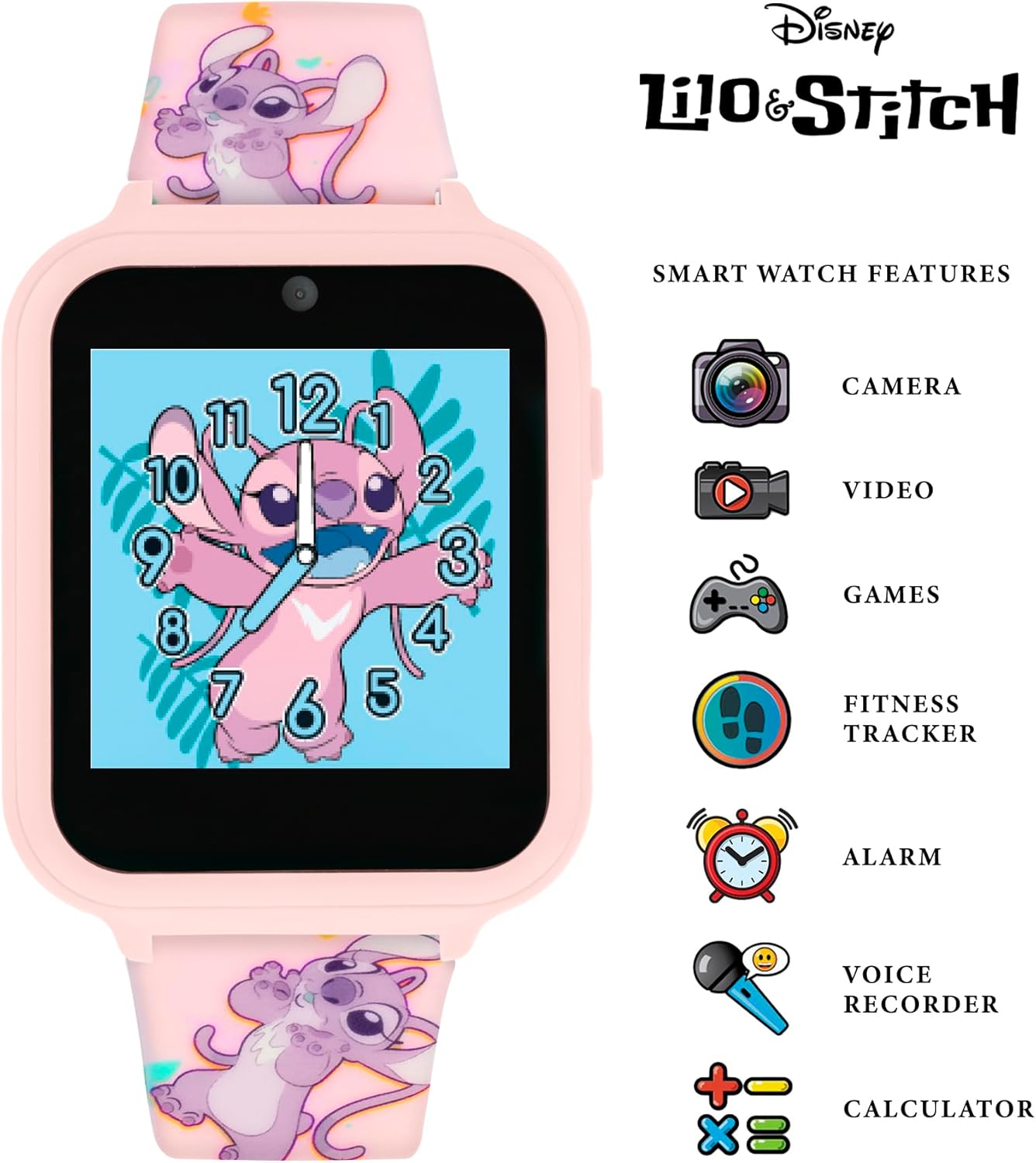
Image 4.1: The smartwatch highlighting its interactive features, including camera, video recording, games, fitness tracking, alarm, voice recorder, and calculator.
4.1 Watch Faces
The smartwatch comes with 10 pre-installed watch faces (5 analog and 5 digital) to customize the display.
- From the home screen, tap and hold the watch face.
- Swipe left or right to browse through the available watch faces.
- Tap on your desired watch face to select it.
4.2 Camera Function
The built-in camera allows you to take photos and record short videos.
- Swipe to find the 'Camera' icon and tap it.
- Tap the screen to take a photo.
- To switch to video mode, look for a video icon on the camera screen and tap it. Tap again to start/stop recording.
- Photos and videos are saved to the watch's internal memory.
4.3 Games
Enjoy pre-loaded interactive games on your smartwatch.
- Locate the 'Games' icon and tap to open the game menu.
- Select a game from the list and follow the on-screen instructions to play.
4.4 Fitness Tracker
Monitor your activity with the integrated fitness tracker.
- Tap the 'Fitness Tracker' icon to view your steps, distance, or calories burned.
- The tracker operates automatically once activated.
4.5 Alarm, Stopwatch, and Timer
Utilize the time management tools for various needs.
- Alarm: Tap the 'Alarm' icon to set new alarms, adjust times, and enable/disable existing alarms.
- Stopwatch: Access the 'Stopwatch' function to measure elapsed time. Tap to start, stop, and reset.
- Timer: Use the 'Timer' feature to set countdowns for specific durations.
4.6 Voice Recorder
Record short audio clips using the voice recorder.
- Tap the 'Voice Recorder' icon.
- Tap the record button to start recording and tap again to stop.
- Recorded files can be played back directly on the watch.
4.7 Calculator
Perform basic arithmetic calculations.
- Open the 'Calculator' application.
- Use the touch screen to input numbers and operations.
5. Connectivity
5.1 Bluetooth
The smartwatch supports Bluetooth connectivity for potential future features or data transfer to compatible devices (e.g., smartphones, tablets, computers/laptops). Specific app requirements or functionalities may vary.
- To enable/disable Bluetooth, navigate to the settings menu on the smartwatch.
- Follow on-screen prompts to pair with a compatible device if required for specific functions.
6. Maintenance
6.1 Cleaning
- Wipe the smartwatch and strap with a soft, dry, lint-free cloth.
- For stubborn marks, slightly dampen the cloth with water. Avoid using harsh chemicals or abrasive materials.
- Ensure the charging port is dry before charging.
6.2 Battery Care
- Avoid exposing the smartwatch to extreme temperatures (hot or cold), as this can affect battery life.
- Charge the battery regularly, even if the watch is not in frequent use, to maintain battery health.
- Do not attempt to replace the internal Lithium-ion battery yourself. Contact customer support if battery issues arise.
7. Troubleshooting
If you encounter any issues with your smartwatch, please refer to the table below for common problems and solutions.
| Problem | Possible Solution |
|---|---|
| Smartwatch does not turn on. | Ensure the battery is charged. Connect to the USB charger for at least 30 minutes. |
| Screen is unresponsive. | Restart the smartwatch by holding the power button. If unresponsive, allow the battery to fully drain and then recharge. |
| Cannot charge the smartwatch. | Check if the USB cable is securely connected to both the watch and the power source. Try a different USB port or power adapter. |
| Features (e.g., camera, games) are not working. | Ensure the smartwatch has sufficient battery. Restart the device. If the issue persists, contact customer support. |
8. Specifications
| Feature | Detail |
|---|---|
| Model Number | LAS4088 |
| Brand | Disney Store |
| Color | Pink |
| Screen Size | 10 Centimeters (approx. 3.9 inches) |
| Connectivity Technology | Bluetooth |
| Special Features | Camera, Alarm, Games, Fitness Tracker, Voice Recorder, Calculator |
| Compatible Devices | Smartphone, Tablet, Computer/Laptop |
| Battery Type | Lithium-ion (included) |
| GPS | No GPS |
| Manufacturer | Accutime |
| Country of Origin | China |
9. Warranty and Support
9.1 Product Warranty
This Disney LAS4088 Lilo & Stitch Angel Interactive Digital Smartwatch comes with a one-year manufacturer's warranty from the date of purchase. This warranty covers defects in materials and workmanship under normal use. It does not cover damage caused by misuse, accidents, unauthorized repairs, or normal wear and tear.
9.2 Customer Support
For warranty claims, technical assistance, or any questions not addressed in this manual, please contact the retailer or the manufacturer's customer service department. Please have your proof of purchase and the product model number (LAS4088) ready when contacting support.


