
1. Introduction
This manual provides detailed instructions for the setup, operation, and maintenance of your BOZYBO Wireless Weather Station. This device is designed to provide accurate indoor and outdoor temperature and humidity readings, along with weather forecasts, an atomic clock, and other useful environmental data.
The weather station features a 7.5-inch HD full-color screen, offering clear visibility from various angles. It displays extensive information including indoor/outdoor temperature and humidity, air pressure and history, moon phase, calendar, atomic clock, weather forecast, and outdoor index.
2. Safety Information
- Do not expose the main unit or remote sensor to excessive force, shock, dust, temperature, or humidity.
- Do not immerse the unit in water.
- Do not remove any screws or attempt to disassemble the unit.
- Do not dispose of old batteries in household waste. Follow local regulations for proper disposal.
- Keep the device away from direct sunlight and heat sources.
3. Package Contents
- BOZYBO Weather Station Main Unit
- Power Charger
- User Manual
- Remote Sensor (1 included, supports up to 3)
4. Product Overview
The BOZYBO Weather Station provides a comprehensive display of environmental data. Below is a visual representation and description of its key features.

Figure 1: Front view of the BOZYBO Wireless Weather Station display, showing indoor/outdoor temperature, humidity, weather forecast, time, and date.
Key Display Areas:
- Outdoor Index: Displays heat index or dew point.
- Outdoor Temperature & Humidity: Current readings from the remote sensor.
- Weather Forecast: Icons indicating predicted weather conditions for the next 12-24 hours.
- Air Pressure: Barometric pressure readings and historical trend.
- Indoor Temperature & Humidity: Current readings from the main unit.
- Comfort Indicator: An icon representing the indoor comfort level based on humidity.
- Atomic Clock & Calendar: Displays current time, date, and day of the week, automatically updated via WWVB signal.
- Moon Phase: Shows the current phase of the moon.
Adjustable Backlight:
When powered by the DC adapter, the display brightness can be adjusted to three levels (High Bright, Low Bright, Off). When powered by batteries only, the backlight will turn off after 10 seconds to conserve power.
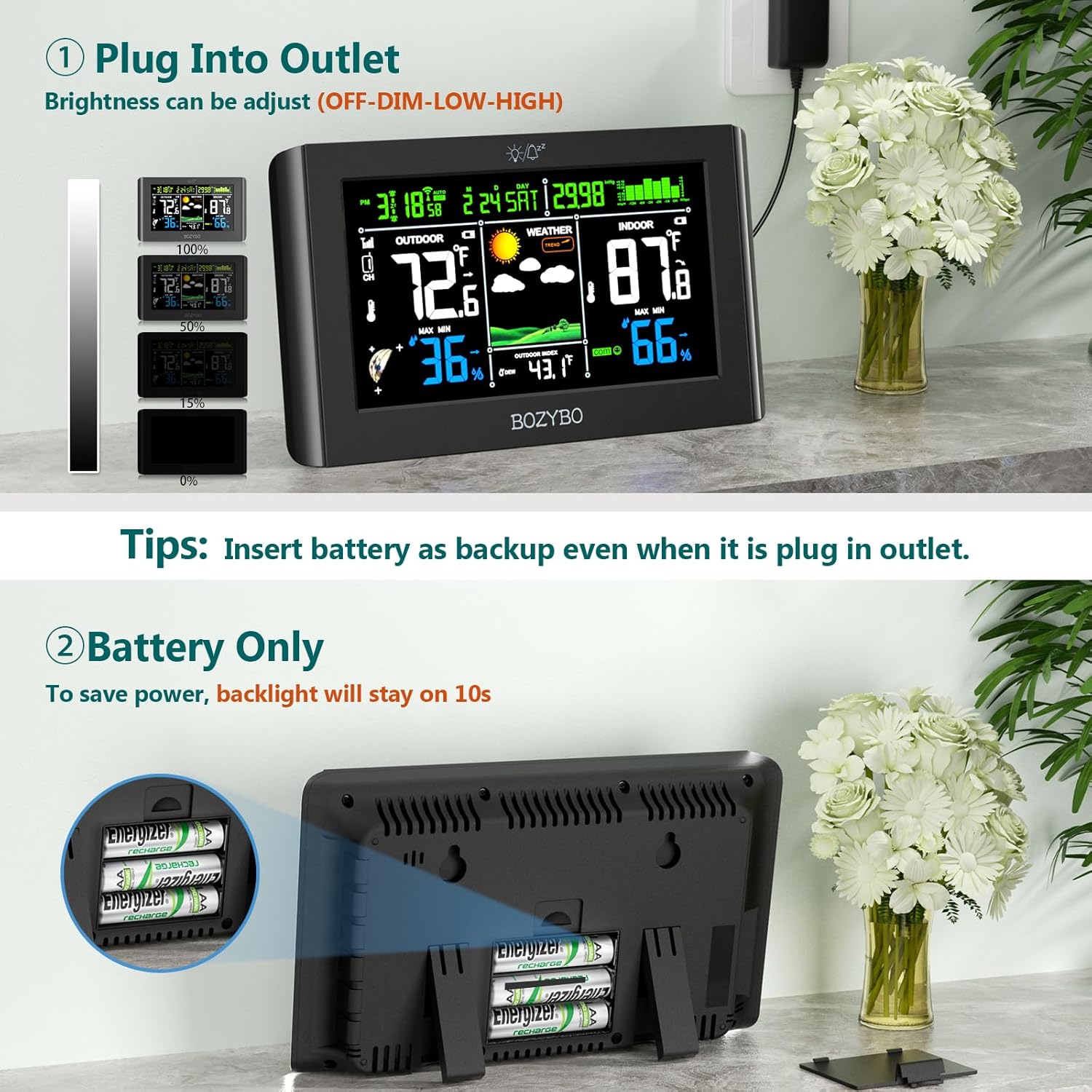
Figure 2: Powering options for the main unit, illustrating AC adapter use with adjustable brightness and battery-only operation with auto-off backlight.
5. Setup
5.1. Powering the Main Unit
- AC Adapter: For continuous display and adjustable brightness, connect the provided DC adapter to the main unit and plug it into a power outlet.
- Batteries (Optional Backup): Insert 3 AAA batteries (not included) into the battery compartment. This provides backup power in case of an outage and allows for portable use with a temporary backlight.
5.2. Remote Sensor Setup
- Insert 2 AAA batteries (not included) into the remote sensor.
- Place the remote sensor in your desired outdoor location, ensuring it is protected from direct rain and sunlight for accurate readings. The wireless transmission range is up to 328 feet (100 meters).
- The main unit can pair with up to 3 remote sensors. Additional sensors are sold separately (Model: B0BNMD1QZG).

Figure 3: Illustration of the remote sensor's wireless transmission to the main unit, showing placement options.
5.3. Atomic Clock Synchronization (WWVB & DST)
The weather station features WWVB (Atomic Clock) and DST (Daylight Saving Time) functions. Once powered on, the unit will automatically attempt to synchronize with the WWVB signal to set the correct time and date. This process may take some time, especially during initial setup or if the signal is weak. Ensure the unit is placed in an area with good reception.

Figure 4: Visual representation of the WWVB and DST functions for automatic time adjustment.
5.4. Weather Forecast Calibration
The barometer function requires 7-10 days to analyze local air pressure history for an accurate 12-24 hour weather forecast to appear. Allow this initial period for optimal performance.
6. Operating Instructions
6.1. Display Brightness
When the main unit is powered by the AC adapter, press the light bulb icon button on the top of the unit to cycle through High Bright, Low Bright, and Off brightness levels.
6.2. Temperature and Humidity Readings
The display shows current indoor and outdoor temperature and humidity. The outdoor readings are transmitted wirelessly from the remote sensor.
6.3. Weather Forecast
The weather forecast section displays icons (e.g., sunny, partly cloudy, rain, thunderstorm, snowfall) predicting the weather for the next 12-24 hours based on barometric pressure changes.

Figure 5: Examples of weather icons used for forecasting, including sunny, partly cloudy, overcast, rain, thunderstorm, snowfall, and heavy snowfall.
6.4. Comfort Indicator
A comfort icon indicates the indoor comfort level based on humidity. This helps you maintain an optimal indoor environment.
6.5. Alarm Clock Function
The weather station includes an alarm clock function. Refer to the side buttons (ALARM, TIME, SET, CH, UP, DOWN) for setting the alarm time and other clock features.
7. Maintenance
- Cleaning: Wipe the display and unit casing with a soft, damp cloth. Do not use abrasive cleaners or solvents.
- Battery Replacement: Replace batteries in both the main unit and remote sensor when the low battery indicator appears on the display.
- Remote Sensor Placement: Periodically check the remote sensor's location to ensure it remains protected from harsh weather conditions and direct elements.
8. Troubleshooting
| Problem | Possible Cause | Solution |
|---|---|---|
| No outdoor temperature/humidity reading | Remote sensor out of range or low battery. | Move sensor closer to the main unit. Replace sensor batteries. Re-pair sensor if necessary. |
| Inaccurate weather forecast | Initial calibration period not complete. | Allow 7-10 days for the unit to gather sufficient air pressure data. |
| Display is dim or off (battery mode) | Power saving mode. | Tap the screen to temporarily illuminate. For continuous bright display, use the AC adapter. |
| Atomic clock not synchronizing | Weak WWVB signal. | Relocate the main unit to an area with better signal reception, away from electronic interference. |
9. Specifications
- Model: B0CSYSPWDK
- Brand: BOZYBO
- Display Type: 7.5" HD Full Color Screen
- Power Source (Main Unit): DC Adapter (included) or 3 x AAA Batteries (not included)
- Power Source (Remote Sensor): 2 x AAA Batteries (not included)
- Connectivity: Wireless (up to 3 remote channels)
- Wireless Transmission Range: Up to 328 ft / 100 m
- Temperature Accuracy: ±1 °C
- Special Features: Adjustable Brightness, Atomic Clock (WWVB & DST), Alarm Clock, Moon Phase, Weather Forecast, Comfort Indicator, Heat Index/Dew Point.
- Dimensions: 9.06 x 7.4 x 1.5 inches (Package)
- Weight: 1.39 Pounds (Package)
10. Warranty and Support
BOZYBO is committed to providing quality products and customer satisfaction. This product comes with a standard manufacturer's warranty. For detailed warranty information, product support, or assistance with troubleshooting, please contact our professional service team. You can typically find contact information on the product packaging or through the retailer where the product was purchased.
We continuously strive to improve our products based on customer feedback. Your satisfaction is our priority.