
1. Introduction and Overview
The Omana AED Trainer XFT-120C+ is a specialized device designed to prepare emergency responders and trainees for the proper use of a clinical Automated External Defibrillator (AED). This trainer provides a safe and effective way to practice CPR and AED procedures without delivering actual high-voltage shocks, ensuring safety during training sessions.
It offers a variety of simulated scenarios and training scripts, allowing users to become familiar with AED operation and to develop the basic skills required in an emergency. The device is compatible with the AHA2015 guidelines for scenarios and operations, making it a valuable tool for comprehensive first aid and CPR training.
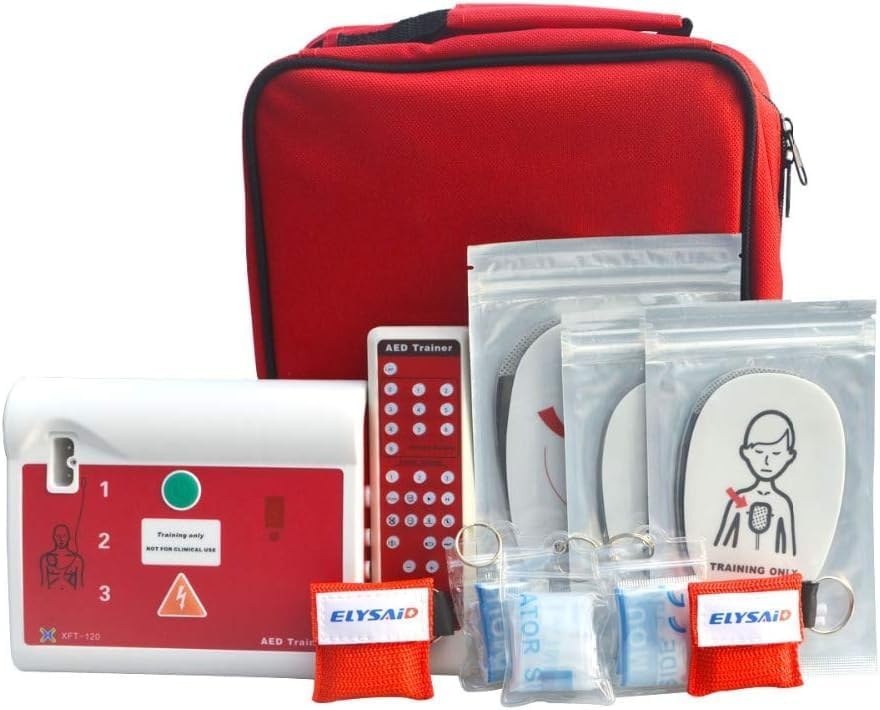
Image: The complete Omana AED Trainer XFT-120C+ kit, showcasing the main training unit, remote control, various electrode pads, and a portable red nylon carrying bag.
2. Package Contents
Upon opening your Omana AED Trainer XFT-120C+ package, please verify that all the following components are included:
- AED trainer unit (XFT-120C+) x 1pc
- Plug-in card x 1pc
- Remote control x 1pc
- Wire connectors x 2pcs (one red, one orange)
- Adult electrode pads x 2 pairs
- Child electrode pads x 1 pair
- Adapter x 1pc
- Manual x 1pc (English)
- Portable nylon bag x 1pc (Zippered, nylon-lined, fabric carry)

Image: The contents of the AED Trainer kit neatly organized within its red zippered carrying bag, including the main unit, remote control, various pads, and the instruction manual.
3. Key Features
The AED Trainer XFT-120C+ incorporates several features designed to enhance the training experience:
- AHA2015 Guideline Compatibility: The trainer is compatible with the latest AHA2015 guidelines for CPR and ECC scenarios and operations, ensuring up-to-date training.
- Realistic Simulation: Designed to prepare emergency responders for using real clinical AEDs through realistic simulations.
- Variety of Training Scripts: Offers diverse simulations and training scripts to familiarize responders with AED functions and necessary basic skills.
- Simulated Shock Delivery: Provides simulated shock delivery without high-voltage capabilities, ensuring complete safety during training.
- Multi-Language Support: Each machine supports two languages, with English as a default and a second language (e.g., Spanish, French, German) based on the order country. Additional language options are available upon request.
- Manikin Compatibility: Can be used with any type of manikin for versatile training.
- Analog Electric Shock Function: Simulates the electric shock function of a real AED.
- Electrode Connection Analysis: Simulates a real AED's ability to analyze whether electrodes are properly connected to the patient.
- Preset Training Modes: Includes 10 preset training modes, each simulating a real-life sudden cardiac arrest event.
4. Setup Guide
Follow these steps to set up your AED Trainer XFT-120C+ for a training session:
- Unpack Components: Carefully remove all items from the portable nylon bag and ensure all package contents listed in Section 2 are present.
- Power Connection: Connect the provided adapter to the AED trainer unit and plug it into a power source. Ensure the unit powers on.
- Language Selection: The trainer comes with English and one other language by default. To switch languages or select a different second language (if available via plug-in cards), refer to the specific instructions in the included manual or use the remote control.
- Connect Electrode Pads: Attach the appropriate electrode pads (adult or child) to the wire connectors. Then, connect the wire connectors to the AED trainer unit. Ensure a secure connection.
- Apply Pads to Manikin: Place the electrode pads firmly onto the designated areas of your training manikin. The trainer will simulate analysis of the connection.
- Remote Control Setup: Ensure the remote control has working batteries (not specified if included, assume standard AAA/AA). The remote is essential for controlling training scenarios.

Image: The AED Trainer XFT-120C+ in use, demonstrating the proper placement of electrode pads on a CPR training manikin.

Image: A visual representation of the extensive language options available for the AED Trainer, highlighting various language pairings with English for diverse training needs.
5. Operating Instructions
The AED Trainer XFT-120C+ is designed for intuitive operation, primarily through its remote control and voice prompts. Here are the general operating procedures:
- Power On: Press the power button on the AED trainer unit or the remote control to turn on the device.
- Select Training Mode: Use the remote control to select one of the 10 preset training modes. Each mode simulates a different cardiac arrest scenario. Refer to the detailed manual for a description of each mode.
- Follow Voice Prompts: The trainer will provide clear voice prompts in the selected language, guiding the user through the steps of AED operation, including:
- "Check responsiveness."
- "Call for help."
- "Attach electrode pads."
- "Analyzing rhythm. Do not touch the patient."
- "Shock advised. Charging."
- "Press the shock button now." (Simulated shock delivery)
- "Begin CPR."
- Simulated Shock Delivery: When prompted, press the simulated shock button. The device will indicate a successful simulated shock without delivering actual high voltage.
- Remote Control Functions: The remote control allows for pausing, resuming, changing scenarios, adjusting volume, and other functions to manage the training session effectively.
- Power Off: After the training session, power off the unit using the power button on the device or remote control.
6. Maintenance
Proper maintenance ensures the longevity and reliable performance of your AED Trainer XFT-120C+:
- Cleaning: Wipe the main unit, remote control, and electrode pads with a soft, damp cloth. Do not use abrasive cleaners or immerse the device in water. Ensure all components are dry before storage.
- Storage: Store the trainer and all its accessories in the provided portable nylon bag in a cool, dry place, away from direct sunlight and extreme temperatures.
- Electrode Pad Care: The electrode pads are reusable for training purposes. After each use, ensure they are clean and properly stored to maintain their adhesive quality. Replace pads if they lose their stickiness or become damaged.
- Battery Check: Periodically check the batteries in the remote control (if applicable) and ensure the main unit's power adapter is in good condition.
- Software Updates: While not explicitly stated, some electronic trainers may have firmware updates. Check the manufacturer's website or contact support for any available updates.
7. Troubleshooting
If you encounter issues with your AED Trainer XFT-120C+, consider the following common troubleshooting steps:
| Problem | Possible Cause | Solution |
|---|---|---|
| Trainer does not power on. | No power, faulty adapter, or internal issue. | Ensure the power adapter is securely connected to both the unit and a working power outlet. Try a different outlet. If using batteries (for remote), replace them. |
| No voice prompts or sound. | Volume too low or muted, internal speaker issue. | Adjust the volume using the remote control. Ensure the unit is not muted. |
| Electrode pads not recognized. | Pads not properly connected or damaged. | Ensure wire connectors are firmly plugged into the unit. Check that pads are securely attached to the manikin. Inspect pads for damage and replace if necessary. |
| Remote control not responding. | Dead batteries, obstruction, or remote malfunction. | Replace batteries in the remote control. Ensure no obstructions between the remote and the trainer unit. Point the remote directly at the unit. |
| Trainer freezes or behaves erratically. | Temporary software glitch. | Power off the unit, wait 30 seconds, then power it back on. If the issue persists, contact customer support. |
If these steps do not resolve the issue, please refer to the comprehensive troubleshooting section in the detailed manual provided with your unit or contact Omana customer support.
8. Specifications
| Attribute | Detail |
|---|---|
| Model | XFT-120C+ |
| Brand | Omana |
| ASIN | B0CSYHT8VG |
| Colour | Red Xft-120c |
| Unit Count | 1.00 Count |
| Training Modes | 10 preset scenarios |
| Language Support | English + 1 additional language (default Spanish, French, German, etc. based on region/request). Total 14 languages available via cards. |
| Shock Capability | Simulated (no high-voltage) |
| Compatibility | AHA2015 guidelines, any manikin |
9. Warranty and Support
For information regarding the warranty period and terms for your Omana AED Trainer XFT-120C+, please refer to the warranty card included in your product packaging or contact the seller directly. Warranty details can vary based on region and retailer.
For technical support, product inquiries, or to purchase additional accessories or language cards, please contact Omana customer service through their official website or the contact information provided in your product documentation.
Legal Disclaimer:
Actual product packaging and materials may contain more and different information than what is shown on our website. We recommend that you do not rely solely on the information presented and that you always read labels, warnings, and directions before using or consuming a product.


