
Introduction
This manual provides essential instructions for the safe and effective use of your Uharbour 1/2 Drive Click Torque Wrench. Designed for precision, this tool ensures accurate torque application for various fasteners, preventing over-tightening and potential damage. Please read this manual thoroughly before operation and retain it for future reference.
Safety Information
- Always wear appropriate personal protective equipment, such as safety glasses, when using tools.
- Ensure the workpiece is stable and secure before applying torque.
- Do not use the torque wrench as a breaker bar or for loosening fasteners. It is designed for tightening only.
- Avoid dropping the torque wrench, as this can affect its calibration and accuracy.
- Keep the torque wrench clean and free from oil or grease to maintain a secure grip.
- Do not exceed the maximum torque capacity of the wrench.
Package Contents
Your Uharbour 1/2 Drive Click Torque Wrench package includes:
- 1x Uharbour 1/2 Drive Click Torque Wrench
- 1x Durable Storage Box
- 1x Instruction Manual

Image: Uharbour 1/2 Drive Click Torque Wrench and its protective storage case.
Setup
1. Setting the Desired Torque
- Unlock the Handle: Locate the locking mechanism at the base of the handle. Push it downwards to unlock the adjustment grip.
- Adjust Torque: Rotate the handle to align the desired torque value on the main scale with the zero mark on the micrometer scale. For fine adjustments, use the micrometer scale. The wrench features a dual scale for both Foot-pounds (Ft-Lb) and Newton-meters (Nm).
- Lock the Handle: Once the desired torque is set, release the locking mechanism. It should spring back into place, securing the setting.

Image: Steps for adjusting and locking the torque setting on the wrench handle.

Image: Close-up of the dual-range torque scale in Ft-Lb and Nm.
2. Attaching Sockets
Press the quick-release button on the ratchet head to attach or remove a 1/2-inch drive socket. Ensure the socket is fully seated and locked into place before use.
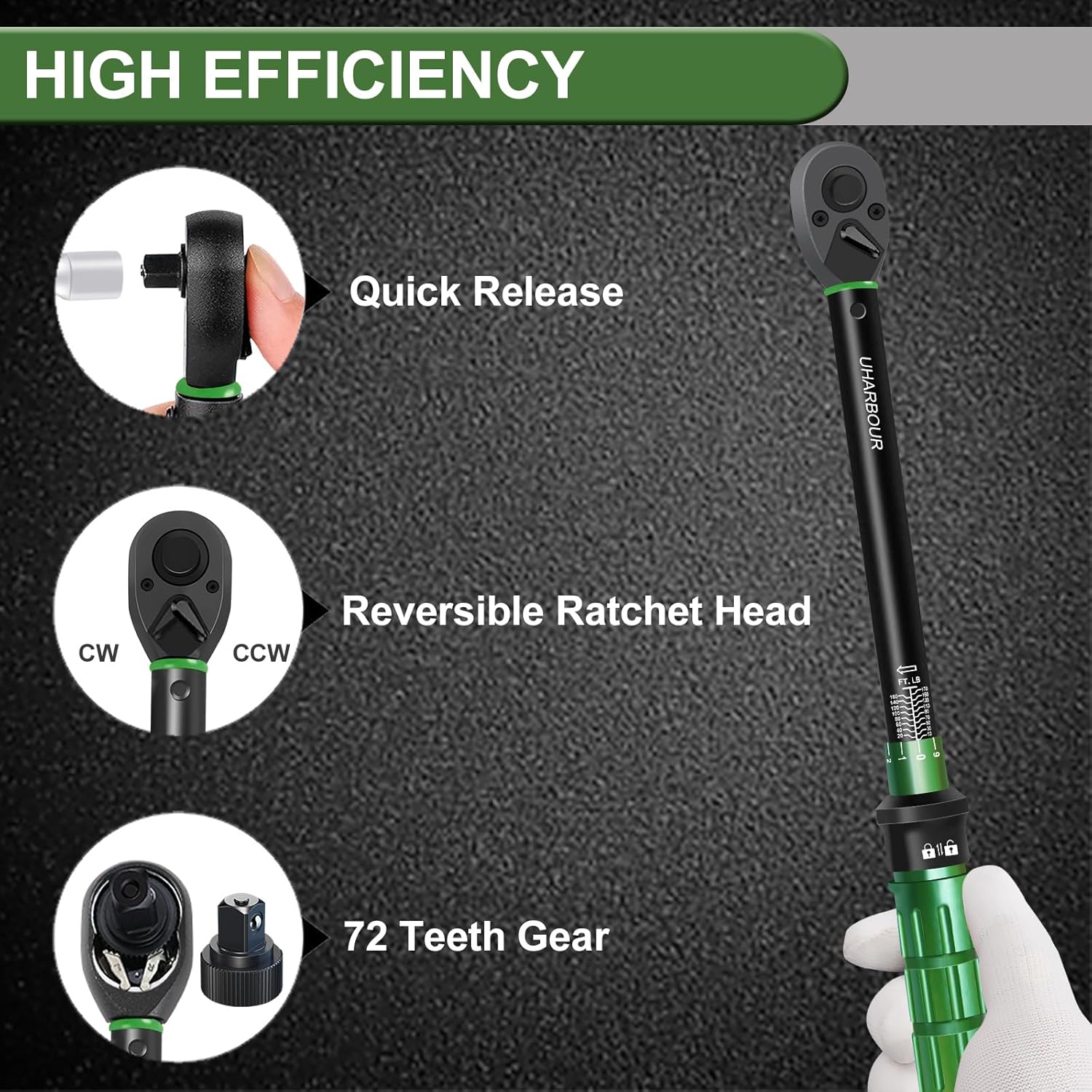
Image: Details of the quick-release mechanism and reversible ratchet head.
Operating Instructions
- Select Direction: Use the switch on the ratchet head to select the desired direction (clockwise for tightening, counter-clockwise for loosening, though the wrench is primarily for tightening).
- Apply Torque: Place the socket onto the fastener. Apply a slow, steady pull to the handle. Do not use sudden jerks or excessive force.
- Listen for the Click: Continue pulling until you hear and feel a distinct "click." This indicates that the preset torque value has been reached. Stop immediately after the click.
- Release Pressure: Once the click is heard, release pressure on the handle. The wrench will reset for the next application.

Image: Torque wrench in use on a bicycle, demonstrating the audible click feature.

Image: Torque wrench being applied to a bicycle's rear wheel assembly.
Maintenance
- Cleaning: Wipe the torque wrench clean with a soft, dry cloth after each use. Do not use harsh chemicals or solvents.
- Storage: To maintain accuracy and prolong the life of the internal spring mechanism, always return the torque wrench to its lowest torque setting (or zero, if applicable) before storing it in its protective case. This relieves tension on the spring.
- Calibration: Torque wrenches are precision instruments and may require periodic calibration to ensure continued accuracy. Consult a professional calibration service if you suspect inaccuracy or after extended use.
Troubleshooting
- No Audible Click: Ensure the torque setting is above the minimum range. If the fastener is already tight, the click may not be as pronounced. If the issue persists, the wrench may require calibration.
- Inaccurate Readings: Dropping the wrench or improper storage (not setting to zero) can affect calibration. Have the wrench professionally calibrated.
- Difficulty Adjusting Torque: Ensure the locking mechanism is fully disengaged. Clean any debris from the adjustment threads.
Specifications
| Feature | Specification |
|---|---|
| Model Number | UHXM007 |
| Drive Size | 1/2 inch |
| Torque Range | 10-170 Ft-Lb (13.6-230.5 Nm) |
| Ratchet Teeth | 72 teeth |
| Direction | Dual-Direction (Clockwise/Counter-clockwise) |
| Material | Chrome Vanadium Steel |
| Finish Type | Powder Coated |
| Item Weight | 1.39 kg (1390 Grams) |
| Included Components | Storage box, Torque wrench |
| Country of Origin | China |
Support
For any questions, technical assistance, or support regarding your Uharbour torque wrench, please contact us via email: