1. Introduction
Thank you for choosing the KarmoP Charging Station. This manual provides essential information for the proper installation, operation, and maintenance of your charging station, ensuring optimal performance for your ABIR X5, X6, and X8 robot vacuum cleaners. Please read this manual thoroughly before use and retain it for future reference.
2. Safety Information
To prevent injury or damage, always observe the following safety precautions:
- Ensure the charging station is placed on a stable, level surface.
- Do not expose the charging station to water or moisture. Use only in dry indoor environments.
- Use only the power cord supplied with the charging station.
- Keep the charging contacts clean and free from dust or debris.
- Do not attempt to disassemble or repair the charging station yourself. Contact qualified personnel for service.
- Keep children and pets away from the charging station during operation.
- Unplug the charging station from the power outlet before cleaning or if it will not be used for an extended period.
3. Package Contents
Verify that all items are present in the package:
- 1 x KarmoP Charging Base
- 1 x Power Cord

Image 3.1: The KarmoP Charging Base, shown with its power cord, ready for setup. This image displays the main unit of the charging station.
4. Product Overview
The KarmoP Charging Station is designed to provide a reliable and convenient charging solution for your ABIR X5, X6, and X8 robot vacuum cleaners. It features:
- Automatic Recharging: The robot vacuum cleaner will automatically return to the charging base when its battery is low.
- Efficient Charging: Ensures your robot vacuum is always charged and ready for its next cleaning cycle.
- Integrated Storage: Can also serve as a storage base for the vacuum cleaner, keeping the area organized.
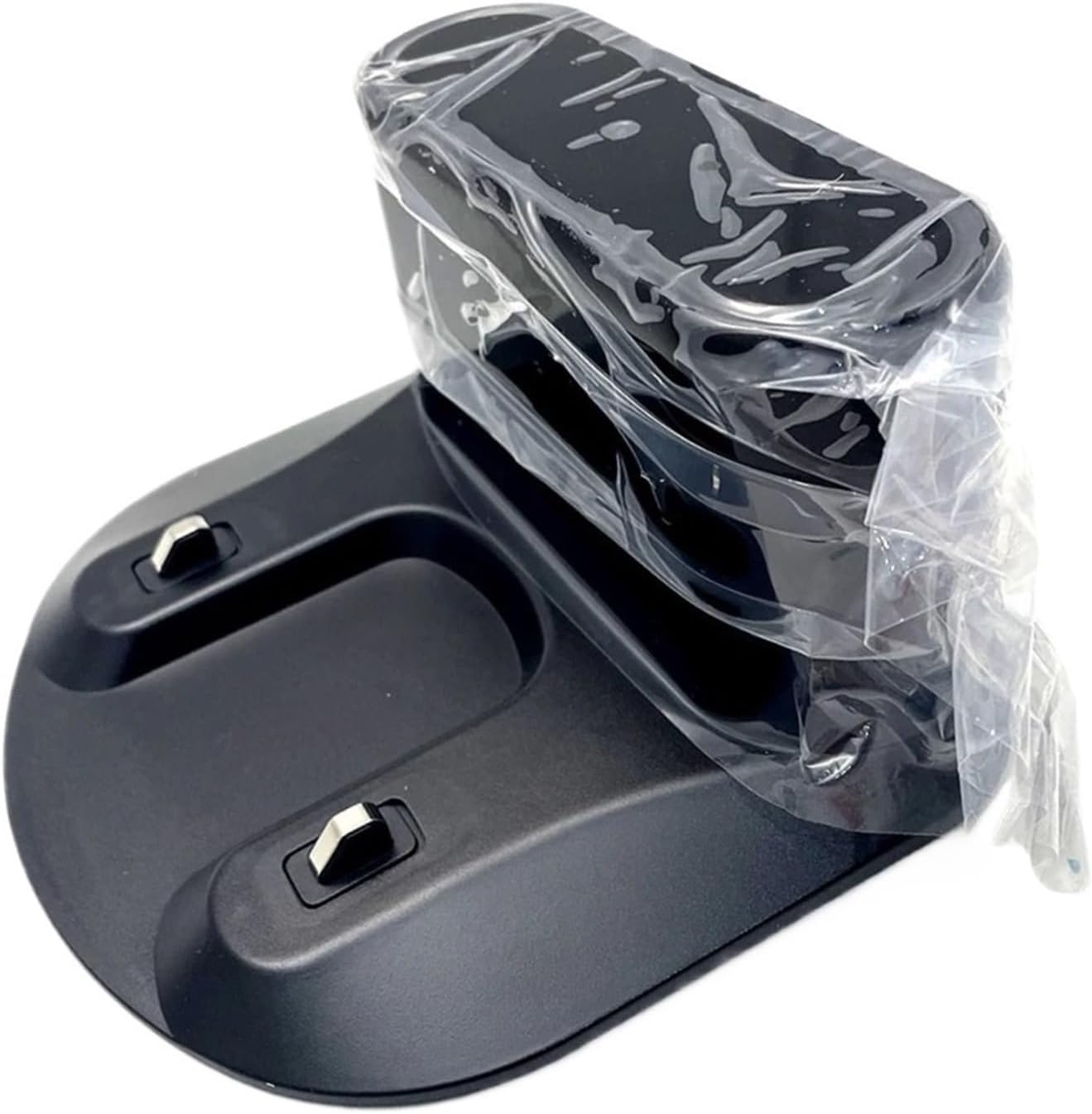
Image 4.1: An angled view of the charging station, highlighting the charging contacts and overall design. The protective plastic wrapping is visible.

Image 4.2: A top-down perspective of the charging station, showing the docking area and the two metallic charging pins.
5. Setup
Follow these steps to set up your charging station:
- Choose a Location: Select a flat, hard surface against a wall with an available power outlet. Ensure there is at least 0.5 meters (1.6 feet) of clear space on either side and 1.5 meters (4.9 feet) in front of the charging station for the robot vacuum to easily dock.
- Connect Power: Plug the power cord into the charging station's power input port, then plug the other end into a wall outlet.
- Verify Power: A power indicator light (if present) on the charging station should illuminate, indicating it is receiving power.
- Place Robot Vacuum: Manually place your ABIR robot vacuum onto the charging station to ensure it makes proper contact and begins charging. The robot's indicator light should show it is charging.
6. Operation
Once set up, the charging station operates largely automatically with your compatible ABIR robot vacuum cleaner:
- Automatic Docking: When the robot vacuum's battery level is low, it will automatically navigate back to the charging station to recharge.
- Manual Docking: You can also manually place the robot vacuum onto the charging station at any time to initiate charging. Ensure the charging contacts on both the robot and the station align.
- Charging Status: Refer to your ABIR robot vacuum's user manual for specific charging indicator lights and statuses.
7. Maintenance
Regular maintenance ensures the longevity and efficient operation of your charging station:
- Cleaning Contacts: Periodically wipe the charging contacts on the station with a clean, dry cloth to remove any dust or debris. Ensure the station is unplugged before cleaning.
- General Cleaning: Wipe the exterior of the charging station with a soft, dry cloth. Do not use abrasive cleaners or solvents.
- Power Cord Inspection: Regularly check the power cord for any signs of damage. If damaged, discontinue use and replace it with an approved cord.
8. Troubleshooting
If you encounter issues with your charging station, refer to the following table:
| Problem | Possible Cause | Solution |
|---|---|---|
| Robot vacuum does not charge when docked. |
|
|
| Robot vacuum cannot find the charging station. |
|
|
| Charging station indicator light is off. |
|
|
9. Specifications
| Product Name | KarmoP Charging Station |
| Compatibility | ABIR X5, X6, X8 Robot Vacuum Cleaners |
| Color | Black |
| Included Components | Charging base, power cord |
| Power Source | Corded Electric |
| Connector Type | 2-Pin |
| Wattage | 120 watts |
| Item Weight | 6.6 ounces (186 Grams) |
| Package Dimensions | 1.18 x 0.79 x 0.39 inches |
10. Warranty and Support
This KarmoP Charging Station is designed for durability and performance. For warranty information or technical support, please refer to the documentation provided with your original purchase or contact the seller directly. Please have your product model and purchase date available when seeking support.
For further assistance, you may also visit the KarmoP brand page on Amazon.


