
1. Product Overview
The SunnyGator LSD-RT9 is a 4-channel wireless RF remote control designed for use with compatible LED RF controllers. This remote facilitates the control of RGBW, RGB, dual-color, or single-color LED light strips, offering functions such as switching, dimming, and color selection. It operates using 2.4GHz wireless technology, allowing for multi-zone control and synchronization of multiple receivers.

Image 1.1: The LSD-RT9 remote control, a black rectangular device with a color wheel, numbered buttons, and function keys, shown alongside its white wall-mount holder.

Image 1.2: A white V4 4-channel LED controller with input/output terminals, shown with various remote control models, including dimming, CCT, and RGB/RGBW types, and a WiFi-Relay device.
2. Features
- 4-channel RF 2.4G controller, compatible with RGB/RGBW remote controls.
- Capable of creating colorful static or dynamic lighting effects.
- Functions as a dual color temperature or dimming controller with broad compatibility.
- Fully compatible with various single color, dual color, and RGB/RGBW remote controls.
- Provides smooth and flicker-free dimming and switching.
- Includes 10 built-in dynamic modes for RGB/RGBW lights, featuring jump or gradient styles.
- 2.4GHz wireless technology offers a remote control distance of up to 30m, supporting control by up to 10 remote controls.
- Automatic transmission function allows one receiver to relay the remote signal to another within 15m, extending the control range beyond 100m.
- Automatic synchronization ensures different receivers operate synchronously when controlled by the same remote, dynamic mode, and speed.
- Can be used with a WiFi-Relay for WiFi control via an APP on iOS or Android mobile devices.
- The 4CH CV RF controller supports connecting an unlimited number of 4CH CV power repeaters in series or parallel to expand output power.
3. Technical Specifications
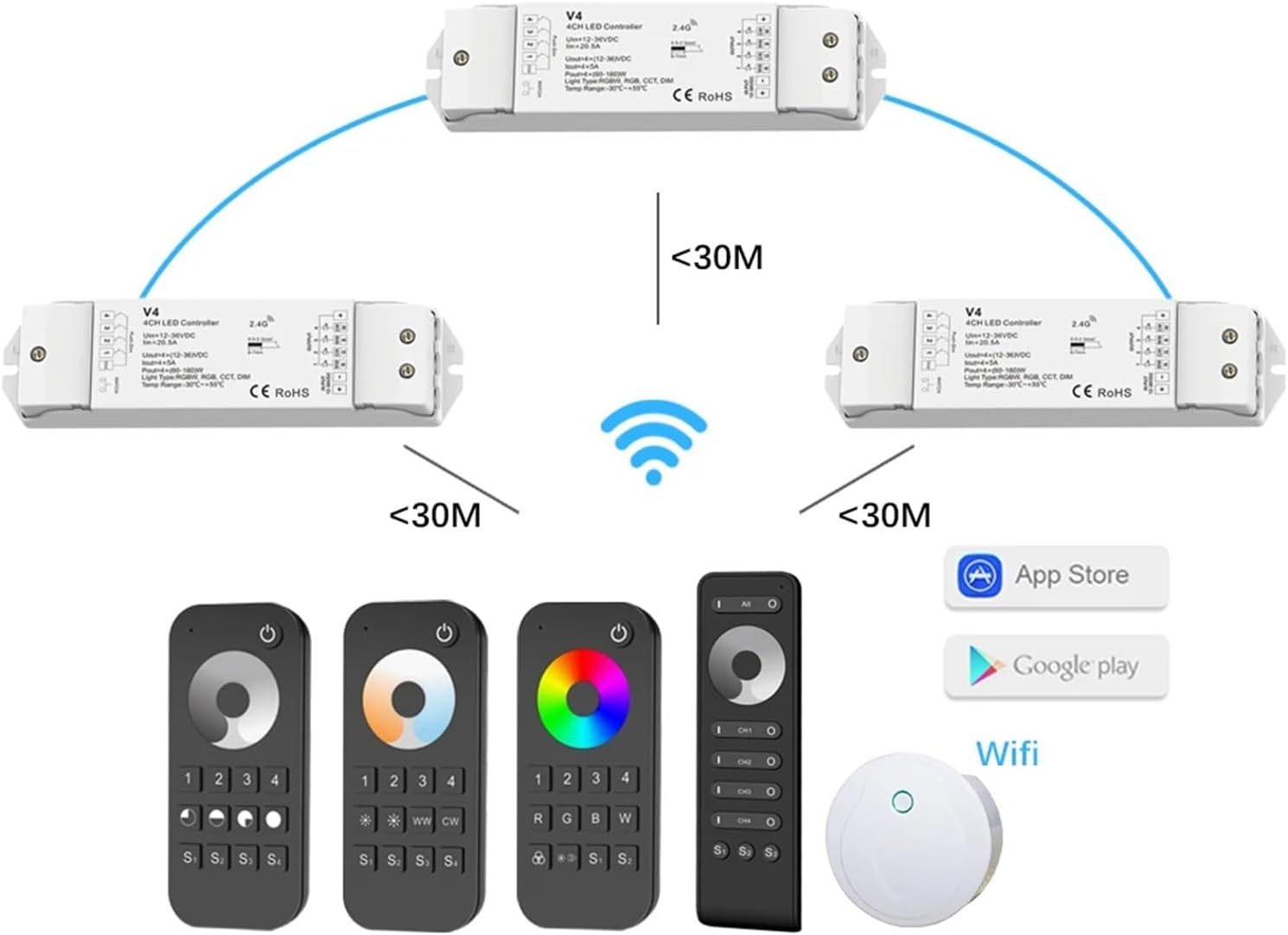
Image 3.1: A table detailing the technical parameters of the LED controller, including input/output, dimming data, environment, safety, and warranty information.
| Category | Parameter | Value |
|---|---|---|
| Input and Output | Input Voltage | 12-36VDC |
| Input Current | 20.5A | |
| Output Voltage | 4 x (12-36)VDC | |
| Output Current | 4CH, 5A/CH | |
| Dimming Data | Input Signal | RF 2.4GHz + Push Dim |
| Control Distance | 30m | |
| Dimming Range | 0-100% | |
| Environment | Operation Temperature | Ta: -30°C ~ +55°C |
| IP Rating | IP20 | |
| Safety and EMC | EMC Standard | EN301 489, EN 62479 |
| Safety Standard | EN60950 | |
| Physical | Dimensions | 175mm x 45mm x 27mm (approx.) |
| Item Weight | 50 Grams (remote only) |
4. Setup and Installation
4.1 Controller Wiring
Ensure the power supply is disconnected before wiring. Connect the LED light strips to the output terminals of the 4-channel LED controller, matching the R, G, B, W, and common positive (+) connections. Connect the 12-36VDC power input to the controller's input terminals, observing polarity.

Image 4.1: A diagram illustrating the mechanical structure and wiring connections of the LED controller. It shows input and output terminals, a match key, LED indicator, and dimensions (175mm length, 45mm width, 27mm height).
4.2 Remote Control Pairing
To pair the LSD-RT9 remote control with the LED controller:
- Power on the LED controller.
- Within 5 seconds of powering on, short press the 'Match key' on the controller or the 'ON' button on the remote control.
- The connected LED lights will flash to indicate successful pairing.
To unpair, repeat the process, but long press the 'Match key' or 'ON' button for 5 seconds. The lights will flash differently to confirm unpairing.
5. Operating Instructions
5.1 LSD-RT9 Remote Control Functions

Image 5.1: A diagram detailing the button functions for the LSD-RT9 (4 Zone RGB/RGBW Remote), including power, color wheel, zone selection, RGBW direct buttons, dynamic mode, brightness/speed adjustment, and scene recall.
- Power Button (⏻): Short press to turn on/off all zone lights.
- Color Wheel: Touch to change the current static RGB color.
- Zone Selection (1, 2, 3, 4): Short press to select and turn on a zone light. Long press for 2 seconds to turn off a zone light. Multiple zone keys can be pressed quickly to select multiple zones synchronously.
- RGB Buttons (R, G, B): Short press to directly get red, green, or blue color. Long press for 1-6 seconds to continuously adjust R/G/B brightness.
- W Button: For RGB light, short press to turn on/off white (RGB mix). Long press for 1-6 seconds to continuously adjust saturation, slowly changing the current static RGB color to mixed white. For RGBW light, short press to turn on/off the W channel. Long press for 1-6 seconds to continuously adjust W brightness, slowly changing saturation by adding white color.
- Dynamic Mode (⚙): Adjust dynamic mode for the current selected zone. Short press for the next dynamic mode. Long press for 2 seconds to cycle through run modes.
- Brightness/Speed Adjustment (☀): For static color, short press to adjust brightness in 10 levels. Long press for 1-6 seconds for continuous 256 levels adjustment. For dynamic mode, short press to adjust speed in 10 levels. Long press for 2 seconds to reset to default speed.
- Scene Recall (S1, S2): Short press to recall the scene. Long press for 2 seconds to save the current state into S1/S2. 4-zone recall and save synchronously.
5.2 Multi-Zone Control and Synchronization
The LSD-RT9 remote allows individual or simultaneous control of multiple zones. By selecting specific zone numbers (1-4), you can adjust settings for each zone independently. The automatic synchronization function ensures that when multiple receivers are controlled by the same remote, they operate in unison, maintaining the same dynamic mode and speed.
Image 5.2: A diagram illustrating how multiple V4 4-channel LED controllers can be wirelessly linked and controlled by various remotes and a WiFi-Relay, demonstrating a multi-zone setup with a control distance of less than 30 meters between devices.
5.3 WiFi-Relay Integration (Optional)
For enhanced control, the system can be integrated with a WiFi-Relay device. This converts the Wi-Fi signal from your smartphone or tablet into an RF signal, allowing you to control your LED lights via a dedicated mobile application (SkySmart App).

Image 5.3: A white, circular WiFi-Relay device labeled 'Wi-Fi to RF Converter', highlighting its features such as brightness, color temperature, 16 million colors, saturation, music & light, 8 scene memories, SkySmart App compatibility, and 1-16 zones.

Image 5.4: Screenshots of the SkySmart App interface, showing controls for brightness, color temperature, RGB color selection, and various lighting effects, demonstrating smartphone control capabilities.
6. Maintenance
The LSD-RT9 remote control and its compatible LED controller require minimal maintenance. Keep the devices clean and dry. Use a soft, dry cloth to wipe surfaces. Avoid exposing the devices to extreme temperatures, humidity, or direct sunlight. Do not use abrasive cleaners or solvents.
7. Troubleshooting
- Lights not responding: Ensure the remote control has fresh batteries. Verify that the LED controller is powered on and correctly wired. Re-attempt the pairing process (Section 4.2).
- Limited control range: Check for obstructions between the remote and the controller. Ensure the remote is within the 30m operating range. If using multiple controllers, verify the automatic transmission function is working correctly.
- Flickering lights: Ensure all connections are secure. Verify the power supply voltage matches the controller's requirements.
- Incorrect colors: Check the wiring of the RGB/RGBW LED strips to ensure correct polarity and channel assignment.
8. Warranty and Support
This product comes with a 5-year warranty against manufacturing defects. For technical support, troubleshooting assistance, or warranty claims, please contact SunnyGator customer service through your purchase platform or the official SunnyGator website. Please retain your proof of purchase for warranty validation.