
1. Introduction
The ESSISH WH8040 is a versatile digital controller designed for precise measurement and control of both temperature and humidity. This device is suitable for a wide range of applications including home environments, refrigerators, laboratories, and coolers. It features a clear digital display, easy-to-use controls, and robust sensor probes for reliable performance. This manual provides detailed instructions for the installation, operation, and maintenance of your WH8040 controller.
2. Product Overview
2.1 Key Features
- Measures, displays, and controls humidity within 1% to 99% RH.
- Measures and displays temperature.
- Humidification and dehumidification control functions.
- Adjustable hysteresis function for precise control.
- Humidity correction and delay protection features.
- Upper and lower limit settings for humidity.
- Alarm function for temperature exceeding set limits.
- Compressor start-up delay protection.
- Data retention capability.
2.2 Package Contents
- 1 x ESSISH WH8040 Humidity Controller (220V)
- 1 x Humidity Controller Sensor Probe with Cable (HM-40)
- 1 x Temperature Sensor Probe with Cable
2.3 Product View

3. Specifications
| Parameter | Value |
|---|---|
| Humidity Measuring Range | 1% ~ 99% RH |
| Humidity Controlling Range | 1% ~ 99% RH |
| Humidity Measuring Error | ±3% RH |
| Humidity Resolution | 1% RH |
| Sensor Type | HM-40 |
| Power Supply | AC 220V |
| Current Consumption | MAX 200mA (< 3W) |
| Relay Contact Current | AC 5A/220V |
| Temperature Compensation | Yes |
| Data Retention | Yes |
| Working Temperature | 0°C ~ 50°C |
| Storage Temperature | -10°C ~ 60°C |
| Dimensions (L x W x H) | Approx. 83 x 75 x 33mm |
| Probe Size (D x L) | Approx. 4 x 20mm |
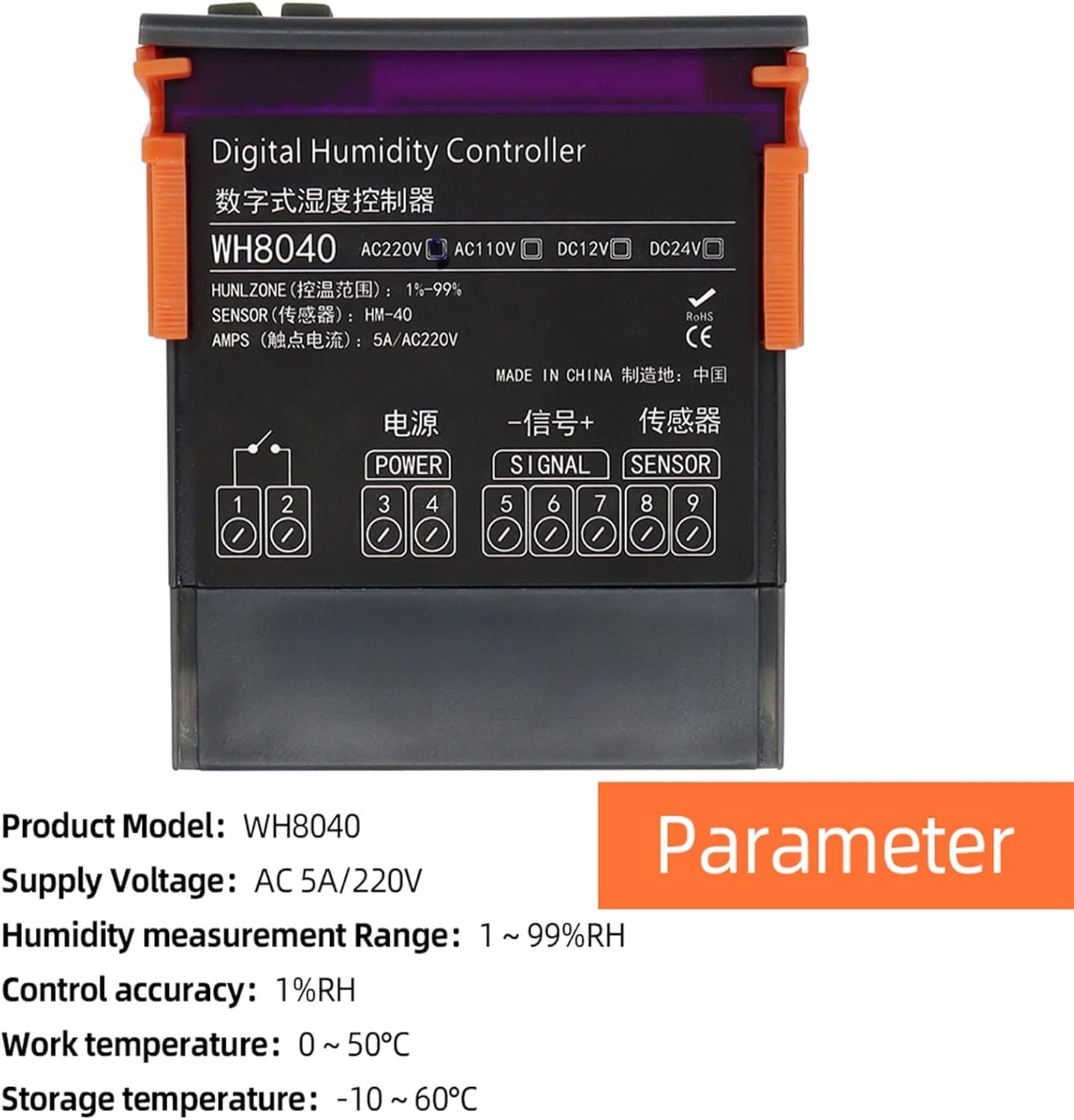

4. Setup and Wiring
Proper wiring is crucial for the safe and correct operation of the WH8040 controller. Ensure the power supply matches the controller's voltage (AC 220V for this model) and that all connections are secure.
4.1 Wiring Diagram

Refer to the diagram above for connecting the power supply, signal output, and sensor probes. The terminals are typically labeled as follows:
- Terminals 1 & 2: Relay contact output for controlled device (e.g., humidifier, dehumidifier, fan).
- Terminals 3 & 4 (POWER): AC 220V power input.
- Terminals 5 & 6 (SIGNAL): Humidity sensor input.
- Terminals 7, 8, 9 (SENSOR): Temperature sensor input.
Warning: Ensure power is disconnected before performing any wiring to prevent electric shock.
5. Operating Instructions
The WH8040 controller features a digital display and four control buttons for easy operation.
5.1 Control Panel

- SET Button: Used to enter and exit the humidity control setting mode.
- Up (▲) Button: Used to increase values during setting. Press and hold for three seconds to enter quick adjustment mode.
- Down (▼) Button: Used to decrease values during setting. Press and hold for three seconds to enter quick adjustment mode.
- RST Button:
- Press briefly to switch to the saturated state and turn off the power.
- When the power is off, press RST to start the device.
- In the starting state, press and hold RST for three seconds to turn off the power.
5.2 Setting Humidity Control
- Press the SET button to enter the humidity control setting mode. The display will show the current set humidity value.
- Use the Up (▲) or Down (▼) buttons to adjust the desired humidity set point.
- To quickly adjust the value, press and hold the Up (▲) or Down (▼) button for three seconds.
- Press the SET button again to confirm the setting and exit the setting mode.
6. Maintenance
To ensure the longevity and accurate performance of your ESSISH WH8040 controller, follow these maintenance guidelines:
- Cleaning: Regularly wipe the controller's surface with a soft, dry cloth. Avoid using abrasive cleaners or solvents.
- Sensor Care: Keep the humidity and temperature sensor probes clean and free from dust or debris. Do not immerse the probes in liquid unless they are specifically designed for such use.
- Environmental Conditions: Operate the controller within its specified working temperature and humidity ranges to prevent damage.
- Connections: Periodically check all wiring connections to ensure they remain secure and free from corrosion.
7. Troubleshooting
If you encounter issues with your WH8040 controller, refer to the following common troubleshooting steps:
- No Power:
- Check the power supply connection to terminals 3 and 4.
- Ensure the power source is active and providing AC 220V.
- Press the RST button to attempt to start the device if it was previously turned off.
- Incorrect Readings:
- Verify that the humidity and temperature sensor probes are correctly connected to their respective terminals.
- Ensure the sensor probes are clean and not obstructed.
- Check for any physical damage to the sensor cables or probes.
- Control Output Not Activating:
- Confirm that the set humidity value is appropriate for the desired action (humidification/dehumidification).
- Check the wiring to the controlled device (terminals 1 and 2).
- Verify that the controlled device itself is functioning correctly.
- Display Errors:
- If an error code appears, consult the product documentation for specific meanings (if available).
- Try power cycling the device by pressing and holding RST for three seconds to turn off, then pressing RST again to restart.
If problems persist after attempting these troubleshooting steps, please contact customer support for further assistance.