
Important Safeguards
When using electrical appliances, basic safety precautions should always be followed to reduce the risk of fire, electric shock, and/or injury to persons, including the following:
- Read all instructions before operating the espresso machine.
- Do not touch hot surfaces. Use handles or knobs.
- To protect against fire, electric shock, and personal injury, do not immerse cord, plugs, or the appliance in water or other liquid.
- Close supervision is necessary when any appliance is used by or near children.
- Unplug from outlet when not in use and before cleaning. Allow to cool before putting on or taking off parts, and before cleaning the appliance.
- Do not operate any appliance with a damaged cord or plug, or after the appliance malfunctions or has been damaged in any manner.
- The use of accessory attachments not recommended by the appliance manufacturer may result in fire, electric shock, or personal injury.
- Do not use outdoors.
- Do not let cord hang over edge of table or counter, or touch hot surfaces.
- Do not place on or near a hot gas or electric burner, or in a heated oven.
- Always attach plug to appliance first, then plug cord into the wall outlet. To disconnect, turn any control to "off", then remove plug from wall outlet.
- Do not use appliance for other than intended use.
- Scalding may occur if the water tank lid is removed during the brewing cycle.
Product Components
Familiarize yourself with the parts of your ICUIRE CM5080 Espresso Machine.

Image: Overview of the ICUIRE CM5080 Espresso Machine, showcasing its main body, control panel, portafilter, and steam wand.
- Main Unit: Houses the heating system, pump, and control panel.
- Water Tank: Removable 37 oz (1.1 L) capacity tank for water.
- Control Panel: Buttons for power, single shot, double shot, and steam, along with a pressure gauge.
- Portafilter: Handle with a filter basket holder.
- Filter Baskets: Includes single and double shot filter baskets.
- Measuring Scoop/Tamper: For measuring coffee grounds and tamping.
- Drip Tray: Removable tray to collect excess liquids.
- Steam Wand: For frothing milk and dispensing hot water.
- Cup Warmer: Top surface to pre-warm espresso cups.

Image: Detachable components of the espresso machine, including the drip tray, filter baskets, portafilter, and measuring scoop, highlighting ease of cleaning.
Initial Setup and First Use
1. Unpacking and Cleaning
- Remove all packaging materials and labels.
- Wash the water tank, portafilter, filter baskets, and drip tray in warm soapy water. Rinse thoroughly and dry.
- Wipe the exterior of the machine with a damp cloth.
2. Filling the Water Tank
- Remove the water tank from the back of the machine.
- Fill the tank with fresh, cold water up to the MAX line. Do not exceed the MAX line.
- Place the water tank back into the machine, ensuring it is seated correctly.

Image: A hand pouring water into the removable water tank located at the back of the espresso machine.
3. Priming the System (First Use Only)
Before brewing coffee or frothing milk for the first time, or if the machine has not been used for a long period, the system needs to be primed to fill the internal boiler with water.
- Ensure the water tank is filled.
- Plug the machine into a grounded electrical outlet.
- Press the power button. The indicator lights will flash as the machine preheats.

Image: A finger pressing the power button on the control panel, indicating the machine is being turned on.
- Once the indicator lights stop flashing and remain solid, the machine is preheated.
- Place an empty cup under the steam wand.
- Turn the steam knob counter-clockwise to the maximum position to release water through the steam wand.

Image: A hand rotating the steam knob on the side of the machine to its fully open position.
- Allow water to flow for approximately 30 seconds, then turn the steam knob back to the OFF position.

Image: Water being dispensed from the steam wand into a glass, indicating the priming process is active.
The machine is now primed and ready for use.
Operating the Espresso Machine
1. Making Espresso
- Prepare Water: Ensure the water tank is filled with fresh, cold water.
- Preheat: Turn on the machine and allow it to preheat until the indicator lights are solid.
- Prepare Portafilter: Insert the desired filter basket (single or double) into the portafilter.
- Add Coffee Grounds: Grind fresh coffee beans to a fine espresso grind. Use the measuring scoop to add coffee grounds to the filter basket. For a single shot, use one scoop (approx. 7g); for a double shot, use two scoops (approx. 14g).

Image: A hand adding ground coffee into the filter basket of the portafilter.
- Tamp Coffee: Use the tamper to press the coffee grounds firmly and evenly. Wipe any excess grounds from the rim of the portafilter.
- Attach Portafilter: Align the portafilter with the group head on the machine. Insert it and rotate it firmly to the right until it is securely locked in place.

Image: A hand attaching the portafilter to the group head of the espresso machine.
- Place Cup: Place one or two preheated espresso cups on the drip tray directly under the portafilter spouts.
- Brew Espresso: Press the single shot button for one cup or the double shot button for two cups. The machine will automatically brew the espresso and stop.

Image: Close-up of espresso being extracted from the portafilter into a glass, demonstrating uniform flow.
The pressure gauge on the front panel will indicate the brewing pressure, ideally in the optimal range for best extraction.

Image: The espresso machine's front panel, highlighting the built-in pressure gauge which shows the exact brewing pressure.
2. Frothing Milk
- Prepare Milk: Fill a stainless steel frothing pitcher with cold milk (dairy or non-dairy) up to one-third full.
- Activate Steam Function: Press the steam button on the control panel. The steam indicator light will flash and then become solid when the machine reaches the correct temperature for steaming.

Image: A finger pressing the steam button on the control panel to initiate the steam function.
- Position Steam Wand: Submerge the tip of the steam wand just below the surface of the milk.
- Release Steam: Slowly turn the steam knob counter-clockwise to release steam.

Image: A hand rotating the steam knob to control the steam output for frothing milk.
- Froth Milk: Move the pitcher up and down gently to create foam. Once desired foam is achieved and milk is hot (approx. 140-150°F / 60-65°C), turn the steam knob to the OFF position.
- Clean Steam Wand: Immediately wipe the steam wand with a damp cloth to prevent milk residue from drying. Briefly release steam into an empty cup to clear any internal milk blockages.
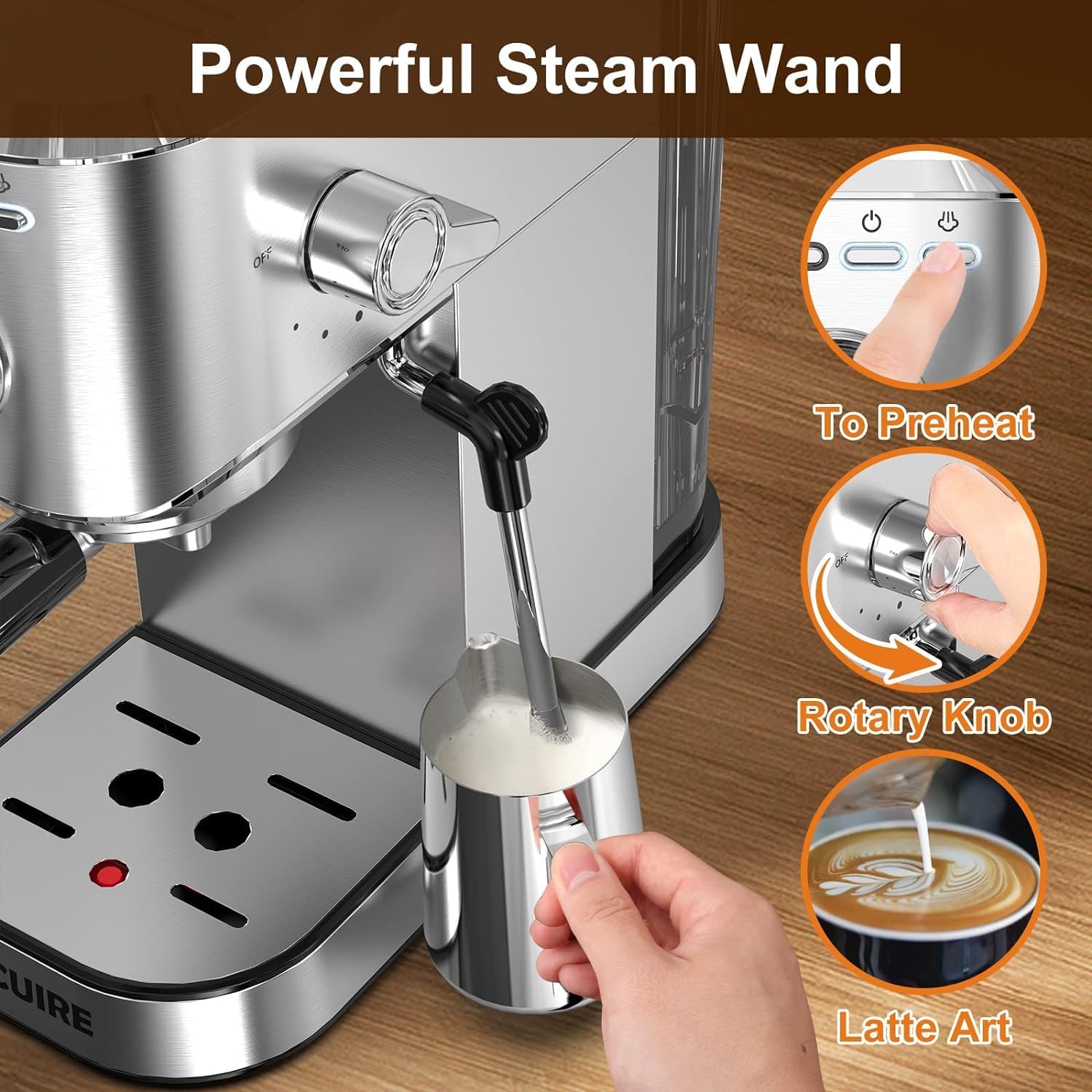
Image: The powerful steam wand in action, frothing milk in a pitcher, with examples of latte art.
3. Hot Water Function
The steam wand can also dispense hot water for tea or Americanos.
- Ensure the machine is preheated.
- Place a cup under the steam wand.
- Turn the steam knob counter-clockwise to release hot water.
- Turn the steam knob back to the OFF position when done.

Image: A visual guide demonstrating both the steam function for frothing milk and the hot water function for dispensing hot water from the steam wand.
Cleaning and Maintenance
1. Daily Cleaning
- Drip Tray: Empty and clean the drip tray and grid after each use or when the indicator floats up. Wash with warm soapy water and rinse.
- Portafilter and Filter Basket: After brewing, remove the portafilter, discard the used coffee grounds (coffee puck), and rinse the portafilter and filter basket under warm water. Use a brush to remove any stubborn coffee residue.
- Steam Wand: As mentioned in the operating section, wipe the steam wand immediately after frothing milk and purge steam briefly.
- Exterior: Wipe the exterior of the machine with a soft, damp cloth. Do not use abrasive cleaners or scouring pads.
2. Descaling
Mineral deposits from water can build up in the machine over time, affecting performance and taste. Descale your machine every 2-3 months, or more frequently if you have hard water.
- Prepare a descaling solution according to the descaler manufacturer's instructions, or use a mixture of white vinegar and water (1:1 ratio).
- Fill the water tank with the descaling solution.
- Place a large container under the group head and steam wand.
- Turn on the machine and allow it to preheat.
- Run approximately half of the solution through the group head by pressing the double shot button.
- Run the remaining solution through the steam wand by turning the steam knob.
- Turn off the machine and let it sit for 15-20 minutes.
- Empty and rinse the water tank thoroughly. Fill it with fresh water.
- Repeat steps 3-6 with fresh water to rinse the machine completely. Repeat rinsing until no descaling solution remains.
Troubleshooting
| Problem | Possible Cause | Solution |
|---|---|---|
| No water coming out of group head/steam wand. | Water tank empty or not properly seated. Machine not primed. | Fill water tank and ensure it's correctly placed. Prime the machine as per 'Initial Setup' section. |
| Espresso brews too slowly or not at all. | Coffee grounds too fine or too much coffee. Coffee tamped too hard. Machine needs descaling. | Use a coarser grind. Reduce coffee amount. Tamp with less force. Descale the machine. |
| Espresso brews too quickly, weak taste. | Coffee grounds too coarse or too little coffee. Coffee not tamped enough. | Use a finer grind. Increase coffee amount. Tamp with more force. |
| No steam from steam wand. | Steam function not activated. Steam wand clogged. | Press the steam button and wait for the indicator light to become solid. Clean the steam wand thoroughly and purge. |
| Machine is leaking. | Water tank not properly seated. Drip tray full. Portafilter not securely locked. | Ensure water tank is correctly placed. Empty drip tray. Lock portafilter firmly. |
| Overheating Protection activated (lights flash quickly). | Machine has been running for too long or is too hot. | Turn the steam knob to maximum to release steam/hot water until the indicator lights stop flashing rapidly. This helps cool down the system. Allow the machine to cool down before resuming operation. |
Product Specifications
| Feature | Specification |
|---|---|
| Brand | ICUIRE |
| Model Name | CM5080 |
| Coffee Maker Type | Espresso Machine |
| Pump Pressure | 20 Bar Professional Italian Pump |
| Wattage | 1350 watts |
| Water Tank Capacity | 37 oz (approx. 1.1 Liters) |
| Product Dimensions (L x W x H) | 11"D x 4.7"W x 11.81"H |
| Item Weight | 9.48 pounds |
| Special Feature | Milk Frother, Pressure Gauge, Removable Drip Tray |
| Included Components | Espresso Machine, Portafilter, Filter Baskets, Measuring Scoop/Tamper |
Warranty and Support
The ICUIRE CM5080 Espresso Machine comes with a 2-Year Warranty from the date of purchase.
This warranty covers manufacturing defects and workmanship under normal use. It does not cover damage resulting from misuse, accident, alteration, neglect, unauthorized repair, or failure to follow instructions.
For warranty claims, technical support, or if you have any questions regarding your product, please contact ICUIRE customer service. Please have your model number (CM5080) and proof of purchase ready when contacting support.
Contact information can typically be found on the product packaging or the official ICUIRE website.


