
1. Introduction
This manual provides detailed instructions for the installation, operation, and maintenance of the YUHANUS Wired Doorbell Chime, Model YH-CU-B01. This device is designed to integrate seamlessly with door access control systems, providing an audible alert when the access button is pressed.
2. Product Overview
The YUHANUS Wired Doorbell Chime is a compact and reliable unit designed to enhance door access control systems. It features a clear "ding-dong" sound and is powered directly by the access control system, eliminating the need for separate batteries.
Key Features:
- Seamless Integration: Emits a "ding-dong" sound when the access control system button is pressed.
- Battery-free Operation: Powered directly by the access control system (DC 12V).
- Durable Construction: Features an ABS fire-resistant case for enhanced longevity and safety.
- Clear Audio Output: High-quality internal speaker ensures a distinct doorbell sound.
- Compact Design: Small size with wall-mount capability for discreet installation.

Figure 2.1: Front view of the YUHANUS Wired Doorbell Chime with connection wires.

Figure 2.2: Dimensions of the YUHANUS Wired Doorbell Chime. The chime measures 3.43 inches in length, 2.44 inches in width, and 0.87 inches in depth.
3. Safety Information
- Ensure the power supply is disconnected before performing any wiring or installation procedures to prevent electrical shock.
- This device operates on DC 12V. Connecting it to an incorrect voltage may damage the unit and pose a safety risk.
- Do not expose the device to excessive moisture or extreme temperatures outside its specified operating range (-10℃ to 45℃).
- The ABS case is fire-resistant; however, do not attempt to open or modify the unit, as this may void the warranty and create hazards.
- Installation should be performed by qualified personnel if you are unsure about electrical wiring.
4. Setup and Installation
The YUHANUS Wired Doorbell Chime is designed for straightforward integration with existing DC 12V door access control systems. Follow these steps for proper installation.
4.1 Wiring Connections
Identify the four wires extending from the doorbell chime and connect them according to the following scheme:
- Red Wire: Connect to +12V (positive power supply).
- Black Wire: Connect to GND (ground/negative power supply).
- Green Wire: Connect to BELL1 terminal on the access controller keypad.
- Yellow Wire: Connect to BELL2 terminal on the access controller keypad.
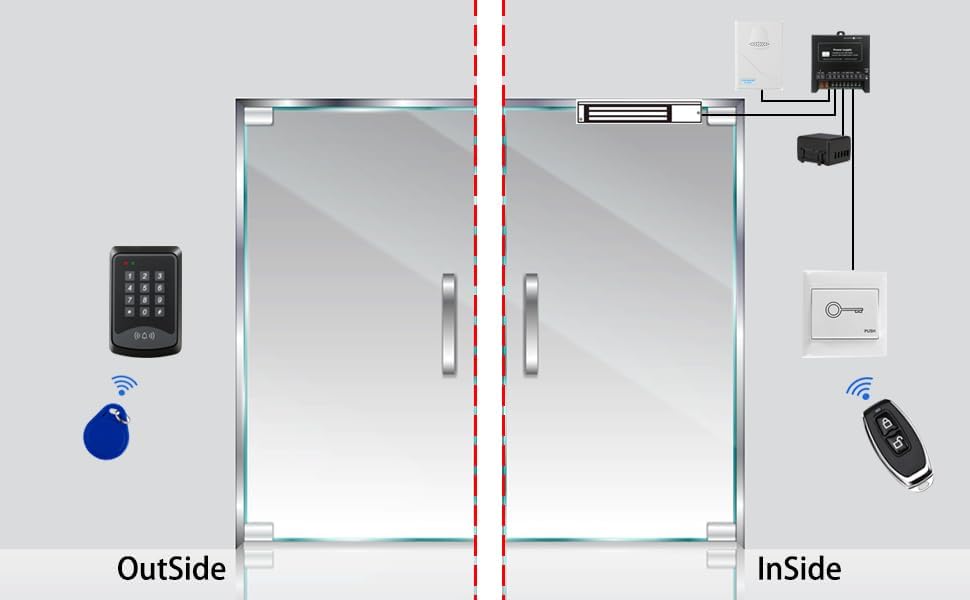
Figure 4.1: Rear view of the doorbell chime indicating wire color assignments for power and switch connections.
4.2 System Integration Diagram
Refer to the diagram below for a comprehensive view of how the doorbell chime integrates into a typical access control system setup.

Figure 4.2: Detailed wiring diagram illustrating the connection of the YUHANUS doorbell chime (highlighted in red dashed box) to an access control keypad, power supply, magnetic lock, exit switch, and remote control.
- Power Supply Connection: Connect the Red wire of the chime to the +12V output of your access control system's power supply. Connect the Black wire to the GND (Ground) terminal of the power supply.
- Access Controller Keypad Connection: Connect the Green wire of the chime to the BELL1 terminal on your access controller keypad. Connect the Yellow wire of the chime to the BELL2 terminal on your access controller keypad.
- Mounting: The chime features a wall-mount hole. Secure the chime in a desired location using appropriate fasteners.
- Power On: Once all connections are secure, restore power to the access control system.
5. Operating Instructions
The YUHANUS Wired Doorbell Chime operates automatically in conjunction with your access control system.
- When a visitor presses the doorbell button on the integrated access control system, the chime will emit a clear "ding-dong" sound.
- No user interaction is required directly with the chime unit for its operation.
6. Maintenance
The YUHANUS Wired Doorbell Chime is designed for low maintenance due to its durable ABS fire-resistant casing and battery-free operation.
- Cleaning: Periodically wipe the exterior of the chime with a soft, dry cloth to remove dust. Do not use abrasive cleaners or solvents.
- Inspection: Occasionally check the wiring connections to ensure they remain secure.
- No Internal Servicing: The unit contains no user-serviceable parts. Do not attempt to open the casing.
7. Troubleshooting
If you encounter issues with your doorbell chime, refer to the following troubleshooting guide:
| Problem | Possible Cause | Solution |
|---|---|---|
| No sound from the chime. |
|
|
| Sound is weak or distorted. |
|
|
| Chime sounds continuously or randomly. |
|
|
8. Specifications
| Model Number | YH-CU-B01 |
| Working Voltage | DC 12V |
| Doorbell Volume | 90dB |
| Dimensions (W x H x D) | 2.44 x 3.43 x 0.87 inches (6.2 x 8.7 x 2.2 cm) |
| Item Weight | 2.11 ounces (60 grams) |
| Operating Temperature | -10℃ to 45℃ (14℉ to 113℉) |
| Relative Humidity | 10%RH to 80%RH |
| Material | ABS Fire Retardant Material |
| Color | White |
| Included Components | Wired Doorbell Chime x 1 |
9. Warranty and Support
9.1 Warranty Information
YUHANUS products are manufactured to high-quality standards. Specific warranty details may vary by region and retailer. Please retain your proof of purchase for any warranty claims. For detailed warranty terms, refer to the documentation provided at the time of purchase or contact your retailer.
9.2 Customer Support
For technical assistance, troubleshooting beyond this manual, or inquiries regarding your YUHANUS Wired Doorbell Chime, please contact your point of purchase or visit the official YUHANUS website for support contact information.