
Introduction
This manual provides instructions for the safe and efficient use of your Cygnett Boost Power Bank 10,000 mAh. This device is designed to charge compatible electronic devices on the go, offering convenience and reliability.
Package Contents
- Cygnett Boost Power Bank 10,000 mAh
- USB-A to USB-C Charging Cable
- User Manual
Product Overview
Components and Features
The Cygnett Boost Power Bank features multiple charging ports and a digital display for battery status, ensuring you are always aware of its charge level.
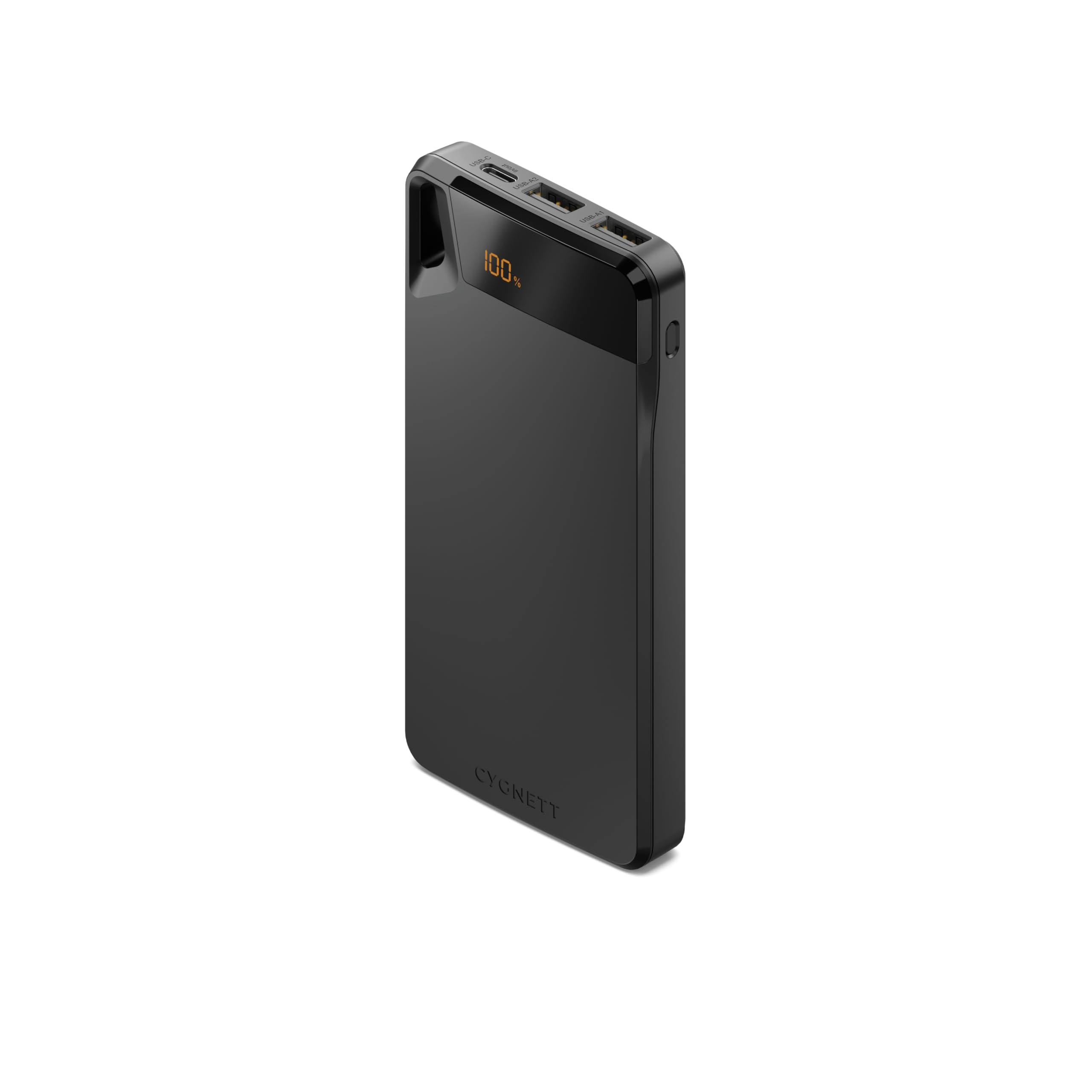
Image Description: A black Cygnett Boost Power Bank showing its top surface with the "CYGNETT" logo, and the front edge displaying a digital "100%" battery indicator, one USB-C port labeled "in/out", and two USB-A ports labeled "USB-A1" and "USB-A2". A black lanyard is attached to the side.
- Digital Display: Clearly shows the remaining battery percentage.
- USB-C Port (In/Out): Used for both recharging the power bank and charging compatible devices.
- USB-A Ports (Output): Two ports available for charging various devices.
- Lanyard: Integrated for convenient portability and secure carrying.
Setup
Initial Charging
Before using your power bank for the first time, ensure it is fully charged to optimize battery performance.
- Connect the provided USB-A to USB-C cable to the power bank's USB-C port.
- Connect the other end of the cable to a compatible USB wall charger (not included).
- The digital display will show the charging progress. Once it reaches "100%", the power bank is fully charged and ready for use.
Operating Instructions
Charging Your Devices
The power bank is capable of charging up to three devices simultaneously.
- Connect your device's charging cable to one of the power bank's USB-A ports or the USB-C port.
- Connect the other end of the cable to your electronic device.
- The power bank will automatically begin charging your device. The digital display will show the power bank's remaining charge.
- Disconnect your device once it is fully charged to conserve power bank battery life.
Recharging the Power Bank
When the digital display indicates a low battery percentage, recharge the power bank promptly.
- Use the provided USB-A to USB-C cable or a compatible USB-C to USB-C cable.
- Connect the USB-C end to the power bank's USB-C port.
- Connect the other end to a USB wall charger or a powered USB port.
- The display will indicate the charging status until it reaches 100%.
Maintenance
Care and Storage
- Keep the power bank dry and away from moisture to prevent damage.
- Avoid exposing the device to extreme temperatures (hot or cold).
- Do not drop, puncture, or attempt to disassemble the power bank.
- Clean the exterior with a soft, dry cloth. Do not use harsh chemicals or abrasive cleaners.
- For long-term storage, charge the power bank to approximately 50-75% every three months to maintain optimal battery health.
Troubleshooting
Common Issues
| Problem | Possible Cause | Solution |
|---|---|---|
| Power bank not charging device | Low power bank battery | Recharge the power bank fully. |
| Incorrect cable or connection | Ensure cables are securely connected and compatible with both devices. | |
| Power bank not recharging | Faulty wall adapter or cable | Try a different wall adapter or charging cable. |
| USB-C port used for output only | Ensure the USB-C port is functioning for input by using a compatible charger. | |
| Digital display not working | Device malfunction | Contact customer support for assistance. |
If problems persist after attempting these solutions, please contact Cygnett customer support for further assistance.
Specifications
Technical Data
- Model: CY4747PBCHE
- Capacity: 10,000 mAh
- Input (USB-C): Up to 15W (e.g., 5V/3A)
- Output (USB-C): Up to 15W (e.g., 5V/3A)
- Output (USB-A1/A2): Up to 15W total (e.g., 5V/3A shared)
- Total Output: 15W
- Dimensions: 10 x 5 x 3 centimetres
- Weight: 100 Grams
- Material: Plastic
- Color: Black
Warranty and Support
Warranty Information
This Cygnett Boost Power Bank comes with a 2-year warranty from the date of purchase. This warranty covers manufacturing defects under normal use. It does not cover damage caused by misuse, accidents, unauthorized modifications, or normal wear and tear.
For warranty claims or technical support, please visit the official Cygnett website or contact their customer service department.
Cygnett Website: www.cygnett.com


