
1. Introduction
This manual provides detailed instructions for the safe and effective use of your BSIDE S30X Digital Multimeter and BSIDE X1 Voltage Detector Pen Kit. This kit is designed to meet the majority of testing needs for household circuits, electronic components, various diode types, LED lighting, industrial temperature measurement, electrical inspections, and automotive repairs. Please read this manual thoroughly before operation and keep it for future reference.
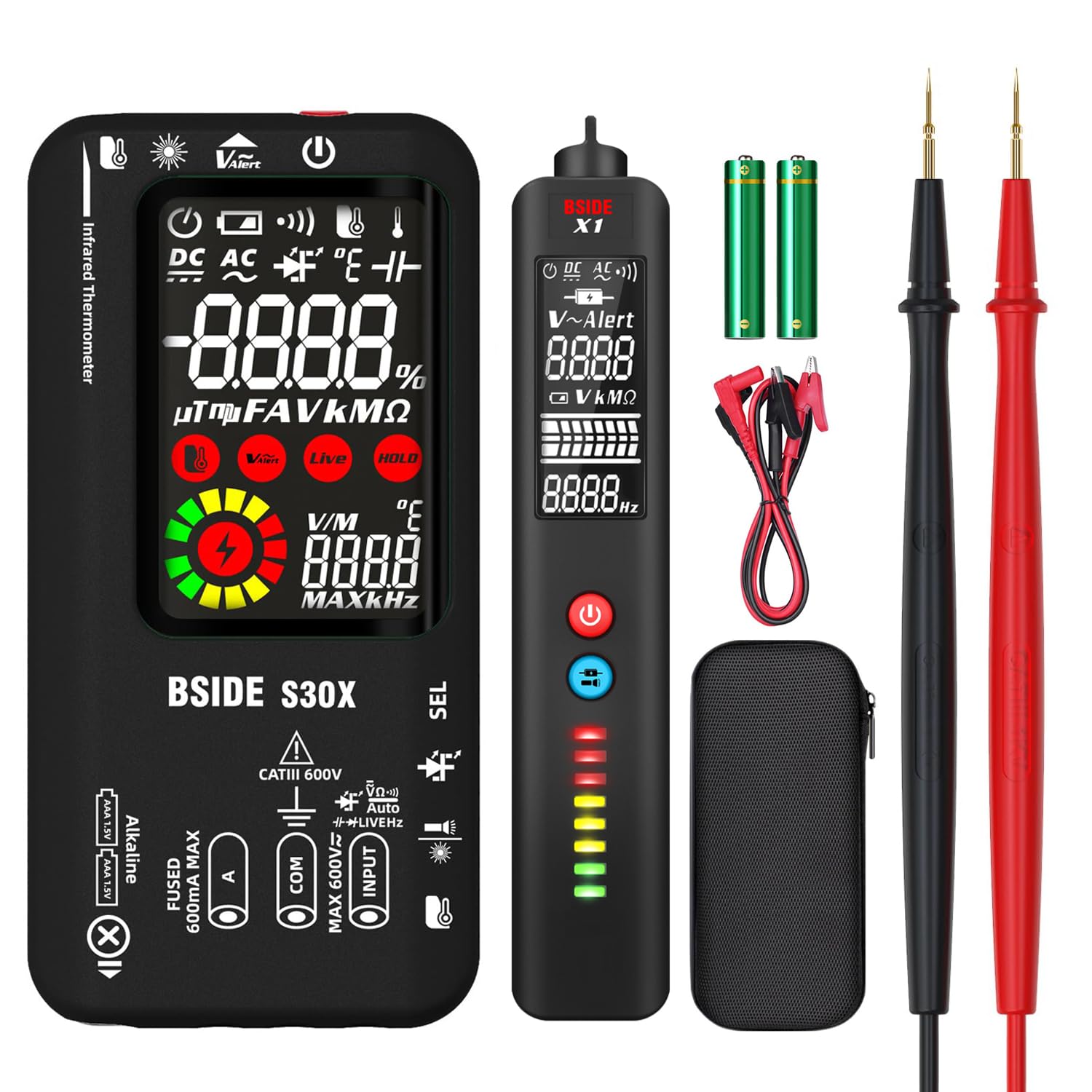
Image: The BSIDE S30X Digital Multimeter and BSIDE X1 Voltage Detector Pen Kit.
2. Product Overview: BSIDE S30X Digital Multimeter
The BSIDE S30X is an automatic digital multimeter featuring a high-speed chip for rapid and accurate measurements. It offers a wide range of functions for various electrical and electronic testing scenarios.
Key Features:
- Automatic Measurement: Automatically identifies AC/DC voltage, resistance, frequency, and continuity.
- Dual Power Supply: Operates on a built-in rechargeable lithium-ion battery or two 1.5V AAA batteries.
- Comprehensive Measurements: Measures AC/DC current, capacitance, low and high voltage diodes, and identifies live/neutral wires.
- Non-Contact Infrared Temperature: Provides non-contact temperature measurement.
- Non-Contact Voltage (NCV) Detection: Detects voltage without direct contact, with an audible buzzer.
- Integrated Tools: Includes a laser pointer and a flashlight for improved visibility.
- Large Color LCD: Displays up to 9999 counts with three test results simultaneously.
- Safety Features: Equipped with a replaceable ceramic anti-burn fuse.
- Convenience: Features automatic shutdown and low battery indication.

Image: The BSIDE S30X Multimeter showing its dual mode power system with rechargeable lithium battery and AAA battery slots.

Image: The BSIDE S30X Multimeter displaying its auto mode selection for various measurements.
3. Product Overview: BSIDE X1 Voltage Detector Pen
The BSIDE X1 is a compact and lightweight voltage detector pen, ideal for quick and safe voltage detection without direct contact.
Key Features:
- Automatic Testing: Automatically tests AC/DC voltage, resistance, and continuity.
- Adjustable NCV Sensitivity: Features NCV with adjustable sensitivity for AC voltage (90V-1000V / 6V-1000V).
- Visual Indicators: 8 LEDs in 3 colors differentiate voltage intensity.
- Wire Identification: Checks live/neutral wires and helps find breakpoints.
- EBTN LCD Display: Shows three test results clearly.
- Built-in Flashlight: For working in dimly lit areas.
- Convenience: Automatic shutdown to conserve battery life.

Image: The BSIDE X1 Voltage Detector Pen detecting voltage near an electrical connection.

Image: The BSIDE X1 Voltage Detector Pen being used with test leads for measurement.
4. Setup
4.1. Battery Installation
BSIDE S30X Multimeter: The S30X can be powered by its internal rechargeable lithium-ion battery or two 1.5V AAA batteries. Ensure the correct polarity when inserting AAA batteries. For recharging, connect the provided charging cable to the device and a suitable USB power source.
BSIDE X1 Voltage Detector Pen: The X1 requires two 1.5V AAA batteries. Open the battery compartment, insert the batteries observing the correct polarity, and close the compartment securely.
4.2. Test Lead Connection (BSIDE S30X)
For most measurements with the S30X, connect the red test lead to the 'INPUT' terminal and the black test lead to the 'COM' terminal. For current measurements, refer to the specific current input terminals (e.g., 'mA' or 'A') as indicated on the device.
5. Operating Instructions
5.1. BSIDE S30X Digital Multimeter
- Power On/Off: Press the power button to turn the device on or off.
- Automatic Measurement: The S30X defaults to automatic measurement mode, identifying voltage, resistance, frequency, and continuity.
- Manual Mode Selection: Press the 'SEL' button to cycle through different measurement functions (e.g., AC Voltage, DC Voltage, Resistance, Capacitance, Frequency, Diode, Continuity, NCV, Live).
- Voltage Measurement (AC/DC): Select the appropriate voltage mode (AC V or DC V) or use auto mode. Connect test leads in parallel to the circuit.
- Current Measurement (AC/DC): Select the appropriate current mode (AC A or DC A). Connect the multimeter in series with the circuit. Ensure correct input terminals are used for current.
- Resistance Measurement: Select resistance mode. Connect test leads across the component.
- Capacitance Measurement: Select capacitance mode. Connect test leads across the capacitor.
- Continuity Test: Select continuity mode. Touch test leads to the points to be tested. An audible beep indicates continuity.
- Diode Test: Select diode mode. Connect test leads across the diode.
- Non-Contact Voltage (NCV) Detection: Select NCV mode. Bring the top of the multimeter near the conductor. The device will beep and display a visual indication if voltage is detected.
- Live Wire Detection: Select Live mode. Insert the red test lead into the live wire. The display will indicate 'LIVE' and provide a visual/audible alert.
- Infrared Temperature Measurement: Point the IR sensor at the target object. The temperature will be displayed.
- Flashlight/Laser Pointer: Use the dedicated buttons to activate the flashlight or laser pointer.

Image: The BSIDE S30X Multimeter demonstrating its integrated infrared thermometer function.

Image: The BSIDE S30X Multimeter automatically identifying and measuring current in Amp Smart Identification mode.

Image: The BSIDE S30X Multimeter being used for electronic maintenance, measuring capacitance on a circuit board.

Image: The BSIDE S30X Multimeter testing high-voltage diodes, showing the display and test leads.
5.2. BSIDE X1 Voltage Detector Pen
- Power On/Off: Press the power button to activate the device.
- Automatic Detection: The X1 automatically detects AC/DC voltage, resistance, and continuity.
- NCV Sensitivity Adjustment: Use the sensitivity button to switch between high (6V-1000V) and low (90V-1000V) sensitivity modes for Non-Contact Voltage detection. Low sensitivity is for precise phase/neutral discrimination, while high sensitivity is for detecting wires behind walls.
- Live/Neutral Wire Identification: Insert the tip of the pen into the socket or near the wire. The device will indicate live or neutral based on the visual and audible alerts.
- Breakpoint Detection: Move the pen along a cable to identify breaks in the circuit.
- Flashlight: Press the flashlight button to illuminate the work area.
6. Maintenance
- Cleaning: Clean the devices with a soft, damp cloth. Do not use abrasive cleaners or solvents.
- Battery Management: Recharge the BSIDE S30X when the low battery indicator appears. Replace the AAA batteries in both devices promptly when they are depleted to ensure accurate readings and proper operation.
- Fuse Replacement (S30X): The S30X is equipped with a replaceable ceramic anti-burn fuse. If the fuse blows, replace it with a fuse of the same type and rating as specified in the technical specifications.
- Storage: Store the kit in a cool, dry place away from direct sunlight and extreme temperatures. If storing for extended periods, remove the AAA batteries from both devices to prevent leakage.
7. Troubleshooting
- Device does not power on: Check battery levels. For S30X, ensure the rechargeable battery is charged or replace AAA batteries. For X1, replace AAA batteries.
- Inaccurate readings: Ensure test leads are properly connected and in good condition. Verify that the correct measurement mode is selected. For X1, adjust NCV sensitivity if in a noisy electrical environment.
- No NCV detection: Ensure the device is powered on and in NCV mode. Bring the tip of the device as close as possible to the conductor. Check battery levels.
- Display issues: If the display is dim or flickering, check battery levels.
8. Specifications
8.1. BSIDE S30X Digital Multimeter
| Feature | Specification |
|---|---|
| Display | 9999 counts |
| AC/DC Voltage | 0-620V |
| AC/DC Current | 1-610mA |
| Resistance | 0-9.999MΩ |
| Capacitance | 0.5µF-9999µF |
| Frequency | 10-1000Hz |
| IR Temperature | -20℃-400℃ |
| Low Voltage Diode | Less than 2V |
| High Voltage Diode | Up to 15V |
| Continuity | Yes |
| Power Supply | Rechargeable or 2x 1.5V AAA |
| Weight | 245g |
| Dimensions | 19 x 9.8 x 8.8 cm |
| Safety Rating | CAT III 600V |
8.2. BSIDE X1 Voltage Detector Pen
| Feature | Specification |
|---|---|
| DC Voltage | 0.5-500V |
| AC Voltage | 1-500V |
| Resistance | 10MΩ max |
| Frequency | 40Hz-1000Hz |
| Continuity | Yes |
| NCV Sensitivity | 90V-1000V (standard), 6V-1000V (high) |
| Power Supply | 2x 1.5V AAA |
| Weight | 93g |
| Safety Rating | CAT II 600V |
9. Warranty and Support
For warranty information and technical support, please refer to the documentation included with your product or visit the official BSIDE website. Keep your purchase receipt as proof of purchase for any warranty claims.


