1. Product Overview
The Blindsmart Matter Supported WiFi Smart Roller Shade Motor (Model ZM25M) is designed to upgrade your existing manual roller blinds into a smart, automated system. This motor is Matter-certified, ensuring broad compatibility with leading smart home platforms such as Apple HomeKit, Amazon Alexa, and Google Home. It is specifically engineered for roller shade tubes with a diameter of 37-38mm and requires wiring for power.
Key features include a powerful 2N torque motor capable of lifting up to 10kg of fabric, quiet operation at just 27 dB, and versatile control options via smartphone apps or voice commands.
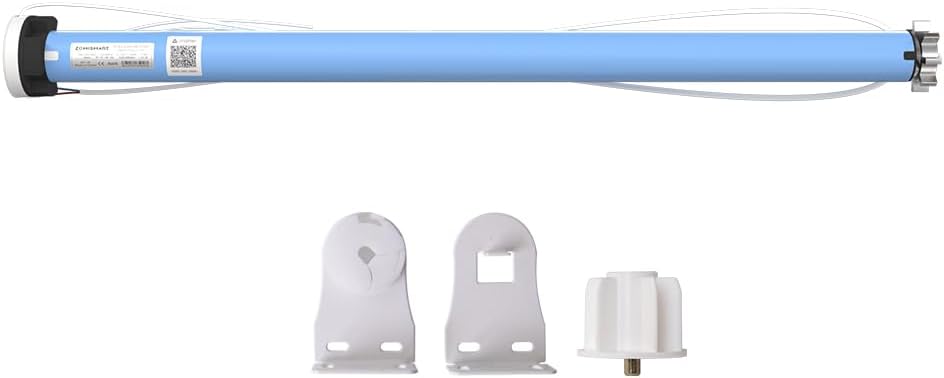
Image 1.1: The Blindsmart Matter Supported WiFi Smart Roller Shade Motor along with its essential mounting brackets and accessories.

Image 1.2: The motor is suitable for various curtain types, including roller blinds, Shangri La blinds, and flexible yarn blinds, enabling smart upgrades for manual systems.
2. Setup and Installation
2.1. Pre-installation Checklist
- Ensure your roller shade tube has an inner diameter of 37-38mm (1.45 inches).
- Verify you have a stable 2.4GHz Wi-Fi network.
- A Matter Controller (e.g., Apple HomePod mini) is required for Matter integration.
- Professional wiring work is required for power connection. The motor supports wide voltage from 110V to 240V.
- Confirm the mounting type is suitable for outside mount installation.
2.2. Wiring Instructions
The motor requires direct wiring to a power source. It is crucial to have this done by a qualified electrician to ensure safety and proper functionality. The motor is designed for stable power connection, which contributes to its reliable operation.

Image 2.1: Diagram illustrating the stable power connection for the roller motor, emphasizing the importance of proper wiring.
2.3. Motor Installation into Shade Tube
- Carefully insert the motor into the 37-38mm roller shade tube.
- Secure the motor within the tube according to the specific design of your roller shade system.
- Mount the roller shade assembly using the provided brackets for an outside mount configuration.
3. Operating the Smart Roller Shade Motor
3.1. App Control
Once installed and connected to your Wi-Fi network, you can control the motor using your preferred smart home app (Google Home, Amazon Alexa, or Apple Home). Follow the app's instructions to add a new Matter-compatible device.
- Download the relevant app (Google Home, Amazon Alexa, or Apple Home) from your device's app store.
- Open the app and follow the on-screen prompts to add a new device.
- Scan the Matter QR code provided with your motor or enter the pairing code manually.
- Once paired, you can open, close, or adjust the position of your blinds remotely.

Image 3.1: A smartphone screen showing the app interface for controlling smart curtains, allowing remote adjustment of blind positions.
3.2. Voice Control
Leverage the power of voice commands through Google Assistant, Amazon Alexa, or Apple Siri for hands-free operation.
- Ensure your smart speaker or device is linked to the same smart home platform as your motor.
- Use commands such as:
- "Hey Google, close the curtains."
- "Alexa, open the blinds to 50%."
- "Siri, raise the shade."

Image 3.2: An illustration of voice control in a living room setting, demonstrating how to use smart speakers to manage curtain positions.
3.3. Remote Control (Optional Accessory)
If you have purchased a variant that includes a remote control or an optional remote accessory, you can use it for direct control and to set upper and lower limits for your blinds. Please refer to the remote's specific instructions for pairing and limit setting.

Image 3.3: A remote control unit designed for smart blinds, featuring buttons for movement, stopping, and setting upper and lower operational limits.
4. Maintenance
To ensure the longevity and optimal performance of your Blindsmart Smart Roller Shade Motor, follow these maintenance guidelines:
- Cleaning: The motor itself requires minimal cleaning. For the exterior, use a soft, dry cloth. For the roller shade fabric, follow the manufacturer's instructions, typically "Spot Clean" as indicated for this product's material.
- Avoid Moisture: The motor is not water-resistant. Keep it away from water and high humidity environments.
- Regular Checks: Periodically check the mounting brackets and wiring connections to ensure they are secure.
- Software Updates: Keep your smart home apps and Matter controller firmware updated to ensure compatibility and access to the latest features and security enhancements.
5. Troubleshooting
If you encounter issues with your smart roller shade motor, refer to the following common troubleshooting steps:
| Problem | Possible Cause | Solution |
|---|---|---|
| Motor not responding to commands. |
|
|
| Motor makes unusual noise or struggles. |
|
|
| Cannot pair with Matter controller. |
|
|
If the problem persists, please contact Blindsmart customer support for further assistance.
6. Specifications
| Model Number | ZM25M |
| Brand | Blindsmart |
| Material | Plastic |
| Product Dimensions | 14.05"L x 1.44"W |
| Compatible Tube Diameter | 37-38mm (1.45 inches) |
| Color | Only Motor |
| Operation Mode | Automatic |
| Special Feature | Eco-Friendly |
| Included Components | Motor (Requires Wiring Work) |
| Control Type | App (Smartphone), Voice (Google Assistant, Alexa, Siri), Remote (Optional) |
| Connectivity | 2.4GHz Wi-Fi, Matter Certified |
| Torque | 2N |
| Max Load Capacity | 10kg |
| Noise Level | 27 dB |
| Voltage | 110V-240V |
| Water Resistance Level | Not Water Resistant |
| Mounting Type | Outside Mount |

Image 6.1: The motor's robust design, highlighting its strong load-bearing capacity of up to 10kg.

Image 6.2: The motor is engineered for quiet operation, producing noise levels as low as 27 dB.
7. Warranty and Support
Blindsmart products are manufactured with quality and reliability in mind. For specific warranty details, please refer to the warranty card included with your purchase or visit the official Blindsmart website. Keep your proof of purchase for any warranty claims.
For technical support, troubleshooting assistance, or inquiries about your product, please contact Blindsmart customer service. Contact information can typically be found on the product packaging or the brand's official website.
You can visit the Blindsmart Store on Amazon for more information and products.

