
Introduction
This user manual provides comprehensive instructions for the setup, operation, maintenance, and troubleshooting of your Lepulse 8-Electrode Body Fat Scale. This advanced smart scale utilizes an eight-electrode technique for segmental Bioelectrical Impedance Analysis (BIA) and dual-frequency measurement, offering a comprehensive analysis of 20 body compositions. It is designed to help you monitor your health and fitness goals with precision and convenience.
Package Contents
Please ensure all items are present in the package:
- Lepulse 8-Electrode Body Fat Scale (Main Unit)
- Measurement Handle with Retractable Rope
- Type-C Charging Cable
- User Manual (This Document)

Image: The Lepulse 8-Electrode Body Fat Scale, showing the main unit, the handheld measurement bar, and representations of the accompanying mobile application interface and charging cable.
Product Features
- Full Body Composition Analysis: Utilizes an 8-electrode technique for segmental BIA and dual-frequency measurement, providing 20 body compositions including weight, body fat percentage, BMI, muscle mass, water weight, bone mass, and more.
- Dimensional Body Analysis Report: The accompanying "Fitdays" app generates detailed analysis reports for each body segment (arms, legs, torso), allowing for targeted fitness and dietary adjustments.
- Extra Large Display: The VA display screen shows 8 key measurements (weight, BMI, body fat percentage, water weight, muscle mass, bone mass, body age, body type) directly on the scale without needing the app for initial readings.
- Intelligent Data Management: Syncs data automatically to your smartphone via Bluetooth. The "Fitdays" app integrates with Apple Health, Google Fit, Fitbit, and Samsung Health. Supports up to 24 user profiles with automatic user recognition.
- High Precision & Rechargeable: Equipped with high-precision sensors for 0.2 lb accuracy, supporting up to 400 lb. Features an ITO coated sensor area for all foot sizes and is rechargeable via Type-C cable, providing approximately 200 uses per full charge.

Image: The scale's large VA display, illustrating how it presents 8 key measurements directly, including weight, BMI, body fat rate, body water rate, body age, muscle mass, bone mass, and body type assessment.
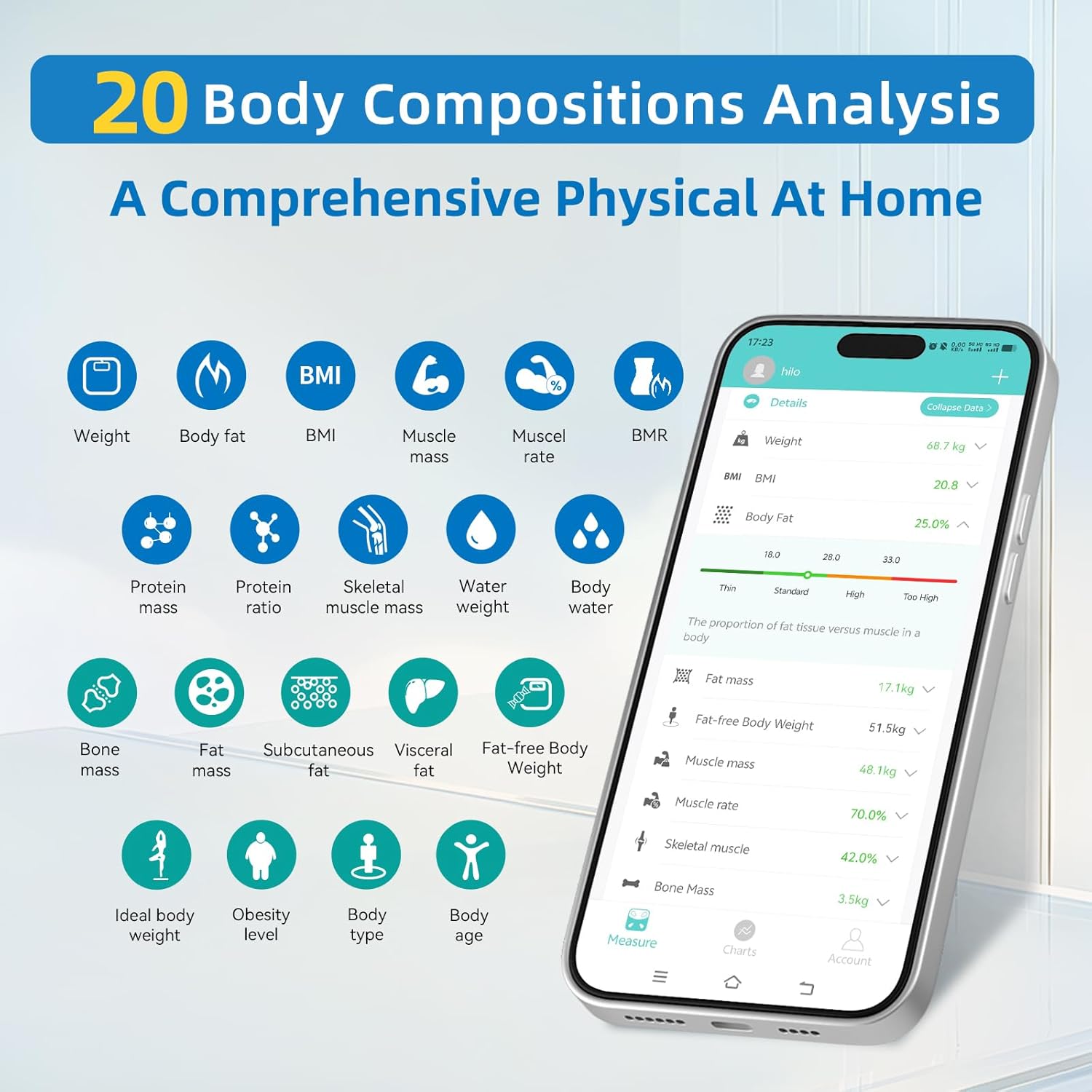
Image: A visual representation of the "Fitdays" app interface, detailing the 20 body composition metrics it analyzes, such as weight, body fat, BMI, muscle mass, bone mass, and visceral fat.

Image: An illustration demonstrating the scale's ability to target fat and shape the body by providing segmental analysis of fat mass percentage for the left arm, right arm, torso, left leg, and right leg.

Image: A comparison illustrating the enhanced accuracy of the 8-electrode system over a 4-electrode system, highlighting the use of 25kHz for extracellular fluid and 100kHz for intracellular fluid for more precise measurements.

Image: An exploded diagram of the scale, detailing its components such as the handle with four electrodes, retractable rope, ITO coating technology, 4 precision G-sensors, memory chip, 4 anti-slip pads, and Type-C charging port.
Setup Guide
1. Charging the Scale
Before first use, fully charge the scale using the provided Type-C charging cable and a 5V 1A charging adapter (not included). The battery indicator on the display will show charging status.
2. Downloading the "Fitdays" App
The "Fitdays" app is essential for accessing all body composition data and tracking your progress.
- Scan the QR code on the product packaging or search for "Fitdays" in your device's app store (Apple App Store for iOS, Google Play Store for Android).
- Download and install the app.

Image: The "Fitdays" app interface, demonstrating its ability to generate a body composition report and sync data with popular health platforms like Google Fit, Fitbit, Samsung Health, and Apple Health.
3. Initial Pairing and User Profile Setup
For the first use, you must connect the scale to the app.
- Ensure Bluetooth is enabled on your smartphone.
- Open the "Fitdays" app and create your user profile by entering necessary details such as gender, age, and height.
- Step onto the scale to activate it. The app should automatically detect and pair with the scale.
- Follow any on-screen prompts in the app to complete the pairing process.
4. Connecting the Measurement Handle
The measurement handle is connected to the scale via a retractable rope. Ensure the handle is securely connected to the scale's port. When not in use, the handle can rest on the floor or be placed in a suitable holder if available (note: no specific holder is included with the product).
Operating Instructions
1. Taking a Measurement
- Place the scale on a hard, flat surface. Avoid carpets or uneven floors.
- Step onto the scale barefoot. Ensure your feet are in full contact with the ITO coated sensor area.
- Hold the measurement handle with both hands, ensuring your palms are in full contact with the electrodes on the handle. Keep your arms straight and slightly away from your body.
- Remain still until the measurement is complete. The display will show your weight and other key metrics.
- For detailed analysis, open the "Fitdays" app on your smartphone. The data will automatically sync.
2. Understanding Display Readings
The scale's VA display provides immediate readings for 8 core metrics: Weight, BMI, Body Fat Percentage, Water Weight, Muscle Mass, Bone Mass, Body Age, and Body Type.
3. Using the "Fitdays" App
The app provides comprehensive insights and tracking features:
- Detailed Analysis: View all 20 body composition metrics with explanations and healthy ranges.
- Historical Data: Track your progress over days, weeks, months, or years with intuitive charts and graphs.
- User Management: Create and manage up to 24 user profiles. The scale intelligently recognizes individual users.
- Data Sharing: Share your data with Apple Health, Google Fit, Fitbit, and Samsung Health.

Image: A user reviewing their fitness data on a smartphone, illustrating the app's capability to display trends for body fat, weight, and BMI over time (week, month, year).

Image: An illustration showing how the scale supports up to 24 user profiles, allowing multiple family members or friends to track their individual health data within the same app.
4. Switching Weight Units
You can change the weight units (lb, kg, st) via the "Fitdays" app settings.
5. Baby Mode / Pet Mode
This feature allows you to weigh infants or pets accurately.
- First, weigh yourself alone on the scale.
- Then, hold your baby or pet and step onto the scale again.
- The app will automatically calculate and display the baby's or pet's weight by subtracting your initial weight.

Image: A step-by-step guide demonstrating the "Baby Mode" or "Pet Mode" feature, where an adult first weighs themselves, then weighs themselves holding the baby/pet, and the app calculates the baby's/pet's weight.
Maintenance and Care
- Cleaning: Wipe the scale surface with a soft, damp cloth. Do not use abrasive cleaners or immerse the scale in water.
- Storage: Store the scale in a cool, dry place. Avoid extreme temperatures and direct sunlight.
- Battery: The scale uses a rechargeable Lithium Polymer battery. Recharge when the battery indicator is low. Use only the provided Type-C cable and a compatible 5V 1A adapter.
- Handle Care: Ensure the retractable rope for the handle is not tangled or damaged.
Troubleshooting
| Problem | Possible Cause / Solution |
|---|---|
| Scale does not turn on. | Battery may be depleted. Charge the scale using the Type-C cable. |
| Inaccurate readings or inconsistent measurements. |
|
| "Measurement process would stop and fail" (as reported by some users). |
|
| Scale not connecting to "Fitdays" app via Bluetooth. |
|
| "Scale can only connect to one phone at a time" (as reported by some users). |
|
Specifications
| Feature | Detail |
|---|---|
| Model | WFCA-680-06236-00-A04 (Lescale P1) |
| Brand | Lepulse |
| ASIN | B0CSRVKKR2 |
| Weight Capacity | Up to 400 lb (approx. 180 kg) |
| Accuracy | 0.2 lb |
| Electrodes | 8 (4 on scale, 4 on handle) |
| Measurement Type | Segmental BIA, Dual-frequency |
| Body Compositions Measured | 20 (including weight, BMI, body fat, muscle mass, bone mass, water weight, etc.) |
| Display Type | VA Display |
| Connectivity | Bluetooth |
| App Compatibility | "Fitdays" app (iOS & Android), syncs with Apple Health, Google Fit, Fitbit, Samsung Health |
| User Profiles | Up to 24 |
| Power Source | Rechargeable Lithium Polymer battery (1 included) |
| Charging Port | Type-C |
| Parcel Dimensions | 42.7 x 33.29 x 5.4 cm; 1.9 kg |
| Country of Origin | China |
| Date First Available | January 19, 2024 |
Warranty Information
The Lepulse 8-Electrode Body Fat Scale typically comes with a return policy allowing for a refund or replacement within 30 days of purchase. Please refer to your purchase receipt or retailer's policy for specific warranty terms and conditions.
Support
For further assistance, please refer to the following resources:
- "Fitdays" App: The app provides detailed insights and may include an FAQ or support section.
- Official Website: Visit the official Lepulse website for product information and support: www.lepulsefit.com
- Online Manual: An extended multi-language user manual may be available online: Download PDF Manual
- QR Code for App/Info: http://qr.hotlnk.cn/79847923117


