
1. Introduction
The ZEBRONICS Pulse Wireless Mouse is designed for versatile and comfortable use across various devices. Featuring multi-connectivity options including dual Bluetooth and a 2.4GHz USB nano receiver, it offers seamless switching between systems. Its ergonomic design and 1200 DPI optical sensor ensure precise and smooth cursor control for enhanced productivity.

Image 1.1: Top view of the ZEBRONICS Pulse Wireless Mouse, showcasing its sleek black design and scroll wheel.
2. Package Contents
Please verify that all items are present in your package:
- ZEBRONICS Pulse Wireless Mouse
- USB Nano Receiver
- User Manual
3. Key Features
- Multi-Connectivity: Supports dual Bluetooth and 2.4GHz wireless connections.
- High Precision: 1200 DPI optical sensor for accurate tracking.
- Ergonomic Design: Comfortable and lightweight for extended use.
- 3 Buttons: Standard left, right, and scroll wheel buttons.
- Removable USB Nano Receiver: Conveniently stored in the mouse's bottom panel.
- Wide Compatibility: Works with desktop PCs, laptops, Mac OS, tablets, and more.
- Power Saving: Features an auto-shutoff function to conserve battery life.

Image 3.1: A visual summary of the mouse's key features, including its comfortable design, power switch, plug-and-play functionality, and high precision.
4. Setup Guide
4.1. Battery Installation
- Flip the mouse over to access the bottom panel.
- Locate the battery compartment cover and slide it open.
- Insert one AA battery, ensuring correct polarity (+/-).
- Close the battery compartment cover securely.
4.2. Connecting via 2.4GHz USB Nano Receiver
- Locate the USB nano receiver stored in the slot on the bottom of the mouse.
- Remove the receiver from its storage slot.
- Plug the USB nano receiver into an available USB port on your computer or laptop.
- Slide the power switch on the bottom of the mouse to the 'ON' position.
- The mouse should automatically connect. If not, press the connection toggle button on the bottom of the mouse to select the 2.4GHz mode (indicated by '2.4G').

Image 4.1: The underside of the mouse, highlighting the battery slot, nano receiver storage, power switch, and connection toggle button.

Image 4.2: The USB nano receiver plugged into a laptop, demonstrating the 2.4GHz wireless connection.
4.3. Connecting via Bluetooth (BT1 / BT2)
- Ensure the mouse has a fresh battery and the power switch is in the 'ON' position.
- Press the connection toggle button on the bottom of the mouse to select either 'BT1' or 'BT2' mode. The corresponding LED indicator will blink.
- On your device (laptop, tablet, etc.), go to Bluetooth settings.
- Search for new devices. The mouse should appear as 'ZEB-PULSE' or similar.
- Select the mouse to pair. Once paired, the LED indicator will stop blinking and remain solid for a few seconds before turning off.
- You can pair a second device using the other Bluetooth channel (BT2) by repeating steps 2-5.
5. Operating Instructions
5.1. Basic Functions
- Left Button: Primary click function.
- Right Button: Secondary click function (context menu).
- Scroll Wheel: Scroll up/down, and middle-click function.

Image 5.1: Illustration of the mouse's three buttons: left, right, and the scroll wheel/middle button.
5.2. Switching Connectivity Modes
To switch between the 2.4GHz wireless mode and Bluetooth modes (BT1, BT2), press the connection toggle button located on the bottom of the mouse. The mouse will cycle through the available modes, indicated by the corresponding LED.
5.3. DPI Setting
The ZEBRONICS Pulse mouse operates at a fixed 1200 DPI (Dots Per Inch), providing a balance of speed and precision suitable for general use. This setting ensures smooth and responsive cursor movement.

Image 5.2: Visual representation of the mouse's 1200 DPI precision for accurate tracking.
6. Maintenance
- Cleaning: Use a soft, dry cloth to clean the mouse. Avoid using harsh chemicals or abrasive materials.
- Battery Replacement: Replace the AA battery when the mouse performance degrades or it stops responding.
- Storage: When not in use for extended periods, turn off the mouse to conserve battery life. Store the USB nano receiver in its dedicated slot on the mouse's bottom.
- Environment: Avoid exposing the mouse to extreme temperatures, direct sunlight, or excessive moisture.
7. Troubleshooting
7.1. Mouse Not Responding
- Ensure the mouse is turned 'ON'.
- Check the battery. Replace it if necessary.
- For 2.4GHz connection: Ensure the USB nano receiver is securely plugged into a working USB port and the mouse is in 2.4GHz mode.
- For Bluetooth connection: Ensure Bluetooth is enabled on your device and the mouse is in the correct BT1/BT2 mode. Try re-pairing the mouse.
- Try connecting the mouse to a different USB port or a different device to rule out port or device issues.
7.2. Erratic Cursor Movement
- Clean the optical sensor on the bottom of the mouse with a soft, dry cloth.
- Ensure you are using the mouse on a clean, non-reflective surface.
- Check for interference from other wireless devices.
7.3. Difficulty Switching Modes
- Ensure the battery has sufficient power.
- Press the connection toggle button firmly and observe the LED indicators to confirm mode changes.
8. Specifications
| Feature | Detail |
|---|---|
| Brand | ZEBRONICS |
| Model | Zeb-Pulse |
| Connectivity Technology | Wireless (2.4GHz, Dual Bluetooth) |
| Movement Detection Technology | Optical |
| DPI | 1200 |
| Number of Buttons | 3 |
| Power Source | Battery Powered (1x AA) |
| Item Weight | 160 g |
| Product Dimensions | 16.6 x 9.5 x 0.1 cm |
| Operating System Compatibility | Windows, Mac OS, etc. |
| Country of Origin | China |
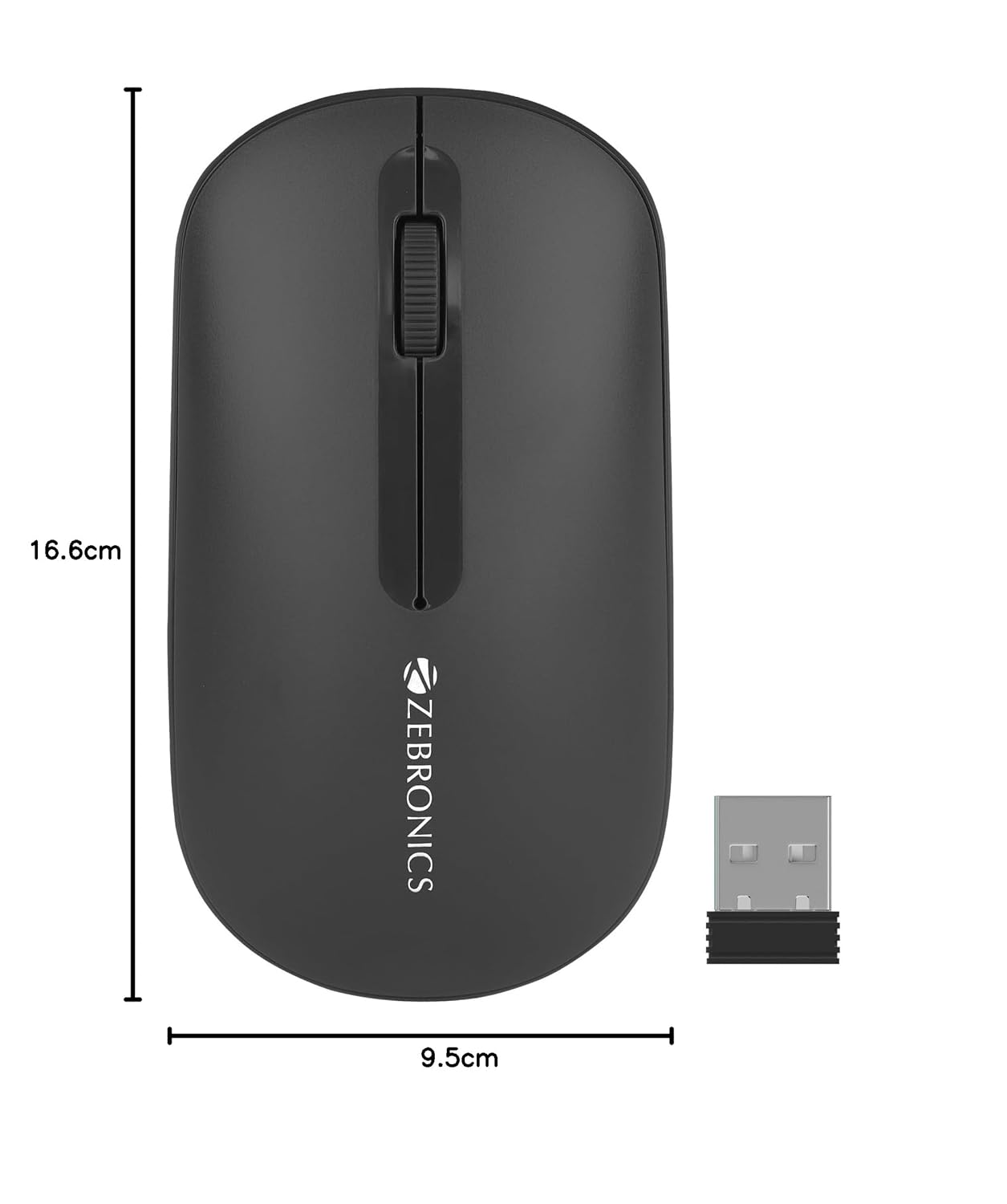
Image 8.1: Diagram showing the physical dimensions of the ZEBRONICS Pulse Wireless Mouse.
9. Warranty & Support
For warranty information, technical support, or service inquiries, please refer to the warranty card included with your product or visit the official ZEBRONICS website. Keep your purchase receipt as proof of purchase for warranty claims.
Official ZEBRONICS Website: www.zebronics.com

