
1. Product Overview
The JOYLIT DC 5-36V 8A LED Dimmer Controller is designed for single color LED strip lights, offering precise dimming and on/off control. This receiver is compatible with V1 and RT6 RF remotes, enabling synchronized control for various lighting applications. It features an auto-transmitting function for extended control distance and multi-controller synchronization.
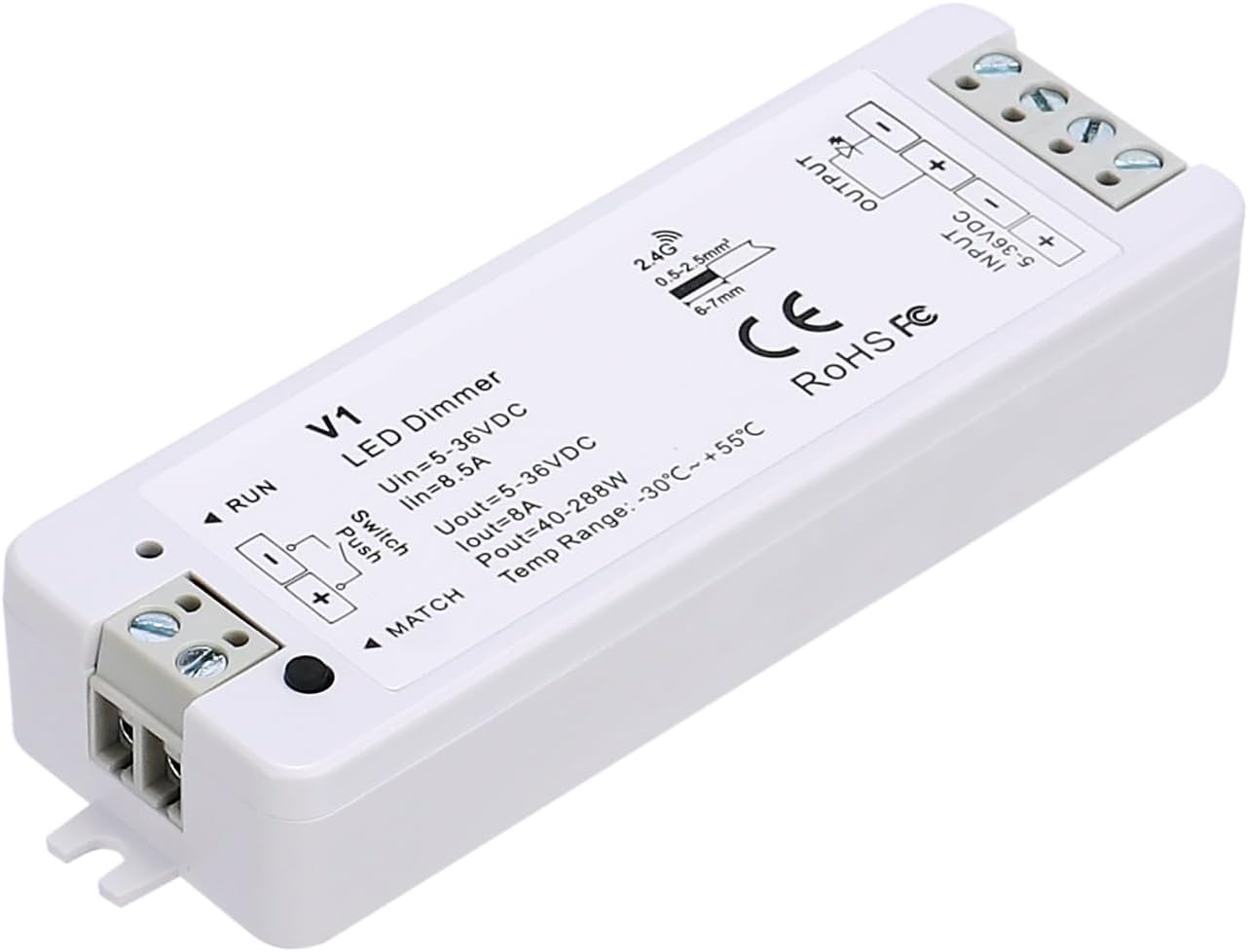
Image 1.1: JOYLIT DC 5-36V 8A LED Dimmer Controller. This image shows the compact white dimmer module with input and output terminals, and product specifications printed on its surface.
2. Safety Precautions
- Ensure the input voltage (5-36V DC) and wattage are correct for your LED strip lights and power supply.
- Do not operate the device when powered. Always disconnect power before making any connections or adjustments.
- This device is designed for indoor use only (IP20 rating). Avoid exposure to moisture or extreme temperatures.
- Consult a qualified electrician if you are unsure about installation or wiring.
- Keep out of reach of children.
3. Package Contents
- 1 x JOYLIT LED Dimmer Controller (Model: RF-Dimmer-V1)
Note: Remote control is not included and must be purchased separately.
4. Technical Specifications
| Parameter | Specification |
|---|---|
| Model Number | RF-Dimmer-V1 |
| Input Voltage | 5-36V DC |
| Input Current | 8.5A |
| Output Voltage | 5-36V DC |
| Output Current | 1 Channel, 8A/Channel |
| Max Output Power | 288 Watts (at 36V) |
| Control Method | RF 2.4GHz Remote / External Push Switch |
| Control Distance | Up to 30M / 98FT (Auto-transmitting) |
| Operating Temperature | -30°C to +55°C |
| Dimensions (L x W x H) | 3.82 x 1.3 x 0.7 inches (9.7 x 3.3 x 1.8 cm) |
| Weight | 1.76 ounces (50g) |
| Material | Acrylonitrile Butadiene Styrene (ABS) |
| Certifications | CE, FCC, RoHS |

Image 4.1: Compact size and dimensions of the JOYLIT LED Dimmer Controller, showing it fits easily in a hand and measures 9.7cm (3.82in) in length, 3.3cm (1.3in) in width, and 1.8cm (0.71in) in height.
5. Installation Guide
Follow these steps to correctly install your LED dimmer controller:
- Disconnect Power: Before making any connections, ensure that the power supply to your LED lighting system is completely disconnected.
- Identify Terminals: The dimmer controller has clearly labeled input and output terminals.
- INPUT (5-36VDC): Connect your DC power supply here. Observe polarity: '+' to '+' and '-' to '-'.
- OUTPUT: Connect your single color LED strip lights here. Observe polarity: '+' to '+' and '-' to '-'.
- Switch Push: Optional connection for an external push switch to control on/off and dimming.
- Wire Connections: Use appropriate gauge wires (0.5-2.5mm²) and ensure secure connections in the screw terminals. Strip approximately 6-7mm of insulation from the wire ends.
- Secure Installation: Place the dimmer controller in a suitable, dry location, away from direct heat or moisture.
- Reconnect Power: Once all connections are secure and verified, reconnect the power supply.

Image 5.1: Wiring diagram for the JOYLIT LED Dimmer Controller, showing connections from a DC power supply to the dimmer's input, and from the dimmer's output to an LED strip light. A zoomed-in view highlights the screw terminals.
6. Operation
The JOYLIT LED Dimmer Controller can be operated using a compatible RF remote (V1 or RT6 series) or an external push switch.
6.1 Remote Control Operation (with V1 or RT6 Remote)
- On/Off: Press the power button on the remote to turn the lights on or off.
- Dimming: Use the brightness adjustment buttons or slider on the remote to increase or decrease the light intensity.
- Light On/Off Fade Time: The controller supports a selectable 3-second fade time for on/off transitions, providing a smooth lighting experience.
6.2 External Push Switch Operation
- Short Press: A short press of the external push switch will toggle the lights on or off.
- Long Press: A long press of the external push switch will initiate dimming. Release and press again to change dimming direction.
7. Pairing Instructions
To enable remote control functionality, the dimmer controller must be paired with a compatible RF remote.
7.1 Pairing with V1 Kit Remote (Auto Synchronization Transmitting)
The V1 kit remote allows for synchronized control of multiple dimmer controllers, ideal for large-scale applications. One remote can control an unlimited number of controllers within a 30M/98FT distance.
- Ensure the dimmer controller is powered on.
- On the dimmer controller, locate the 'MATCH' button.
- Press and hold the 'MATCH' button for approximately 3 seconds until the connected LED lights flash.
- Within 5 seconds, press the 'ON' button on your V1 remote. The LED lights will flash again, indicating successful pairing.
- For multiple controllers, the auto-transmitting function allows the signal to be relayed from one controller to another within 30M, ensuring synchronization across all paired units.
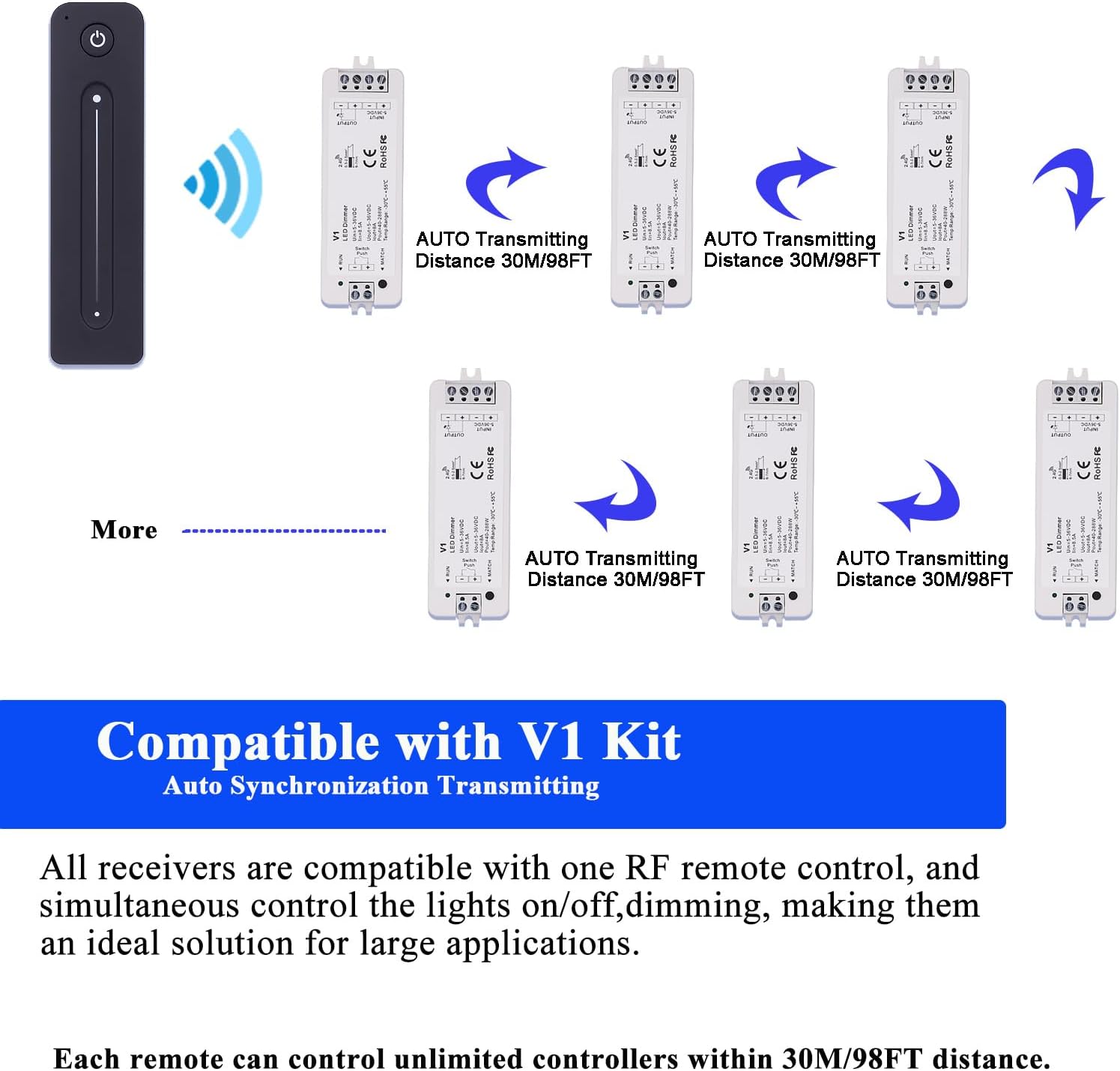
Image 7.1: Diagram illustrating the auto-transmitting and synchronization capabilities of the JOYLIT dimmer controller when paired with a V1 remote, showing how one remote can control multiple receivers over a 30M distance.
7.2 Pairing with RT6 Remote (Group Control)
The RT6 remote allows for group control, enabling you to manage different zones of lighting independently.
- Ensure the dimmer controller is powered on.
- On the dimmer controller, locate the 'MATCH' button.
- Press and hold the 'MATCH' button for approximately 3 seconds until the connected LED lights flash.
- Within 5 seconds, press the desired zone 'ON' button (e.g., Zone 1 ON) on your RT6 remote. The LED lights will flash again, indicating successful pairing to that specific zone.
- Repeat for other controllers and zones as needed.

Image 7.2: Illustration of group control with the RT6 remote, demonstrating how different zones (e.g., living room, bedroom) can be controlled independently by a single remote within a 30M/98FT range.
8. Features and Benefits
- Remote Control & Push Switch Compatibility: Offers flexible control options via RF remote or an external push switch for on/off and dimming functions.
- Auto-Transmitting Function: Controllers automatically transmit signals to other controllers within 30 meters (98 feet), extending the control range and ensuring seamless operation in larger installations.
- Multi-Controller Synchronization: Achieve synchronized lighting effects across multiple controllers, perfect for uniform illumination in large spaces.
- Smooth Light Transitions: Selectable 3-second fade time for gentle on/off transitions, enhancing user comfort.
- Quiet Running & Flicker-free: Designed to provide stable and smooth dimming without audible noise or visible flickering, ensuring a comfortable lighting environment.

Image 8.1: An example of the JOYLIT dimmer controller in use, providing quiet and flicker-free lighting for LED strips under a bed, creating a comfortable bedroom ambiance.
9. Troubleshooting
| Problem | Possible Cause | Solution |
|---|---|---|
| Lights do not turn on. | No power to controller; Incorrect wiring; Unpaired remote. | Check power supply connection; Verify input/output wiring polarity; Pair the remote control (refer to Section 7). |
| Lights do not dim. | Remote not paired; Incorrect remote function. | Ensure remote is correctly paired; Use the correct dimming buttons/slider on the remote. |
| Remote control range is poor. | Obstructions; Interference; Low remote battery. | Reduce obstructions between remote and controller; Check for other 2.4GHz devices causing interference; Replace remote battery (if applicable). |
| Lights flicker or hum. | Incompatible power supply; Overloaded circuit. | Ensure a high-quality, stable DC power supply is used; Verify total wattage of LED strips does not exceed controller's maximum output (288W). |
10. Maintenance
- Keep the device clean and free from dust. Use a soft, dry cloth for cleaning.
- Do not use abrasive cleaners or solvents.
- Store the controller in a cool, dry place when not in use for extended periods.
11. Warranty and Support
JOYLIT products are manufactured with high quality standards. For warranty information or technical support, please refer to the product packaging or contact your retailer. You may also visit the official JOYLIT store on Amazon for further assistance or to explore compatible accessories.
JOYLIT Store Link: https://www.amazon.com/stores/JOYLIT/page/E270CB4B-9326-4704-91B1-E01EF57DC712