
Important Safety Instructions
When using electrical appliances, basic safety precautions should be followed, including the following:
- Read all instructions before using the appliance.
- Do not operate any appliance with a damaged cord or plug, or after the appliance malfunctions or has been damaged in any manner.
- Do not use this appliance for other than its intended use.
- Close supervision is necessary when any appliance is used by or near children.
- To reduce the risk of fire in the oven cavity:
- Do not overcook food.
- Remove wire twist-ties from paper or plastic bags before placing bags in oven.
- If materials inside the oven should ignite, keep oven door closed, turn oven off, and disconnect the power cord.
- Do not use the cavity for storage purposes. Do not leave paper products, cooking utensils, or food in the cavity when not in use.
- Liquids such as water, coffee, or tea can be overheated beyond the boiling point without appearing to boil. This can result in very hot liquids suddenly boiling over when a spoon or other utensil is inserted into the liquid.
- Do not heat baby bottles or baby food in the microwave oven. Uneven heating may occur and could cause physical injury.
- Do not fry food in the microwave oven. Hot oil can damage oven parts and utensils and even result in skin burns.
- Do not operate the microwave oven when empty.
- Do not use corrosive chemicals or vapors in this appliance.
- This appliance must be grounded. Connect only to properly grounded outlets.
Product Overview
The Emerson MWRG0901W is a 0.9 cubic foot retro-style microwave oven with an integrated grill function, designed for countertop use. It combines microwave cooking with grilling capabilities for versatile meal preparation.
Key Features
- Built-In 1,000W Grill Function: Allows for browning, crisping, and grilling of various foods, such as pizza, toast, and casseroles.
- Compact Yet Powerful: Offers 800 watts of microwave cooking power with 5 adjustable power levels within a 0.9 cu. ft. capacity.
- Stylish Retro White Design: Features a glossy white exterior with chromed accents.
- User-Friendly Controls: Equipped with an LED display, and clearly labeled buttons and a dial for ease of use.
- Versatile Cooking Presets & Smart Defrost: Includes 8 auto menus for common foods and both time and weight-based defrost options.
- Child Safety Lock: Prevents unintended operation.
- Removable Glass Turntable: Ensures even cooking and easy cleaning.
Components
- Microwave Oven Unit
- Removable Glass Turntable
- Turntable Ring
- Wire Rack (for grill function)
- User Manual

Image: Front view of the Emerson MWRG0901W Retro Microwave Oven. It features a white exterior, a large dark door window, a chrome handle, and a control panel on the right with an LED display and various buttons and a dial.
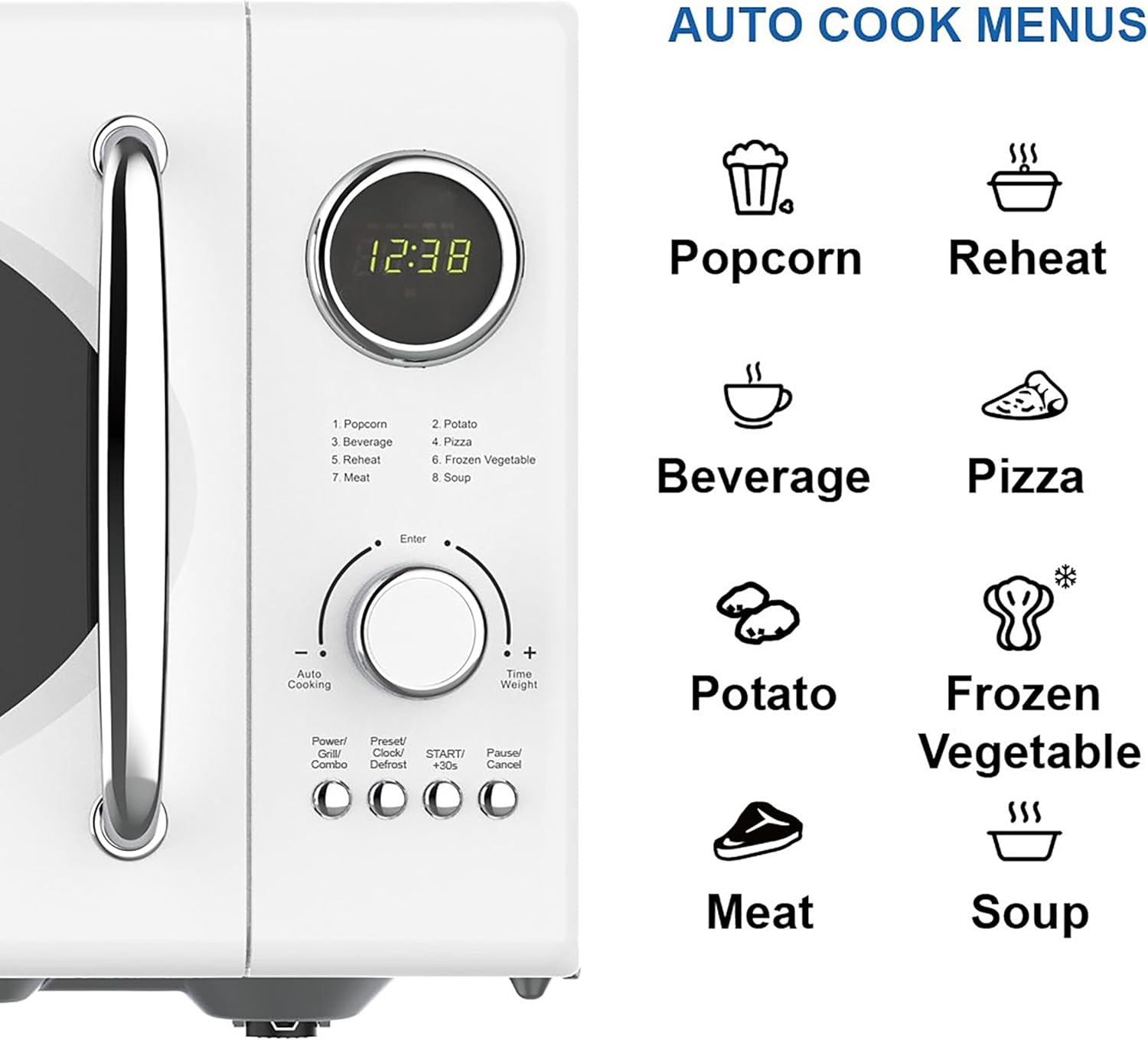
Image: Close-up of the control panel and a list of auto cook menus for the Emerson MWRG0901W microwave. The panel includes an LED display, a central dial for 'Enter' and '+/- Weight', and buttons for 'Power/Time/Combo', 'Preset/Clock/Defrost', 'START/+30s', and 'Pause/Cancel'. The auto cook menus listed are Popcorn, Reheat, Beverage, Pizza, Potato, Frozen Vegetable, Meat, and Soup.
Setup and Installation
Unpacking
Carefully remove the microwave oven and all materials from the carton. Check the oven for any damage, such as dents or a broken door. Do not operate the oven if it is damaged. Contact customer support immediately.
Placement
- Place the oven on a flat, stable surface that can support its weight and the heaviest food likely to be cooked in it.
- Ensure adequate ventilation. Maintain a minimum of 4 inches (10 cm) of space around the sides, back, and top of the oven for proper airflow. Do not block air vents.
- Keep the oven away from heat sources, steam, or splashing liquids.
- Do not place the oven near a radio or TV, as microwave operation may cause interference.

Image: Diagram showing the dimensions of the Emerson MWRG0901W Retro Microwave. The width is approximately 21.13 inches, depth is 16.5 inches, and height is 12.75 inches. This illustrates the compact size for countertop placement.
Electrical Connection
- The oven must be grounded. It is equipped with a cord having a grounding wire with a grounding plug.
- Plug the cord into a properly installed and grounded wall outlet.
- Do not use an extension cord. If the power cord is too short, have a qualified electrician install an outlet near the appliance.
Turntable Installation
- Place the turntable ring in the center of the oven cavity.
- Place the glass turntable on top of the turntable ring, ensuring it sits securely on the center hub.
- Ensure the turntable rotates freely.
Operating Instructions
Setting the Clock
- Press the "Preset/Clock/Defrost" button once.
- Turn the "Enter" dial to set the hour. Press "Enter" to confirm.
- Turn the "Enter" dial to set the minutes. Press "Enter" to confirm. The clock is now set.
Microwave Cooking
- Place food in a microwave-safe container on the glass turntable.
- Press the "Power/Time/Combo" button repeatedly to select the desired power level (P100 for 100% power, P80 for 80%, etc., down to P20 for 20%).
- Turn the "Enter" dial to set the cooking time.
- Press the "START/+30s" button to begin cooking.
Note: For quick start, simply press "START/+30s" to cook at 100% power for 30 seconds. Each subsequent press adds 30 seconds.
Grill Function
The grill function is ideal for browning thin slices of meat, steaks, chops, sausages, or chicken pieces. It is also suitable for hot sandwiches and au gratin dishes.
- Place food on the wire rack provided, then place the rack on the glass turntable.
- Press the "Power/Time/Combo" button until "GRILL" appears on the display.
- Turn the "Enter" dial to set the grilling time.
- Press the "START/+30s" button to begin grilling.

Image: The Emerson MWRG0901W microwave oven with a roasted chicken inside, illustrating the grill function in operation. The top heating element is visible, emitting a warm glow over the food.

Image: A collage showing three examples of food prepared using the grill function: crispy chicken pieces, grilled meat skewers, and a melted cheese pizza. Below the collage, a small illustration of the included wire rack is shown, indicating its use for grilling.
Combination Cooking (Microwave + Grill)
This function combines microwave energy with the grill to cook food faster and achieve a crispy, browned finish.
- Press the "Power/Time/Combo" button until "COMBI 1" or "COMBI 2" appears.
- COMBI 1: 30% Microwave, 70% Grill (suitable for small meat pieces, sausages)
- COMBI 2: 55% Microwave, 45% Grill (suitable for poultry, beef, lamb)
- Turn the "Enter" dial to set the cooking time.
- Press the "START/+30s" button to begin.
Auto Menus
The oven has 8 pre-programmed auto menus for convenient cooking:
| Menu No. | Food Item | Instructions |
|---|---|---|
| 1 | Popcorn | Place popcorn bag in oven. Turn dial to select weight (e.g., 1.75 oz, 3.0 oz). Press START. |
| 2 | Potato | Turn dial to select quantity (e.g., 1, 2, 3 potatoes). Press START. |
| 3 | Beverage | Turn dial to select quantity (e.g., 1, 2, 3 cups). Press START. |
| 4 | Pizza | Turn dial to select weight (e.g., 4 oz, 8 oz, 12 oz). Press START. |
| 5 | Reheat | Turn dial to select weight (e.g., 8 oz, 12 oz, 16 oz). Press START. |
| 6 | Frozen Vegetable | Turn dial to select weight (e.g., 4 oz, 8 oz, 12 oz). Press START. |
| 7 | Meat | Turn dial to select weight (e.g., 8 oz, 12 oz, 16 oz). Press START. |
| 8 | Soup | Turn dial to select weight (e.g., 8 oz, 12 oz, 16 oz). Press START. |
To use an auto menu: Press the "Auto Cooking" button repeatedly until the desired menu number appears. Turn the "Enter" dial to select the weight or quantity. Press "START/+30s".
Defrosting
The oven offers two defrost modes: Defrost by Weight and Defrost by Time.
Defrost by Weight
- Press the "Preset/Clock/Defrost" button twice. "dEF1" will appear.
- Turn the "Enter" dial to select the food weight (from 4 oz to 5 lbs).
- Press "START/+30s" to begin defrosting. The oven will automatically calculate the defrosting time.
Defrost by Time
- Press the "Preset/Clock/Defrost" button three times. "dEF2" will appear.
- Turn the "Enter" dial to set the desired defrosting time.
- Press "START/+30s" to begin defrosting.
Child Safety Lock
To activate the child lock, press and hold the "Pause/Cancel" button for 3 seconds. A lock indicator will appear on the display. To deactivate, press and hold the "Pause/Cancel" button again for 3 seconds.
Maintenance and Cleaning
Regular cleaning and maintenance will ensure the longevity and optimal performance of your microwave oven.
Exterior Cleaning
- Wipe the exterior with a damp cloth and mild soap. Dry thoroughly.
- Do not use abrasive cleaners or chemical solvents.
Interior Cleaning
- Clean the oven cavity after each use with a damp cloth. For stubborn stains, boil a cup of water with a few slices of lemon inside the oven for 5-10 minutes to loosen food particles.
- Remove the glass turntable and turntable ring for cleaning. Wash them in warm, soapy water or in a dishwasher.
- Wipe the inside of the door, including the door seals and frame, to remove any spills or splatters.
- Ensure the oven is completely dry before closing the door and operating.
Wire Rack Cleaning
- Wash the wire rack in warm, soapy water. Rinse and dry thoroughly before storage or next use.
Troubleshooting
Refer to the table below for common issues and their solutions. If the problem persists, contact customer support.
| Problem | Possible Cause | Solution |
|---|---|---|
| Oven will not start | Power cord not plugged in; Door not closed properly; Fuse blown or circuit breaker tripped; Child lock activated. | Ensure plug is securely in outlet; Close door firmly; Check household fuse/circuit breaker; Deactivate child lock (press and hold "Pause/Cancel" for 3 seconds). |
| Food not cooking evenly | Food not stirred or turned; Turntable not rotating; Incorrect power level or cooking time. | Stir or turn food during cooking; Ensure turntable and ring are correctly placed and free of obstructions; Adjust power level and cooking time as needed. |
| Sparking or arcing inside oven | Metal or foil in oven; Utensils not microwave-safe; Food splatters on cavity walls. | Remove any metal objects; Use only microwave-safe dishes; Clean oven interior thoroughly. |
| Oven light not working | Bulb burned out. | Contact qualified service personnel for bulb replacement. Do not attempt to replace yourself. |
| Unusual noise during operation | Turntable or turntable ring not correctly positioned; Debris under turntable. | Re-position turntable and ring; Clean under the turntable. |
Specifications
| Feature | Detail |
|---|---|
| Brand | Emerson |
| Model Number | MWRG0901W |
| Capacity | 0.9 Cubic Feet |
| Microwave Power | 800 Watts |
| Grill Power | 1000 Watts |
| Power Levels | 5 |
| Installation Type | Countertop |
| Product Dimensions (D x W x H) | 16.5 x 21.13 x 12.75 inches |
| Item Weight | 31.4 pounds |
| Voltage | 120 Volts (AC) |
| Inner Material Type | Stainless Steel |
| Special Features | Auto Cook, Child Safety Lock, Grill Function, Shortcut Keys, Wire Rack |
| Included Components | Grill, Removable Glass Turntable, User Manual |
| Controller Type | Button, Mechanical Knob |
Warranty Information
Emerson products are manufactured to the highest quality standards. This product is warranted to be free from defects in materials and workmanship for a period of one (1) year from the original date of purchase.
This warranty does not cover damage caused by misuse, accident, abuse, neglect, improper installation or operation, or unauthorized repair or modification. Normal wear and tear is not covered by this warranty.
For warranty service, please retain your original proof of purchase. Contact customer support for assistance.
Customer Support
If you have any questions, require technical assistance, or need to report a problem with your Emerson MWRG0901W microwave oven, please contact our customer support team.
- Website: Visit the official Emerson website for FAQs and support resources.
- Phone: Refer to the contact information provided in your product packaging or on the official Emerson website.
- Email: Use the contact form or email address available on the Emerson support page.
Please have your model number (MWRG0901W) and proof of purchase ready when contacting support.


