
Introduction
This manual provides essential instructions for the safe and efficient installation, operation, and maintenance of your EvoCharge Home 50 Level 2 EV Charger. Please read this manual thoroughly before installation and use, and retain it for future reference. The EvoCharge Home 50 is a hardwired 50 Amp Level 2 EV charging station designed for electric vehicles utilizing the J1772 connector type, offering up to 45 miles of range per hour charged.
Safety Information
WARNING: Risk of electric shock. Improper installation or use can result in serious injury or death. All installation and servicing must be performed by qualified, licensed personnel in accordance with all applicable electrical codes and regulations.
- Do not attempt to open, repair, or modify the charger.
- Ensure the power supply is disconnected before any installation or maintenance.
- This device is designed for permanent hardwired installation only.
- Do not use if the charging cable or connector is damaged.
- Keep children away from the charging station during operation.
- The charger is rated NEMA 4 for indoor or outdoor use, but avoid direct exposure to extreme weather conditions if possible.
Package Contents
Verify that all items are present in the package:
- EvoCharge Home 50 Charging Station
- Integrated 25-foot Charging Cable with J1772 Connector
- Remote Holster for J1772 Connector
- Mounting Bracket
- Installation Guide (this document)
Product Overview
The EvoCharge Home 50 features a slim profile and a weather-tight enclosure, suitable for various environments. Key components include:
- LED Status Indicator Light: Provides visual feedback on the charger's operational status.
- Hardwired Power Connection: For permanent electrical installation.
- 25ft Flexible Charging Cable: Offers ample reach for vehicle parking.

Figure 1: Side view of the EvoCharge Home 50 EV Charger, illustrating its slim profile, LED status indicator, weather-tight enclosure, hardwired power connection, and 25-foot flexible charging cable, along with its dimensions (13.75 inches height, 9.7 inches width, 3.5 inches depth).
Setup and Installation
The EvoCharge Home 50 is designed for hardwired installation. It is crucial that installation is performed by a qualified, licensed electrician to ensure safety and compliance with local electrical codes.
- Site Selection: Choose a suitable location for the charger, considering proximity to your EV parking spot and electrical panel. The NEMA 4 rating allows for both indoor and outdoor installation.
- Power Requirements: The charger requires a 240V dedicated circuit. The amperage is adjustable from 16A to 50A to match your home's electrical capacity. Consult with your electrician to determine the optimal amperage setting for your installation.
- Mounting: Securely mount the charging station using the provided mounting bracket. Ensure the mounting surface can support the weight of the unit.
- Electrical Connection: The electrician will hardwire the charger to your electrical panel. This involves connecting the appropriate wiring to the charger's internal terminals.
- Initial Power-Up: After installation, the electrician will power up the unit and verify proper functionality.

Figure 2: A licensed electrician performing the 240V hardwired installation of the EvoCharge Home 50 EV Charger, highlighting the importance of professional setup.

Figure 3: The EvoCharge Home 50 EV Charger installed, demonstrating its adjustable amperage feature (16 to 50A) for optimizing charging speed based on home electrical power.
Operating Instructions
The EvoCharge Home 50 offers smart charging capabilities through its mobile app and desktop portal.
- Connecting to Your EV:
- Remove the J1772 connector from its holster.
- Insert the connector firmly into your electric vehicle's charging port.
- The charger's LED indicator will change to show that charging has begun or is ready to begin.
- Using the EvoCharge App:
Download the EvoCharge mobile app from the App Store or Google Play. The app allows you to:
- Schedule charging sessions to take advantage of off-peak electricity rates.
- Monitor real-time charging status and view charging data.
- Share access to your charging station.
- Manage amperage settings (if applicable and configured during installation).
- Stopping a Charge:
- You can stop charging via the EvoCharge app or by disconnecting the J1772 connector from your vehicle.
- Always return the connector to its holster when not in use to protect it from damage and environmental elements.

Figure 4: The EvoCharge Home 50 EV Charger shown with a smartphone displaying the EvoCharge mobile application, illustrating the smart charging capabilities and user interface.
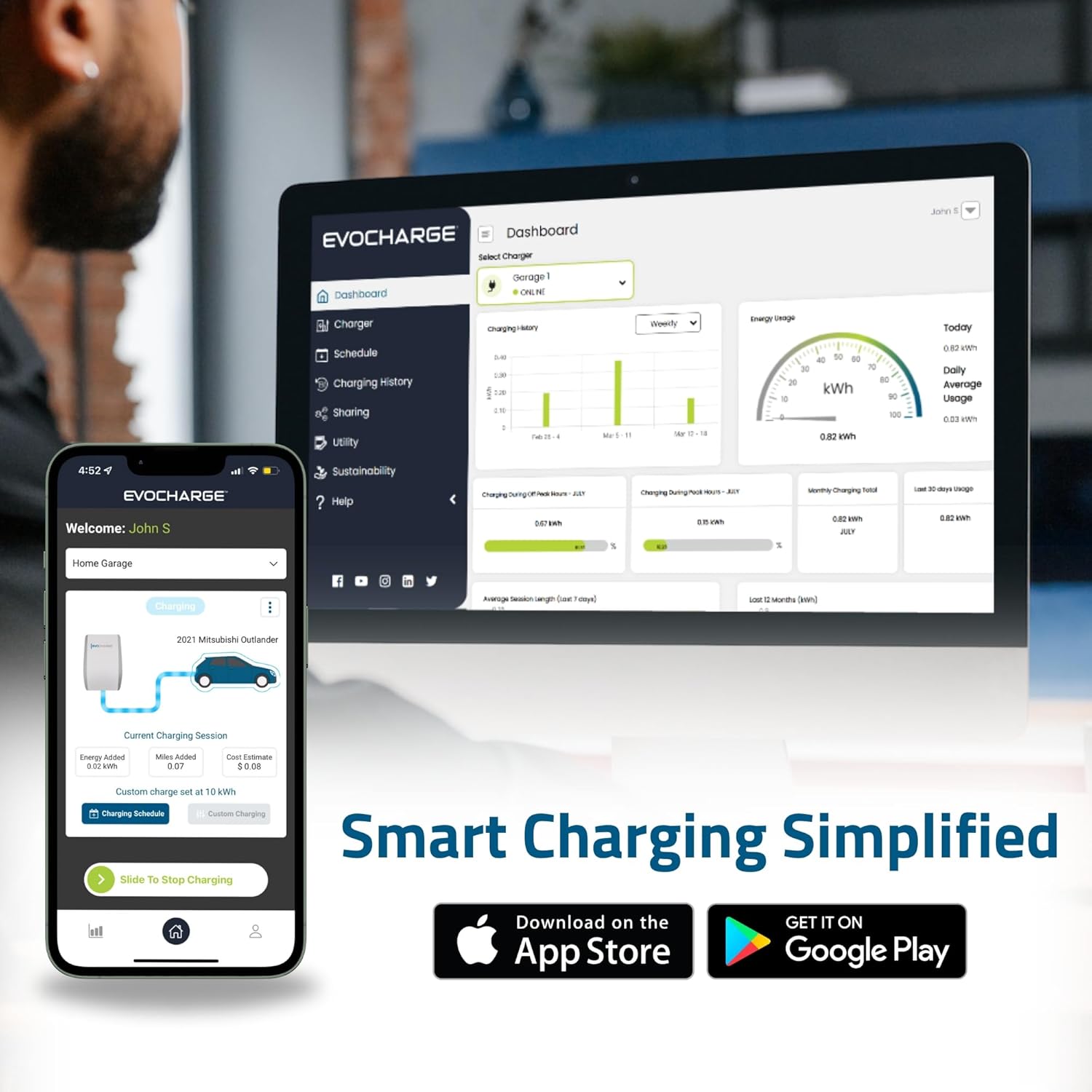
Figure 5: Screenshots of the EvoCharge mobile application and desktop portal, demonstrating features for scheduling, data viewing, and overall smart charging management.
Maintenance
The EvoCharge Home 50 is designed for minimal maintenance. Follow these guidelines to ensure longevity:
- Cleaning: Periodically wipe the exterior of the charger with a soft, damp cloth. Do not use harsh chemicals or abrasive cleaners. Ensure the unit is powered off before cleaning.
- Cable and Connector Inspection: Regularly inspect the charging cable and J1772 connector for any signs of wear, damage, or fraying. If damage is observed, discontinue use immediately and contact customer support.
- Holster Use: Always store the J1772 connector in its holster when not in use to protect it from dirt, moisture, and physical damage.
Troubleshooting
If you encounter issues with your EvoCharge Home 50, refer to the following common troubleshooting steps:
| Problem | Possible Cause | Solution |
|---|---|---|
| Charger not powering on | No power from electrical panel; circuit breaker tripped. | Check your home's circuit breaker. If tripped, reset it. If the problem persists, contact a licensed electrician. |
| EV not charging | Connector not fully inserted; vehicle charging schedule active; charger fault. | Ensure the J1772 connector is securely plugged into the vehicle. Check the EvoCharge app for active charging schedules. Try rebooting the charger by cycling its circuit breaker. |
| App connectivity issues | Poor Wi-Fi signal; app not updated; temporary server issue. | Ensure your charger is within Wi-Fi range. Restart your router and the charger (by cycling the breaker). Update the EvoCharge app to the latest version. |
| Slow charging speed | Amperage setting too low; vehicle limitation. | Verify the amperage setting in the EvoCharge app or consult your electrician if the setting needs adjustment. Confirm your vehicle's maximum charging rate. |
If these steps do not resolve the issue, please contact EvoCharge customer support for further assistance.
Specifications
| Feature | Detail |
|---|---|
| Model Number | EVC50012001 |
| Input Voltage | 240 Volts AC |
| Amperage | Adjustable 16A to 50A |
| Connector Type | J1772 |
| Cable Length | 25 feet |
| Dimensions (H x W x D) | 13.75 x 9.7 x 3.5 inches |
| Item Weight | 11.68 pounds |
| Enclosure Rating | NEMA 4 (Indoor/Outdoor) |
| Certifications | UL Listed, Energy Star, FCC |
| Manufacturer | EvoCharge |
Warranty and Support
EvoCharge products are backed by a manufacturer's warranty. For specific warranty terms and conditions, please refer to the warranty card included with your product or visit the official EvoCharge website. For technical support, troubleshooting assistance, or warranty claims, please contact EvoCharge customer service:
- Website: www.evocharge.com
- Contact Information: Refer to the EvoCharge website for the most current contact details, including phone numbers and email support.
When contacting support, please have your product model number (EVC50012001) and purchase date available.
