1. Product Overview
This instruction manual provides detailed information for the Audiosavings bundle, which includes two Chauvet DJ Intimidator Spot 60 ILS 70 Watt Compact DMX Moving Head Lights and two Rockville RTP-GO Portable Collapsible DJ Totem Light/Speaker Stands with accompanying bags and scrims.
Chauvet DJ Intimidator Spot 60 ILS
The Chauvet DJ Intimidator Spot 60 ILS is a compact, feature-packed moving head light designed for mobile performances. It offers advanced control options and dynamic lighting effects.
- ILS Compatibility: Integrated Lighting System (ILS) for seamless integration with other ILS products.
- D-Fi USB Compatibility: Enables wireless Master/Slave or DMX control.
- Motorized Focus: Projects crisp gobos from various distances.
- Manual Zoom: Adjustable for short or long throw applications.
- 3-Facet Prism: Splits the beam to cover a larger area.
- Totem Mode: Innovative feature to keep beams on the dance floor.
- Control: Full-color LCD display for setting, saving, and recalling scenes.
Rockville RTP-GO Portable Collapsible DJ Totem Stand
The Rockville RTP-GO is a portable and collapsible totem stand designed to support lights, speakers, or monitors. Its 3-way collapsible system ensures easy transport and quick setup.
- Collapsible Design: 3-way collapsible system for compact storage and transport.
- Quick Setup: Assembles in under 3 minutes without tools.
- Adjustable Height: From 39 inches to 70 inches.
- Stability: Designed for maximum stability even at full height.
- Accessories: Includes black and white scrims, a carry bag, and Velcro cable ties.
- Versatility: Features a 35mm pole mount speaker adapter and non-slip foam EVA pads for the top plate.
2. Setup Instructions
2.1 Rockville RTP-GO Totem Stand Assembly
- Unpack Components: Carefully remove all parts from the travel bag. Ensure you have the main stand frame, base plates, top plate, scrims (black and white), 35mm pole mount adapter, non-slip EVA pads, Velcro cable ties, and 8mm quick release thumb screws/bolts.
- Attach Base Plates: Position the stand frame upright. Attach the two base plates to the bottom of the stand using the four hand-tightening screws. Ensure they are securely fastened.
- Extend Stand: Use the spring-loaded turn and lock mechanism to raise the stand to your desired height (between 39 and 70 inches). Ensure the locking pins are fully engaged for stability.
- Attach Top Plate: Secure the top plate to the uppermost section of the stand. If mounting a speaker, use the provided 35mm pole mount adapter. For other equipment, attach the non-slip foam EVA pads to the top plate for added grip.
- Apply Scrim: Drape either the black or white scrim over the stand. Adjust it to ensure a neat and professional appearance.
- Cable Management: Use the included Velcro cable ties to neatly secure any power or signal cables along the stand, preventing tripping hazards and maintaining a clean setup.

Image: Rockville RTP-GO Totem Stand assembly steps, illustrating the process of attaching the base, adjusting height, and applying the scrim.
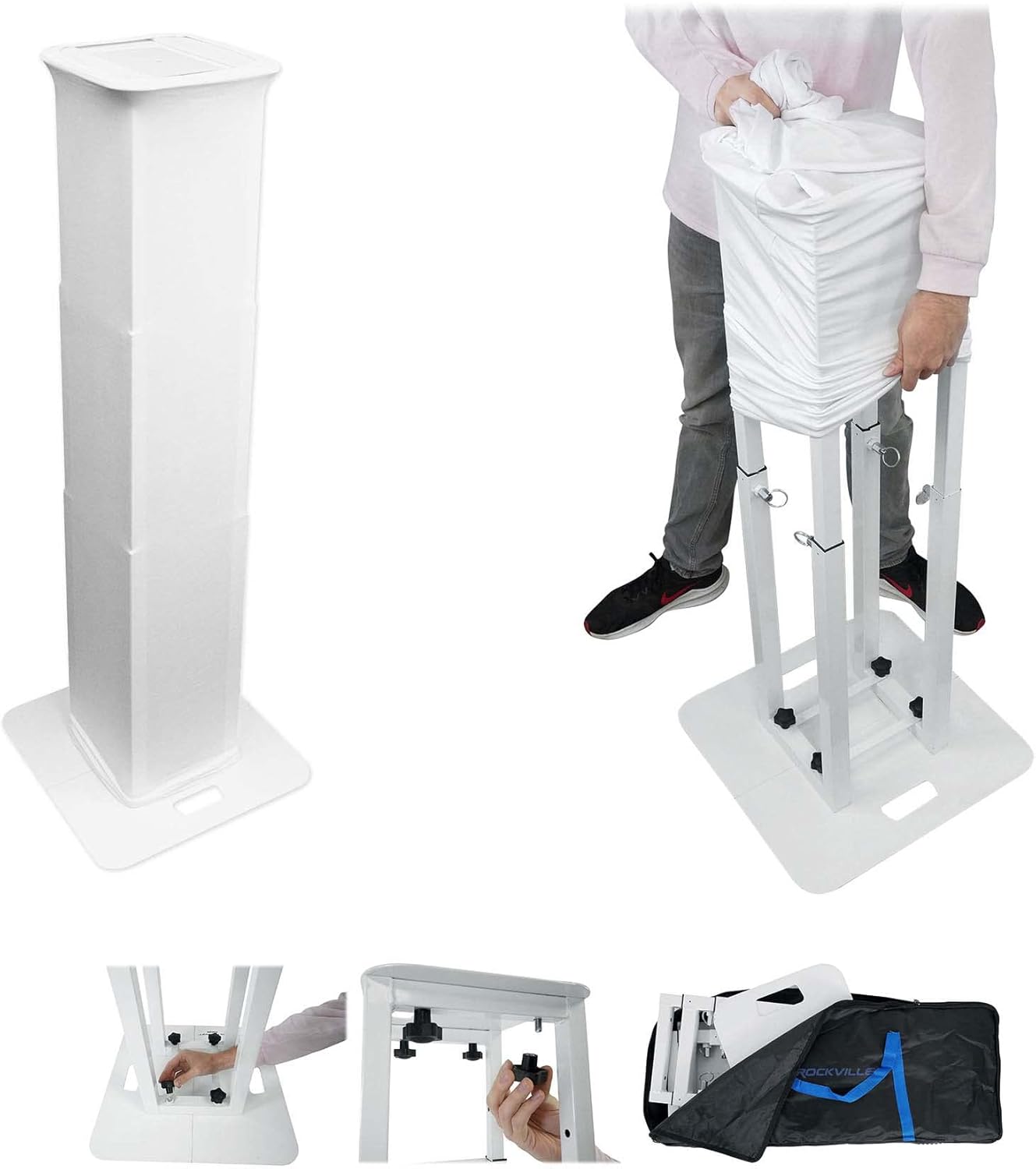
Image: An assembled Rockville RTP-GO Totem Stand, covered with a white scrim, ready for use.
2.2 Chauvet DJ Intimidator Spot 60 ILS Installation
- Mounting: Secure the Intimidator Spot 60 ILS to a truss or suitable mounting surface using the 1/4-turn hanging bracket. Ensure the mounting point can safely support the fixture's weight (11.2 lbs / 5.1 kg).
- Power Connection: Connect the fixture to a power source (100 to 240 VAC, 50/60 Hz) using the provided power cable. The fixture features auto-ranging voltage detection.
- DMX Connection (Optional): For DMX control, connect a 3-pin XLR cable from your DMX controller to the DMX IN port of the first fixture. For multiple fixtures, daisy-chain them by connecting the DMX OUT of the first to the DMX IN of the next.
- D-Fi USB (Optional): For wireless Master/Slave or DMX control, insert a D-Fi USB transceiver (sold separately) into the D-Fi USB port on the fixture.
- Power Linking: Up to 5 units can be power-linked at 120 V, or 9 units at 230 V. Use appropriate power linking cables.

Image: Rear view of the Chauvet DJ Intimidator Spot 60 ILS, highlighting the DMX IN/OUT ports, power input, and fuse.

Image: Front view of the Chauvet DJ Intimidator Spot 60 ILS moving head light, showcasing its compact design and red lens.
3. Operating Instructions
3.1 Chauvet DJ Intimidator Spot 60 ILS Operation
The Intimidator Spot 60 ILS can be operated via its onboard control panel, DMX, or wirelessly with D-Fi USB.
Control Panel Navigation
Use the MENU, UP, DOWN, and ENTER buttons located on the control panel to navigate through the fixture's settings and modes. The full-color LCD display provides clear feedback.

Image: Angled view of the Chauvet DJ Intimidator Spot 60 ILS, highlighting the control panel with its LCD screen and navigation buttons.
Operating Modes
- DMX Mode: Control the fixture using a DMX controller. Select from 8, 10, or 14 DMX channels depending on the desired level of control. Refer to the DMX channel chart in the full user manual for specific functions.
- Automated Mode: The fixture runs pre-programmed shows. Link up to 4 fixtures to create synchronized light shows.
- Sound-Active Mode: The fixture reacts to music via its built-in microphone. Link up to 4 fixtures for synchronized sound-active effects.
- Master/Slave Mode: Designate one fixture as the Master and others as Slaves for synchronized operation without a DMX controller.
- ILS Mode: Integrate the fixture into an ILS ecosystem for coordinated lighting control.
Key Features and Adjustments
- Pan and Tilt: The fixture offers a pan range of 540° and a tilt range of 240°. Adjustable ranges include 180°, 360°, 540° pan and 90°, 180°, 240° tilt.
- Colors: Access 8 distinct colors plus open white, with split color options and continuous scroll at variable speeds.
- Gobos: Utilize 7 gobos (6 metal + 1 glass) plus open. Gobos are rotating, interchangeable, and feature a slot-n-lock system for easy replacement. Continuous scroll at variable speeds is available.
- Focus and Zoom: Use the motorized focus to sharpen gobos and the manual zoom for adjusting beam angle.
- Strobe: Adjust the strobe rate from 0 to 20 Hz.
- Totem Mode: Activate Totem mode to ensure beams remain directed towards the dance floor, preventing light from shining into the audience's eyes.
3.2 Rockville RTP-GO Totem Stand Usage
Once assembled, the RTP-GO totem stand provides a stable platform for your equipment.
- Height Adjustment: The stand's height can be easily adjusted using the spring-loaded turn and lock mechanism. Always ensure the stand is locked at the desired height before placing equipment on it.
- Equipment Placement: Place your Chauvet DJ Intimidator Spot 60 ILS, speakers, or other equipment on the top plate. For speakers, utilize the 35mm pole mount adapter.
- Stability: The stand is designed for maximum stability. For optimal safety, ensure the base is on a flat, level surface and that the weight of the equipment is centered.
- Cable Management: Use the Velcro cable ties to secure power and signal cables to the stand frame, keeping them tidy and out of the way.
4. Maintenance
Regular maintenance ensures the longevity and optimal performance of your Chauvet DJ Intimidator Spot 60 ILS and Rockville RTP-GO Totem Stands.
4.1 Chauvet DJ Intimidator Spot 60 ILS Maintenance
- Cleaning: Periodically clean the exterior of the fixture with a soft, lint-free cloth. For optical components (lens, gobos), use a specialized lens cleaner and cloth to avoid scratches. Ensure the fixture is unplugged before cleaning.
- Fan and Vent Cleaning: Keep the cooling fan and ventilation openings free from dust and debris to prevent overheating. Use compressed air if necessary.
- Cable Inspection: Regularly inspect all power and DMX cables for any signs of wear, cuts, or damage. Replace damaged cables immediately.
- Firmware Updates: Check the Chauvet DJ website for any available firmware updates for your fixture.
4.2 Rockville RTP-GO Totem Stand Maintenance
- Cleaning: Wipe down the stand's metal surfaces with a damp cloth to remove dust and dirt. The scrims can be hand-washed or machine-washed on a gentle cycle with cold water and mild detergent, then air-dried.
- Hardware Check: Periodically check all screws, bolts, and locking mechanisms to ensure they are tight and functioning correctly. Tighten any loose hardware.
- Storage: When not in use, collapse the stand and store it in the provided travel bag to protect it from damage and dust.
5. Troubleshooting
If you encounter issues with your products, refer to the following common troubleshooting steps.
5.1 Chauvet DJ Intimidator Spot 60 ILS Troubleshooting
- No Power: Ensure the power cable is securely connected to both the fixture and a working power outlet. Check the fuse on the fixture and replace if blown (refer to specifications for fuse type).
- No Light Output: Verify that the fixture is receiving power and is not in a blackout or standby mode. Check DMX settings if using a controller.
- Fixture Not Responding to DMX: Confirm DMX cable connections are secure and correctly oriented (IN to OUT). Check DMX address settings on the fixture and controller. Ensure the DMX chain is properly terminated.
- Erratic Movement/Behavior: Check for DMX signal interference or incorrect DMX settings. Ensure the fixture is on a stable surface and not obstructed.
- Overheating: Ensure the fan and vents are clear of obstructions. Operate the fixture in a well-ventilated area.
5.2 Rockville RTP-GO Totem Stand Troubleshooting
- Stand Instability: Ensure all base plate screws are tightened. Verify that the stand is on a flat, level surface. Do not exceed the maximum weight capacity of 132 lbs.
- Difficulty Adjusting Height: Check that the spring-loaded turn and lock mechanism is clean and free of debris. Apply a small amount of silicone lubricant if necessary.
- Missing Parts: If any parts are missing upon unboxing, contact Audiosavings customer support immediately.
6. Specifications
6.1 Chauvet DJ Intimidator Spot 60 ILS
| Feature | Specification |
|---|---|
| Light Source | 1 LED (cool white) 70 W, 50,000 hours life expectancy |
| Color Temperature | 15,000 K |
| Illuminance (17°) | 7,792 lux @ 2 m |
| DMX Channels | 8, 10, or 14 |
| DMX Connectors | 3-pin XLR |
| Pan and Tilt | 540° pan / 240° tilt |
| Pan and Tilt Ranges | 180°, 360°, 540° pan / 90°, 180°, 240° tilt |
| Colors | 8 + open, split colors, continuous scroll |
| Gobos | 7 + open (6 metal + 1 glass), rotating, interchangeable, slot-n-lock |
| Strobe Rate | 0 to 20 Hz |
| Input Voltage | 100 to 240 VAC, 50/60 Hz (auto-ranging) |
| Power and Current (120 V) | 107 W, 1.5 A @ 60 Hz |
| Power and Current (230 V) | 105 W, 1 A @ 50 Hz |
| Power Linking (120 V) | 5 units |
| Power Linking (230 V) | 9 units |
| Weight | 11.2 lbs (5.1 kg) |
| Size | 8.2 x 5.9 x 12 in (207 x 149 x 308 mm) |
| Approvals | CE, RoHS, UKCA |
| Prism | 3-facet round static |
| Bracket Mounting Hole | 13 mm |
6.2 Rockville RTP-GO Portable Collapsible DJ Totem Stand
| Feature | Specification |
|---|---|
| Adjustable Height | 39" to 70" inches |
| Base Plates (W x D x H) | 19.6" x 9.85" x 0.11" inches |
| Top Plate (W x D x H) | 11.8" x 11.8" x 0.11" inches |
| Pole Mount Speaker Adapter Length | 4 7/8" |
| Unit Dimensions for Transport (W x D x H) | 6.3" x 12" x 31.5" inches |
| Maximum Weight Support | 132 lbs |
| Unit Weight | 37 lbs |
| Material | Steel Construction |
| Color | White |
6.3 Bundle General Specifications
| Feature | Specification |
|---|---|
| Total Item Weight | 108.4 pounds |
| Product Dimensions (Overall Package) | 16.81"L x 13.66"W x 11.1"H |
| Manufacturer | Chauvet DJ (for lights) |
| Brand | Audiosavings |
| Model Number | (2) INTIMSPOT60ILS+(2) RTP-GO |
7. Warranty and Support
For warranty information and technical support, please refer to the respective manufacturers and your point of purchase.
7.1 Chauvet DJ Support
For detailed product manuals, firmware updates, and technical assistance for the Intimidator Spot 60 ILS, please visit the official Chauvet DJ website:
Chauvet DJ Intimidator Spot 60 ILS Downloads
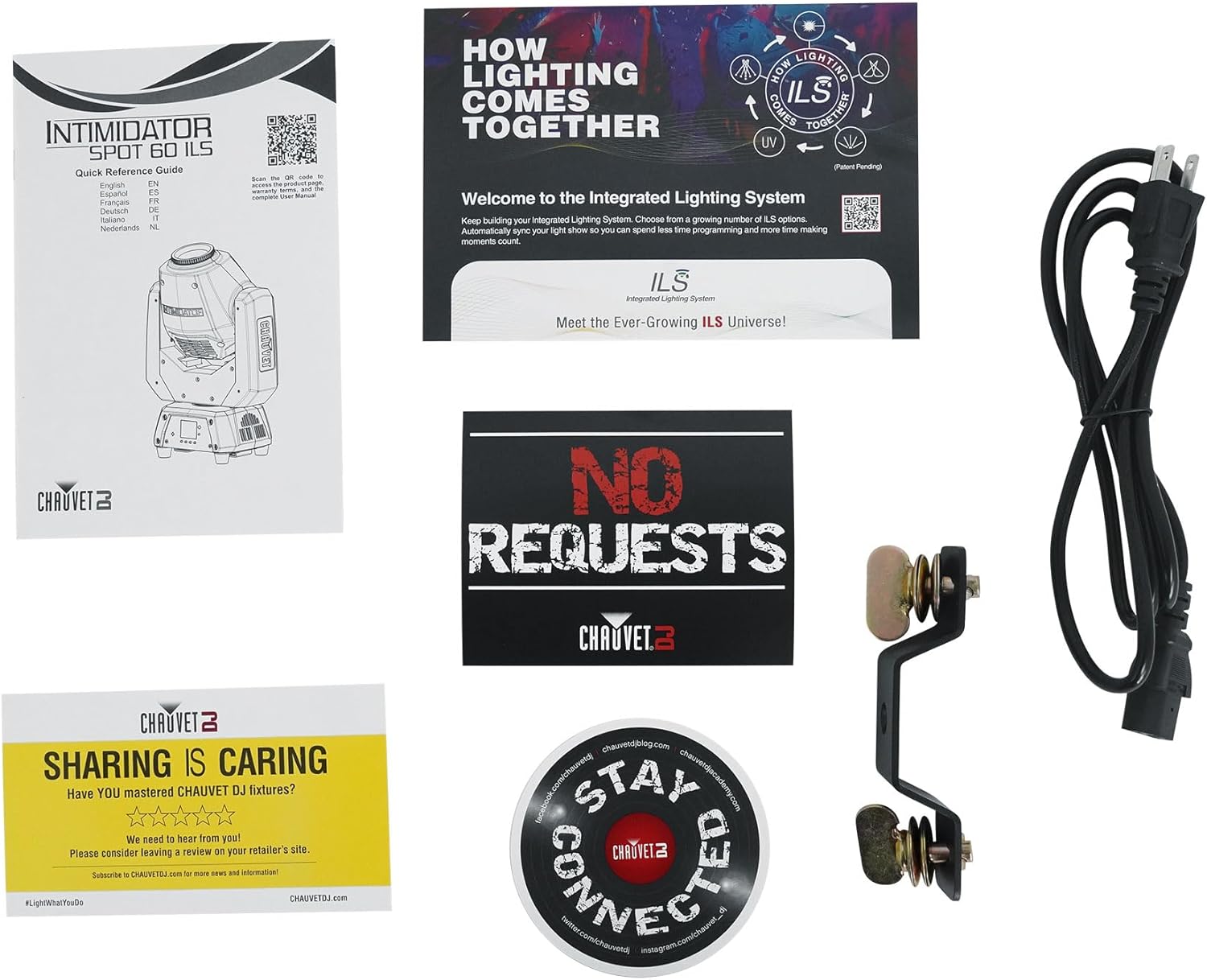
Image: Packaging and quick reference guide for the Chauvet DJ Intimidator Spot 60 ILS, including information on the Integrated Lighting System (ILS).
7.2 Rockville Support
For support regarding the Rockville RTP-GO Totem Stands, please refer to the documentation included with your product or contact Rockville customer service.
7.3 Audiosavings Customer Support
For any bundle-specific inquiries, order support, or general assistance, please contact Audiosavings customer support.


