
1. Introduction
This manual provides detailed instructions for the installation, operation, and maintenance of your DAJUNGUO S220HS 2.1 Channel Bluetooth Power Amplifier Board. Please read this manual thoroughly before use to ensure proper functionality and to prevent damage to the device.
2. Product Features
- TDA7498E Chip: Utilizes two TDA7498E chips for powerful audio output.
- High Output Power: Delivers a peak output of 160W × 2 (stereo channels) + 220W (subwoofer channel).
- Wide Voltage Input: Operates with a DC input voltage range of 12V to 38V.
- Multiple Input Methods: Supports Bluetooth input, 3.5mm AUX input, and USB input for versatile connectivity.
- APP Control: Allows customization of Bluetooth name and password via a dedicated application.
- Upgraded DC Socket: Features a gold-plated high-current shielded DC socket (5.5 x 2.5mm) designed to prevent sparks during power connection, enhancing safety and reliability.
- Cooling System: Integrated cooling fan for optimal thermal management during operation.
3. Package Contents
- 1 x DAJUNGUO S220HS 2.1 Channel Bluetooth Power Amplifier Board
4. Setup Instructions
Follow these steps to set up your amplifier board:
4.1 Component Overview

This image provides a detailed overview of the amplifier board, highlighting the AUX input, R&L Bass/Treble controls, Multifunctional Knob, Subwoofer Volume/Frequency controls, USB input, Power Switch, Cooling Fan, Bluetooth Antenna Base, 2Pin Input Socket, and the Upgraded DC Socket.
4.2 Power Supply Connection
- Ensure the amplifier is powered off.
- Connect a DC 12-38V power supply to the 5.5 x 2.5mm upgraded DC socket. Alternatively, use the 2-pin input socket for power.
- Verify the power supply voltage is within the specified range (12V-38V DC) to prevent damage.
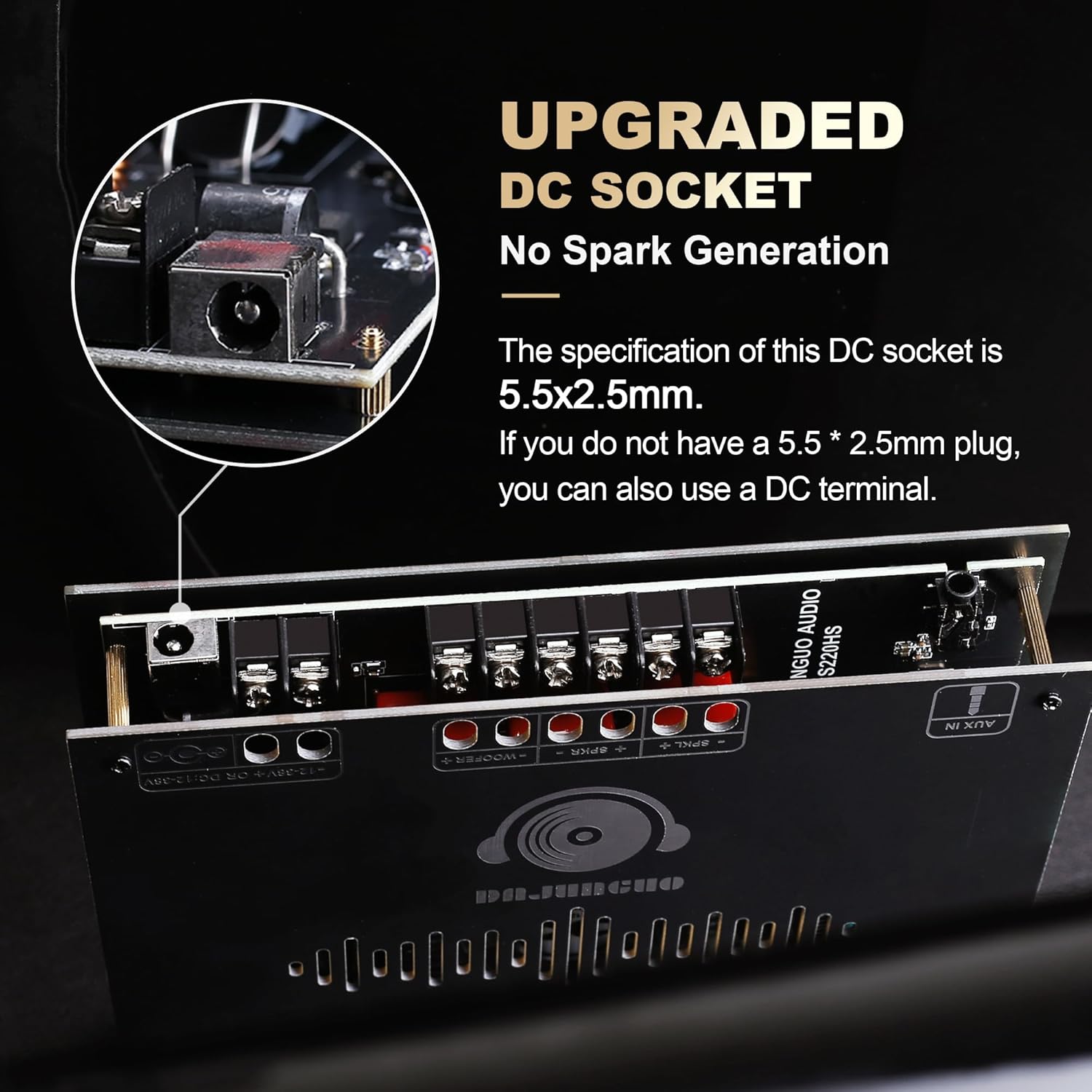
This image shows the upgraded 5.5x2.5mm DC socket, designed for spark-free connection.
4.3 Speaker Connection
- Identify the Left (L), Right (R), and Subwoofer (S) output terminals on the amplifier board.
- Connect your passive speakers to the corresponding L and R terminals. Ensure correct polarity (+/-).
- Connect your passive subwoofer to the S terminals. Ensure correct polarity (+/-).
- The amplifier supports 2.1 channel output. Ensure your speakers and subwoofer are compatible with the amplifier's output power and impedance ratings.
This video demonstrates the process of connecting speaker wires to the amplifier board's terminals and powering on the device.
4.4 Bluetooth Antenna Connection
- If using Bluetooth, connect an IPEX(MHF1) compatible Bluetooth antenna to the designated base on the board.

This image illustrates the correct type of Bluetooth antenna (IPEX(MHF1)) to use with the amplifier board.
5. Operating Instructions
5.1 Power On/Off
Use the power switch located on the front panel to turn the amplifier ON or OFF. A long press on the Multifunctional Knob can also power on/standby the device.
5.2 Input Mode Selection
The amplifier supports Bluetooth, 3.5mm AUX, and USB inputs. Press the Multifunctional Knob four times to cycle through the available input modes.

This image highlights the various input options available on the amplifier board.
5.3 Bluetooth Pairing
- Switch the amplifier to Bluetooth mode.
- On your mobile device, search for available Bluetooth devices and select the amplifier's Bluetooth name.
- You can customize the Bluetooth name and set a password using the dedicated APP.
5.4 Volume and Tone Control
The amplifier features several knobs for audio adjustment:
- Multifunctional Knob: Controls main volume. Also functions for Play/Pause (one click), Next Song (two clicks), Previous Song (three clicks), Switch Mode (four clicks), and Factory Reset (five clicks).
- Subwoofer Volume: Adjusts the output level of the subwoofer.
- Subwoofer Frequency: Adjusts the crossover frequency for the subwoofer.
- R&L Bass: Adjusts the bass level for the left and right stereo channels.
- R&L Treble: Adjusts the treble level for the left and right stereo channels.

This image details the functions of the multifunctional knob, including playback control and mode switching.
5.5 USB Playback
Insert a USB flash drive formatted to FAT32 into the USB input port to play audio files directly.
6. Maintenance
- Keep the amplifier board clean and free from dust. Use a soft, dry cloth for cleaning.
- Ensure adequate ventilation around the amplifier to prevent overheating. Do not block the cooling fan.
- Avoid exposing the device to moisture, extreme temperatures, or direct sunlight.
- Do not attempt to disassemble or repair the unit yourself. Contact customer support for assistance.
7. Troubleshooting
If you encounter issues with your amplifier board, refer to the following common problems and solutions:
- No Power:
- Check if the power supply is correctly connected and providing the specified DC 12-38V.
- Ensure the power switch is in the 'ON' position.
- No Sound Output:
- Verify that speakers are correctly connected to the L, R, and S terminals with proper polarity.
- Check the input source (Bluetooth, AUX, USB) and ensure it is selected correctly and playing audio.
- Increase the main volume and individual channel volumes (bass, treble, subwoofer).
- Bluetooth Connection Issues:
- Ensure the amplifier is in Bluetooth mode.
- Make sure your device's Bluetooth is enabled and within range.
- Try forgetting the device on your phone and re-pairing.
- Perform a factory reset (five clicks on the Multifunctional Knob) if issues persist.
- Distorted Sound:
- Reduce the volume to see if distortion decreases.
- Ensure your speakers and subwoofer impedance match the amplifier's recommended range (typically 4-8 ohms). Connecting a 2-ohm subwoofer to an amplifier designed for 4-ohm or higher can cause damage.
- Check the quality of your audio source and cables.
8. Specifications
| Specification | Value |
|---|---|
| Model Number | S220HS |
| Brand | DAJUNGUO |
| Item Dimensions (L x W x H) | 5.9 x 5.15 x 1.02 inches |
| Item Weight | 11.5 ounces |
| Output Power (Peak) | 160W × 2 (L&R) + 220W (Subwoofer) |
| Number of Channels | 2.1 |
| Minimum Supply Voltage | 12 Volts (DC) |
| Maximum Supply Voltage | 38 Volts (DC) |
| Bluetooth Version | 5.1 |
| Frequency Range | 20Hz-20KHz |
| Material | Plastic, Gold |
| Specification Met | CE, FCC, RoHS |
8.1 Output Power vs. Input Voltage

This table provides a comparison of input voltage and the resulting output power for both the R&L channels and the subwoofer.
9. Warranty and Support
DAJUNGUO is committed to customer satisfaction. If you have any questions about the product, or if the product experiences quality problems, please contact us at any time. We offer 7*24 hours after-sales service and will provide a satisfactory answer to your inquiries.