1. Introduction
Thank you for choosing the ACEZUK M01 Portable Car Jump Starter. This device is designed to provide emergency jump-starting for 12V vehicles (up to 7.0L gasoline or 5.5L diesel engines) and also functions as a portable power bank and LED flashlight. Please read this manual thoroughly before use to ensure safe and proper operation.
2. Safety Information
WARNING: Improper use may result in damage to the device, vehicle, or personal injury. Always follow these safety guidelines.
- Do not attempt to jump start vehicles with engines larger than specified (7.0L gas, 5.5L diesel).
- Ensure the jump starter is at least 50% charged before attempting to jump start a vehicle.
- Connect the clamps correctly: Red clamp to positive (+) terminal, Black clamp to negative (-) terminal. Reverse polarity can cause damage.
- Remove the jump starter clamps from the vehicle battery within 30 seconds after the engine starts.
- Do not connect the red and black clamps together.
- Do not expose the device to extreme temperatures (below -20℃ or above 60℃), direct sunlight, or water.
- Keep out of reach of children.
- If the device becomes excessively hot during use, discontinue operation immediately.
3. Package Contents
Verify that all items are present in your package:
- 1 x ACEZUK M01 Jump Starter
- 1 x Smart Jumper Cable with Clamps
- 1 x USB-C Charging Cable
- 1 x User Manual
- 1 x Storage Bag

Image: Package contents of the ACEZUK M01 Jump Starter.
4. Product Overview
The ACEZUK M01 is a versatile device featuring multiple functionalities:
- 5000A Peak Current: Capable of jump-starting 12V vehicles with up to 7.0L gas or 5.5L diesel engines.
- 2.5-inch LCD Display: Shows real-time power level, charging status, and temperature protection indicator.
- Multifunction LED Light: Features three modes: illumination, strobe, and SOS for various emergency situations.
- 12800mAh Power Bank: Equipped with 1 USB output (5V/2.4A) and 1 Type-C input/output (5V/2A, 9V/2A) for charging mobile devices.
- Smart Jumper Clamps: Incorporate 8 advanced protection technologies for safe operation.

Image: ACEZUK M01 Jump Starter and accessories.
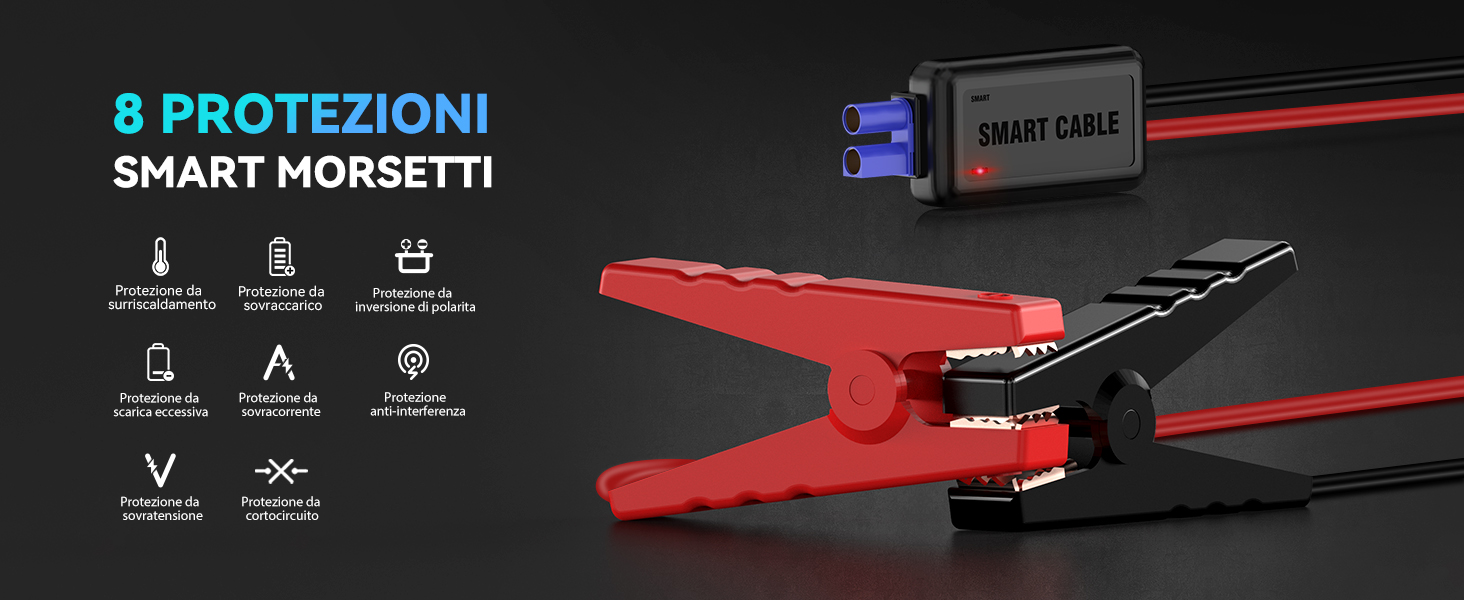
Image: Labeled diagram of the ACEZUK M01 Jump Starter's components.
5. Setup and Charging
5.1 Initial Charging
Before first use, fully charge the jump starter. It is recommended to charge the device every 3-6 months to maintain battery health, even if not in use.
- Connect the provided USB-C charging cable to the Type-C input port on the jump starter.
- Connect the other end of the USB-C cable to a 5V/2.4A (or higher) USB wall adapter (not included).
- The LCD display will show the charging progress. The device is fully charged when the display shows 100%.

Image: Charging the ACEZUK M01 Jump Starter.
6. Operating Instructions
6.1 Jump Starting a Vehicle
Ensure the jump starter has at least 50% charge before attempting to jump start.
- Insert Jumper Cable: Plug the smart jumper cable into the EC5 output port on the jump starter. Ensure a secure connection.
- Connect Clamps: Attach the red (+) clamp to the positive terminal of the vehicle's battery. Attach the black (-) clamp to the negative terminal of the vehicle's battery. The smart cable indicator light should turn green, indicating a safe connection.
- Start Engine: Return to your vehicle and start the engine.
- Remove Clamps: Once the engine starts, immediately remove the clamps from the vehicle battery within 30 seconds. First, remove the black (-) clamp, then the red (+) clamp. Disconnect the smart cable from the jump starter.
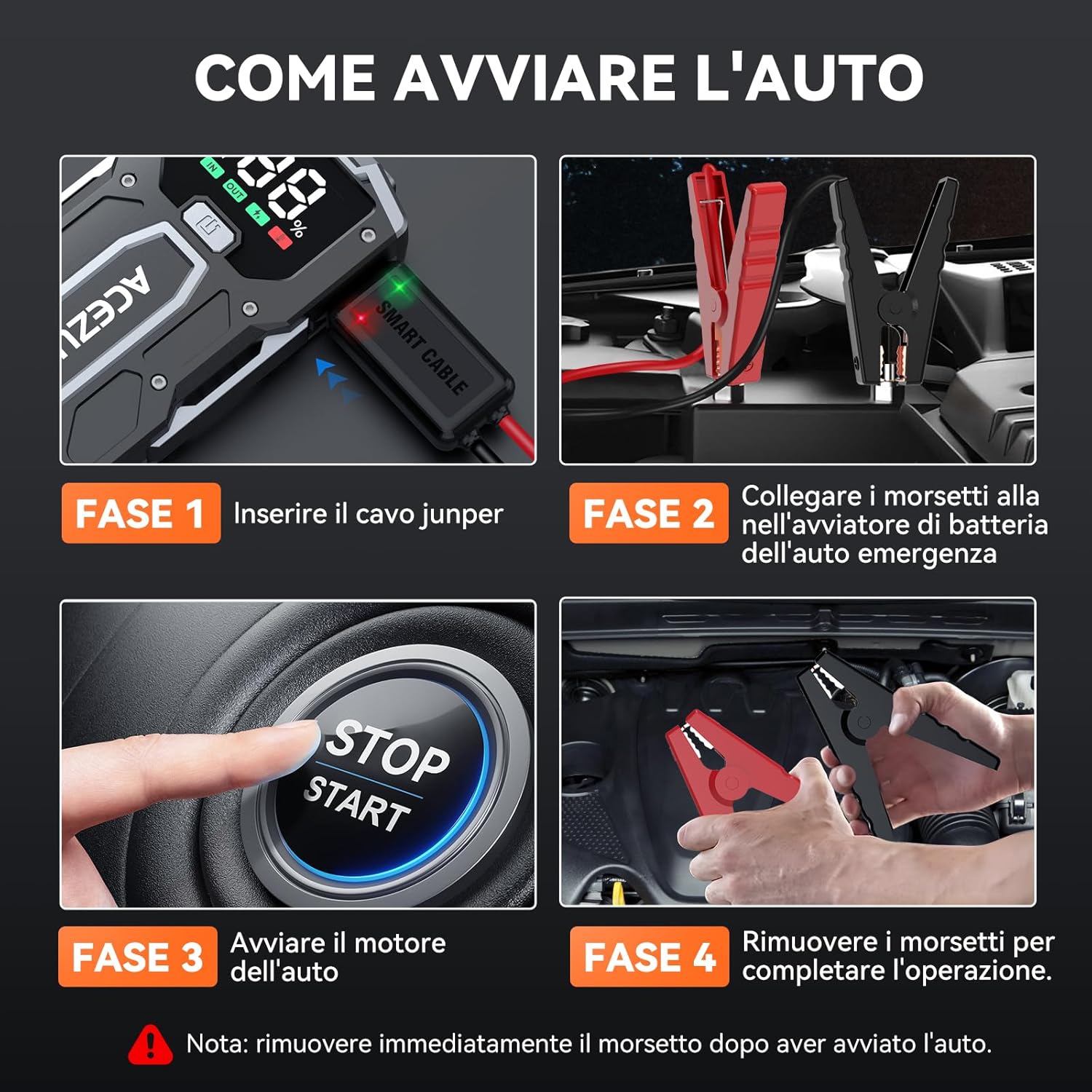
Image: Step-by-step guide for jump starting a vehicle.
6.2 Using as a Power Bank
The ACEZUK M01 can charge various USB-powered devices.
- Connect your device's charging cable to the USB output port (5V/2.4A) or the Type-C port (5V/2A, 9V/2A) on the jump starter.
- The LCD display will indicate that charging is active.

Image: Using the jump starter to charge mobile devices.
6.3 Using the LED Flashlight
The integrated LED light has three modes for different situations.
- Press and hold the power button for 3 seconds to turn on the LED light (illumination mode).
- Press the power button once to switch to strobe mode.
- Press the power button again to switch to SOS mode.
- Press and hold the power button for 3 seconds to turn off the LED light.

Image: LED flashlight modes.
7. Maintenance and Storage
- Clean the device with a dry, soft cloth. Do not use harsh chemicals or abrasive materials.
- Store the jump starter in its protective bag in a cool, dry place, away from direct sunlight and moisture.
- Recharge the device every 3-6 months to prevent deep discharge and prolong battery life.
- Keep the clamps clean and free of corrosion.
8. Troubleshooting
| Problem | Possible Cause | Solution |
|---|---|---|
| Vehicle does not start | Low charge on jump starter Incorrect clamp connection Vehicle battery completely dead Engine size exceeds capacity | Ensure jump starter is at least 50% charged Check clamp polarity (Red to +, Black to -) Try again after a few minutes, or consult a mechanic Verify engine displacement is within limits (7.0L gas, 5.5L diesel) |
| Smart cable indicator is red | Reverse polarity Short circuit Over-temperature | Disconnect and reconnect clamps with correct polarity Ensure clamps are not touching each other Allow device to cool down before use |
| Device not charging | Faulty charging cable/adapter Charging port issue | Try a different USB-C cable and wall adapter Contact customer support |
| LED light not working | Low battery Device malfunction | Charge the jump starter Contact customer support |
9. Specifications
| Feature | Specification |
|---|---|
| Model | M01 |
| Peak Current | 5000A |
| Battery Capacity | 12800mAh (approximate, based on feature bullets) |
| Start Voltage | 12V |
| Engine Compatibility | Up to 7.0L Gas / 5.5L Diesel |
| USB Output | 5V/2.4A |
| Type-C Input/Output | 5V/2A, 9V/2A |
| Operating Temperature | -20℃ to 60℃ (-4℉ to 140℉) |
| Dimensions | 3.88 x 9.25 x 18 cm |
| Weight | 400 g |
10. Warranty and Support
ACEZUK provides a 2-year warranty for this product. For any missing parts, technical support, or other issues, please contact ACEZUK customer service via Amazon. Our customer service team is available 24/7 to assist you.


