
Restmo O-HT
RESTMO Sprinkler Timer User Manual
Model: O-HT
Introduction
Thank you for choosing the RESTMO Sprinkler Timer with Brass Inlet. This programmable water timer is designed to simplify your garden watering tasks, providing automatic control for garden hoses, outdoor faucets, drip irrigation systems, and lawn watering. Please read this manual carefully before use to ensure proper installation, operation, and maintenance.
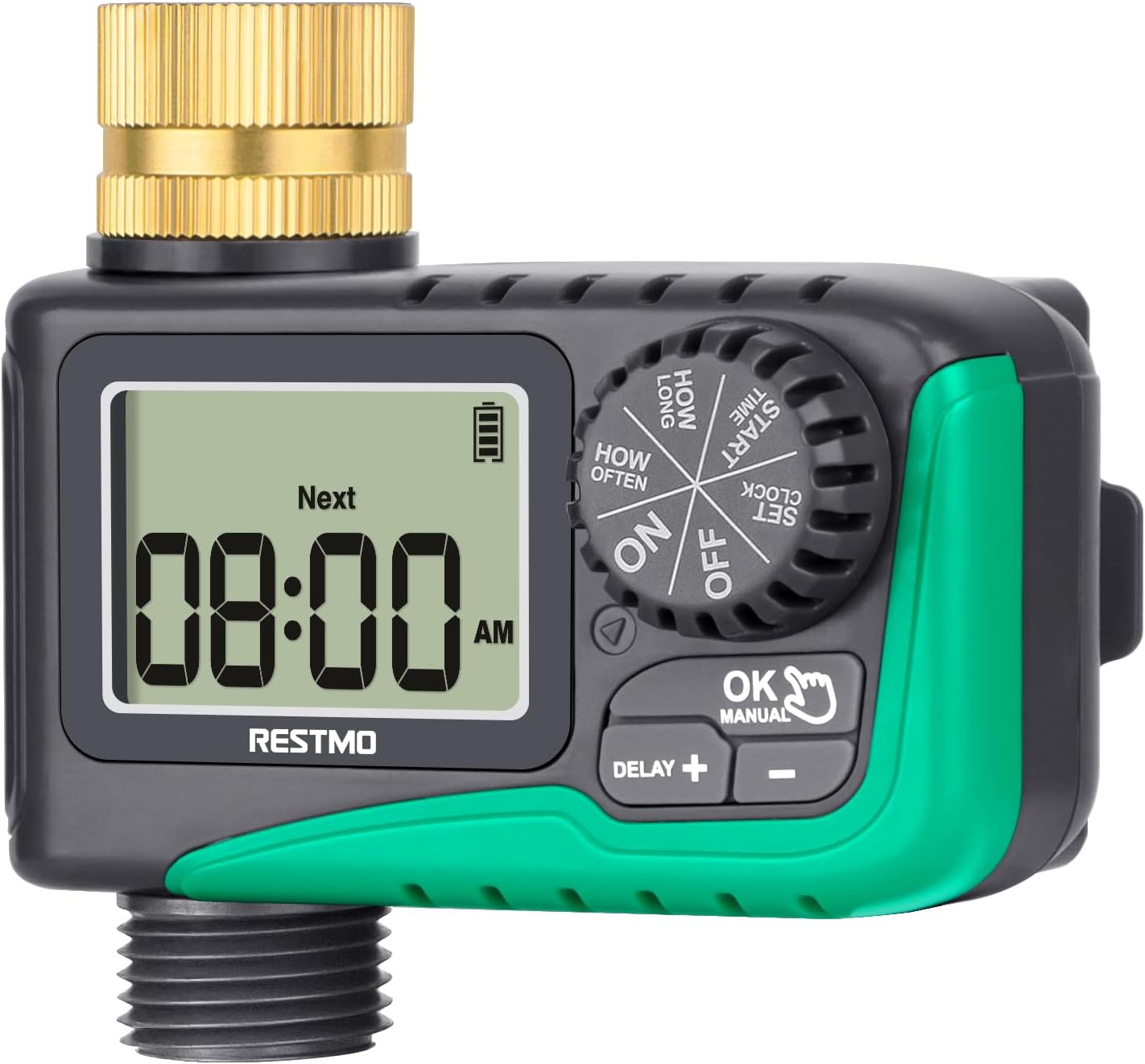
Image: Front view of the RESTMO Sprinkler Timer, showing the digital display and control dial.
Safety Information
- Do not immerse the timer in water. It is IP54 waterproof, meaning it is protected against dust and splashing water, but not full immersion.
- Use only 2 x AAA 1.5V alkaline batteries (not included). Do not mix old and new batteries or different types of batteries.
- Remove batteries if the timer will not be used for an extended period to prevent leakage.
- Protect the timer from freezing temperatures. Disconnect and store indoors during winter.
- Ensure all connections are tight to prevent leaks. Teflon tape is recommended for a secure seal.
Product Overview
The RESTMO Sprinkler Timer features a user-friendly design with a large LCD screen and intuitive controls.
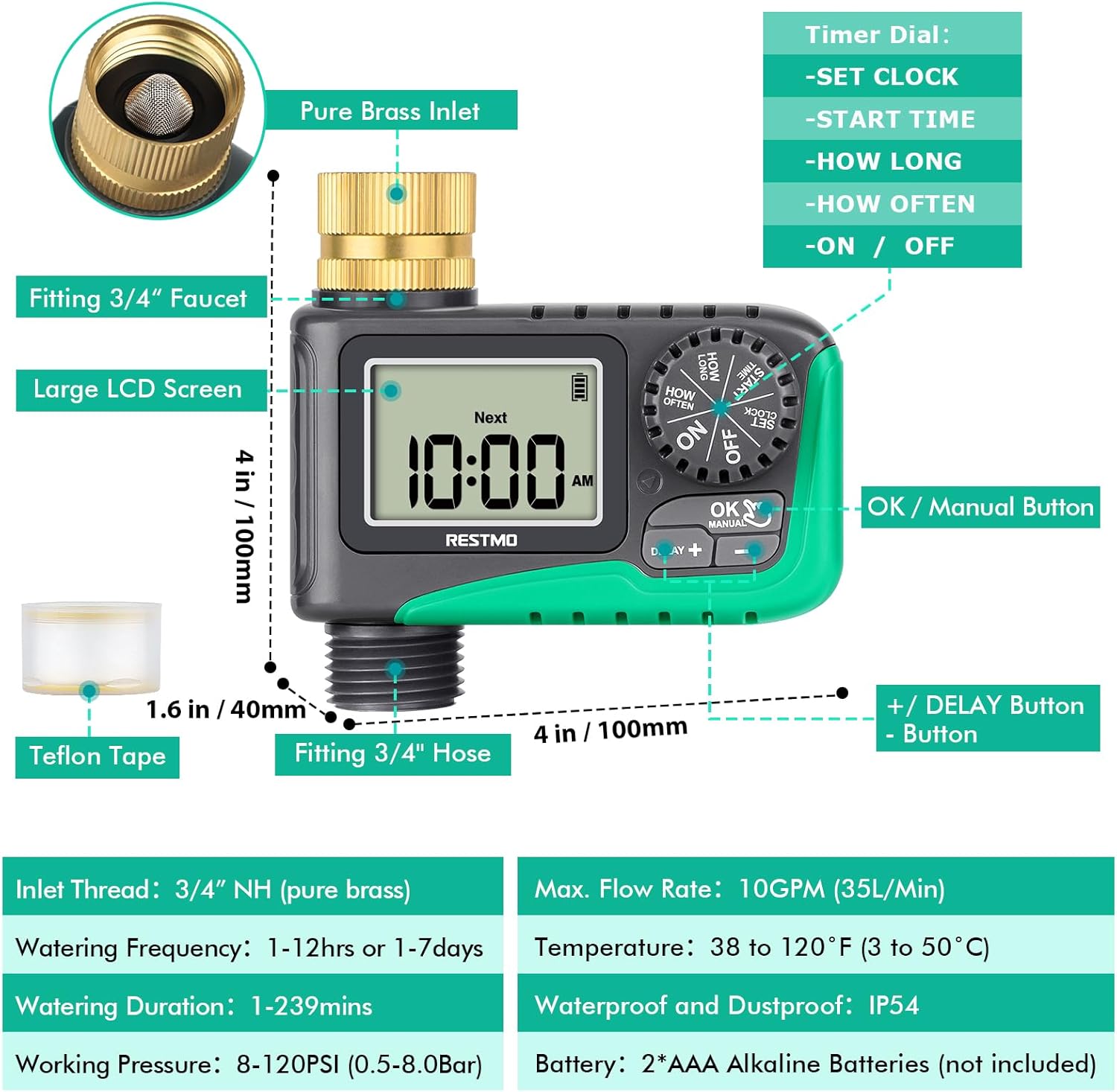
Image: Diagram illustrating the various components of the sprinkler timer, including the brass inlet, LCD screen, control dial, and buttons.
Key Components:
- Pure Brass Inlet Thread: 360-degree rotatable for easy installation, with a built-in metal filter washer to prevent debris.
- Large LCD Screen: Displays current time, next watering time, and battery status.
- Timer Dial: Used to select different settings (SET CLOCK, START TIME, HOW LONG, HOW OFTEN, ON, OFF).
- OK/Manual Button: Confirms settings and activates manual watering.
- +/- Buttons: Adjust values and activate rain delay.
- Waterproof Battery Compartment: Houses 2 x AAA batteries.

Image: Close-up view of the 360-degree swivel pure brass inlet, highlighting its design and durability.
Setup and Installation
Follow these steps to install your RESTMO Sprinkler Timer:
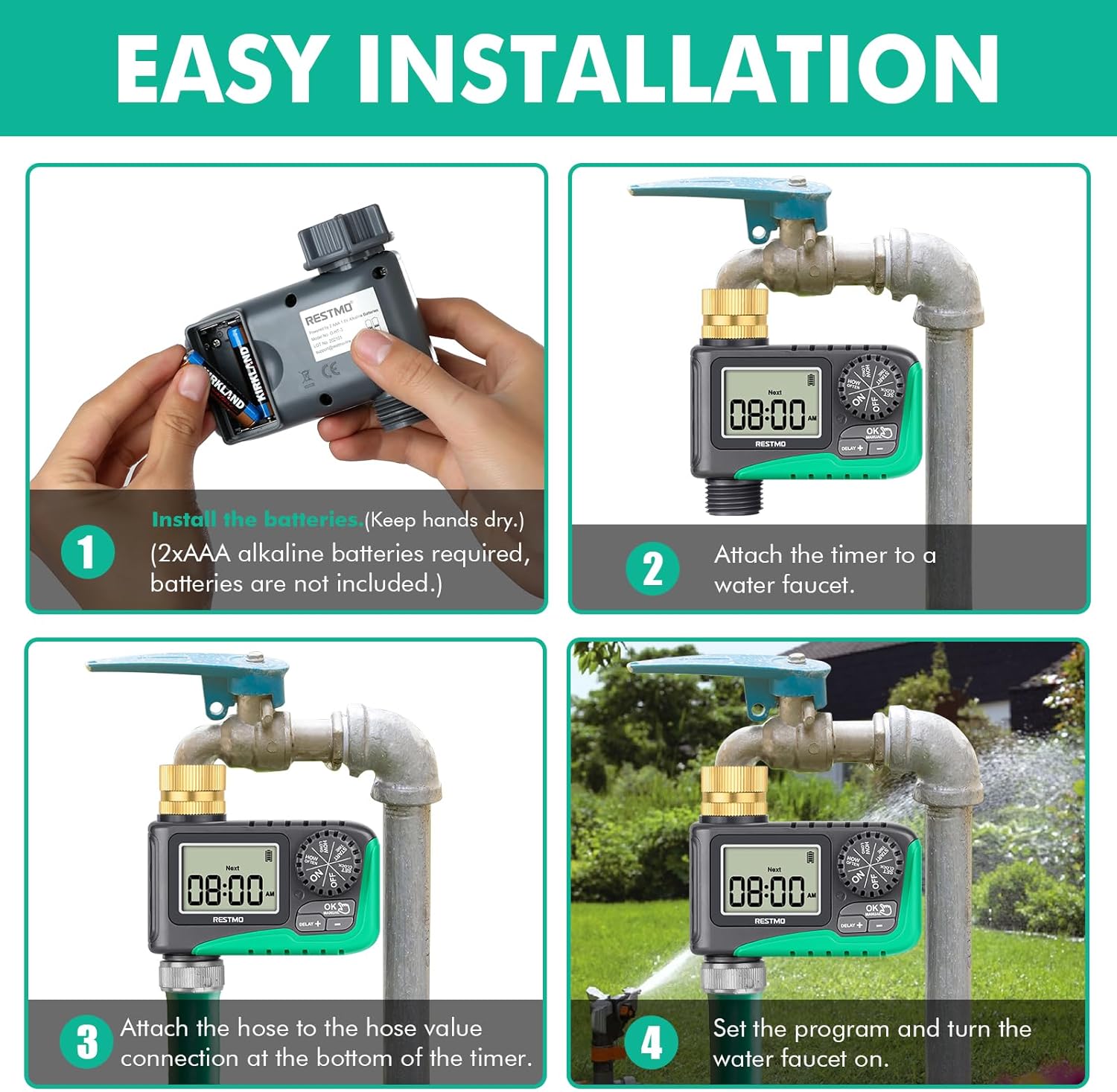
Image: Four-panel diagram showing the installation process: installing batteries, attaching to faucet, attaching hose, and setting the program.
- Install Batteries: Open the waterproof battery compartment. Insert 2 x AAA 1.5V alkaline batteries (not included), ensuring correct polarity. Close the compartment securely. Keep your hands dry during this process.
- Attach to Faucet: Screw the timer's brass inlet onto your 3/4" outdoor faucet. Hand-tighten firmly. For a leak-proof connection, wrap Teflon tape around the faucet threads before attaching the timer.
- Attach Hose: Connect your garden hose to the 3/4" hose connection at the bottom of the timer. Ensure it is tightly secured.
- Turn on Faucet: Open your faucet fully. The timer is designed to operate under water pressure.
Operating Instructions
1. Set Clock
This step sets the current time on the timer.
- Turn the dial to SET CLOCK.
- Press the +/- buttons to set the current hour and minute.
- Press the OK button to switch between hour and minute setup.
- Turn the dial to any other position to save changes.
2. Set Start Time
This sets when your automatic watering program will begin.
- Turn the dial to START TIME.
- Press the +/- buttons to set the desired start time.
- Press the OK button to switch between hour and minute setup.
- Turn the dial to any other position to save changes.
3. Set Watering Duration (How Long)
This sets how long the watering will last for each cycle.
- Turn the dial to HOW LONG.
- Press the +/- buttons to set the watering duration from 1 minute to 239 minutes.
- Press the OK button to switch between hour and minute setup.
- Turn the dial to any other position to save changes.
4. Set Watering Frequency (How Often)
This sets how often the watering cycles will repeat.
- Turn the dial to HOW OFTEN.
- Press the +/- buttons to set the watering frequency: from 1 hour to 12 hours, or from 1 day to 7 days.
- Press the OK button to switch between hour and day/hour setup.
- Turn the dial to any other position to save changes.
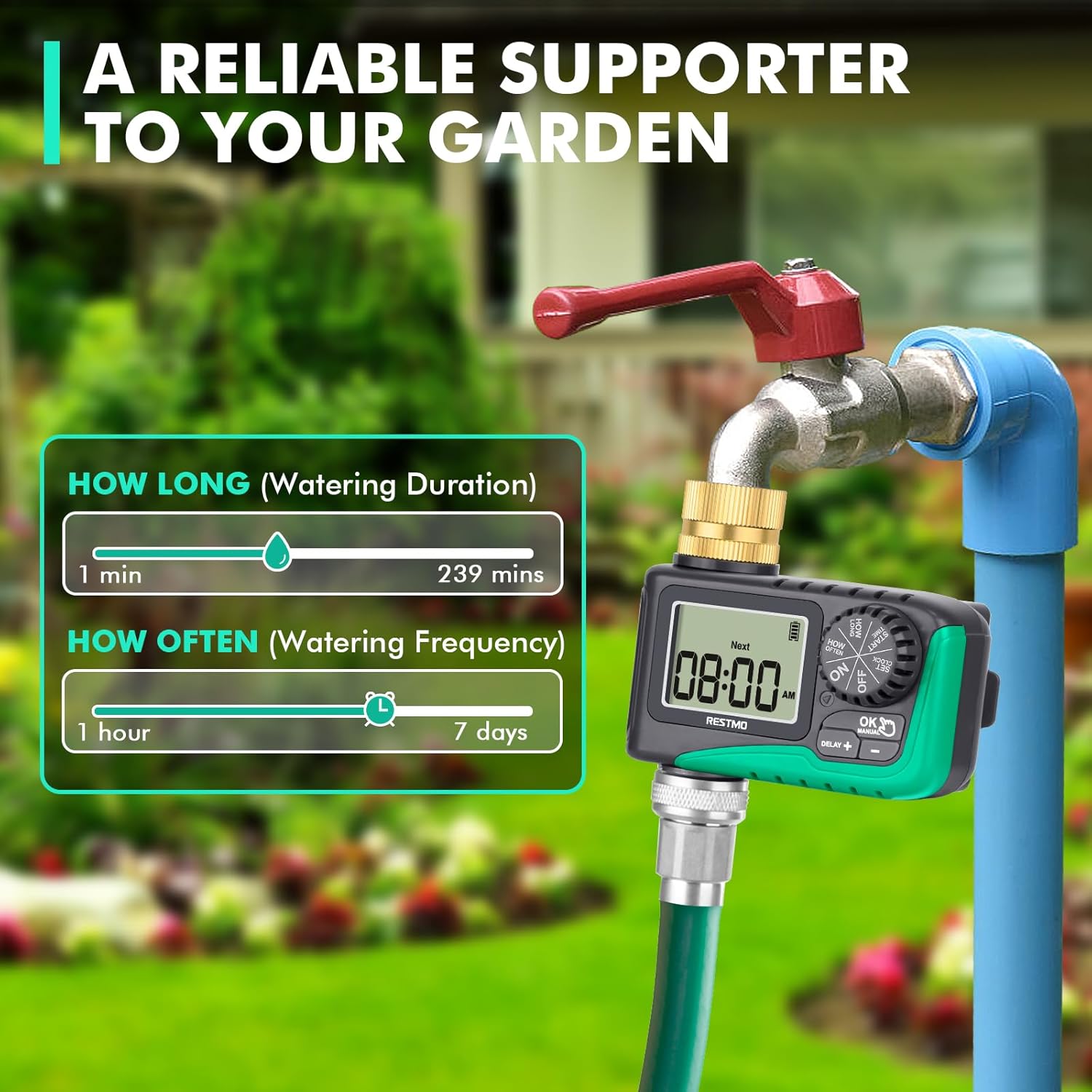
Image: Visual guide showing the range for 'How Long' (1-239 mins) and 'How Often' (1hr-7 days) settings.
5. Automatic Watering
Once programmed, turn the dial to ON to activate the automatic watering schedule. The LCD screen will display the remaining time of the current watering program when watering is active. When watering is off, the screen will flash between the next watering start time and the current time.

Image: Depicts the timer set to 'ON' for automatic watering, with a visual representation of the watering duration and frequency settings.
6. Manual Watering
To water manually without affecting your programmed schedule:
- With the dial at ON, long press the OK/MANUAL button for 3 seconds.
- Press the +/- buttons to select the desired manual watering duration (1 to 239 minutes).
- Press OK to switch between hour and minute. The setup flashes 3 times and manual watering will automatically start.
- To cancel manual watering, turn the dial to OFF and then back to ON.

Image: Shows how to activate manual watering and adjust its duration, with a visual of water flowing from the hose.
7. Rain Delay
To temporarily pause your watering schedule due to rain or other reasons:
- With the dial at ON, long press the DELAY + button for 3 seconds.
- Press the +/- buttons to select a delay of 12, 24, 48, or 72 hours.
- Press OK or wait for 3 seconds to start the rain delay.
- To cancel rain delay, turn the dial to OFF and then back to ON.

Image: Illustrates the rain delay function with options for 12, 24, 48, and 72-hour delays.
8. Stop Watering
To completely stop all watering programs:
- Turn the dial to OFF. The timer will keep off until the dial is turned to ON again.

Image: Shows the timer dial set to 'OFF', indicating that watering has stopped.
Maintenance
- Cleaning: Periodically check the brass inlet filter washer for debris and clean it to ensure optimal water flow.
- Battery Replacement: When the battery indicator on the LCD screen shows low power, replace the batteries promptly to avoid interruption of watering schedules.
- Winterization: Before the first frost, disconnect the timer from the faucet and hose. Remove the batteries and store the timer indoors in a dry, protected area to prevent damage from freezing.
Troubleshooting
Here are some common issues and their solutions:
| Problem | Possible Cause | Solution |
|---|---|---|
| Timer not turning on/LCD blank | Dead or incorrectly installed batteries. | Replace batteries with new 2 x AAA alkaline batteries, ensuring correct polarity. |
| Water not flowing/Timer not watering | Faucet is off; low water pressure; clogged filter; incorrect program settings; valve stuck. | Ensure faucet is fully open. Check water pressure (10-120 psi required). Clean the inlet filter. Verify program settings (start time, duration, frequency). Reset the valves (see video below). |
| Water leaking from connections | Loose connections; missing/damaged washer; insufficient Teflon tape. | Tighten all connections. Check for and replace any missing or damaged rubber washers. Apply more Teflon tape to faucet threads. |
| Timer not following schedule | Incorrect clock setting; program not activated (dial not on ON); rain delay active. | Re-set the current time. Ensure the dial is set to ON. Check if rain delay is active and cancel if necessary. |
How to Reset the Valves:
If the timer's internal valves are not functioning correctly, you may need to reset them. This process involves cycling water through the timer manually to clear any obstructions or reset the mechanism.
Video: A step-by-step guide on how to reset the internal valves of the RESTMO Sprinkler Timer to ensure proper water flow.
Specifications
- Model: O-HT
- Material: Brass, Metal
- Inlet Thread: 3/4" NH (Pure Brass)
- Hose Fitting: 3/4"
- Watering Duration: 1-239 minutes
- Watering Frequency: 1-12 hours or 1-7 days
- Rain Delay Options: 12/24/48/72 hours
- Max. Flow Rate: 10 GPM (35 L/Min)
- Working Pressure: 10-120 PSI (0.5-8.0 Bar)
- Temperature Range: 38 to 120°F (3 to 50°C)
- Waterproof Rating: IP54
- Power Source: 2 x AAA Alkaline Batteries (not included)
- Product Dimensions: 3.94"D x 3.94"W x 1.57"H
- Item Weight: 5 Ounces
Warranty and Support
RESTMO products are designed for durability and performance. For warranty information or technical support, please refer to the contact details provided with your product packaging or visit the official Restmo website. Our customer service team is available to assist you with any questions or concerns.
Related documentsO-HT


Ask a question about this manual
Ask about setup, troubleshooting, compatibility, parts, safety, or missing instructions. Manuals+ will review the question and use this page’s manual context to help answer it.