
1. Introduction
This manual provides essential information for the safe and effective operation of your Tiffcofio TF-1701 Outdoor Mechanical Timer Outlet. Please read these instructions thoroughly before installation and use, and retain them for future reference.
2. Safety Information
- Electrical Safety: Always ensure the timer is connected to a properly grounded 15A, 125V AC outlet. Do not exceed the maximum load capacity of 1875W (15A) or 1/2HP.
- Waterproof Installation: For optimal weatherproof performance, mount the timer vertically at least 2 feet (0.6 meters) above the ground with the outlets facing downwards. Ensure the protective cover is securely closed when not accessing the dial.
- Avoid Submersion: This device is designed to resist rain and splashes but is not submersible. Do not immerse in water.
- Children and Pets: Keep the device out of reach of children and pets to prevent accidental tampering or electrical hazards.
- Inspection: Regularly inspect the timer and its cords for any signs of damage. Discontinue use if any damage is found.
3. Product Overview
The Tiffcofio TF-1701 is a robust outdoor mechanical timer designed for automating electrical devices. It features a durable, weatherproof construction and user-friendly controls.
Key Features:
- 24-Hour Daily Repeat: Offers up to 48 ON/OFF settings per day, with each pin representing a 30-minute interval. Settings repeat daily.
- Dual Grounded Outlets: Equipped with two grounded outlets and a 6-inch heavy-duty cord for connecting multiple devices.
- Easy to Use: Simple mechanical dial with push-down pins for programming.
- Weatherproof Design: Constructed with waterproof materials to withstand various outdoor conditions, including sun, rain, wind, and snow.
Components:
- Timer Dial: Displays 24-hour cycle with 30-minute segments.
- Programming Pins: Small segments around the dial. Push down for ON, pull up for OFF.
- Current Time Arrow: Indicates the current time on the dial.
- ON/TIMER Switch: Allows selection between continuous ON mode or programmed TIMER mode.
- Grounded Outlets: Two 3-prong outlets for connecting devices.
- Protective Cover: Transparent cover to shield the dial from elements.
- Power Plug: 3-prong plug for connecting to a wall outlet.
- Wall-Mounted Holes: For secure installation.
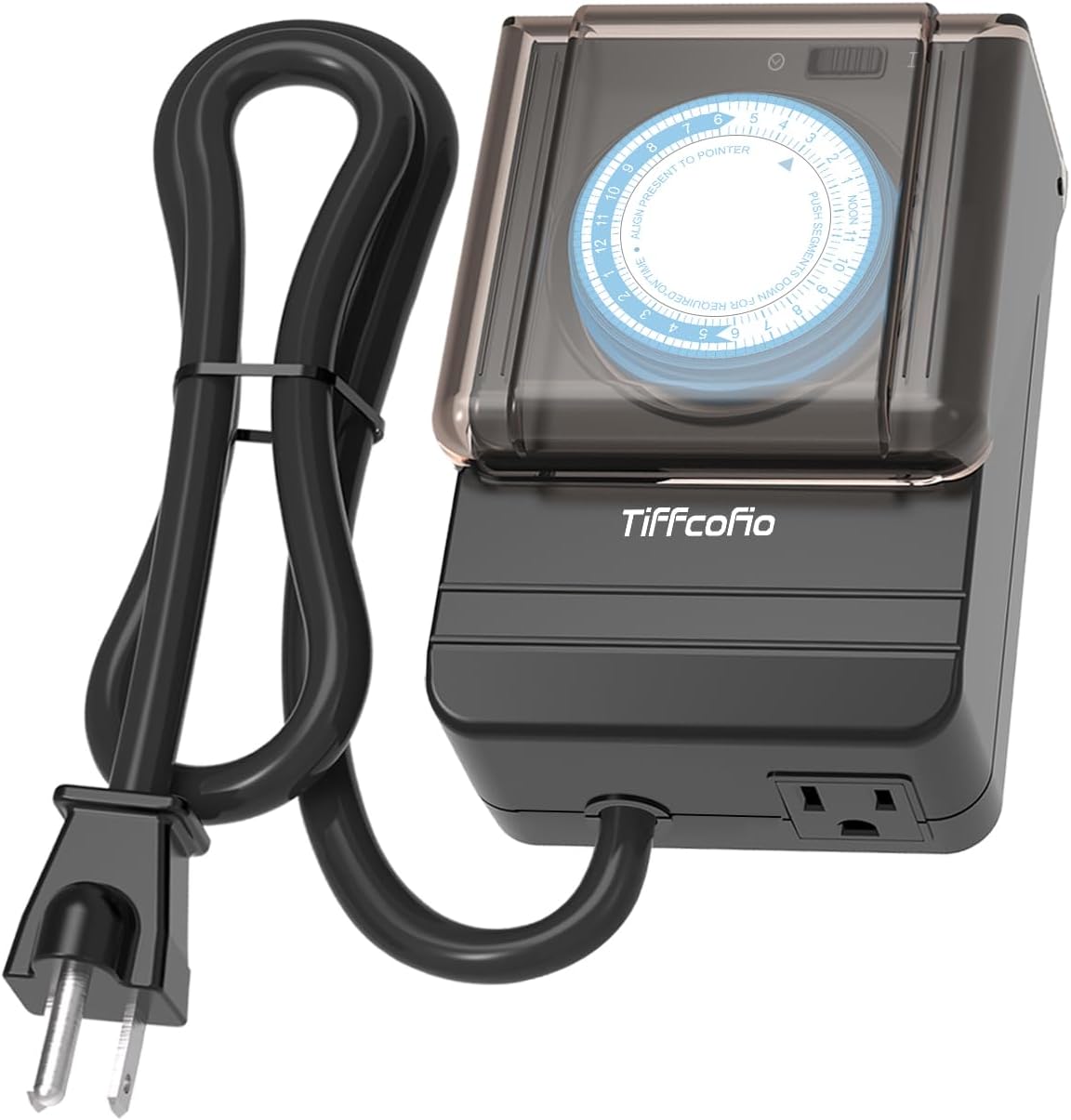
Figure 1: Tiffcofio TF-1701 Outdoor Mechanical Timer Outlet.

Figure 2: Easy Setup Diagram showing pins for ON/OFF, Timer Mode, and Always On switch.
4. Setup Instructions
- Mounting: If desired, use the wall-mounted holes on the back of the timer to secure it to a vertical surface. Ensure it is at least 2 feet above the ground with outlets facing down for optimal weather protection.
- Set Current Time: Rotate the entire timer dial clockwise until the current time aligns with the 'TIME NOW' arrow. The dial is marked with AM/PM hours.
- Program ON/OFF Times: The dial has small, push-down pins around its circumference. Each pin represents a 30-minute interval.
- To set an ON period, push the corresponding pins down.
- To set an OFF period, leave the corresponding pins up.
For example, to turn a device ON from 6:00 PM to 10:00 PM, push down all pins between the '6 PM' and '10 PM' marks on the dial.
- Connect Devices: Plug your outdoor lights or appliances into the two grounded outlets on the bottom of the timer.
- Plug into Power: Insert the timer's power plug into a suitable 15A, 125V AC outdoor grounded outlet.

Figure 3: Recommended vertical mounting for weatherproof performance.
5. Operating Instructions
The Tiffcofio TF-1701 offers two operating modes:
- TIMER Mode: Slide the ON/TIMER switch to the 'TIMER' position. The timer will now automatically turn your connected devices ON and OFF according to your programmed pin settings.
- ON Mode (Manual Override): Slide the ON/TIMER switch to the 'ON' position. This will bypass all programmed settings, and your connected devices will remain continuously ON until the switch is moved back to 'TIMER' or 'OFF' (if available).
Video 1: Product Overview demonstrating the timer's features and operation.
Video 2: Demonstration of setting the timer with pins for outdoor lights.
6. Maintenance
- Cleaning: Disconnect the timer from the power source before cleaning. Wipe the exterior with a damp cloth. Do not use harsh chemicals or abrasive cleaners.
- Protective Cover: Always ensure the clear protective cover over the dial is securely closed to prevent moisture and debris from entering the mechanism.
- Storage: When not in use, store the timer in a cool, dry place away from direct sunlight and extreme temperatures.
7. Troubleshooting
- Device Not Turning ON/OFF:
- Check if the timer is plugged into a live outlet.
- Ensure the ON/TIMER switch is set to 'TIMER' mode.
- Verify that the programming pins for the desired ON/OFF times are correctly set (down for ON, up for OFF).
- Confirm the current time on the dial is accurately aligned with the 'TIME NOW' arrow.
- Timer Not Advancing:
- Ensure the timer is receiving power.
- The internal mechanism may be jammed. Gently rotate the dial to see if it frees up. If not, the unit may require replacement.
- Outlets Not Providing Power:
- Test the connected device directly in the wall outlet to confirm it is functional.
- Check the timer's switch position (ON/TIMER).
8. Specifications
| Brand | Tiffcofio |
| Model Number | TF-1701 |
| Color | Black |
| Material | Plastic |
| Product Dimensions | 5"D x 5"W x 4"H |
| Item Weight | 1.06 pounds |
| Number of Settings | 48 (30-minute intervals) |
| Electrical Rating | 125V/60Hz, 15A/1875W Resistive, 1/2HP |
| UPC | 797442686472 |
| ASIN | B0CSJCT3G3 |
9. Warranty and Support
For warranty information or technical support, please refer to the product packaging or contact Tiffcofio customer service directly. Keep your purchase receipt for warranty claims.