
CONTIA FS8233Pro
FS8233Pro Touch Multi Meter User Manual
Model: FS8233Pro | Brand: CONTIA
Introduction
The CONTIA FS8233Pro is an automatic smart digital multimeter designed for professional electricians and enthusiasts. It features a touch screen for convenient operation and clear display, offering precise measurements for various electrical parameters. This manual provides essential information for the safe and effective use of your multimeter.
Product Overview

Front view of the FS8233Pro Touch Multi Meter, showcasing its large digital display and touch-sensitive controls.

The FS8233Pro Multimeter shown with its included red and black test leads, ready for various electrical measurements.

Demonstration of the intelligent touch sensing feature on the FS8233Pro, highlighting its responsive interface for quick and easy operation.
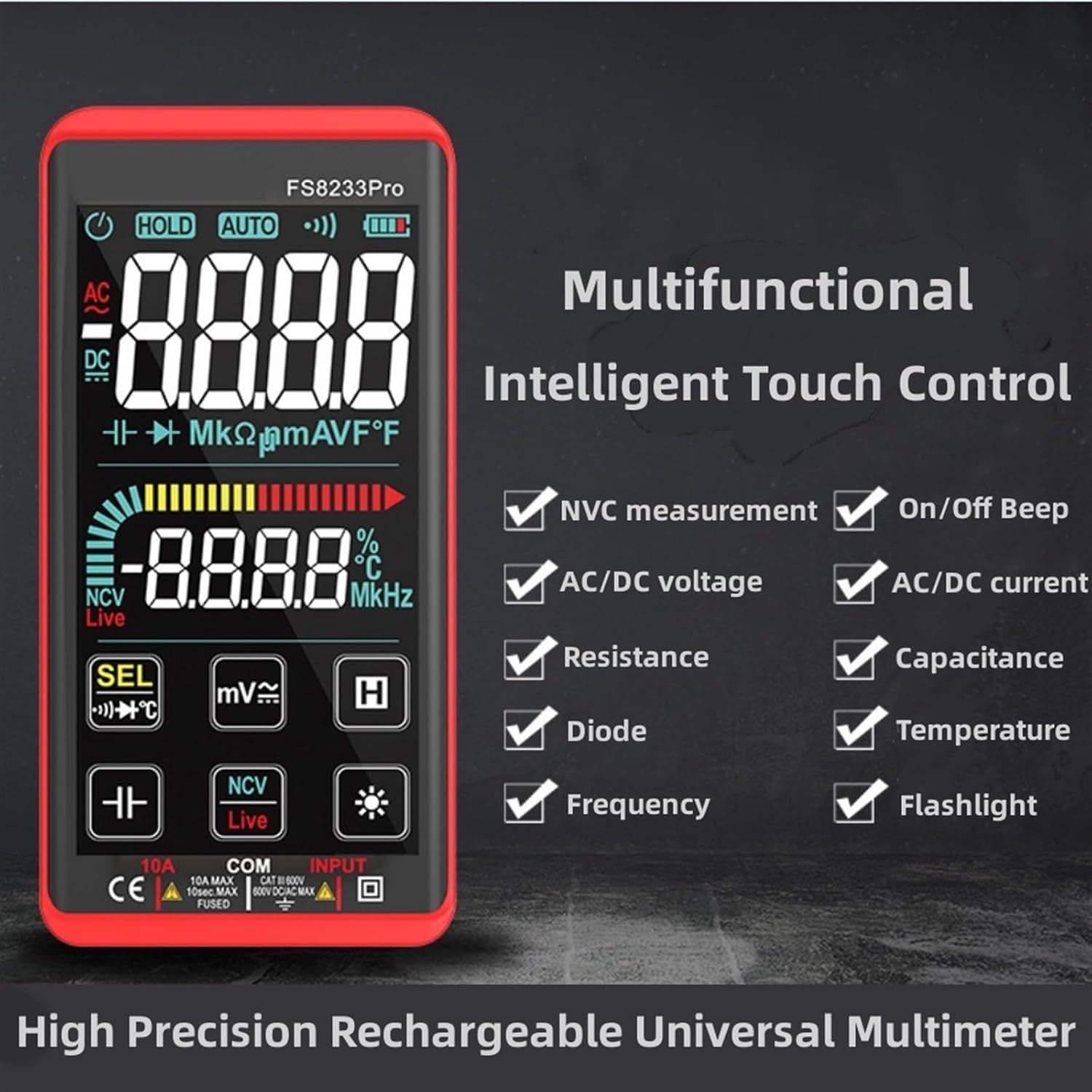
An illustration of the multifunctional intelligent touch control panel of the FS8233Pro, indicating its various measurement capabilities including NCV, AC/DC voltage, resistance, diode, frequency, on/off beep, AC/DC current, capacitance, temperature, and flashlight.
Setup
Charging the Multimeter
The FS8233Pro multimeter features a built-in lithium battery that can be charged via USB. Before first use, ensure the device is fully charged.
- Connect the provided charging cable to the multimeter's charging port.
- Connect the other end of the charging cable to a standard USB power adapter (not included) or a computer's USB port.
- The charging indicator on the device will show the charging status. Once fully charged, the indicator will change or turn off.
Initial Connection
To begin measurements, connect the test leads to the appropriate input jacks.
- Insert the red test lead into the "INPUT" jack.
- Insert the black test lead into the "COM" (common) jack.
- Ensure connections are firm before proceeding with any measurements.
Operating Instructions
The FS8233Pro features automatic detection, simplifying operation by eliminating the need for manual range selection in most cases. Use the touch screen to select specific functions if needed.
Automatic Measurement Mode
Upon powering on, the multimeter typically enters an automatic measurement mode, detecting the type of input (voltage, resistance, continuity) and displaying the appropriate reading.
Specific Measurement Functions
- AC Voltage (ACV):
Range: 0.5V~750V ±(1%+5)
To measure AC voltage, ensure the multimeter is in ACV mode (or auto-detects ACV). Connect the test leads in parallel to the circuit or component being measured.
- DC Voltage (DCV):
Range: 0.5V~1000V ±(0.5%+3)
To measure DC voltage, ensure the multimeter is in DCV mode (or auto-detects DCV). Connect the red lead to the positive side and the black lead to the negative side of the circuit.
- Resistance (Ω):
Range: 0.1Ω~99999KΩ ±(1%+3)
To measure resistance, ensure the circuit is de-energized. Connect the test leads across the component. The multimeter will automatically select the appropriate range.
- Frequency (Hz):
Range: 40HZ~10000HZ ±(0.5%+3)
For frequency measurement, connect the test leads to the circuit where the frequency needs to be determined. Ensure the multimeter is set to frequency mode.
- Capacitance (F):
Range: 10nF~60000μF ±(4.5%+5)
Before measuring capacitance, ensure the capacitor is fully discharged. Connect the test leads across the capacitor terminals.
- Temperature (°C/°F):
Range: -40°C~1000°C ±(2%+5)
Use the included temperature probe (if applicable) and connect it to the appropriate jacks. Select the temperature measurement function.
- On & Off Beep (Continuity):
The multimeter will sound an auxiliary buzzer if the resistance of the tested circuit is less than 50Ω, indicating continuity.
- Diode Test:
Displays the approximate diode forward voltage value. Connect the red lead to the anode and the black lead to the cathode of the diode.
- NCV (Non-Contact Voltage) Detection:
Allows detection of AC voltage without direct contact. There are three alarm modes based on the detected voltage strength. Hold the NCV sensor near the conductor.
- Live Line Identification:
When detecting a live line, "Live" will appear on the screen, accompanied by an alarm sound.
Automatic Shutdown
The device will automatically shut down if it is not used for approximately 15 minutes to conserve battery life.
Maintenance
- Cleaning: Use a soft, damp cloth to clean the exterior of the multimeter. Do not use abrasive cleaners or solvents.
- Storage: Store the multimeter in a cool, dry place away from direct sunlight and extreme temperatures.
- Battery Care: Recharge the lithium battery regularly, even if not in frequent use, to maintain its lifespan. Avoid fully discharging the battery for extended periods.
- Protective Case: The multimeter is equipped with a silicone protective case to prevent shock and protect the hardware from damage. Keep the case on during use and storage.
- Fuse: The device is equipped with an intelligent anti-burning fuse for protection. If the multimeter stops functioning correctly, consult a qualified technician for fuse inspection and replacement.
Troubleshooting
| Problem | Possible Cause | Solution |
|---|---|---|
| Multimeter does not power on. | Low or depleted battery. | Charge the multimeter using the provided USB cable. |
| Inaccurate readings. | Incorrect function selected (if not in auto mode) or poor test lead connection. | Ensure test leads are securely connected. Verify the correct measurement function is selected or allow auto-ranging to stabilize. |
| No continuity beep. | Resistance is above 50Ω or continuity function not active. | Check the circuit's resistance. Ensure the multimeter is in continuity mode. |
| Display is dim or unreadable. | Low battery or display brightness setting. | Charge the battery. Adjust display brightness if the option is available (refer to device interface). |
| Device shuts off unexpectedly. | Automatic shutdown activated due to inactivity. | This is normal behavior. Power on the device again to resume use. |
Specifications
| Parameter | Value |
|---|---|
| Model | FS8233Pro |
| Brand | CONTIA |
| AC Voltage (ACV) Range | 0.5V~750V ±(1%+5) |
| DC Voltage (DCV) Range | 0.5V~1000V ±(0.5%+3) |
| Resistance Range | 0.1Ω~99999KΩ ±(1%+3) |
| Frequency Range | 40HZ~10000HZ ±(0.5%+3) |
| Capacitance Range | 10nF~60000μF ±(4.5%+5) |
| Temperature Range | -40°C~1000°C ±(2%+5) |
| Continuity Beep Threshold | Less than 50Ω |
| Automatic Shutdown | Approx. 15 minutes of inactivity |
| Power Source | Rechargeable Lithium Battery (USB charged) |
| Safety Feature | Intelligent anti-burning fuse |
| Protection | Silicone protective case |
| Package Dimensions | 1.18 x 0.79 x 0.39 inches |
| Item Weight | 1.76 ounces (50 Grams) |
| Country of Origin | China |
Package Contents
- 1 x FS8233Pro Multimeter
- 1 x Instruction Manual
- 1 x Charging Cable
- Test Leads (Red and Black)
Ask a question about this manual
Ask about setup, troubleshooting, compatibility, parts, safety, or missing instructions. Manuals+ will review the question and use this page’s manual context to help answer it.