
Introduction
This manual provides instructions for the PERFASCIN AKB74235402 replacement remote control, designed for use with LG AC Air Conditioners. This remote control offers a direct replacement solution without the need for complex programming or pairing. Simply install batteries to begin operation.
Product Features
- Direct replacement for LG AC Air Conditioner remote control model AKB74235402.
- No programming or pairing required; ready to use after battery installation.
- Infrared (IR) remote controller.
- Ergonomic design for comfortable handling.
- Includes a pedestal for convenient storage.
Setup
Battery Installation
The remote control requires two AAA batteries (not included). Follow these steps to install them:
- Locate the battery compartment cover on the back of the remote control.
- Slide the cover downwards or press the latch and lift to open the compartment.
- Insert two new AAA batteries, ensuring the positive (+) and negative (-) terminals match the diagrams inside the compartment.
- Replace the battery compartment cover by sliding it back into place until it clicks securely.
Once batteries are installed, the remote control is ready for immediate use with compatible LG AC Air Conditioners. No additional programming or pairing is necessary.
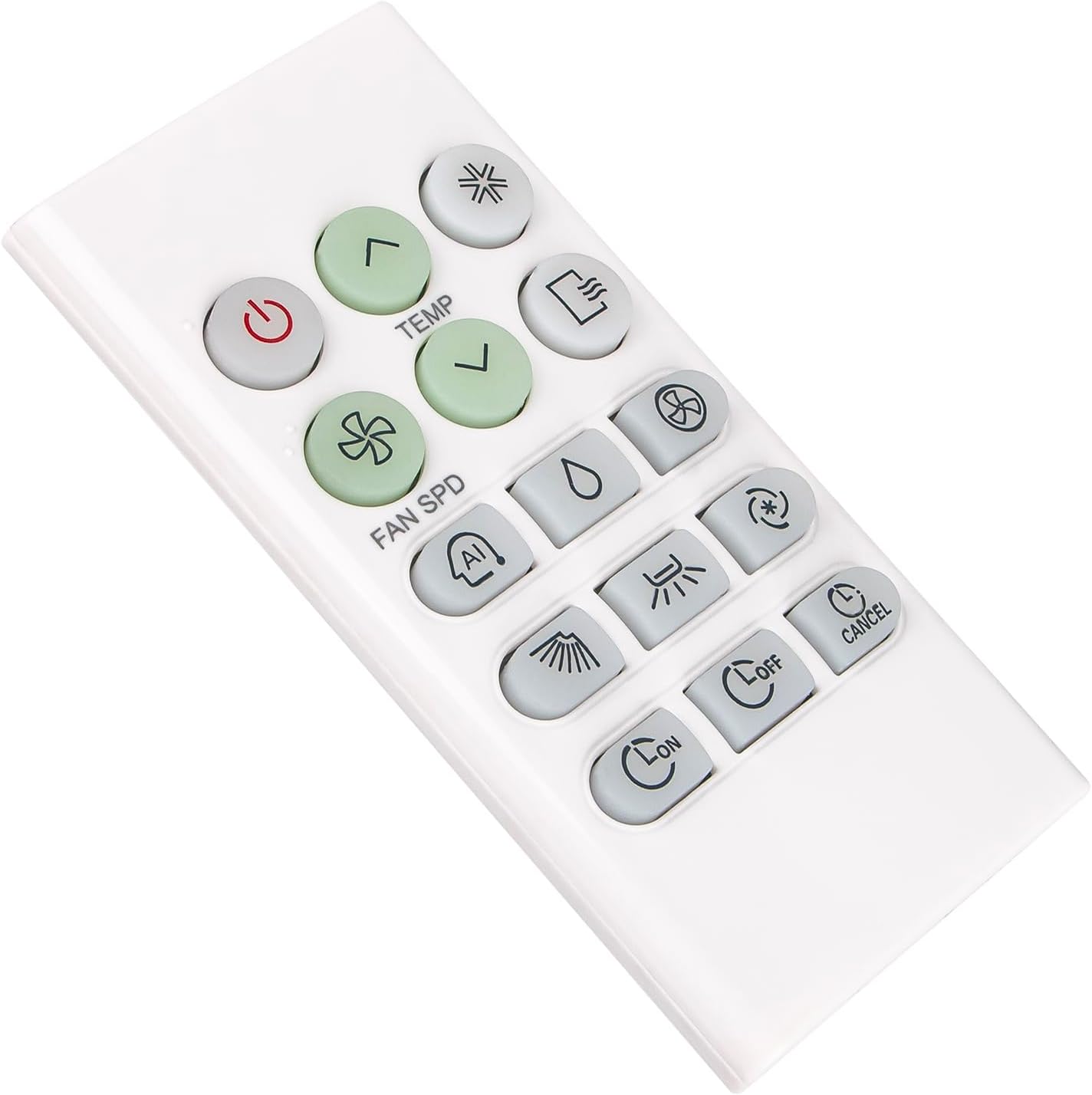
Figure 1: Front view of the PERFASCIN AKB74235402 replacement remote control, showing button layout.
Using the Pedestal
The remote control comes with a pedestal for convenient storage and easy access. Place the remote control into the pedestal when not in use to keep it secure and prevent misplacement.

Figure 2: The PERFASCIN AKB74235402 replacement remote control placed in its accompanying pedestal.
Operating Instructions
Button Functions
Point the remote control directly at the LG AC Air Conditioner's infrared receiver. Ensure there are no obstructions between the remote and the air conditioner.
- Power Button (Red Circle with Line Icon): Turns the air conditioner ON or OFF.
- TEMP Up/Down Buttons (Green Up/Down Arrows): Adjusts the temperature setting up or down.
- FAN SPD Button (Green Fan Icon): Cycles through fan speed settings (e.g., Low, Medium, High, Auto).
- Mode Button (Wavy Lines Icon): Selects the operating mode (e.g., Cool, Heat, Fan, Dry, Auto).
- AI Button (AI Icon): Activates or deactivates Artificial Intelligence mode (if supported by the AC unit).
- Dry Mode Button (Water Drop Icon): Activates the dehumidification (dry) mode.
- Swing Button (Fan with Arrows Icon): Controls the air swing direction or activates/deactivates the swing function.
- Jet Cool/Fast Cool Button (Snowflake/Star Icon): Activates a rapid cooling function.
- Sleep Button (Star Icon): Activates or deactivates the sleep mode for quiet operation and energy saving.
- Timer ON Button (Clock with ON): Sets the timer for the air conditioner to turn ON automatically.
- Timer OFF Button (Clock with OFF): Sets the timer for the air conditioner to turn OFF automatically.
- Cancel Button (Clock with CANCEL): Cancels active timer settings or other functions.
- Louver/Spray Icon Button: Controls the vertical louver movement or a specific air flow direction.
- Heat Mode Button (Sun Icon): Activates the heating mode.
Note: Specific functions may vary slightly depending on your LG AC Air Conditioner model. Refer to your air conditioner's manual for detailed information on each function.
Maintenance
Battery Replacement
Replace batteries when the remote control's range decreases or if it stops responding. Always replace both batteries at the same time with new AAA alkaline batteries. Do not mix old and new batteries, or different types of batteries.
Cleaning
To clean the remote control, wipe it gently with a soft, dry cloth. Do not use liquid cleaners, abrasive cleaners, or chemical solvents, as these can damage the remote's surface or internal components.
Troubleshooting
Remote Not Responding
- Check Batteries: Ensure batteries are inserted correctly with the correct polarity (+/-) and are not depleted. Replace with new AAA alkaline batteries if necessary.
- Line of Sight: Make sure there is a clear path between the remote control and the air conditioner's infrared receiver. Obstructions can block the signal.
- Distance: Ensure you are within the effective operating range of the air conditioner's infrared receiver.
- Interference: Strong light sources (like direct sunlight or fluorescent lights) can interfere with the infrared signal. Try operating the remote in a different lighting condition.
Specifications
| Feature | Detail |
|---|---|
| Product Model | AKB74235402 |
| Compatibility | LG AC Air Conditioner AKB-74235402 |
| Power Source | 2 x AAA Batteries (not included) |
| Transmission Type | Infrared (IR) |
| Color | Black |
| Product Dimensions | 6 x 5 x 0.55 inches |
| Item Weight | 1.4 ounces |
| Special Feature | Ergonomic, No Programming Required |
Support
For any questions or further assistance regarding your PERFASCIN AKB74235402 replacement remote control, please contact the seller or manufacturer directly. Refer to your purchase documentation for contact information.