
1. Introduction
Thank you for purchasing the ANTDALIS AKVINE4 Small Digital Alarm Clock. This manual provides detailed instructions for setting up and operating your new alarm clock. Please read it carefully to ensure proper use and to fully utilize all its features.
The ANTDALIS AKVINE4 features dual alarm functionality, adjustable brightness, an automatic night mode, and a clear display for time, date, and temperature. Its compact and modern design makes it suitable for various environments.
2. Product Overview
2.1 Key Features
- Dual Alarm Functionality: Set two independent alarms with options for weekday or weekend modes.
- Snooze Function: Provides extra moments of rest after the alarm sounds.
- Adjustable Brightness: 5 levels of brightness adjustment for the LED display.
- Automatic Night Mode: Automatically dims the display from 22:00 to 06:00 for comfortable sleep.
- Multiple Display Modes: Choose between time-only display or a cycling display of time, temperature, and date.
- Mirror LED Display: Stylish and practical design.
2.2 Package Contents
- ANTDALIS AKVINE4 Digital Alarm Clock
- Power Cord (USB)
- User Manual
2.3 Product Diagram

Figure 1: Front view of the ANTDALIS Small Digital Alarm Clock, showing the digital time display.
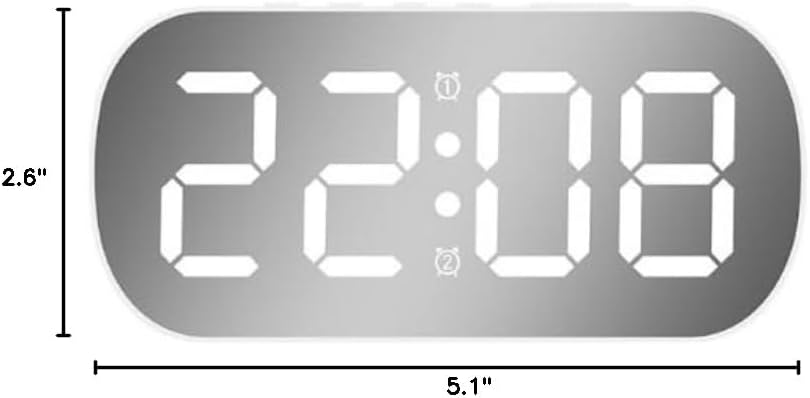
Figure 2: Dimensions of the ANTDALIS Small Digital Alarm Clock, measuring 5.1 inches in width and 2.6 inches in height.
3. Setup
3.1 Powering the Device
- Connect the provided USB power cord to the DC 5V port on the back of the alarm clock.
- Plug the other end of the USB cable into a compatible USB power adapter (not included) and then into a wall outlet.
- The display will light up, indicating the clock is powered on.
Battery Backup: The clock supports battery backup (3x AAA batteries, not included) to maintain time settings during a power outage. Insert batteries into the compartment on the back of the device. Note that the display will not remain continuously lit when operating on battery power alone; it will only show the time briefly when a button is pressed.
3.2 Initial Time Setting
- Press and hold the MODE button (or similar time set button, refer to device markings) on the back of the clock until the hour digits begin to flash.
- Use the UP and DOWN buttons to adjust the hour.
- Press the MODE button again to switch to minute adjustment. Use the UP and DOWN buttons to set the minutes.
- Continue pressing MODE to cycle through setting the year, month, and date, adjusting each with the UP and DOWN buttons.
- Press MODE one last time to confirm all settings and exit time setting mode.
4. Operating Instructions
4.1 Setting Alarms
The ANTDALIS AKVINE4 supports two independent alarms (Alarm 1 and Alarm 2).
- Press and hold the ALARM button (or ALARM1/ALARM2 button) on the back of the clock. The alarm hour will begin to flash.
- Use the UP and DOWN buttons to set the desired alarm hour.
- Press the ALARM button again to switch to minute adjustment. Use the UP and DOWN buttons to set the desired alarm minutes.
- Press the ALARM button once more to select the alarm mode:
- 1-5: Weekday alarm (Monday to Friday)
- 1-7: Daily alarm (Monday to Sunday)
- 6-7: Weekend alarm (Saturday to Sunday)
- Press ALARM to confirm and exit alarm setting mode. Repeat for the second alarm if needed.
- To activate/deactivate an alarm, briefly press the corresponding ALARM1 or ALARM2 button. An indicator icon will appear/disappear on the display.
4.2 Snooze Function
When the alarm sounds, press the large SNOOZE button on the top of the clock. The alarm will pause for a few minutes (typically 5-9 minutes) and then sound again. To turn off the alarm completely, press any other button on the back of the clock.
4.3 Adjusting Display Brightness
The clock offers 5 levels of manual brightness adjustment and an automatic night mode.
- Manual Adjustment: Briefly touch the SNOOZE button on the top of the clock to cycle through the 5 brightness levels.
- Automatic Night Mode: The clock automatically adjusts its brightness to a softer, lower level between 10:00 PM (22:00) and 6:00 AM (06:00) to ensure a comfortable sleep environment. This feature is enabled by default.
4.4 Display Modes
The clock can display time alone or cycle through time, temperature, and date.
- Briefly press the MODE button to switch between display modes.
- Available modes include: Time only, or Time/Temperature/Date cycling.
5. Maintenance
- Clean the clock's surface with a soft, dry cloth. Avoid using abrasive cleaners or solvents.
- Keep the device away from water and high humidity.
- Do not expose the clock to extreme temperatures or direct sunlight for extended periods.
- If using battery backup, replace batteries annually or when the display becomes dim (on battery power) to ensure continuous timekeeping during power interruptions.
6. Troubleshooting
| Problem | Possible Cause | Solution |
|---|---|---|
| Display is blank or dim. | No power, power cord loose, or in battery-only mode with no button press. | Ensure power cord is securely connected and plugged into a working outlet. If on battery, press any button to briefly illuminate. |
| Alarm does not sound. | Alarm not activated, alarm time incorrectly set, or volume too low. | Verify alarm is activated (indicator icon visible). Check alarm time and ensure it's set correctly. Adjust alarm volume if applicable. |
| Time is incorrect. | Time not set correctly after power loss or initial setup. | Follow the "Initial Time Setting" instructions to reset the time. Ensure battery backup is installed for power outages. |
| Automatic night mode not working. | Feature may be disabled or not functioning correctly. | The automatic night mode is typically always active. If it's not working, ensure the clock is receiving continuous power. |
7. Specifications
- Brand: ANTDALIS
- Model Number: AKVINE4
- Display Type: Digital LED
- Color: White
- Product Dimensions: 5.1"W x 2.6"H
- Item Weight: 6.4 ounces
- Power Source: Corded Electric (USB)
- Battery Backup: Yes (Batteries not included)
- Material: Plastic
- Special Features: Dual Alarm, Snooze Function, 5 Levels of Adjustable Brightness, Automatic Night Mode, Time/Date/Temperature Display
8. Warranty & Support
For warranty information and customer support, please refer to the documentation included with your product or contact ANTDALIS customer service directly. Contact details are typically available on the product packaging or the official ANTDALIS website.