
1. Getting Started
1.1. What's in the Box
Before you begin, ensure all components are present in your product packaging:
- Xiaomi Redmi Note 13 4G LTE Smartphone
- USB Cable
- Wall Adapter
- SIM Tray Ejector
- Fast Car charger (Note: This item is listed in the product details, but typically a car charger is a separate accessory. Please verify your specific package contents.)
1.2. Device Overview
Familiarize yourself with the physical layout of your Redmi Note 13 4G LTE.

Image: Front and back view of the Xiaomi Redmi Note 13 4G LTE in Ice Blue, highlighting the display and the triple camera setup on the rear.
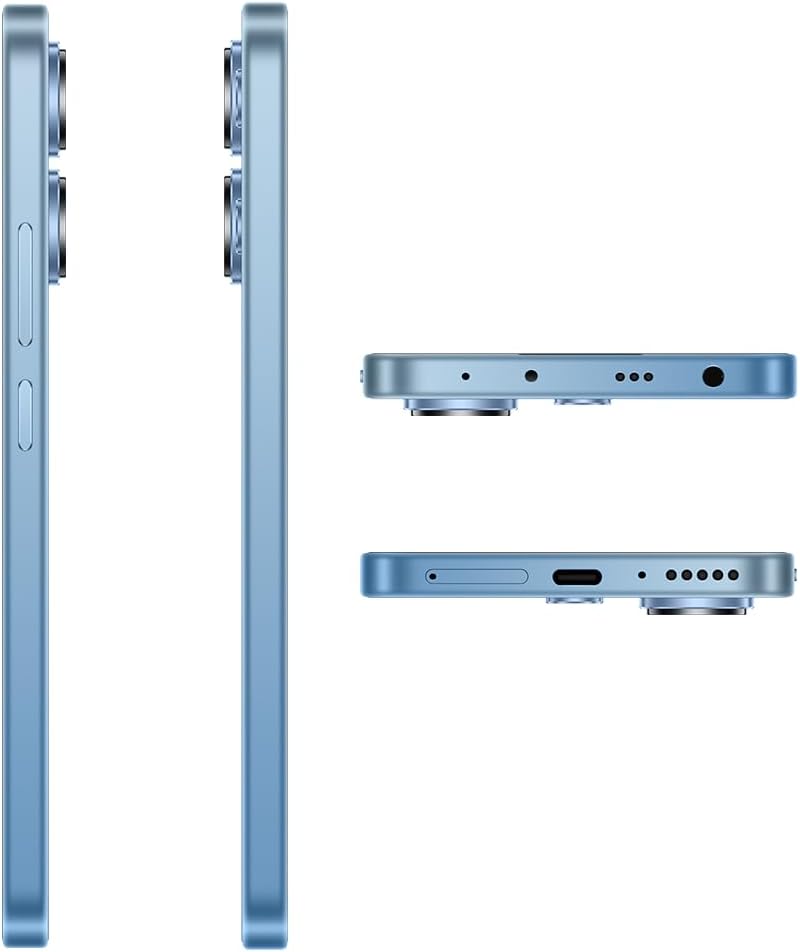
Image: Detailed views of the Xiaomi Redmi Note 13 4G LTE's sides, top, and bottom, illustrating the placement of the SIM tray, USB port, 3.5mm headphone jack, and speaker grilles.
1.3. SIM Card and MicroSD Installation
The Redmi Note 13 4G LTE supports a hybrid SIM tray, allowing for either two SIM cards or one SIM card and one MicroSD card for expanded storage.
- Locate the SIM tray on the side of the device.
- Insert the SIM tray ejector tool into the small hole next to the tray and press gently until the tray pops out.
- Place your Nano-SIM card(s) and/or MicroSD card into the designated slots on the tray. Ensure the gold contacts are facing down.
- Carefully reinsert the tray into the device until it clicks into place.
Note: This device is designed for the USA market and primarily works on T-Mobile, Mint, Tello, or any network under the T-Mobile umbrella. Outside the USA, it works with any GSM carrier SIM. An already activated SIM card is required for network functionality.
1.4. Initial Power On and Charging
To power on your device for the first time, press and hold the Power button until the Xiaomi logo appears. If the battery is depleted, connect the device to the wall adapter using the provided USB cable to charge it. It is recommended to fully charge the device before first use.
2. Operating Your Device
2.1. Display and Navigation
The Redmi Note 13 features a 6.67-inch FHD+ AMOLED DotDisplay with a refresh rate of up to 120Hz, providing a smooth and responsive user experience. Navigation is primarily done via the touchscreen.

Image: Front view of the Xiaomi Redmi Note 13 4G LTE, showcasing its vibrant AMOLED display and punch-hole front camera.
- Touchscreen Gestures: Swipe, tap, pinch-to-zoom, and long-press are standard gestures for interacting with the MIUI 14 operating system.
- Brightness Adjustment: The display offers 4096 levels of brightness for comfortable viewing. Adjust this in the Quick Settings panel or Display settings.
- Eye Care Features: The device includes SGS eye care certification and circadian rhythm adjustment to reduce eye strain, especially during night use.
2.2. Camera Features
Capture high-quality photos and videos with the advanced camera system.

Image: Close-up of the Xiaomi Redmi Note 13 4G LTE's rear camera module, featuring the 108MP main sensor, ultra-wide, and macro lenses, along with the LED flash.
- Main Camera: 108MP (f/1.8) ultra-clear main camera with built-in zoom technology for telephoto effects.
- Ultra-Wide Camera: 8MP (f/2.2) for capturing broader scenes.
- Macro Camera: 2MP (f/2.4) for detailed close-up shots.
- Front Camera: 13MP (wide) for selfies and video calls.
- Xiaomi Imaging Engine: Ensures faster startup speeds and clearer photos.
2.3. Connectivity
Your device supports various connectivity options:
- Cellular: Dual 4G support (SIM1 + Hybrid SIM/MicroSD). Supports various LTE, WCDMA, and GSM bands.
- Wi-Fi: 802.11a/b/g/n/ac protocol for high-speed internet access.
- Bluetooth: Version 5.2 for connecting wireless accessories.
- GPS: GPS/AGPS and Glonass for accurate location services.
2.4. Audio Features
The Redmi Note 13 4G LTE is equipped with dual speakers for an immersive audio experience and a 3.5mm headphone jack for wired audio connections. It also supports Hi-Res Audio.
3. Maintenance
3.1. Battery Care
The device is powered by a 5000 mAh Lithium Polymer battery. To maximize battery life:
- Avoid extreme temperatures.
- Use the original charger and cable provided.
- Avoid completely draining the battery frequently.
- Unplug the charger once the battery is full.
3.2. Cleaning Your Device
Use a soft, lint-free cloth to clean the screen and body of the phone. Avoid using harsh chemicals or abrasive materials that could damage the finish or screen coating.
3.3. Software Updates
Regularly check for and install system updates to ensure your device has the latest features, security patches, and performance improvements. You can usually find this option in the Settings menu under "About phone" or "System update."
4. Troubleshooting
If you encounter issues with your Redmi Note 13 4G LTE, try the following common troubleshooting steps:
- Device Not Responding: Press and hold the Power button for about 10-15 seconds to force a restart.
- Network Issues: Check if your SIM card is properly inserted. Toggle Airplane Mode on and off. Restart the device. Verify your mobile data settings.
- Wi-Fi Connectivity: Restart your Wi-Fi router. Forget the network on your phone and reconnect.
- App Crashes: Clear the cache and data of the problematic app in Settings > Apps. If the issue persists, uninstall and reinstall the app.
- Battery Draining Quickly: Review app usage in battery settings. Reduce screen brightness. Disable unnecessary background apps or features like GPS, Bluetooth, and Wi-Fi when not in use.
- Slow Performance: Close unused apps. Clear cache. Consider performing a factory reset as a last resort (back up your data first).
For more complex issues, refer to the official Xiaomi support website or contact customer service.
5. Specifications
Detailed technical specifications for the Xiaomi Redmi Note 13 4G LTE (Model: 23129RA5FL):
| Feature | Specification |
|---|---|
| Model Name | Note 13 4G |
| Operating System | MIUI 14 |
| Processor | Qualcomm Snapdragon 4 Gen 1 (2X Cortex-A78 @ 2.0GHz; 6X Cortex-A55 @ 1.8GHz) |
| GPU | Adreno 619 |
| Display | 6.67 Inches FHD+ AMOLED DotDisplay, 120Hz Refresh Rate, 1200nits brightness, 4,500,000:1 Contrast Ratio |
| Resolution | 1920 x 1080 |
| RAM Memory | 8 GB |
| Storage Capacity | 256 GB |
| Main Camera | 108MP (f/1.8) |
| Ultra-Wide Camera | 8MP (f/2.2) |
| Macro Camera | 2MP (f/2.4) |
| Front Camera | 13 MP |
| Battery | 5000 mAh Lithium Polymer (5000 Watt Hours) |
| Wireless Technologies | Bluetooth 5.2, Wi-Fi (802.11a/b/g/n/ac), Cellular (4G LTE, WCDMA, GSM) |
| Audio Jack | 3.5 mm |
| Dimensions | 7.09 x 3.54 x 2.36 inches |
| Item Weight | 1.04 pounds (470 Grams) |
| Color | Ice Blue Global ROM |
6. Warranty and Support
6.1. Product Warranty
Your Xiaomi Redmi Note 13 4G LTE comes with a standard manufacturer's warranty. Please refer to the warranty card included in your product packaging or visit the official Xiaomi website for detailed terms and conditions regarding warranty coverage, duration, and service procedures.
6.2. Customer Support
For technical assistance, service inquiries, or further information, please contact Xiaomi customer support through their official channels. You can typically find contact information on the Xiaomi global website or within the support section of the MIUI operating system on your device.
Online resources such as FAQs, user forums, and software downloads may also be available on the official Xiaomi support portal.


