
1. Introduction
Thank you for choosing the DARKBEAM UV Flashlight 365nm. This powerful and versatile UV light is designed for various detection tasks, including pet urine, resin curing, amber identification, and banknote verification. The 365nm wavelength provides a dedicated detection spectrum with minimal visible light leakage, making it effective even in natural light, though optimal results are achieved in darker conditions.
For your safety, UV400-UV protective glasses are included to shield your eyes during prolonged use.
2. What's in the Box
- 1x DARKBEAM UV Flashlight 365nm
- 1x Rechargeable Battery
- 1x USB-C Charging Cable
- 1x UV Protective Glasses
3. Safety Information
- Eye Protection: Always wear the provided UV protective glasses when operating the UV flashlight to prevent eye strain or potential damage from prolonged exposure to ultraviolet light.
- Direct Exposure: Avoid directing the UV light into eyes or onto skin for extended periods.
- Children: Keep out of reach of children. This is not a toy.
- Battery Safety: Use only the specified rechargeable battery. Do not attempt to open or modify the battery.
- Disposal: Dispose of batteries and the flashlight according to local regulations.
4. Setup
4.1 Charging the Battery
- Insert the included rechargeable battery into the flashlight with the correct polarity.
- Connect the USB-C charging cable to the flashlight's charging port.
- Plug the other end of the USB-C cable into a 5V 2A adapter, power bank, or computer USB port.
- The charging indicator light will show red during charging and turn green when fully charged.
A full charge typically takes approximately 3 hours and provides 6-8 hours of operation.

Image: High Capacity Rechargeable Battery. The image shows the DARKBEAM UV flashlight being charged via a USB-C cable connected to a power bank. Indicator lights show red for 'In Charging' and green for 'Full Charged'.

Image: Charging Indicator Lights. A detailed view of the flashlight's power button area, illustrating the red light for 'In Charging' and green light for 'Full Charging'.
4.2 Attaching the Detachable Clip
The flashlight comes with a detachable pocket clip for convenient carrying. Simply slide the clip onto the flashlight body until it securely snaps into place. This allows you to attach the flashlight to a pocket, belt, or backpack.

Image: Detachable Clip for Portability. The image demonstrates the flashlight's detachable clip, showing it secured to a backpack strap and conveniently placed in a jeans pocket.
5. Operating Instructions
5.1 Power On/Off
Press the power button with a light click to turn the UV flashlight on or off.
5.2 Adjustable Focus
The flashlight features an adjustable focus mechanism. Extend the head of the flashlight to widen the beam for floodlight coverage, or retract it to narrow the beam for a spotlight effect. This allows you to adapt the light to your specific detection needs.
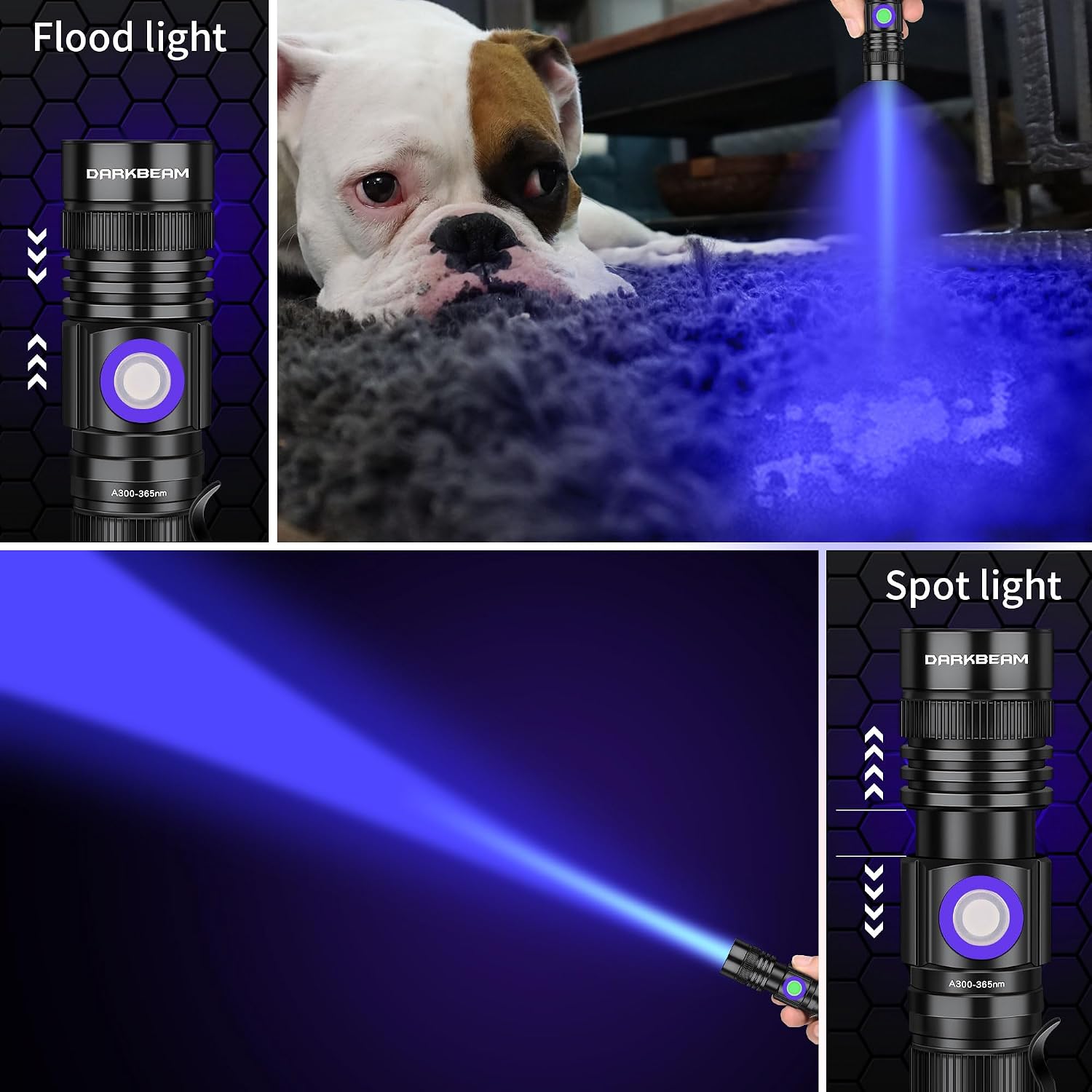
Image: Adjustable Focus: Flood and Spot Light. This image illustrates the flashlight's ability to switch between a wide floodlight beam and a narrow spotlight beam by adjusting the head, useful for various detection scenarios.

Image: Scalable Design and Portability. A diagram illustrating the flashlight's adjustable length for wide and narrow beams, shown alongside an iPhone 15 for scale, emphasizing its compact and portable nature.
5.3 Common Applications
- Pet Urine Detection: Use in a darkened room to reveal hidden pet urine stains on carpets, furniture, and floors.
- Resin Curing: Accelerate the curing process of UV resin and green oil.
- Banknote Verification: Authenticate currency by revealing security features.
- Mineral and Amber Identification: Detect fluorescent properties in minerals and amber.
- Scorpion Detection: Scorpions fluoresce under UV light, making them easier to spot.
- Hotel Room Inspection: Check for cleanliness in hotel rooms, including bedding and bathroom surfaces.

Image: Cat Ringworm Detection. The image shows the UV flashlight being used to detect ringworm on a kitten, highlighting a glowing area on its head.

Image: Pet Urine Detection. This image depicts the UV flashlight revealing pet urine stains on a carpet, with a dog and cat nearby, illustrating its use for cleaning.

Image: Diverse Applications: Banknote, Mineral, and Scorpion Detection. A collage showcasing the flashlight's versatility, including banknote authentication, glowing minerals, pet stain detection, fluorescent materials, scorpion spotting, and resin curing.
6. Maintenance
6.1 Cleaning
Wipe the flashlight body with a soft, damp cloth. Do not use abrasive cleaners or solvents.
6.2 Water Resistance
The flashlight has an IPX4 water resistance rating, meaning it is protected against splashing water from any direction. It is not designed for submersion. Ensure the charging port cover is securely closed to maintain water resistance.

Image: IPX4 Waterproof Rating. The flashlight is shown on wet pebbles with water droplets, illustrating its IPX4 water resistance against splashes.
6.3 Storage
Store the flashlight in a cool, dry place when not in use. If storing for extended periods, charge the battery periodically to maintain its health.
7. Troubleshooting
- Flashlight not turning on: Ensure the battery is correctly inserted and fully charged.
- Light is dim: Recharge the battery.
- Battery drains quickly: Ensure the flashlight is fully turned off when not in use. If the issue persists, the battery may need replacement.
- Charging issue: Check the USB-C cable and charging adapter. Try a different cable or power source.
8. Specifications
| Model Number | A300 365 set-DKL |
| UV Wavelength | 365 nm |
| Power | 10 Watts |
| Luminous Flux (White Light) | 500 Lumens (Note: This refers to white light output, UV light is measured differently) |
| Battery Type | Lithium-ion (Rechargeable) |
| Battery Life | Up to 8 hours |
| Charging Time | Approx. 3 hours (with 5V 2A input) |
| Material | Aluminum Alloy |
| Water Resistance | IPX4 (Splash-proof) |
| Dimensions (L x W x H) | 121 x 20 x 26 mm |
| Weight | 102 Grams |
9. Warranty and Support
DARKBEAM provides a 180-day refund policy and a one-year warranty for this product. For any questions, issues, or support needs, please contact DARKBEAM customer service. We are committed to providing prompt and satisfactory assistance.
Manufacturer: DARKBEAM
