
Introduction
Thank you for purchasing the Shark NZ850UK Upright Vacuum Cleaner. This manual provides essential information for the safe and efficient operation, maintenance, and troubleshooting of your new appliance. Please read these instructions thoroughly before first use and retain them for future reference.
Important Safety Instructions
WARNING: To reduce the risk of fire, electric shock, or injury, always follow basic safety precautions when using your vacuum cleaner.
- Always unplug the vacuum cleaner from the electrical outlet before cleaning or servicing.
- Do not use outdoors or on wet surfaces.
- Do not allow the appliance to be used as a toy. Close attention is necessary when used by or near children.
- Use only as described in this manual. Use only manufacturer’s recommended attachments.
- Do not use with a damaged cord or plug. If the appliance is not working as it should, has been dropped, damaged, left outdoors, or dropped into water, return it to SharkNinja Operating LLC for examination, repair, or adjustment.
- Do not pull or carry by cord, use cord as a handle, close a door on cord, or pull cord around sharp edges or corners. Do not run appliance over cord. Keep cord away from heated surfaces.
- Do not unplug by pulling on cord. To unplug, grasp the plug, not the cord.
- Do not handle plug or vacuum cleaner with wet hands.
- Do not put any object into openings. Do not use with any opening blocked; keep free of dust, lint, hair, and anything that may reduce airflow.
- Keep hair, loose clothing, fingers, and all parts of body away from openings and moving parts.
- Turn off all controls before plugging or unplugging.
- Use extra care when cleaning on stairs.
- Do not use to pick up flammable or combustible liquids, such as gasoline, or use in areas where they may be present.
- Do not pick up anything that is burning or smoking, such as cigarettes, matches, or hot ashes.
- Do not use without dust cup and/or filters in place.
Components and Accessories
Your Shark NZ850UK vacuum cleaner comes with several components and accessories designed for versatile cleaning.
- Main Upright Vacuum Unit with DuoClean Floorhead
- Dust Cup
- Handle with Hose
- Wand
- Duster-Crevice Tool
- Upholstery Tool
- Multi-Surface Tool
- Pet Power Brush
- Car Detail Kit
Assembly and Setup
Follow these steps to assemble your vacuum cleaner:
- Place the motorized floor nozzle on a level surface.
- Insert the wand into the nozzle until it clicks securely into place.
- Slide the handle into the top of the wand until it clicks.
- Attach the hose to the connector on the back of the vacuum pod.
- Secure the hose clip to the wand.
- Store accessories on the onboard posts.
Ensure all connections are firm before operating the vacuum cleaner.
Operating Instructions
Power and Surface Settings
Plug the power cord into an electrical outlet. Press the Power button to turn on the vacuum. Select the appropriate surface setting:
- Hard Floor: For bare floors and delicate area rugs. The brush-rolls spin slowly.
- Carpet/Low Pile: For carpets. The brush-rolls spin faster.
The DuoClean floorhead features two motorized brush-rolls that work together to clean both hard floors and carpets effectively without needing to switch heads.

LED Headlights: The integrated LED headlights illuminate hidden dust and debris, making it easier to spot and clean.
Anti Hair Wrap Technology
The Anti Hair Wrap technology actively removes hair from the brush-roll as you clean, preventing hair from getting tangled. This feature is ideal for homes with long hair or pet hair.

Anti Hair Wrap: This image shows the vacuum in use on a kitchen floor, demonstrating the Anti Hair Wrap technology that prevents hair tangles on the brush-roll.
Lift-Away Mode
For versatile cleaning above floors, simply press the Lift-Away button to detach the pod from the floor nozzle. This allows you to clean stairs, upholstery, and high areas with ease.
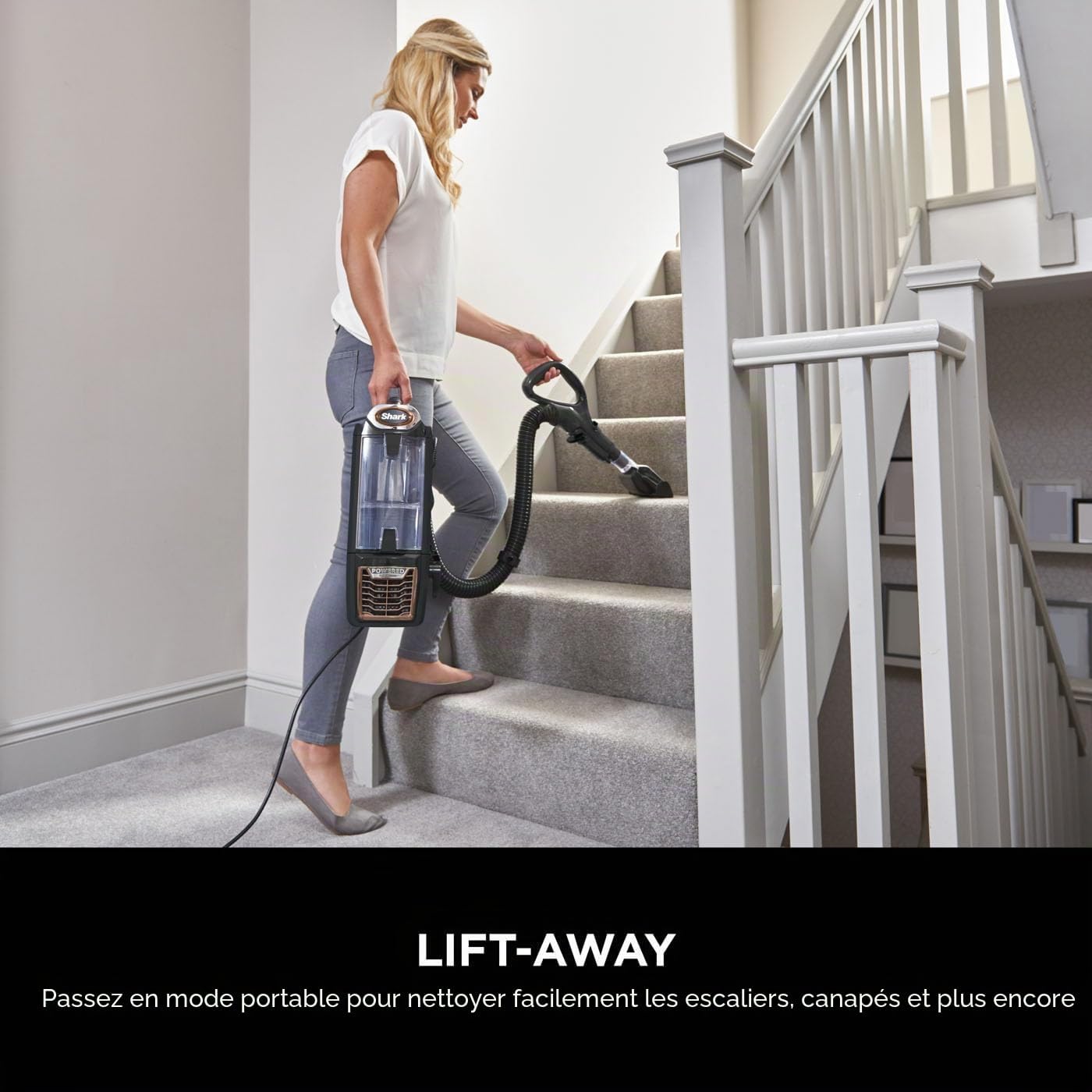
Lift-Away Mode: The vacuum pod detaches for portable cleaning, as shown by a user cleaning stairs.
Using Attachments
Connect the desired accessory tool to the end of the hose or wand for specialized cleaning tasks. The included accessories are:
- Duster-Crevice Tool: For reaching tight spaces and dusting surfaces.
- Upholstery Tool: Designed for cleaning pet hair and dust from upholstery and fabrics.
- Multi-Surface Tool: A versatile tool for various cleaning needs.
- Pet Power Brush: Specifically designed to remove stubborn pet hair from carpets and upholstery.
- Car Detail Kit: A set of tools for thorough car interior cleaning.

Versatile Cleaning: This image illustrates the vacuum being used in Lift-Away mode with an attachment, highlighting its adaptability for various cleaning tasks.
Maintenance
Regular maintenance ensures optimal performance of your vacuum cleaner.
Emptying the Dust Cup
Empty the dust cup after each use or when debris reaches the MAX fill line. To empty:
- Press the dust cup release latch and lift the dust cup off the vacuum pod.
- Hold the dust cup over a trash bin and press the bottom release latch to open the bottom of the dust cup.
- Tap gently to remove contents. Close the bottom lid until it clicks.
Cleaning Filters
Rinse the pre-motor filters (foam and felt) every 3 months, or as needed. Rinse the post-motor HEPA filter once a year, or as needed. Allow all filters to air-dry completely before reinstalling.

Anti-Allergen Complete Seal: This system captures and traps 99.9% of dust and allergens inside the vacuum, preventing them from being released back into the air. Regular filter maintenance is crucial for this system's effectiveness.
Cleaning Brush-rolls
The Anti Hair Wrap technology minimizes hair tangles, but occasional inspection and cleaning of the brush-rolls may be necessary. Remove any debris or blockages from the brush-rolls and soft roller.
Troubleshooting
| Problem | Possible Cause | Solution |
|---|---|---|
| Vacuum not picking up debris or suction is low. | Dust cup is full; filters need cleaning; blockage in nozzle, hose, or wand. | Empty dust cup; clean filters; check for and remove blockages. |
| Brush-rolls not spinning. | Floor nozzle is clogged; brush-roll garage is obstructed; vacuum is in Hard Floor mode. | Clear any blockages from the nozzle; ensure brush-roll garage is clear; switch to Carpet mode for brush-roll activation. |
| Vacuum turns off on its own. | Overheating due to clogged filters or blockages. | Turn off and unplug the vacuum. Empty dust cup and clean filters. Check for blockages in nozzle, hose, and wand. Allow to cool for at least 45 minutes before restarting. |
Technical Specifications
| Feature | Specification |
|---|---|
| Model Name | NZ850UK |
| Model Number | NZ801UKTBK |
| Power | 750 Watts |
| Voltage | 240 Volts |
| Power Source | Corded Electric |
| Cord Length | 8 meters |
| Dust Cup Capacity | 0.83 Liters |
| Item Weight | 7.29 Kilograms |
| Noise Level | 80 Decibels |
| Filter Type | Foam, HEPA (Anti-Allergen Complete Seal) |
| Dimensions (L x W x H) | 33 cm x 26 cm x 117 cm |
| Recommended Surfaces | All floors (carpets, hard floors) |
| Special Features | Anti Hair Wrap, DuoClean, Lift-Away, LED Headlights, Anti-Allergen Complete Seal |
| UPC | 622356288446 |
Warranty and Registration
The Shark NZ850UK vacuum cleaner comes with a 5-year guarantee. To activate your warranty, you must register your product with Shark. This guarantee is valid upon registration with Shark, for UK & ROI only.
For detailed warranty terms and conditions, and to register your product, please visit the official Shark website or refer to the warranty card included in your product packaging.

5 Year Guarantee: This image displays the 5-year guarantee logo, indicating the extended warranty period available upon product registration.
Customer Support
For further assistance, replacement parts, or to report an issue, please contact Shark customer service. You can find contact information on the official Shark website or in your product documentation.
When contacting support, please have your model number (NZ850UK) and serial number ready. The serial number can usually be found on a label on the back or bottom of the vacuum cleaner.


