
WONNIE 612D
WONNIE 7.5 Inch Car DVD Player User Manual
Model: 612D
Product Overview
The WONNIE 7.5 Inch Car DVD Player (Model 612D) is a dual-screen portable entertainment system designed specifically for in-car use. It features upgraded chips for clearer images and stable disc playback, even during travel. This system allows for playing two different movies simultaneously or sharing the same movie across both screens, making it ideal for families with multiple passengers. It supports a wide range of media formats and includes a last memory function for seamless viewing.

Image: The WONNIE 7.5 inch dual car DVD players, showcasing their compact design and included remote controls. One screen displays a child on a beach, and the other shows animated characters in a living room.
What's in the Box
- 2 x Car DVD Players
- 2 x Headrest Straps
- 2 x Remotes
- 1 x 2 IN 1 Car Charger
- 1 x AV Cable
Setup and Installation
The WONNIE 7.5 inch car DVD players are designed for easy installation on car headrests. Follow these steps for proper setup:
- Attach Headrest Straps: Securely attach one headrest strap to the back of each DVD player.
- Mount Players: Mount each DVD player to the back of a car headrest using the attached straps. Ensure they are firmly in place and at a comfortable viewing height for passengers.
- Connect Power: The dual DVD players require continuous power from your car. Connect the included 2-in-1 car charger to your car's cigarette lighter socket. Then, connect the power cables from the charger to each DVD player's DC IN port. Important: These players do not have a built-in battery and must always be plugged into the car charger to operate.
- Connect for Shared Viewing (Optional): To play the same movie on both screens, connect the two DVD players using the provided AV cable. Plug one end into the AV OUT port of the main player (the one with the disc) and the other end into the AV IN port of the secondary player.
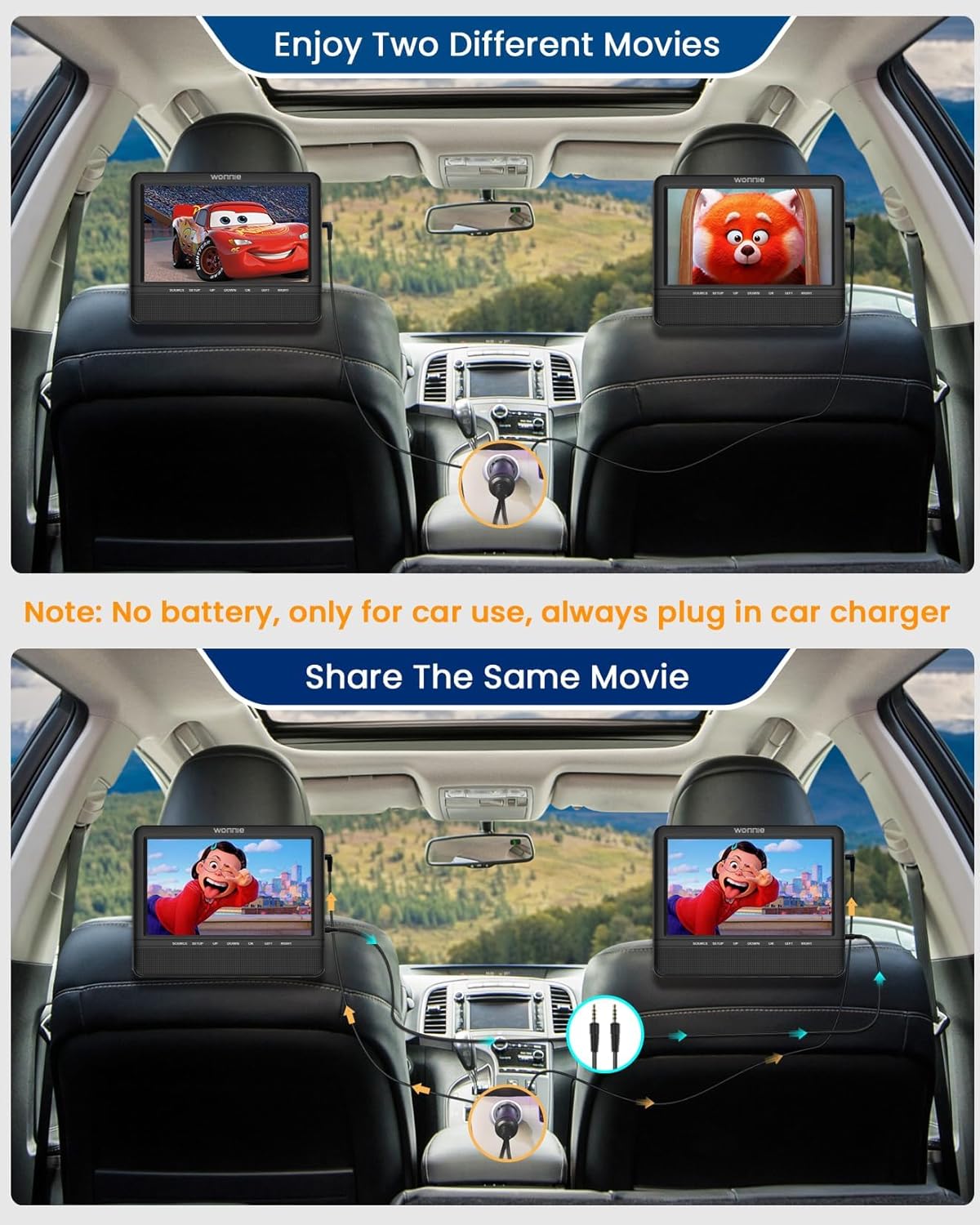
Image: Illustration of two WONNIE car DVD players installed on headrests, demonstrating how they can play different movies independently, each powered by the car charger.

Image: A family in a car, with two children in the back seats enjoying content on the WONNIE car DVD players mounted on the headrests, illustrating the product's use case.
Operating Instructions
Powering On/Off
Once connected to the car charger, the players will power on automatically or can be turned on using the power button on the unit or remote control.
Disc Playback
Insert a compatible DVD or CD into the disc slot. The player will automatically detect and begin playback. Use the remote control or on-unit buttons (SOURCE, SETUP, UP, DOWN, OK, LEFT, RIGHT) to navigate menus and control playback.
USB/SD Card Playback
Insert a USB drive or SD/MMC card (up to 32GB) into the respective slot. Use the SOURCE button to select USB or SD as the input. Navigate through your media files using the remote or unit buttons.

Image: A visual representation of the multiple formats supported by the WONNIE car DVD players, including DVD, USB drives, and SD cards, with examples of video, audio, and image formats.
Last Memory Function
The players feature a break-point memory function. If the player is turned off during playback, it will resume from the exact point where it stopped when powered on again.
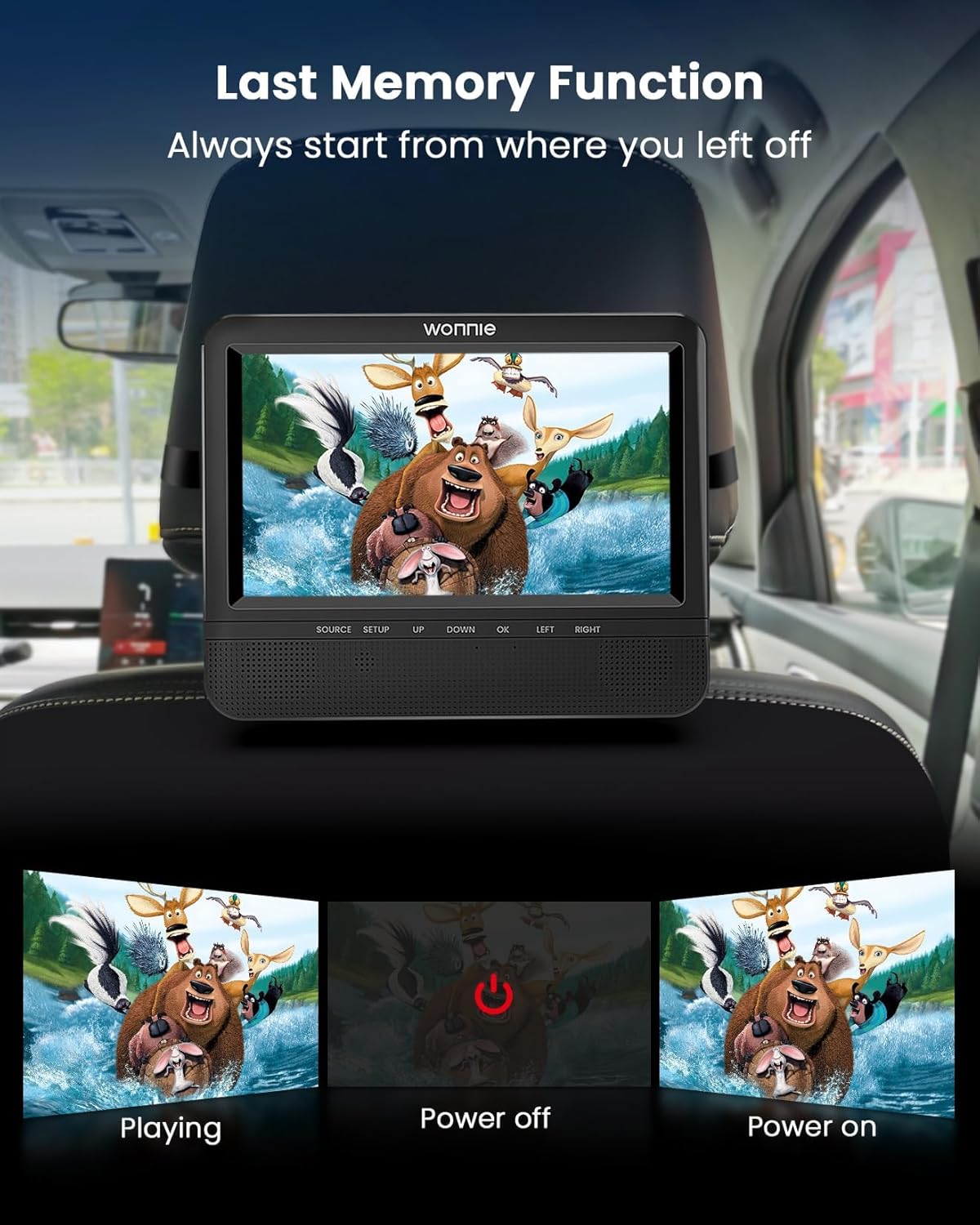
Image: A three-panel illustration demonstrating the "Last Memory Function," showing a movie playing, the device being powered off, and then powering back on to resume playback from the last point.
Audio and Headphone Use
Each DVD player is equipped with dual powerful stereo speakers for clear audio. Volume can be adjusted via the remote or unit controls. For private listening, each player has a headphone jack, allowing users to connect wired headphones.

Image: Two WONNIE car DVD players with graphic overlays indicating powerful stereo speakers, designed to provide an immersive listening experience.
Maintenance
To ensure the longevity and optimal performance of your WONNIE Car DVD Players, follow these maintenance guidelines:
- Cleaning: Use a soft, dry cloth to clean the screen and exterior of the players. For stubborn smudges, a slightly damp cloth with a mild, non-abrasive cleaner can be used, but ensure no liquid enters the device.
- Disc Care: Handle discs by their edges to avoid fingerprints and scratches. Store discs in their cases when not in use.
- Storage: When not in use for extended periods, disconnect the players from the car charger and store them in a cool, dry place away from direct sunlight and extreme temperatures.
- Cable Management: Ensure all cables (power, AV) are not kinked or pinched, which can lead to damage.
Troubleshooting
If you encounter issues with your WONNIE Car DVD Player, refer to the following common troubleshooting steps:
| Problem | Possible Cause | Solution |
|---|---|---|
| Player does not power on. | Not connected to power; car charger issue; car's power outlet issue. | Ensure the 2-in-1 car charger is securely plugged into both the car's cigarette lighter and both DVD players. Check if the car's power outlet is functional. Remember, there is no built-in battery. |
| Disc not playing or skipping. | Disc is dirty, scratched, or incompatible format; player lens is dirty. | Clean the disc with a soft cloth. Try a different disc. Ensure the disc format is supported (DVD, CD, VCD, SVCD - Blu-Ray not supported). Avoid excessive bumps during playback. |
| No video/audio when connected via AV cable. | AV cable not connected correctly; incorrect source selected. | Ensure the AV cable is firmly connected to the AV OUT of the main player and AV IN of the secondary player. On the secondary player, ensure the input source is set to AV IN. |
| USB/SD card not recognized or files not playing. | Incompatible file format; card/drive capacity too large; corrupted media. | Ensure files are in supported formats (VOB, AVI, MPEG1, MPEG2 for video; MP3, WMA for audio; JPG, JPEG for images). USB/SD cards should not exceed 32GB. Video resolution should not exceed 720x576 pixels. Try reformatting the USB/SD card (backup data first) or using a different one. |
| Headrest straps come loose. | Improper tightening; wear and tear. | Re-tighten the straps securely around the headrest. Ensure the player is positioned to minimize movement. |
Specifications
- Model: 612D
- Screen Size: 7.5 Inches
- Display Type: LCD
- Color: Black
- Item Weight: Approximately 3.19 pounds (for the set)
- Package Dimensions: 10.24 x 8.5 x 6.14 inches
- Power Source: Car Charger (no built-in battery)
- Supported Disc Formats: DVD, DVD+R, DVD-R, DVD+RW, DVD-RW, CD, CD+R, CD-R, CD+RW, CD-RW, VCD, SVCD (Blu-Ray not supported)
- Supported Video Formats: VOB, AVI, MPEG1, MPEG2 (MP4 not supported). Max resolution: 720x576 pixels.
- Supported Audio Formats: MP3, WMA
- Supported Image Formats: JPG, JPEG
- USB/SD Card Support: Up to 32GB
- Region Compatibility: All Regions
- Features: Dual stereo speakers, Headphone jack, Last Memory Function, AV In/Out
Warranty and Support
WONNIE provides comprehensive customer support for your product:
- Replacement Policy: Replacement is provided within 365 days of purchase.
- Technical Support: Life-time professional technical support is available.
- Contact Information: For any questions, needs, or issues (e.g., missing accessories, broken items), please contact WONNIE directly via the "Get Product Support" option on Amazon or through their after-sales email. Responses are typically provided within 24 hours.
- Official Store: For more information and products, visit the WONNIE Store on Amazon.
Related documents612D


Ask a question about this manual
Ask about setup, troubleshooting, compatibility, parts, safety, or missing instructions. Manuals+ will review the question and use this page’s manual context to help answer it.