
Aptkdoe HD65
Aptkdoe HD65 Wireless Earbuds User Manual
Model: HD65
Introduction
Thank you for choosing the Aptkdoe HD65 Deep Blue Wireless Earbuds. These Bluetooth 5.3 headphones are designed for sport and active lifestyles, featuring stereo deep bass, over-ear hooks for secure fit, ENC noise-cancelling microphone, and IPX7 waterproof rating. This manual provides essential information for setting up, operating, maintaining, and troubleshooting your earbuds.
Package Contents
- Aptkdoe HD65 Wireless Earbuds (Left and Right)
- Charging Case
- USB Charging Cable
- User Manual (this document)
Setup
1. Charging the Earbuds and Case
Before first use, fully charge the earbuds and the charging case. Place the earbuds into the charging case. Connect the charging case to a USB power source using the provided USB cable. The LED display on the charging case will indicate the battery percentage of the case and the charging status of each earbud.
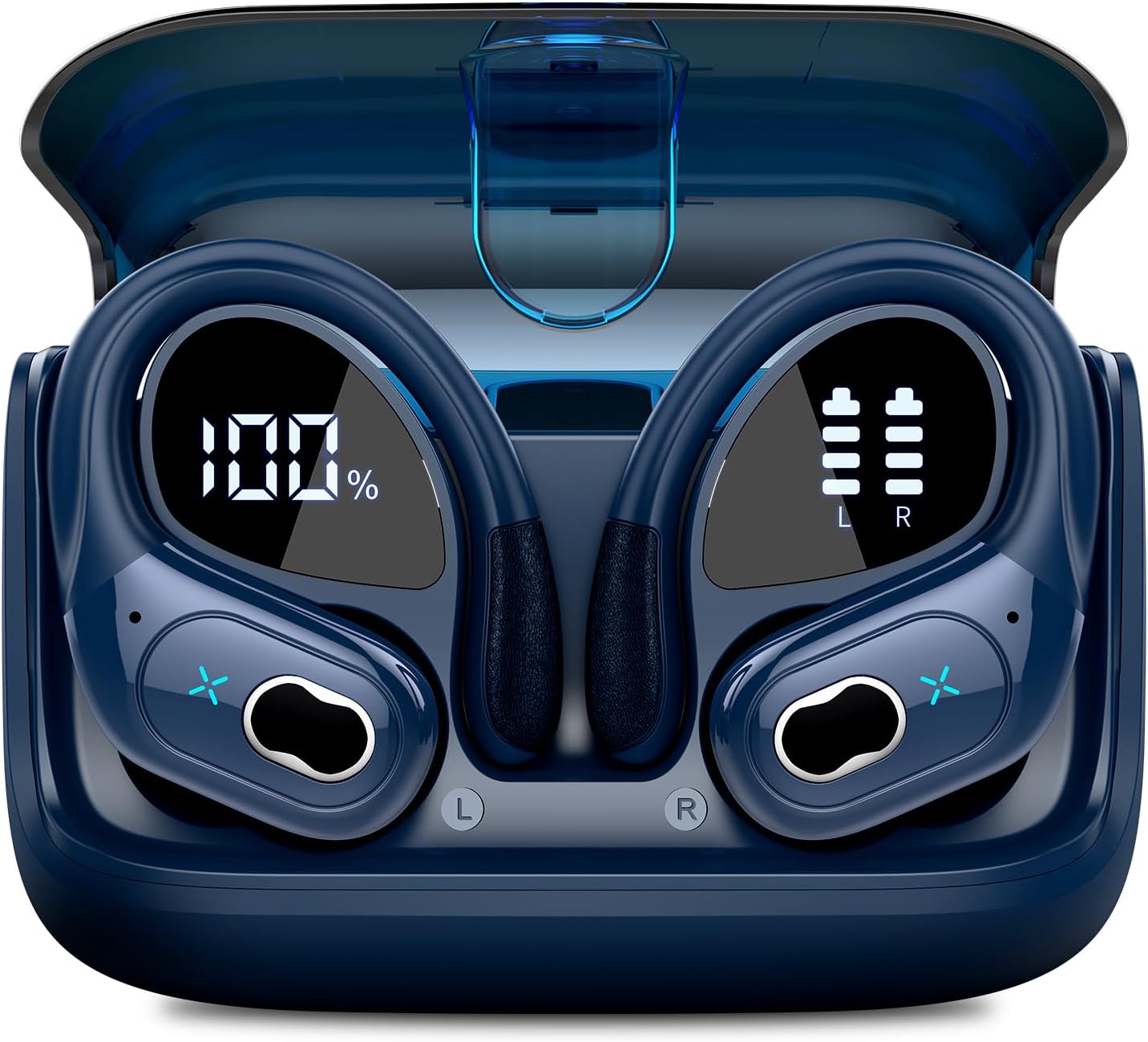
Image: Aptkdoe HD65 Wireless Earbuds in their charging case. The case features a digital display showing the charging percentage of the case and individual battery indicators for the left and right earbuds.
A full charge provides approximately 15 hours of battery life for the earbuds, with the charging case extending total playtime significantly (up to 75 hours as per product description).
2. Pairing with Your Device
- Ensure the earbuds are charged.
- Open the charging case. The earbuds will automatically enter pairing mode, indicated by a flashing LED light (specific light pattern not provided, assume standard).
- On your device (cellphone, tablet, laptop, desktop), go to Bluetooth settings and turn Bluetooth on.
- Search for "HD65" or "Aptkdoe HD65" in the list of available devices.
- Select "HD65" to connect. Once connected, the earbud LED lights will turn off or show a steady light, and you will hear a confirmation tone.
- The earbuds will automatically reconnect to the last paired device when taken out of the case, if Bluetooth is enabled on the device.
Operating Instructions
Wearing the Earbuds
The Aptkdoe HD65 earbuds feature an over-ear hook design for a secure and comfortable fit, especially during sports and exercise. Gently place the earbud into your ear canal and adjust the earhook over your ear until it feels snug and stable.

Image: A man wearing the Aptkdoe HD65 earbuds while reading, demonstrating a casual use scenario.

Image: A woman wearing the Aptkdoe HD65 earbuds while walking outdoors, highlighting their suitability for daily activities.

Image: A woman wearing the Aptkdoe HD65 earbuds in a sporty setting, emphasizing their secure fit for exercise.
Controls
The earbuds feature button controls for media playback and call management. Specific functions are typically assigned as follows:
- Play/Pause: Single press on either earbud.
- Next Track: Double press on the right earbud.
- Previous Track: Double press on the left earbud.
- Volume Up: Triple press on the right earbud.
- Volume Down: Triple press on the left earbud.
- Answer/End Call: Single press on either earbud during an incoming call or active call.
- Reject Call: Press and hold either earbud for 2 seconds during an incoming call.
- Activate Voice Assistant: Press and hold either earbud for 3 seconds.
Water Resistance (IPX7)
The Aptkdoe HD65 earbuds are IPX7 waterproof, meaning they can withstand submersion in water up to 1 meter for 30 minutes. This makes them suitable for workouts, rain, and accidental splashes. However, they are not designed for swimming or prolonged submersion. Ensure the earbuds are dry before placing them back into the charging case to prevent damage.
Maintenance
Cleaning
Regular cleaning helps maintain sound quality and hygiene. Use a soft, dry, lint-free cloth to wipe the earbuds and charging case. For stubborn dirt, a slightly damp cloth can be used, but ensure no moisture enters the charging ports or speaker grilles. Do not use harsh chemicals or abrasive materials.
Storage
When not in use, store the earbuds in their charging case to protect them from dust, dirt, and physical damage. Store the case in a cool, dry place away from extreme temperatures and direct sunlight.
Troubleshooting
| Problem | Possible Solution |
|---|---|
| Earbuds not pairing/connecting |
|
| Only one earbud working |
|
| No sound or low volume |
|
| Charging case not charging |
|
Specifications
- Model: HD65
- Brand: Aptkdoe
- Wireless Communication Technology: Bluetooth 5.3
- Ear Placement: Over Ear (with Earhooks)
- Audio Driver Type: Dynamic Driver
- Audio Driver Size: 14.2 Millimeters
- Battery Life (Earbuds): Up to 15 Hours (per charge)
- Total Playtime (with Charging Case): Up to 75 Hours
- Control Type: Media Control, Button
- Microphone: ENC Noise Cancelling Mic
- Water Resistance Level: IPX7 Waterproof
- Material: Plastic, Thermoplastic Elastomer (TPE)
- Compatible Devices: Cellphones, Tablets, Laptops, Desktops
- Bluetooth Range: 10 Meters
- Color: Deep Blue
Warranty and Support
Aptkdoe provides a 2-year warranty for the HD65 Wireless Earbuds, ensuring peace of mind regarding product quality and performance. For any questions, technical support, or warranty claims, please contact Aptkdoe customer service. We aim to provide a 24-hour customer service response.
Please refer to the official Aptkdoe website or your purchase documentation for the most up-to-date contact information and detailed warranty terms.
Ask a question about this manual
Ask about setup, troubleshooting, compatibility, parts, safety, or missing instructions. Manuals+ will review the question and use this page’s manual context to help answer it.