
RADIOMASTER Ranger 2.4GHz ELRS Module Combo Package
RadioMaster Ranger 2.4GHz ELRS Module Combo Package User Manual
Model: Ranger 2.4GHz ELRS Module Combo Package
1. Introduction
This user manual provides comprehensive instructions for the safe and effective operation of your RadioMaster Ranger 2.4GHz ELRS Module Combo Package. Please read this manual thoroughly before using the product to ensure proper setup, operation, and maintenance. This package is designed to provide a complete solution for integrating ExpressLRS technology into your radio system.
2. Safety Information
Always operate the Ranger module and associated equipment in a safe and responsible manner. Failure to follow safety guidelines can result in damage to the product, property, or personal injury.
- Ensure all connections are secure before powering on the device.
- Do not expose the module to water or extreme temperatures.
- Only use approved power sources and accessories.
- Keep out of reach of children. Recommended age for use is 18 years and up.
- Do not attempt to disassemble or modify the module, as this will void the warranty.
- Operate within legal frequency limits and regulations in your region.
3. Package Contents
The RadioMaster Ranger 2.4GHz ELRS Module Combo Package includes the following items:
- 1 x Ranger Module
- 2 x RP1 ExpressLRS Receivers
- 1 x RP2 ExpressLRS Receiver
- Micro and Nano Adapters
- Moxon Antenna
- T-Antenna
- CRSF Cable (for compatible Futaba radios)

Figure 3.1: All components included in the Ranger Combo Package, including the module, receivers, adapters, and antennas.
4. Product Overview
The Ranger module is a high-performance 2.4GHz ELRS (ExpressLRS) external module designed for use with compatible radio transmitters. It features a rugged CNC case and an OLED display for easy configuration and status monitoring.
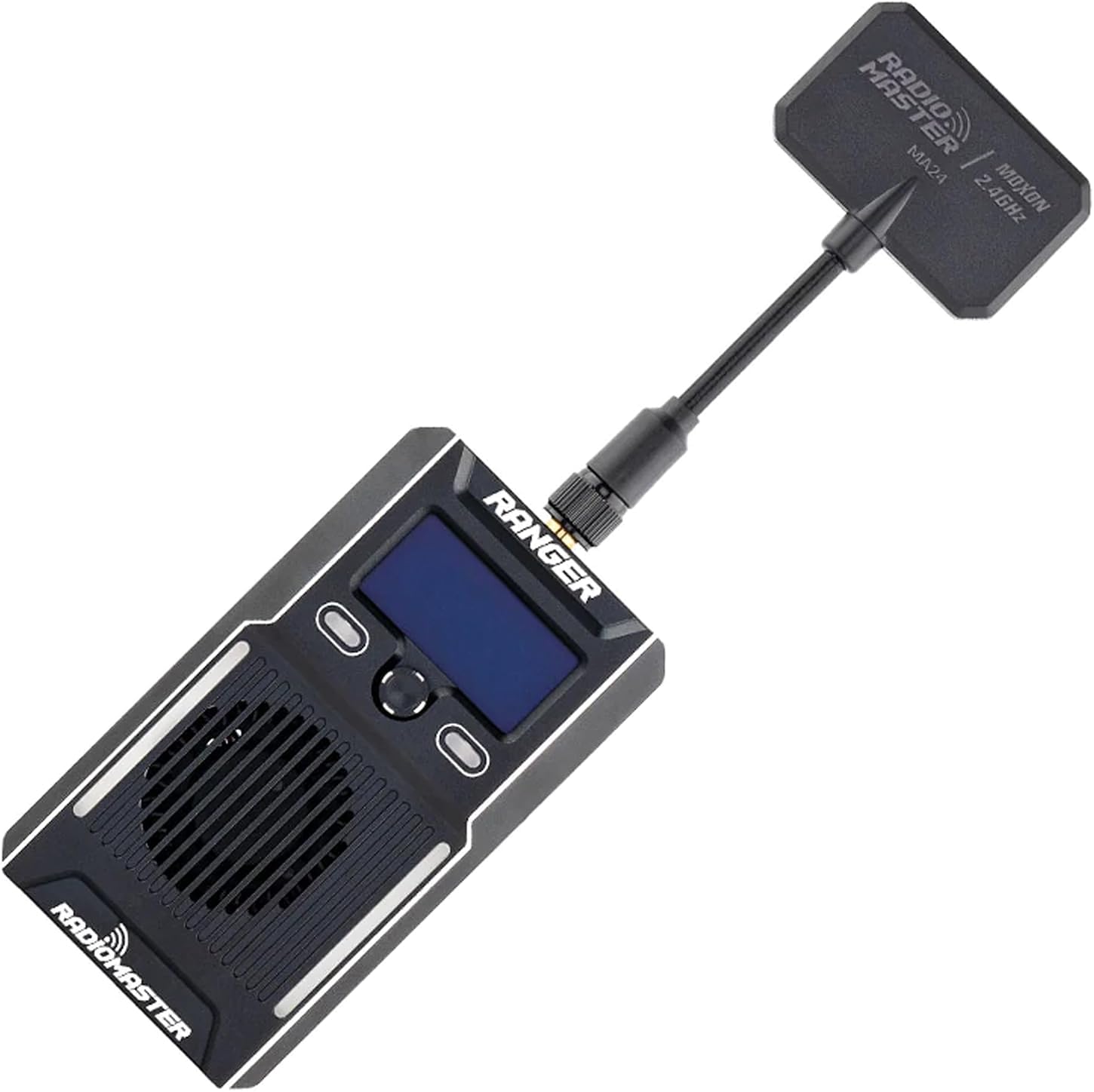
Figure 4.1: Front view of the Ranger module with the Moxon antenna attached, showing the OLED display and control buttons.
4.1 Key Features
- OLED Display: Provides clear information on module status, settings, and telemetry.
- Rugged CNC Case: Durable construction for enhanced protection.
- Built-in Accelerometer: For potential future features or advanced telemetry.
- Packet Rates: Supports high packet rates up to F-1000Hz for low latency communication.
- Power Output: Up to 1 Watt (1000mW) power output for extended range.
- Connectivity: Integrated Wifi and Bluetooth support for firmware updates and configuration.
- Cooling System: High-efficiency cooling system to maintain optimal performance.
- Navigation: 5-Direction Nav key and customizable shortcut buttons for intuitive control.
4.2 Ports and Connectors

Figure 4.2: Side view of the Ranger module showing the USB-C port, USB-A port, and XT30 power input.
- Antenna Connector: SMA connector for attaching the included Moxon or T-antenna.
- USB-C Port: For connecting to a computer for firmware updates and configuration.
- USB-A Port: (Functionality may vary, typically for external device connection or power output).
- XT30 Power Input: For external power supply when required, especially for high power output.
5. Setup
This section guides you through the initial setup of your Ranger ELRS module and receivers.
5.1 Module Installation
- Select Adapter: Choose the appropriate Micro or Nano adapter for your radio transmitter's module bay.
- Attach Adapter: Securely attach the selected adapter to the Ranger module.
- Install Antenna: Screw the Moxon or T-antenna onto the SMA connector on the top of the Ranger module. Ensure it is finger-tight.
- Insert Module: Carefully insert the Ranger module with the adapter into your radio transmitter's module bay. Ensure it clicks into place securely.
- CRSF Cable (Optional): If using a compatible Futaba radio, connect the provided CRSF cable between the module and the radio as per your radio's instructions.

Figure 5.1: The Ranger module connected to its antenna, with RP1 and RP2 receivers shown, representing a typical setup.
5.2 Receiver Binding
To establish communication between the Ranger module and the RP1/RP2 receivers, they must be bound. Refer to the ExpressLRS official documentation for detailed binding procedures, as these can vary based on firmware versions. Generally, the process involves:
- Power on the Ranger module and navigate to the ELRS menu on your radio.
- Select the 'Bind' option.
- Power cycle the receiver three times rapidly. The receiver's LED should flash indicating bind mode.
- Once bound, the receiver's LED will turn solid, indicating a successful connection.
6. Operating Instructions
Once the module and receivers are set up and bound, you can begin operating your RC model.
6.1 Basic Operation
- Power On: Turn on your radio transmitter. The Ranger module will power on automatically if correctly installed.
- Check Status: Observe the OLED display on the Ranger module for status indicators such as connected receivers, packet rate, and power output.
- Receiver Status: Ensure the LED on your RP1/RP2 receiver is solid, indicating a stable connection.
- Pre-Flight Checks: Always perform thorough pre-flight checks, including range testing and control surface verification, before operating any model.
6.2 Advanced Features
The Ranger module supports various advanced ExpressLRS features. Access these through the ELRS Lua script on your radio transmitter (if supported) or via the ExpressLRS Configurator software.
- Packet Rate Adjustment: Configure the packet rate (e.g., 250Hz, 500Hz, F-1000Hz) based on your application's latency requirements.
- Power Output Adjustment: Adjust the RF power output (e.g., 10mW, 100mW, 500mW, 1000mW) to optimize range and minimize interference.
- Wifi/Bluetooth Configuration: Use Wifi or Bluetooth for wireless firmware updates and configuration via the ExpressLRS web interface.
- Customizable Buttons: Utilize the customizable shortcut buttons on the module for quick access to frequently used functions.
7. Maintenance
Proper maintenance ensures the longevity and reliable performance of your RadioMaster Ranger module.
- Cleaning: Use a soft, dry cloth to clean the module's exterior. Do not use liquid cleaners or solvents.
- Storage: Store the module in a cool, dry place away from direct sunlight and extreme temperatures.
- Firmware Updates: Regularly check for and install the latest ExpressLRS firmware updates for both the module and receivers to benefit from new features and bug fixes. Use the official ExpressLRS Configurator for this process.
- Antenna Care: Handle antennas carefully. Avoid bending or stressing the antenna connector.
8. Troubleshooting
This section addresses common issues you might encounter with your Ranger ELRS module.
| Problem | Possible Cause | Solution |
|---|---|---|
| Module not powering on. | Incorrect installation; Radio not providing power; Faulty module. | Ensure module is fully seated in the bay. Check radio's module bay settings. Try external XT30 power. Contact support if issue persists. |
| Receivers not binding. | Incorrect binding procedure; Firmware mismatch; Receiver too far from module. | Review binding steps in section 5.2. Ensure module and receiver firmware versions are compatible. Bring receiver closer to module during binding. |
| Poor range or signal loss. | Antenna not properly attached; Low power output setting; Environmental interference. | Check antenna connection. Increase power output in ELRS settings. Avoid operating near large metal objects or strong RF sources. |
| OLED display is blank or frozen. | Firmware issue; Power instability. | Reboot the radio. Attempt to reflash the module firmware. Ensure stable power supply. |
9. Specifications
| Feature | Detail |
|---|---|
| Product Name | RadioMaster Ranger 2.4GHz ELRS Module Combo Package |
| Brand | RADIOMASTER |
| Frequency | 2.4GHz |
| Protocol | ExpressLRS (ELRS) |
| Max Power Output | 1 Watt (1000mW) |
| Packet Rates | Up to F-1000Hz |
| Display | OLED |
| Connectivity | USB-C, USB-A, XT30, Wifi, Bluetooth |
| Case Material | CNC Machined |
| Country of Origin | China |
| Recommended Age | 18 years and up |
10. Warranty and Support
RadioMaster products are manufactured to high quality standards. For warranty information and technical support, please refer to the official RadioMaster website or contact your authorized dealer.
- Warranty: Specific warranty terms and conditions are available on the manufacturer's official website. Keep your proof of purchase for warranty claims.
- Technical Support: For technical assistance, firmware updates, or advanced troubleshooting, visit the official ExpressLRS project website or the RadioMaster support portal.
- Returns: Refer to the retailer's return policy for details on product returns.
Related documentsRanger 2.4GHz ELRS Module Combo Package


Ask a question about this manual
Ask about setup, troubleshooting, compatibility, parts, safety, or missing instructions. Manuals+ will review the question and use this page’s manual context to help answer it.