1. Introduction and Overview
The VSTARCAM CS49 is a versatile 3MP indoor security camera designed for comprehensive monitoring of your home, pets, or children. Featuring 360° pan and tilt capabilities, color night vision, two-way audio, and smart motion detection, this camera provides reliable surveillance and communication. It supports 2.4GHz WiFi connectivity for stable real-time streaming and offers flexible storage options including local SD card and cloud storage.

Figure 1.1: VSTARCAM CS49 Indoor Security Camera with its accompanying mobile application interface, demonstrating live view and control options.
2. What's in the Box
Please verify that all components are present upon unboxing:
- VSTARCAM CS49 Indoor Security Camera
- Power Cord
- Mounting Bracket
- Screws for mounting
- User Manual
- Certificate
3. Product Features
The VSTARCAM CS49 camera is equipped with advanced features to enhance your indoor security and monitoring experience:
- 3MP HD & 360° Coverage: Captures ultra-HD resolution video (Max pixel 2304x1296) with a 360° pan and 70° tilt rotation, ensuring full-room visibility without blind spots.
- Night Vision & Smart Motion Alerts: Equipped with infrared night vision for clear monitoring in low-light conditions (up to 9 meters). AI motion detection sends instant alerts to your phone for suspicious activity, with customizable zones to reduce false alarms.
- Two-Way Audio & Multi-User Access: Communicate in real-time using the built-in microphone and speaker. Share camera access with up to 4 users, allowing collaborative monitoring and control through the intuitive app.
- 24/7 Recording & Auto Tracking: Supports continuous recording with smart tracking, automatically following moving objects. Dual storage options (microSD card up to 256GB and encrypted cloud services) ensure footage is always accessible.
- Multi-Platform Viewing: Access your camera feed from various devices including mobile phones (iOS/Android), laptops, and desktop computers.

Figure 3.1: Visual comparison illustrating the enhanced clarity and detail provided by 3MP HD resolution compared to standard 1080P.
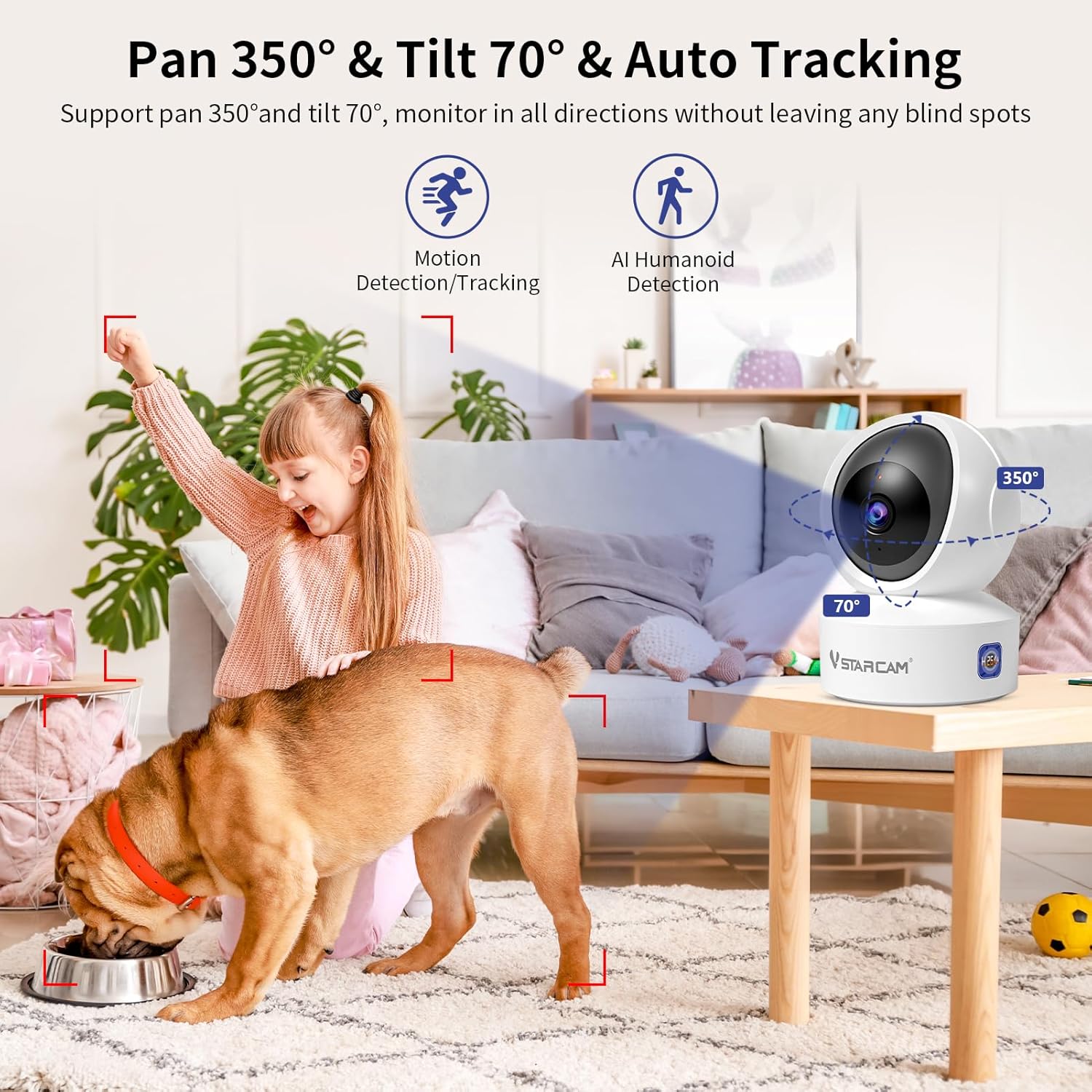
Figure 3.2: Illustration of the camera's 350° horizontal pan and 70° vertical tilt capabilities, alongside its motion detection and auto-tracking functions.

Figure 3.3: The camera's clear infrared night vision capability, allowing for monitoring in dark environments.

Figure 3.4: AI Humanoid Detection in action, highlighting a detected person and the corresponding mobile app notification.

Figure 3.5: Depiction of the two-way audio feature, enabling remote communication with individuals or pets near the camera.

Figure 3.6: The real-time sharing feature, allowing multiple users to view the camera feed simultaneously on various devices.

Figure 3.7: Overview of the 24/7 continuous recording capability, highlighting both local microSD card storage and cloud storage options.

Figure 3.8: The camera supports remote monitoring and multi-terminal viewing across Android, iOS, and PC platforms.
4. Setup Guide
Follow these steps to set up your VSTARCAM CS49 camera:
- Power On: Connect the camera to a power outlet using the provided power cord. The camera will initiate its self-test and indicator lights will activate.
- Download the App: Search for and download the "O-KAM Pro" app from your mobile device's app store (available on Google Play for Android and the App Store for iOS).
- Create Account & Add Device: Open the O-KAM Pro app and follow the on-screen instructions to create a new account or log in. Select the option to add a new device.
- Connect to WiFi: The app will guide you through connecting the camera to your 2.4GHz WiFi network. Ensure your router is broadcasting a 2.4GHz signal, as the camera does not support 5GHz WiFi. You may need to scan a QR code displayed on your phone with the camera lens.
- Placement & Mounting: Position the camera in your desired indoor location. It can be placed on a flat surface or mounted to a wall using the included bracket and screws. Ensure the camera has a clear line of sight to the area you wish to monitor.

Figure 4.1: The O-KAM Pro application available for download on mobile app stores.
5. Operating Instructions
Once set up, you can utilize the camera's features through the O-KAM Pro app:
- Live View: Open the app and select your camera to view the live feed.
- Pan/Tilt Control: Use the directional controls within the app to remotely adjust the camera's viewing angle (360° horizontal, 70° vertical).
- Two-Way Audio: Tap the microphone icon in the app to speak through the camera's speaker, and listen through its built-in microphone.
- Motion Detection & Alerts: Configure motion detection sensitivity and alert zones in the app settings. You will receive push notifications when motion is detected.
- Recording & Playback: Access recorded footage via the app. If an SD card is inserted, recordings are stored locally. Cloud storage options are also available through subscription.
- Multi-User Sharing: In the app settings, you can invite other users to view and control the camera, granting them specific permissions.
6. Maintenance
To ensure optimal performance and longevity of your VSTARCAM CS49 camera:
- Cleaning: Gently wipe the camera lens and body with a soft, dry cloth. Avoid using harsh chemicals or abrasive materials.
- Ventilation: Ensure the camera is placed in an area with adequate ventilation to prevent overheating.
- Firmware Updates: Regularly check the O-KAM Pro app for available firmware updates. Keeping the firmware updated ensures access to the latest features and security enhancements.
- Power Cycle: If the camera becomes unresponsive, disconnect it from the power source for a few seconds and then plug it back in.
7. Troubleshooting
If you encounter issues with your VSTARCAM CS49 camera, refer to the following common problems and solutions:
| Problem | Possible Cause | Solution |
|---|---|---|
| Camera offline/Cannot connect to WiFi | Incorrect WiFi password; Camera too far from router; 5GHz WiFi network used; Router issues. | Verify WiFi password. Move camera closer to router. Ensure your WiFi is 2.4GHz. Restart your router. Re-add the camera in the app. |
| Blurry image | Protective film on lens; Dirty lens; Insufficient lighting. | Remove any protective film. Clean the lens with a soft cloth. Ensure adequate lighting for optimal image quality. |
| No two-way audio | Microphone/speaker muted in app; App permissions not granted. | Check app settings to ensure audio is not muted. Grant microphone permissions to the O-KAM Pro app in your phone's settings. |
| Motion detection false alarms | High sensitivity setting; Environmental factors (e.g., shadows, pets). | Adjust motion detection sensitivity in the app. Define specific activity zones to exclude irrelevant areas. |
| SD card not recording | SD card full or corrupted; Incorrect format; Card not inserted properly. | Check SD card status in app. Format the SD card via the app. Ensure card is inserted correctly. Use a compatible Class 10 or higher microSD card. |
8. Specifications
| Feature | Detail |
|---|---|
| Model Name | CS49 |
| Indoor/Outdoor Usage | Indoor |
| Video Capture Resolution | 3MP (2304x1296) |
| Connectivity Technology | Wired (Power), Wi-Fi (Data) |
| Connectivity Protocol | Wi-Fi (2.4GHz only) |
| Pan/Tilt Range | 360° Pan, 70° Tilt |
| Night Vision Range | Up to 9 Meters |
| Storage Options | MicroSD (up to 256GB), Cloud Storage |
| Two-Way Audio | Yes (Built-in microphone and speaker) |
| Motion Detection | AI Humanoid Detection, Customizable Zones |
| Compatible Devices | PC, MAC, iOS, Android |
| Power Source | Corded Electric |
| Mounting Type | Wall Mount |
| Product Dimensions | 6.69 x 5.9 x 4.25 inches |
| Item Weight | 13.7 ounces |
9. Warranty and Support
VSTARCAM provides comprehensive support for your CS49 camera:
- Warranty: The VSTARCAM CS49 camera is backed by a 1-year warranty from the date of purchase. This warranty covers manufacturing defects and ensures peace of mind regarding product quality.
- Customer Service: For any inquiries, technical assistance, or troubleshooting not covered in this manual, 24/7 customer service is available. Please refer to the contact information provided in your product packaging or on the official VSTARCAM website.
- Firmware Upgrades: Enjoy free firmware upgrades for enhanced features and improved performance over time. These updates are typically delivered through the O-KAM Pro app.

Figure 9.1: VSTARCAM offers dedicated customer support to assist with product inquiries and technical issues.


