
1. Introduction
Thank you for choosing the MISONDA Android Car Radio. This manual provides detailed instructions for the installation, operation, and maintenance of your new car stereo system. Please read this manual thoroughly before installation and use to ensure proper function and to maximize your user experience. This unit is specifically designed for Mercedes Benz Smart 453 Fortwo models manufactured between 2014 and 2020.
2. Product Overview
Key Features
- Display: 9-inch IPS Touch Screen (1024*600 HD pixel, 178° wide angle, 1400 nits peak brightness, 97% sRGB)
- Compatibility: Designed for Mercedes Benz Smart 453 Fortwo (2014-2020)
- Operating System: Android 15 (Note: System information may display Android 13 in some menus, but the core system is optimized for Android 15 features.)
- Processor: Octa-core A53 2.5GHz CPU, 14nm ultra-low power process
- Memory & Storage: 6GB LPDDR4 RAM + 128GB EMMC Storage
- Graphics: IMG GE8300 GPU
- Audio: Built-in DSP (AKM7739 chip, 5.1 channel, 64-band equalizer, 5 scene modes, virtual central, surround sound adjustment), Amplifier IC 7850
- Connectivity: Wireless CarPlay & Android Auto, Bluetooth 5.0, WiFi 5.0, USB, AUX IN
- Navigation: Integrated GPS Navigation
- Radio: RDS/FM/AM Radio (TDA 7786 chip, FM range: 87.5~108MHz, 18 preset stations)
- Control: Steering Wheel Control (SWC) support
- Additional Functions: Split Screen, Mirror Link, Fast Boot (less than 3 seconds)
- Power Output: 45-50 Watt x 4 channels
Package Contents
Verify that all items are present in the package:
- MISONDA 9-inch IPS Touch Screen Autoradio
- 4 LED Backup Camera
- External Microphone
- Power Adapter
- RCA A&B Cables
- USB Cable
- GPS Antenna
- Radio Antenna
- Instruction Manual (this document)
- Canbus Decoder
- Installation Brackets

Image: Detailed view of all accessories included in the MISONDA Android Car Radio package.
3. Setup and Installation
Professional installation is recommended. Ensure the vehicle's power is disconnected before beginning installation.
Vehicle Compatibility
This unit is designed for Mercedes Benz Smart 453 Fortwo models from 2014 to 2020. Please verify your vehicle's year and console type carefully. Note that if your Smart ForTwo has a factory TomTom navigation system, the console design may differ, requiring a different console for proper fitment.
Wiring Connections
Refer to the wiring diagrams for correct connections. Ensure all cables are securely connected to prevent intermittent issues.

Image: Diagram illustrating the car radio unit and its compatible frame for installation.

Image: Back panel of the MISONDA car radio with labeled ports for power, USB, RCA, and antennas.
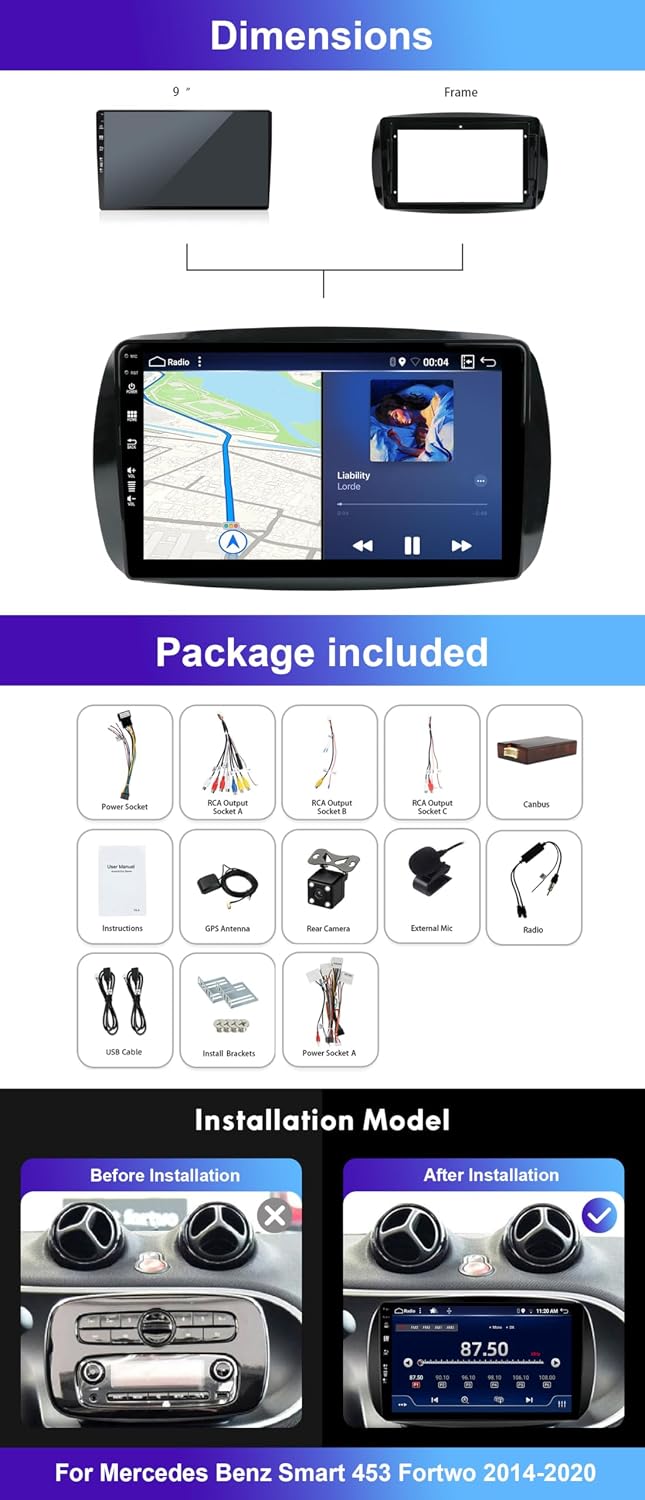
Image: Comprehensive wiring diagram for connecting the car radio to the vehicle's electrical system and peripherals.
Specific Installation Notes
- JBL Sound System: If your Smart Fortwo is equipped with a JBL sound system, the amplifier will need to be powered. Connect the blue antenna cable to the pink (remote) wire of the large connector to provide power to the amplifier. Without this connection, the radio will power on but produce no sound.
- Antenna Connector: The standard antenna connector on the back of the radio may protrude significantly, making it difficult to fully seat the unit in the dashboard. An L-shaped antenna adapter may be required to ensure a flush fit.
- Canbus: The included Canbus decoder is essential for integrating the radio with your vehicle's existing systems, such as steering wheel controls. Ensure it is correctly connected.

Image: Visual comparison showing the original car dashboard and the dashboard after the MISONDA Android Car Radio has been installed.
4. Operating Instructions
Basic Operation
- Power On/Off: The unit powers on automatically with the vehicle's ignition. Press and hold the power button (if available) for manual power control.
- Touch Screen: Navigate the interface using the responsive 9-inch IPS touch screen.
- Fast Boot: The system is designed for quick startup, logging into the system in less than 3 seconds.
Wireless CarPlay & Android Auto
Connect your smartphone wirelessly via Bluetooth to access CarPlay or Android Auto features. This allows for navigation, music, calls, and messages directly on the car radio display.
- CarPlay Connect: Connect your iPhone to the car radio via Bluetooth. Open the zlink software on the radio.
- Android Auto Connect: Connect your Android phone using the original data cable. Download the Android Auto software from your phone. Open the zlink software on the radio.

Image: Screenshot of the car radio displaying the Wireless CarPlay and Android Auto interfaces.
Bluetooth 5.0
Pair your smartphone for hands-free calling and audio streaming. Access your phone's contacts and call history directly from the radio.
GPS Navigation
Utilize the built-in GPS module for accurate navigation. The system supports various navigation applications available on the Android platform.

Image: The car radio display showing an active GPS navigation map.
Digital Sound Processor (DSP)
The integrated DSP allows for advanced audio customization. Adjust the 64-band equalizer, select from 5 scene modes, and fine-tune virtual central and surround sound settings to optimize your listening experience.

Image: The DSP settings interface, demonstrating the equalizer and sound field adjustments.
Radio (FM/AM/RDS)
Tune into your favorite radio stations. The RDS function provides station information and traffic announcements where available. The FM range is 87.5~108MHz with 18 preset stations.
Split Screen & Mirror Link
- Split Screen: View two applications simultaneously on the screen, such as navigation and music playback.
- Mirror Link: Mirror your smartphone's screen (Android and iOS) directly onto the car radio display.
Steering Wheel Control (SWC)
Program the unit to work with your vehicle's existing steering wheel controls for safe and convenient operation of volume, track changes, and calls.

Image: A composite image highlighting key features such as WiFi connectivity, GPS navigation, HD rear camera support, steering wheel control, Bluetooth 5.0, and split-screen functionality.
5. Maintenance
To ensure the longevity and optimal performance of your MISONDA Android Car Radio, follow these general maintenance guidelines:
- Cleaning: Use a soft, dry cloth to clean the screen and unit. Avoid abrasive cleaners or solvents that could damage the surface.
- Temperature: Avoid exposing the unit to extreme temperatures, both hot and cold, for extended periods.
- Software Updates: Periodically check for available software updates from the manufacturer to ensure the system runs efficiently and has the latest features.
- Connections: Ensure all cables and connections remain secure. Loose connections can lead to intermittent functionality.
6. Troubleshooting
If you encounter issues with your MISONDA Android Car Radio, refer to the following common problems and solutions:
| Problem | Possible Cause / Solution |
|---|---|
| No sound from speakers | Check speaker wiring. If vehicle has a JBL sound system, ensure the amplifier remote wire (blue antenna cable to pink wire) is connected. |
| Steering Wheel Controls not working | Ensure the Canbus decoder is correctly installed and connected. Check the radio's settings for SWC calibration or synchronization. Contact support if issues persist. |
| Poor radio reception | Verify the radio antenna is securely connected. Consider using an L-shaped antenna adapter if the connector is strained. Check for local signal interference. |
| CarPlay/Android Auto connection issues | Ensure Bluetooth is enabled on both the radio and your phone. For Android Auto, use the original data cable. If multiple devices are trying to connect, disable Bluetooth on one device. Restart both the phone and the car radio. |
| Reverse camera image is poor quality or not displayed | Check the camera's video input connection to the radio. Ensure the camera is receiving power. Verify the camera type is compatible. |
| Apps not launching or slow performance | Ensure sufficient storage space is available. Close background applications. Restart the unit. While the system is optimized for Android 15, some internal menus might display Android 13; this is generally not a functional issue unless specific Android 15 features are missing. |
| Unit does not fit correctly in dashboard | Verify vehicle compatibility (Smart 453 Fortwo 2014-2020). If your vehicle has a factory TomTom navigation system, a different dashboard console may be required. |
7. Specifications
| Feature | Detail |
|---|---|
| Brand | MISONDA |
| Model Number | BX-5Z11-D04-128G |
| Connectivity Technology | RCA, USB, Bluetooth 5.0, Wi-Fi 5.0 |
| Controller Type | Android Touch Screen |
| Special Features | Android Auto, Apple CarPlay, DSP, GPS Navigation, RDS |
| Compatible Devices | Smartphones |
| Total HDMI Ports | 1 (Note: This refers to an internal HDMI pathway, not an external port for user connection) |
| Audio Output Mode | Stereo |
| Surround Sound Configuration | 2.1 (with DSP for 5.1 channel processing) |
| Video Encoding | H.264, H.265/HEVC |
| Color | Black |
| Analog RGB Input | USB Type A |
| Number of Audio Channels | 2.1 (Output) |
| Output Power | 45-50 Watt per channel (4 channels) |
| Internet Applications | Browser, various Android apps |
| Control Method | Touch |
| Audio Output Type | Speakers |
| Audio Format Support | Dolby (various formats) |
| Country of Origin | China |
8. Warranty and Support
Warranty Information
This MISONDA Android Car Radio comes with a 1-year warranty from the date of purchase. The warranty covers manufacturing defects and malfunctions under normal use. Please retain your proof of purchase for warranty claims.
Customer Support
For technical assistance, troubleshooting beyond this manual, or warranty inquiries, please contact MISONDA customer support through your retailer or the official MISONDA website. When contacting support, please provide your product model number (BX-5Z11-D04-128G) and a detailed description of the issue.