
Introduction
This manual provides detailed instructions for the setup, operation, maintenance, and troubleshooting of your JBL Boombox 2 Portable Bluetooth Speaker and JBL Vibe Beam True Wireless Headphones. Please read this manual thoroughly to ensure optimal performance and longevity of your devices.

Image: The JBL Boombox 2 portable speaker (black) shown alongside the JBL Vibe Beam true wireless headphones (white) in their charging case.
1. Setup
1.1 JBL Boombox 2 Speaker Setup
- Charging: Connect the power cable to the Boombox 2 and a power outlet. The battery indicator lights will show charging progress. A full charge takes approximately 6.5 hours.
- Power On/Off: Press the power button located on the top panel to turn the speaker on or off.
- Bluetooth Pairing:
- Turn on the Boombox 2.
- Press the Bluetooth button on the top panel. The Bluetooth indicator will flash.
- On your device (smartphone, tablet, laptop), enable Bluetooth and select "JBL Boombox 2" from the list of available devices.
- Once connected, the Bluetooth indicator will glow solid.
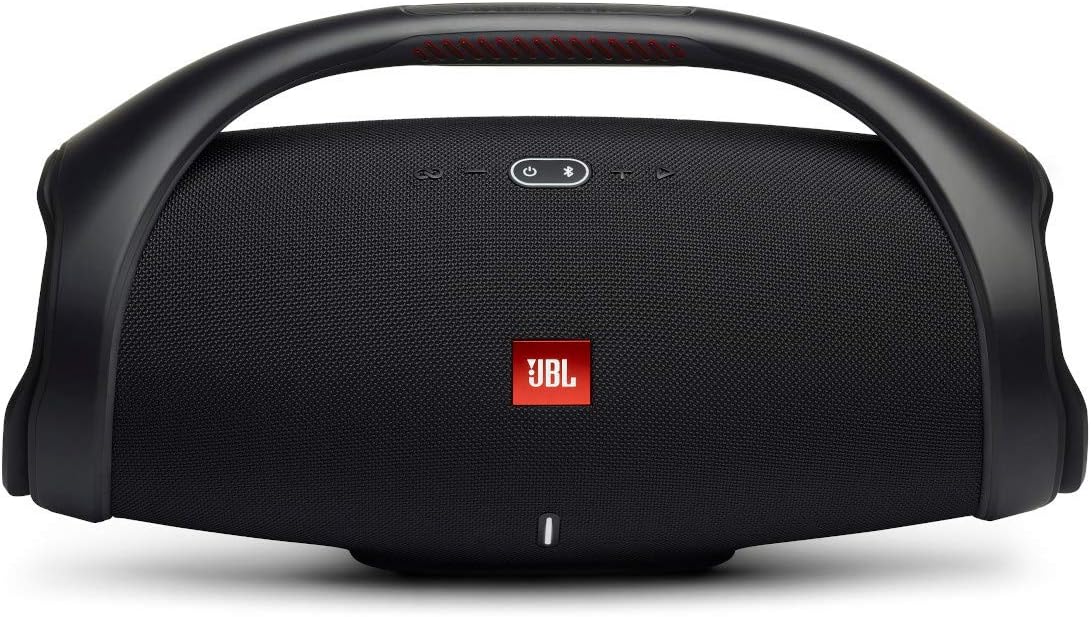
Image: A close-up front view of the black JBL Boombox 2 portable speaker, highlighting its grille and control buttons on the top handle.
1.2 JBL Vibe Beam Headphones Setup
- Charging: Place the earbuds into the charging case. Connect the USB-C cable to the charging case and a power source. The LED indicators on the case will show charging status.
- Power On/Off: The earbuds automatically power on when removed from the case and power off when placed back in the case.
- Bluetooth Pairing:
- Open the charging case. The earbuds will enter pairing mode automatically.
- On your device, enable Bluetooth and select "JBL Vibe Beam" from the list of available devices.
- Once connected, a confirmation sound will play.

Image: The white JBL Vibe Beam true wireless headphones resting inside their open charging case, with indicator lights visible.
2. Operating Instructions
2.1 JBL Boombox 2 Speaker Operation
- Volume Control: Use the '+' and '-' buttons on the top panel to adjust the volume.
- Play/Pause: Press the play/pause button to control music playback.
- JBL PartyBoost: Press the PartyBoost button to connect with other JBL PartyBoost-compatible speakers for a synchronized audio experience. Refer to the JBL PartyBoost guide for detailed instructions on linking multiple speakers.
- Powerbank Feature: The Boombox 2 includes a built-in powerbank. Connect your mobile device to the USB port on the back of the speaker to charge it.

Image: An X-ray style view of the JBL Boombox 2, illustrating its internal components including two JBL passive radiators and a proprietary racetrack-shaped driver, emphasizing its powerful sound capabilities.
2.2 JBL Vibe Beam Headphones Operation
- Touch Controls: The earbuds feature touch-sensitive areas for controlling playback, calls, and voice assistant activation. Refer to the quick start guide for specific tap patterns.
- Hands-free Calls with VoiceAware: When making calls, VoiceAware allows you to adjust the amount of your own voice you hear, enhancing call clarity.
- Battery Life: The earbuds provide up to 32 total hours of battery life with the charging case.

Image: A close-up view of the white JBL Vibe Beam true wireless earbuds, showcasing their ergonomic design and JBL branding.
3. Maintenance
3.1 Cleaning
- JBL Boombox 2: Wipe the speaker with a soft, damp cloth. Do not use abrasive cleaners or submerge the speaker in water for cleaning.
- JBL Vibe Beam Headphones: Gently clean the earbuds and charging case with a dry, soft cloth. Avoid using liquids directly on the earbuds.
3.2 Water and Dust Resistance
- JBL Boombox 2: The Boombox 2 is IPX7 waterproof, meaning it can be submerged in up to 1 meter of water for up to 30 minutes. Ensure the charging port cover is securely closed before exposure to water.
- JBL Vibe Beam Headphones: The earbuds are IP54-certified for splash and dust resistance, and the charging case is IPX2-certified for splash resistance. This protects against light splashes and dust, but they are not designed for full submersion.

Image: The black JBL Boombox 2 speaker being splashed with water, demonstrating its IPX7 waterproof rating.
4. Troubleshooting
4.1 Common Issues & Solutions
- No Power: Ensure the device is charged. For Boombox 2, check the power cable connection.
- No Sound: Check volume levels on both the device and the speaker/headphones. Ensure Bluetooth is connected.
- Bluetooth Disconnection: Move the devices closer together. Disconnect and re-pair the Bluetooth connection. Ensure no other devices are interfering.
- Poor Sound Quality: Ensure the audio source is of good quality. Check for obstructions between the devices.
- Headphones Not Charging: Ensure earbuds are correctly seated in the charging case. Check the charging case battery level.
5. Specifications
| Feature | JBL Boombox 2 | JBL Vibe Beam |
|---|---|---|
| Model Name | Boombox 2 | Vibe Beam |
| Connectivity Technology | Bluetooth | |
| Power Source | Battery Powered | |
| Water Resistance Level | IPX7 Waterproof | IP54 (earbuds), IPX2 (case) |
| Playtime | Up to 24 Hours | Up to 32 Total Hours (with case) |
| Charging Time | 6.5 Hours | Not specified (earbuds/case) |
| Special Features | Bass Boost, PartyBoost, Powerbank | Deep Bass Sound, VoiceAware |
| Included Components | JBL Boombox 2 speaker, Vibe Beam headphones, powerbank feature, and 3.5 mm audio cable | |
| Material | Metal, Plastic | Plastic |
| Control Method | Buttons | Touch, Voice |
6. Warranty Information
JBL products come with a limited warranty. For specific details regarding your warranty coverage, including duration and terms, please refer to the warranty card included with your product or visit the official JBL support website.
7. Support
For further assistance, technical support, or to access frequently asked questions, please visit the official JBL support website:
You may also contact JBL customer service directly through the contact information provided on their website.


