
Lapcare LBS-609
LAPCARE Musi Bar VI Bluetooth Speaker User Manual
Model: LBS-609
Introduction
The LAPCARE Musi Bar VI is a compact and portable Bluetooth soundbar designed to deliver an immersive audio experience. Featuring Bluetooth 5.3, 16W RMS dynamic drivers, and stereo sound, it offers up to 8 hours of playtime and multiple connectivity options. This manual provides essential information for setting up, operating, and maintaining your Musi Bar VI speaker.
What's in the Box
- 1 x LAPCARE Musi Bar VI Soundbar
- 1 x User Manual
- 1 x Charging Cable

Image: The LAPCARE Musi Bar VI soundbar in yellow, accompanied by its charging cable and user manual, as typically found in the product packaging.
Product Features
- Powerful Audio: 16W RMS output with dynamic drivers for clear, stereo sound.
- Extended Playtime: Up to 8 hours of continuous audio playback on a single charge.
- Bluetooth 5.3: Stable and efficient wireless connectivity.
- Multiple Connectivity Options: Supports Bluetooth, Aux-in, TF Card, and USB Pendrive playback.
- Compact & Portable: Lightweight design for easy transport.
- Easy Controls: Intuitive buttons for media and volume management.

Image: A graphic highlighting the 16W audio output of the LSB-609 Musi Bar VI portable Bluetooth soundbar, emphasizing its compact yet powerful nature.

Image: A visual representation of the soundbar's battery life, indicating up to 8 hours of playback time for endless listening.

Image: An illustration emphasizing the stereo sound capabilities of the soundbar, designed to deliver rich bass and clear audio.
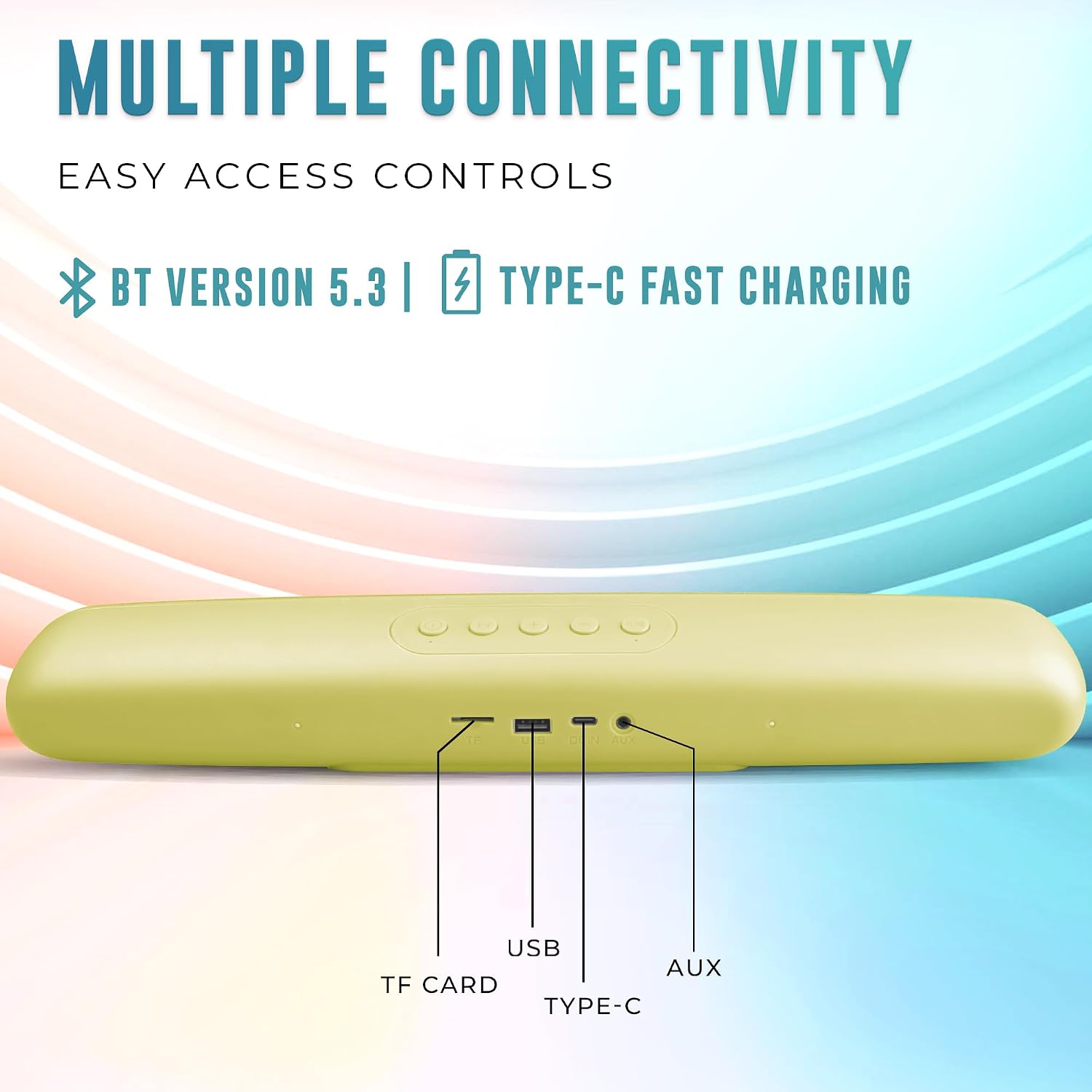
Image: A close-up view of the soundbar's rear panel, detailing its multiple connectivity options including TF Card slot, USB port, Type-C charging port, and AUX input, alongside Bluetooth 5.3.
Setup
Initial Charging
Before first use, fully charge the Musi Bar VI. Connect the provided charging cable to the Type-C port on the soundbar and the other end to a USB power adapter (not included). The charging indicator light will show the charging status and turn off when fully charged.
Powering On/Off
- To Power On: Press and hold the Power button for a few seconds until you hear an audible prompt and the indicator light illuminates.
- To Power Off: Press and hold the Power button again for a few seconds until you hear an audible prompt and the indicator light turns off.
Operating Instructions
Bluetooth Pairing
- Ensure the soundbar is powered on and in Bluetooth pairing mode (indicated by a flashing blue light).
- On your device (smartphone, tablet, etc.), enable Bluetooth and search for available devices.
- Select "LAPCARE Musi Bar VI" from the list.
- Once paired, the soundbar will indicate a successful connection, and the indicator light will become solid blue.
Multiple Playback Options
- Bluetooth Mode: After pairing, audio will stream wirelessly from your device.
- AUX Mode: Connect an audio device using a 3.5mm AUX cable to the AUX port. The soundbar will automatically switch to AUX mode.
- TF Card Mode: Insert a TF (microSD) card with audio files into the TF card slot. The soundbar will automatically play music from the card.
- USB Pendrive Mode: Insert a USB pendrive with audio files into the USB port. The soundbar will automatically play music from the pendrive.
Button Controls
The soundbar features intuitive buttons for easy control:
- Power Button: Press and hold to power on/off. Short press to switch between playback modes (Bluetooth, AUX, TF Card, USB).
- Volume Up (+): Short press to increase volume.
- Volume Down (-): Short press to decrease volume.
- Play/Pause Button: Short press to play or pause audio.
- Next Track Button: Long press Volume Up (+) to skip to the next track.
- Previous Track Button: Long press Volume Down (-) to go to the previous track.
Maintenance
- Cleaning: Use a soft, dry cloth to clean the surface of the soundbar. Do not use abrasive cleaners or solvents.
- Storage: Store the soundbar in a cool, dry place away from direct sunlight and extreme temperatures.
- Battery Care: To prolong battery life, avoid fully discharging the battery frequently. Charge the device regularly, even if not in use for extended periods.
- Water Resistance: This product is not waterproof. Avoid exposure to water or high humidity.
Troubleshooting
| Problem | Possible Cause | Solution |
|---|---|---|
| No power | Battery is low or depleted. | Charge the soundbar fully using the provided charging cable. |
| Cannot pair via Bluetooth | Soundbar is not in pairing mode; device Bluetooth is off; too far from device. | Ensure soundbar is in pairing mode (flashing blue light). Turn on Bluetooth on your device. Move device closer to the soundbar (within 10 meters). |
| No sound | Volume is too low; incorrect mode selected; audio source issue. | Increase volume on both soundbar and connected device. Ensure correct playback mode (BT, AUX, TF, USB) is selected. Check audio source for playback. |
| Distorted sound | Volume too high; interference; low battery. | Reduce volume. Move away from other electronic devices. Charge the soundbar. |
Specifications
| Model Name | LBS-609 |
| Speaker Type | Soundbar |
| Audio Output | 16W RMS |
| Connectivity | Bluetooth 5.3, AUX, TF Card, USB |
| Battery Life | Up to 8 hours |
| Battery Capacity | 1200 mAh Lithium Ion |
| Product Dimensions (L x W x H) | 178D x 29W x 44H Millimeters |
| Item Weight | 550 Grams |
| Control Type | Button |
| Power Source | Battery Powered |
| Manufacturer | Rx Infotech Pvt Ltd |
| Country of Origin | India |
Warranty and Support
For warranty information and technical support, please refer to the warranty card included with your product or visit the official Lapcare website. Keep your purchase receipt as proof of purchase for warranty claims.
Manufacturer: Rx Infotech Pvt Ltd
Contact Information: Please refer to the contact details provided on the product packaging or the official Lapcare support page for assistance.
Ask a question about this manual
Ask about setup, troubleshooting, compatibility, parts, safety, or missing instructions. Manuals+ will review the question and use this page’s manual context to help answer it.