Product Overview
The DEWALT Heavy Duty 2-in-1 Neckband Bluetooth Headphones are designed for robust use, featuring both wireless earbuds and built-in speakers. This versatile audio solution provides an impressive 60+ hours of earbud runtime and 7.5+ hours of speaker time, making it ideal for extended use on the jobsite or during daily activities. Its heavy-duty construction with IP56 water resistance ensures durability against sweat and moisture.

Image: The DEWALT 2-in-1 Neckband Bluetooth Headphones, showcasing the neckband design, earbuds, and integrated speakers.
What's in the Box
Your DEWALT Neckband Headphones package includes the following items:
- DEWALT Heavy Duty 2-in-1 Neckband Bluetooth Headphones
- Ear Cushions (various sizes for optimal fit)
- Ear Fins (for secure fit)
- Type C Charging Cable
- User Manual (this document)
- Carry Pouch

Image: All components included in the product packaging: the neckband headphones, various ear tips and fins, USB-C charging cable, and a carry pouch.
Setup
1. Charging the Device
Before first use, fully charge your DEWALT Neckband Headphones. Connect the provided Type C charging cable to the charging port on the neckband and plug the other end into a compatible USB power source. The LED indicator will show charging status.
- Charging Time: Approximately 1.5 hours for a full charge.
- Battery Life: Up to 60+ hours in earphone mode, 7.5+ hours in speaker mode.

Image: Close-up of the DEWALT neckband showing the USB-C charging port and cable connected.
2. Bluetooth Pairing
- Ensure the headphones are powered off.
- Press and hold the power button until the LED indicator flashes, indicating pairing mode.
- On your device (smartphone, tablet, etc.), enable Bluetooth and search for available devices.
- Select "DEWALT DXMA1902093" from the list of devices.
- Once connected, the LED indicator will change to a steady light or turn off, depending on the model.
Operating Instructions
Power On/Off
- To power on: Press and hold the power button for 3 seconds.
- To power off: Press and hold the power button for 5 seconds.
Switching Between Earbud and Speaker Mode
The DEWALT Neckband Headphones offer a unique 2-in-1 functionality, allowing you to switch between private earbud listening and open-ear speaker mode for jobsite awareness.
- Locate the dedicated mode switch button on the neckband.
- Press the button to toggle between earbud mode and built-in speaker mode.

Image: Diagram highlighting the open-ear speaker, vibrating call alerts, 60+ hour battery life, and 4 EQ modes.
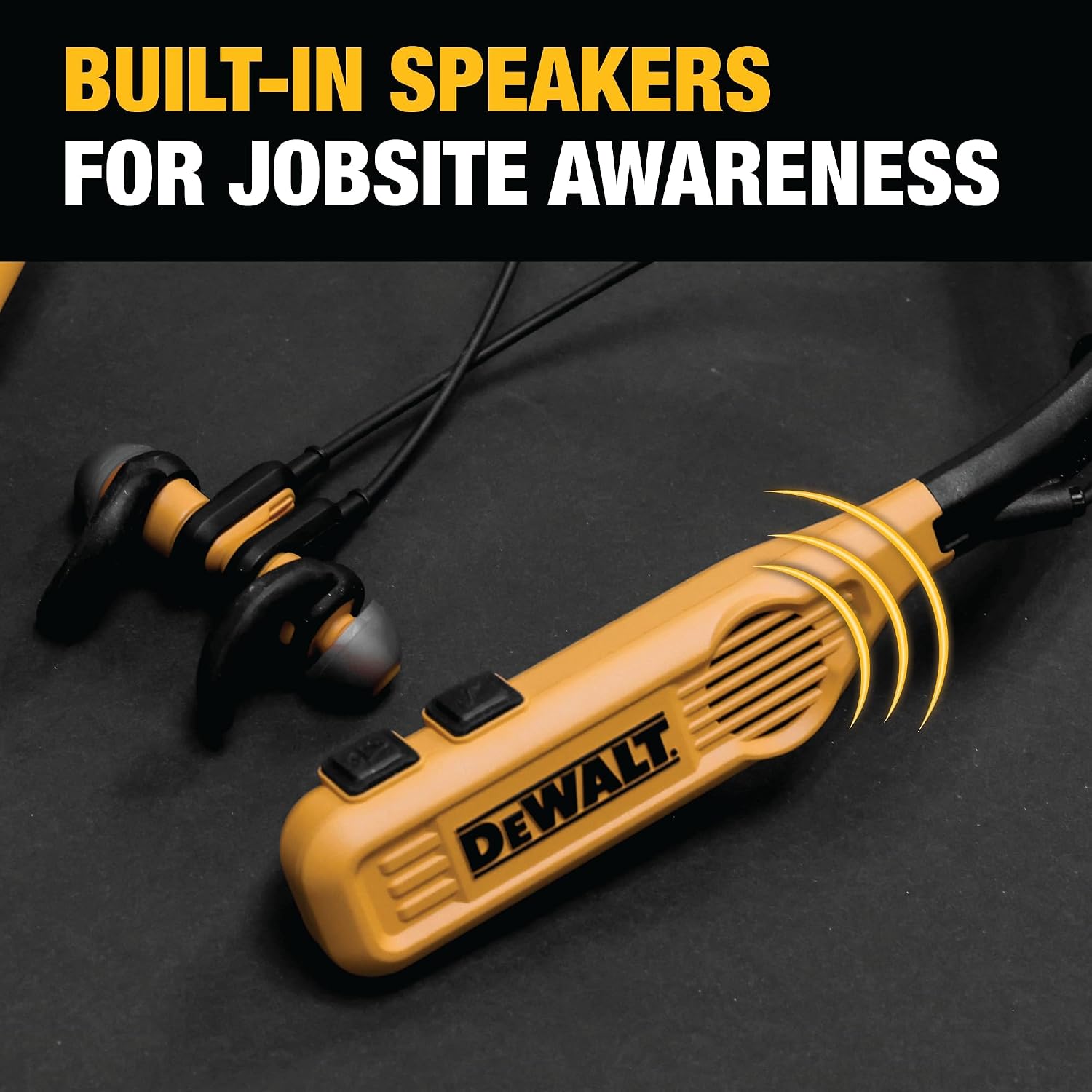
Image: Close-up of the neckband showing the built-in speaker grille, emphasizing its function for jobsite awareness.
Audio Controls
The neckband features oversized buttons for easy control, even with gloved hands.
- Volume Up/Down: Use the (+) and (-) buttons.
- Play/Pause: Press the center button once.
- Next Track: Double-press the center button.
- Previous Track: Triple-press the center button.
EQ Modes
Experience balanced audio with 4 EQ modes for personalized sound tailored to your preferences (available in earphone mode only).
- Music Mode: Standard balanced audio.
- Movie Mode: Enhanced for cinematic sound.
- Podcast Mode: Optimized for clear vocals.
- Super Bass Mode: Amplified bass for powerful audio.

Image: Icons representing the four EQ modes: Music, Movie, Podcast, and Bass.
Call Management
The Bluetooth phone headset features call vibration alerts and hands-free calling.
- Answer/End Call: Press the center button once.
- Reject Call: Press and hold the center button for 2 seconds.
- Call Vibration Alerts: The neckband will vibrate to notify you of incoming calls.

Image: A construction worker wearing the headphones, illustrating the hands-free calling and vibrating alert feature.
Maintenance
To ensure the longevity and optimal performance of your DEWALT Neckband Headphones, follow these maintenance guidelines:
- Cleaning: Wipe the neckband and earbuds with a soft, damp cloth. Do not use harsh chemicals or abrasive cleaners.
- Water Resistance: The headphones have an IP56 rating, meaning they are protected against dust and high-pressure water jets. While they can withstand sweat and moisture, do not submerge them in water.
- Storage: When not in use, store the headphones in the provided carry pouch to protect them from dust and damage. The built-in magnets help secure the earbuds together, preventing tangling.
- Charging Port: Keep the USB-C charging port clean and free of debris. Ensure the flap covering the port is securely closed when not charging to maintain water resistance.

Image: Two views of the neckband, demonstrating how the magnetized earbuds connect to prevent dangling when not in use.
Troubleshooting
| Problem | Possible Cause | Solution |
|---|---|---|
| Device won't power on. | Low battery. | Charge the device fully using the provided USB-C cable. |
| Cannot pair with Bluetooth device. | Headphones not in pairing mode; device Bluetooth off; too far from device. | Ensure headphones are in pairing mode (flashing LED). Turn Bluetooth on your device. Move headphones closer to the device (within 10 meters). |
| No sound or low volume. | Volume too low; incorrect mode (earbuds vs. speakers); device volume low. | Increase volume on both headphones and connected device. Ensure you are in the desired audio mode (earbuds or speakers). |
| Headphones vibrate continuously when charging or powered on. | This is an intended feature for call alerts or charging indication. | This is normal operation. The vibration indicates charging status or an incoming call. The vibration during charging will stop after approximately 15 seconds. The vibration upon power-on will also stop after approximately 15 seconds. |
If problems persist, please refer to the warranty and support section for further assistance.
Specifications
| Feature | Detail |
|---|---|
| Model Number | DXMA1902093 |
| Connectivity Technology | Wireless (Bluetooth 5.0) |
| Battery Life (Earphone Mode) | 60+ Hours |
| Battery Life (Speaker Mode) | 7.5+ Hours |
| Charging Time | 1.5 Hours |
| Water Resistance Rating | IP56 (Dust and high-pressure water jet resistant) |
| Control Method | Button |
| EQ Modes | Music, Movie, Podcast, Super Bass |
| Item Weight | 7.7 ounces (0.22 Kilograms) |
| Product Dimensions | 1 x 6 x 8 inches |
| Material | Plastic |
| UPC | 826341050814 |
Warranty and Support
DEWALT products are built to last and are backed by a Lifetime Warranty, ensuring durability and reliability for the jobsite. For warranty claims, technical support, or service inquiries, please visit the official DEWALT website or contact their customer service.
For more information and support, visit: DEWALT Official Store


