
Introduction
The Hmusic H23 Jobsite Neckband Headphones are designed for demanding environments, offering robust hearing protection, durability, and extended battery life. These wireless earbuds feature 3-level noise reduction, IP67 dustproof and waterproof rating, up to 80 hours of playtime, and dual ENC microphones for clear communication. With Bluetooth 5.4 and dual-device pairing, they provide a stable and versatile audio experience for work, outdoor activities, and gaming.
What's in the Box
- Hmusic H23 Neckband Headphones
- Storage Bag
- Magnetic Charging Cable
- 3 Sets of Interchangeable Ear Tips (Tri-flange, Foam, and Round tips in S/M/L sizes)

Image: Contents of the Hmusic H23 package, including the headphones, storage bag, charging cable, and various ear tips.
Product Features
3-Level Hearing Protection
The H23 headphones come with three interchangeable ear tip sets (tri-flange, foam, and round tips in S/M/L sizes) to provide customized noise reduction from 20dB to 40dB. This makes them ideal for blocking everyday noise or loud equipment like mowers, vacuums, and power tools.
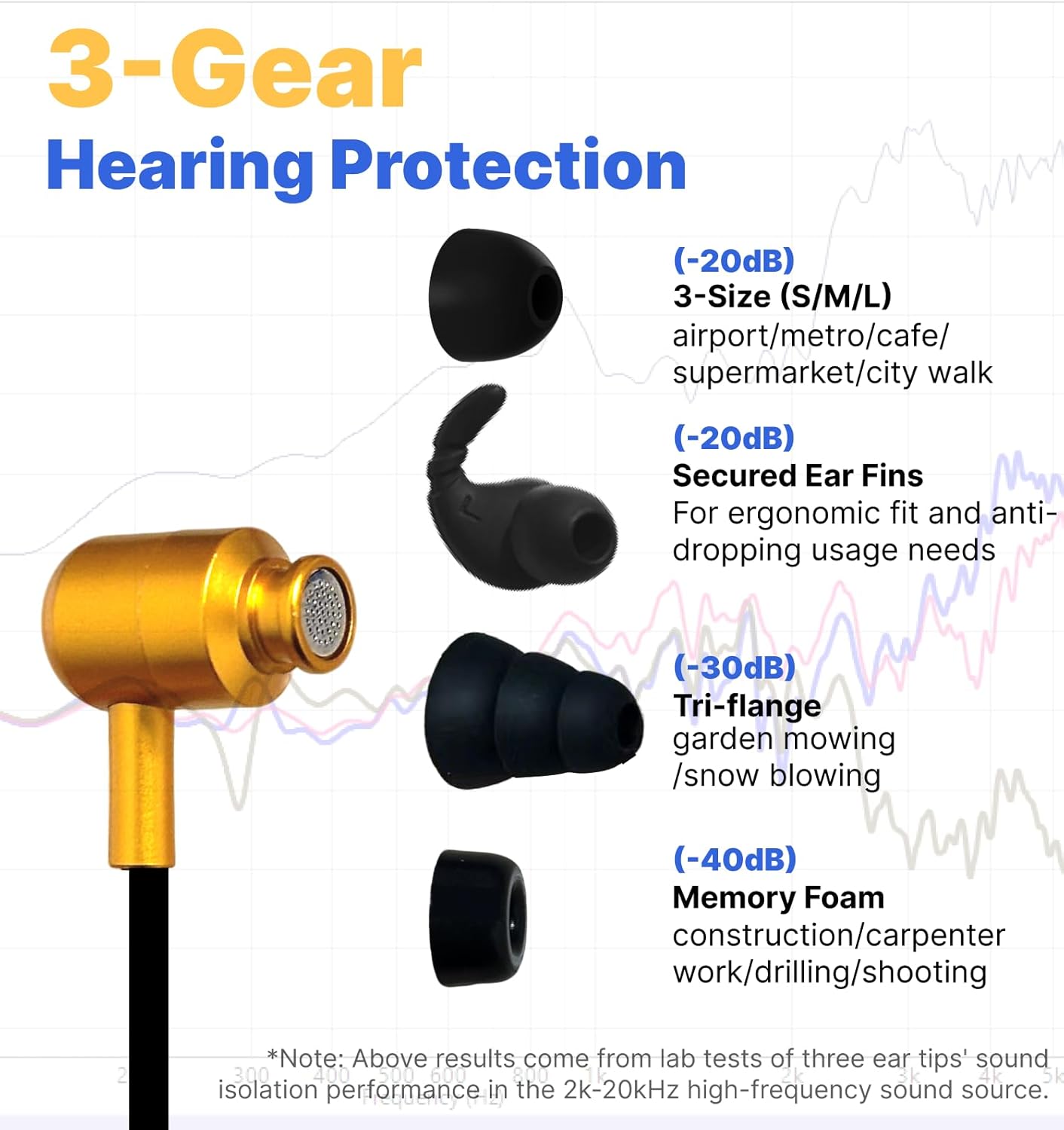
Image: A close-up of the various ear tip options (silicone, tri-flange, memory foam) provided with the H23 headphones, designed for different levels of noise reduction.
Rugged IP67 Dustproof & Waterproof
Built tough with industrial-grade dust resistance and IPX7 waterproof rating, these headphones handle wood dust, jobsite debris, rain, and snow. They are ideal for workshops, DIY projects, hiking, camping, and other outdoor activities.

Image: The Hmusic H23 headphones are shown partially submerged in water, highlighting their IPX7 waterproof capability for use in wet conditions.
80-Hour Playtime & Quick Charge
Powered by a 400mAh battery with a waterproof 2-pin charging port, the headphones get a full charge in 1 hour for up to 80 hours of music or 50 hours of talk time. This ensures less charging and more usage.

Image: An illustration depicting the Hmusic H23 headphones' impressive 80-hour playtime and rapid 1-hour charging capability, emphasizing long-lasting use.
Dual Mics for Clear Calls in Noise
The neckband headphone features dual ENC (Environmental Noise Cancellation) microphones with AI noise cancellation to block background sounds. Your voice comes through clearly even on loud job sites, busy streets, or crowded places.

Image: A man wearing Hmusic H23 headphones on a noisy jobsite, engaged in a phone call, illustrating the effectiveness of the dual ENC microphones for clear communication.
Comfortable & Secure Tangle-Free Wear
The ergonomic neck-hugging fit ensures the headphones stay put during active movement. Magnetic earbuds snap together when not in use for easy storage and portability, preventing tangles.

Image: A woman working in a workshop while wearing Hmusic H23 headphones, showcasing their comfortable neckband design and magnetic earbuds for secure and tangle-free use.
Dual-Device Pairing & Game Mode
Equipped with Bluetooth 5.4, the headphones allow for seamless switching between two devices. The low-latency Game Mode ensures real-time audio sync for smooth, immersive gameplay.

Image: Visuals demonstrating the Hmusic H23 headphones' ability to pair with two devices simultaneously and their low-latency Game Mode for enhanced gaming audio.
Setup
1. Charging the Headphones
- Connect the magnetic charging cable to the waterproof 2-pin charging port on the neckband.
- Plug the USB end of the cable into a power source.
- The indicator light will be steady red during charging and turn off when fully charged.

Image: A step-by-step diagram illustrating how to connect the magnetic charging cable to the Hmusic H23 headphones for charging.
2. Choosing the Right Ear Tips
Select the ear tips that provide the best fit and desired level of noise isolation for your activity. The package includes silicone (S/M/L), tri-flange (30dB), and memory foam (40dB) ear tips.

Image: A visual guide to selecting the appropriate ear tips for the Hmusic H23 headphones, showing options for daily use and ultra-protection needs.
3. Bluetooth Pairing
- Press and hold the power button to turn on the headphones. They will enter pairing mode automatically.
- On your device (smartphone, tablet, etc.), enable Bluetooth and search for "H23".
- Select "H23" to connect. A voice prompt will confirm successful pairing.
- For dual-device pairing, connect to the first device, then disable Bluetooth on the first device. Pair with the second device, then re-enable Bluetooth on the first device to connect to both.

Image: A four-step visual guide demonstrating how to establish dual-device Bluetooth connections with the Hmusic H23 headphones.
Operating Instructions
Controls Overview

Image: A detailed diagram illustrating the power button, volume controls, microphone, and touch control functions on the Hmusic H23 neckband headphones.
Power Button Functions
- Press & Hold: Power on/off, enter pairing mode, reject call, activate voice assistant.
- X1 Click: Answer/hang up calls, play/pause music.
- X3 Click: Switch language between English and Japanese (in pairing mode).
Volume & Track Control (+ / - Keys)
- + Key (X1 Click): Increase volume.
- + Key (Press & Hold): Previous song.
- - Key (X1 Click): Reduce volume.
- - Key (Press & Hold): Next song.
Touch Control Functions
- X2 Tap: Switch between Game Mode and Music Mode.
- X3 Tap: Switch between 3 EQ modes.
Maintenance
- Cleaning: Wipe the headphones with a soft, damp cloth. Do not use harsh chemicals or abrasive materials.
- Water Exposure: While IP67 rated, ensure the charging port is dry before connecting the magnetic charger. Avoid prolonged submersion beyond specified limits.
- Storage: When not in use, store the headphones in the provided storage bag to prevent tangling and damage.
- Ear Tips: Regularly clean ear tips with mild soap and water. Replace them if they become worn or damaged to maintain optimal noise reduction and hygiene.
Troubleshooting
- No Power: Ensure the headphones are fully charged. Connect to the magnetic charger and check for the red indicator light.
- Cannot Pair: Make sure the headphones are in pairing mode (blinking indicator light). Disable and re-enable Bluetooth on your device. Ensure the headphones are not connected to another device.
- Poor Sound Quality/Low Volume: Check if the ear tips are properly seated in your ears and are the correct size for a good seal. Adjust the volume on both the headphones and your connected device.
- Intermittent Connection: Ensure your device is within the Bluetooth range (up to 19.81 meters). Avoid obstacles that may interfere with the signal.
- Charging Issues: Ensure the magnetic charging cable is securely connected and the charging port is clean and dry.
Specifications
| Feature | Detail |
|---|---|
| Brand | Hmusic |
| Model Number | H23 |
| Color | Jobsite Yellow |
| Ear Placement | In Ear |
| Form Factor | In Ear |
| Impedance | 32 Ohms |
| Item Weight | 0.21 Kilograms |
| Battery Charge Time | 1 Hour |
| Battery Average Life | 80 Hours |
| Noise Control | Sound Isolation (30dB-40dB) |
| Frequency Range | 20 Hz to 20,000 Hz |
| Audio Driver Type | Dynamic Driver |
| Audio Driver Size | 8 Millimeters |
| Water Resistance Level | IPX7 Waterproof |
| Connectivity Technology | Wireless (Bluetooth) |
| Bluetooth Range | 19.81 Meters |
| Bluetooth Version | 5.2 |
| Control Type | Volume Control, Button, Touch |
Official Product Video
Video: An official Hmusic video showcasing the wireless neckband headphones, demonstrating their features and design.
Warranty & Support
The Hmusic H23 Jobsite Neckband Headphones come with a 1-Year Warranty. For support or warranty claims, please refer to the contact information provided in your product packaging or visit the official Hmusic website.


