
1. Introduction
This manual provides detailed instructions for the installation, operation, and maintenance of your ANNKE 8CH 3K Security Camera System. Please read this manual thoroughly before using the product to ensure proper setup and functionality. Keep this manual for future reference.
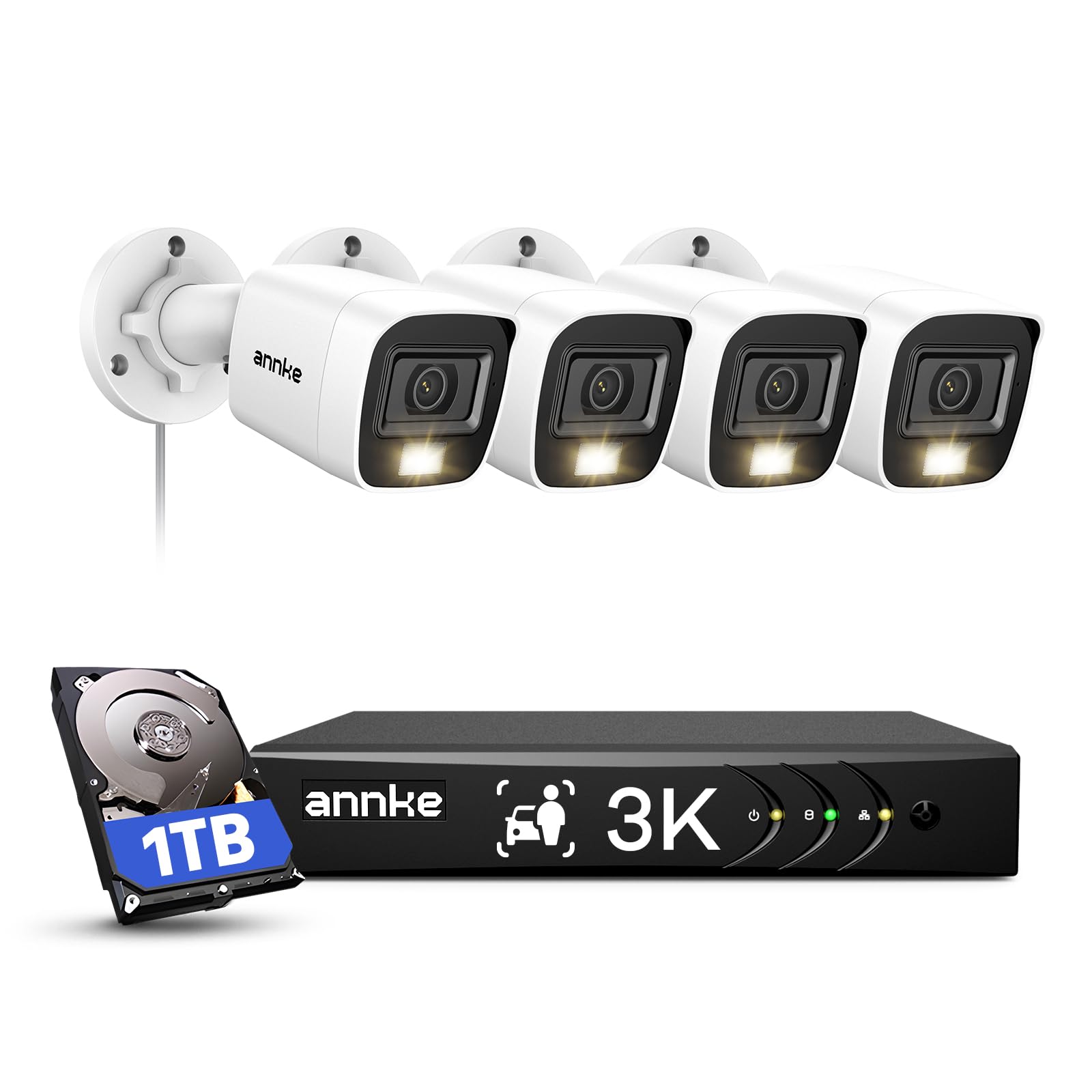
Figure 1: ANNKE 8CH 3K Security Camera System Overview
2. What's in the Box
Verify that all components are present in your package:
- 1x 8CH 3K Lite Surveillance DVR with 1TB Hard Drive
- 4x 3K CCTV Cams & 60ft BNC Cables & Screw Kits
- 2x Power Adapters & 1x1-to-4 Splitter cables
- 1x 5.9ft HDMI Cable & 3.2ft Ethernet Cable
- 1x USB Mouse & Wall Sticker & User Manual
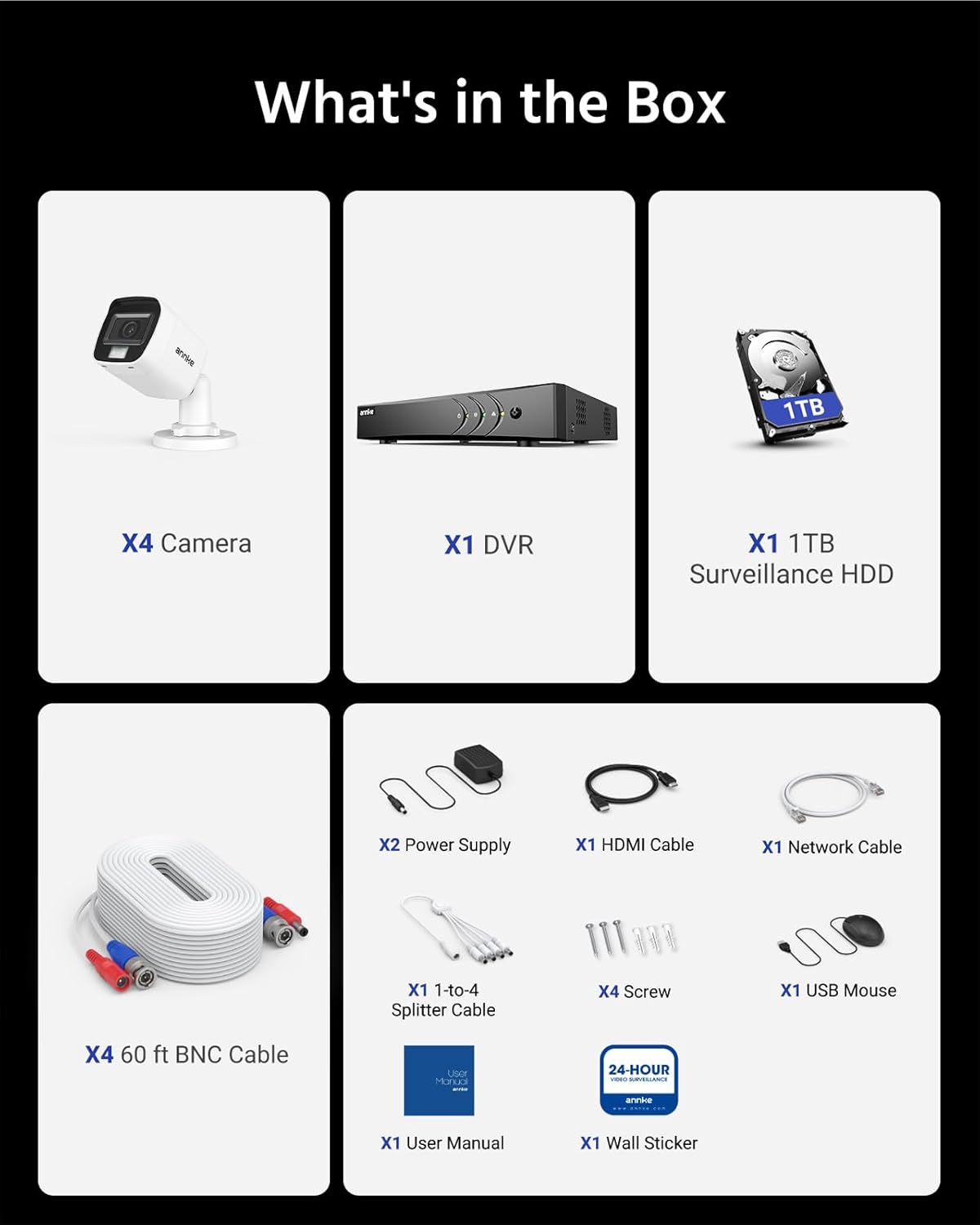
Figure 2: Package Contents
3. Product Features
- Smart Dual-light Camera: This wired security camera system offers three night vision modes: smart light, white light, and IR night vision. The smart light mode is the default, where black and white night vision automatically switches to color upon human or vehicle detection.
- 3K Camera & Built-in Mic: Equipped with a 3K CMOS image sensor, the security camera delivers 2960×1665 resolution at 20fps with a 16:9 aspect ratio for clear live streams. A built-in microphone enables audio recording, which can be disabled in the menu.
- AI Human/Vehicle Detection: Advanced algorithms provide approximately 99% accuracy in detecting humans and vehicles, reducing false alerts. Customizable zone settings further enhance detection precision.
- Up to 10TB HDD & H.265+ Coding: The home security system supports up to a 10TB hard drive (1TB HDD included) for continuous surveillance monitoring. H.265+ video compression technology saves up to 80% more storage space compared to H.264.
- IP67 Weatherproof: ANNKE cameras are designed with an IP67 rating, ensuring durability and reliable operation in various weather conditions.

Figure 3: Smart Dual-Light Night Vision

Figure 4: Built-in Microphone for Audio

Figure 5: AI Human/Vehicle Detection

Figure 6: IP67 All-Weather Proof Design

Figure 7: Smart Playback Feature
4. Setup Instructions
Follow these steps to set up your ANNKE 8CH 3K Security Camera System:
- Connect the DVR: Connect the DVR to a monitor using a VGA or HDMI cable. Connect the DVR to your router via an Ethernet cable. Plug in the 12V DC power adapter to the DVR. Connect the USB mouse to a USB input on the DVR.
- Connect Cameras: Connect the BNC video output of each camera to the corresponding video input on the DVR. Connect the DC power input of each camera to the power supply using the provided splitter cables.
- Power On: Plug in all power adapters to a power outlet. The system will boot up automatically.
Video 1: How to Hook Up an Analog Camera for ANNKE DVR System. This video demonstrates the physical connections for setting up an analog camera with the DVR.
Video 2: How to Hook Up an IP Camera to ANNKE DVR System. This video guides you through connecting an IP camera to your ANNKE DVR.
5. Operating Instructions
Learn how to navigate and utilize the features of your ANNKE Security Camera System:
- Accessing the DVR Menu: Right-click on the live view screen to access the main menu. Enter your gesture pattern or password to log in.
- Switching Analog to IP Channels: Navigate to Menu > Configuration > Camera > Analog. Select the analog channel you wish to convert and choose the IP option. Click 'Apply' and confirm to reboot the DVR for changes to take effect.
- Adjusting Window Division: From the live view, right-click and select 'Window Division' to change the layout of your camera feeds (e.g., 1x1, 2x2, 1+5, 1+7, 3x3, 4x4).
- Setting Privacy Mask: Go to Menu > Configuration > Camera > Privacy Mask. Enable the function, then use the left mouse button to draw the area you wish to mask on the screen. Click 'Apply' to save.
Video 3: How to Change Analog Channels to IP Ones for ANNKE DVR. This video demonstrates the process of converting analog channels to IP channels on your DVR.
Video 4: ANNKE 3K Lite DVR Window Division Switch. This video shows how to switch the number of preview channels displayed on your DVR.
Video 5: How to Set the Privacy Mask for ANNKE 3K Lite DVR. This video demonstrates how to configure privacy masks on your DVR to obscure sensitive areas.
6. Maintenance
Regular maintenance ensures optimal performance and longevity of your security system:
- Clean Cameras: Periodically clean camera lenses with a soft, damp cloth to remove dust and dirt that may obstruct vision.
- Check Connections: Ensure all cables (power, video, network) are securely connected to prevent signal loss or power interruptions.
- Software Updates: Check the ANNKE official website for firmware updates for your DVR and cameras to ensure you have the latest features and security patches.
- Hard Drive Health: Monitor the health of your 1TB hard drive through the DVR's system settings. Back up important footage regularly.
7. Troubleshooting
Refer to the following common issues and solutions:
- No Video Output:
- Check HDMI/VGA cable connections to the monitor and DVR.
- Ensure the DVR is powered on and its indicator lights are active.
- Verify camera power and video connections.
- No Network Connection:
- Ensure the Ethernet cable is securely connected to both the DVR and the router.
- Check your router's internet connection.
- Verify network settings in the DVR menu (IP address, gateway, DNS).
- Camera Not Displaying:
- Check the camera's power supply and BNC cable connection.
- If it's an IP camera, ensure it's properly added and configured in the DVR's IP channel settings.
- If a camera shows only night vision during the day, try resetting its power supply.
- False Motion Alerts:
- Adjust the sensitivity of the motion detection in the DVR settings.
- Utilize the AI Human/Vehicle Detection feature to filter out irrelevant movements.
- Set up specific detection zones to monitor only critical areas.
8. Specifications
| Feature | Specification |
|---|---|
| Brand | ANNKE |
| Model Number | DW81KD1-V7-R4CV-P |
| Connectivity Technology | Wired |
| Video Capture Resolution | 3K (2960x1665) |
| Number of Channels | 8 |
| Special Features | Audio Recording, Human Detection, Night Vision, Smart Playback, Vehicle Detection |
| Memory Storage Capacity | 1 TB (Hard Drive) |
| Power Source | DC |
| Operating System | Linux-Based System |
| Compatible Devices | Cameras, Laptops, Personal Computers, Smartphones, Tablets |
| Signal Format | Analog |
| Night Vision Range | 82 Feet |
| Focal Length | 2.8 millimeters |
| Viewing Angle | 107 Degrees |
| Video Input | BNC |
| Item Weight | 9.5 Pounds |
| Item Dimensions | 14.57 x 11.81 x 7.56 inches |
| Color | White |

Figure 8: Product Dimensions
9. Warranty and Support
ANNKE products are designed for reliability and performance. For any technical assistance or warranty inquiries, please contact ANNKE customer support.
- Technical Support: ANNKE offers lifetime technical support for its products.
- Warranty Information: Refer to the official ANNKE website or the warranty card included in your package for specific warranty terms and conditions.
- Online Resources: Visit the ANNKE Store on Amazon or the official ANNKE website for FAQs, software downloads, and additional support.