
1. Introduction
Thank you for choosing the JAZAVA 72-inch Smart Ceiling Fan with Lights. This manual provides detailed instructions for the safe installation, operation, and maintenance of your new ceiling fan. Please read this manual thoroughly before installation and keep it for future reference.

Image 1.1: Overview of the JAZAVA 72-inch Smart Ceiling Fan with included accessories.
2. Safety Information
WARNING: To reduce the risk of fire, electric shock, or personal injury, always follow these basic precautions:
- Read all instructions before installing the fan.
- Ensure the installation site is suitable for supporting the fan's weight (approximately 26.6 pounds).
- All wiring must be in accordance with national and local electrical codes. If you are unfamiliar with wiring, consult a qualified electrician.
- Disconnect power at the circuit breaker or fuse box before beginning installation or performing any maintenance.
- Do not operate the fan with a damaged power cord or plug.
- Avoid placing objects in the path of the fan blades.
- Ensure the fan is installed at a height where blades are at least 7 feet (2.1 meters) from the floor.
3. Package Contents
Verify that all components listed below are included in your package:
- 1 x DC Motor and Housing
- 1 x LED Light and Lamp Shades
- 9 x Wood Blades
- 1 x Remote Control
- Installation Accessories (including 5", 10", and 24" downrods)

Image 3.1: Product details and included components diagram.
4. Setup and Installation
The JAZAVA smart ceiling fan is designed for straightforward installation. A video guide and comprehensive instructions are included in the package. Ensure you have all necessary tools before beginning.
- Prepare the Installation Site: Turn off power at the circuit breaker. Ensure the ceiling junction box is securely mounted and capable of supporting the fan's weight.
- Mount the Bracket: Attach the mounting bracket to the ceiling junction box using the provided screws and washers.
- Assemble Downrod and Motor: Select the appropriate downrod (5", 10", or 24") for your ceiling height. Securely attach it to the fan motor housing.
- Hang the Fan: Carefully lift the fan assembly and hang it on the mounting bracket.
- Wire the Fan: Connect the electrical wires according to the wiring diagram provided in the detailed manual. Ensure all connections are secure. Note: Some units may have reversed yellow and white wires in the light kit connector. If the light does not function correctly, verify wire alignment or consult customer support.
- Attach Blades: Securely attach the nine wooden blades to the motor housing.
- Install LED Light Kit: Connect and install the LED light kit and lamp shades.
- Final Checks: Ensure all screws are tightened and connections are secure. Restore power at the circuit breaker.
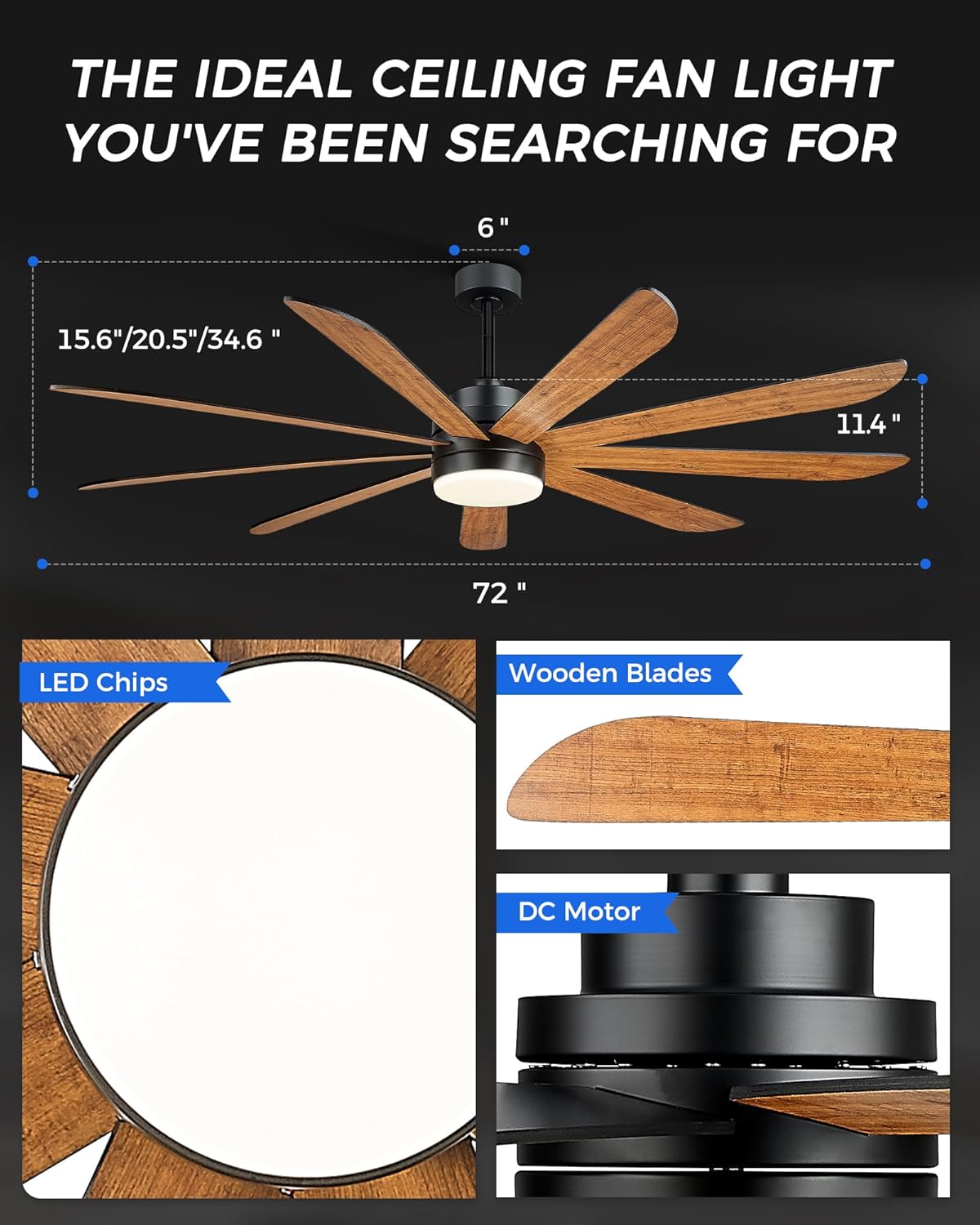
Image 4.1: Key components of the ceiling fan, including LED light, wooden blades, and DC motor.
5. Operating Instructions
Your JAZAVA ceiling fan offers multiple control methods for convenience.
5.1. Remote Control
The included remote control allows full functionality of the fan and light. Insert batteries (not included) into the remote. Follow the pairing instructions in the detailed manual if the remote does not respond immediately.
- Fan ON/OFF: Press the fan button to turn the fan on or off.
- Fan Speed: Adjust fan speed from 1 to 6 using the speed buttons.
- Light ON/OFF: Press the light button to turn the light on or off.
- Light Color Temperature: Cycle through 3000K (Warm Light), 4000K (Natural Light), and 5000K (Cool Light) settings.
- Light Brightness: Adjust brightness from 10% to 100%.
- Timer: Set the fan to turn off after 1, 2, or 4 hours.
- Forward/Reverse: Switch between summer (forward, clockwise) and winter (reverse, counter-clockwise) modes.
5.2. TUYA Smart App Control
Download the TUYA Smart App (compatible with 2.4GHz WIFI) from your device's app store. Follow the in-app instructions to connect your fan to your home network. The app provides comprehensive control over all fan and light functions, including scheduling.
5.3. Voice Control
Once connected to the TUYA Smart App, you can link your fan to voice assistants like Amazon Alexa or Google Assistant. Use voice commands to control fan speed, light settings, and turn the fan on/off.

Image 5.1: Demonstrating the three intelligent control systems: remote, app, and voice control.

Image 5.2: Explanation of the fan's reversible motor for summer and winter use.

Image 5.3: Customizable color temperature and brightness settings.

Image 5.4: Six wind speed settings for varied comfort levels.
6. Maintenance
Regular maintenance ensures optimal performance and longevity of your ceiling fan.
- Cleaning: Periodically wipe the fan blades and motor housing with a soft, damp cloth. Do not use abrasive cleaners or solvents. Ensure power is off before cleaning.
- Blade Balance: If the fan wobbles, check that all blade screws are tight. A balancing kit (not included) can be used if necessary.
- Light Kit: The LED light kit is designed for long life and typically does not require replacement. If issues occur, refer to troubleshooting or contact support.
7. Troubleshooting
Refer to this section for common issues and their solutions.
| Problem | Possible Cause | Solution |
|---|---|---|
| Fan does not start | No power; Loose wiring; Remote not paired or dead batteries. | Check circuit breaker; Verify all wire connections; Replace remote batteries or re-pair remote. |
| Light does not work | Loose wiring; Incorrect wiring of light kit; LED failure. | Check light kit wiring (ensure yellow to yellow, white to white); Verify connections; Contact customer support if LED is faulty. |
| Fan wobbles | Loose blades or mounting; Unbalanced blades. | Ensure all blade screws and mounting screws are tight; Use a blade balancing kit if necessary. |
| Fan is noisy | Loose screws; Motor issue; Obstruction. | Check all screws for tightness; Ensure no wires or objects are touching the fan; If noise persists, contact support. |
| Smart features (App/Voice) not working | Incorrect Wi-Fi connection; App not configured; Voice assistant not linked. | Ensure fan is connected to 2.4GHz Wi-Fi; Reconfigure fan in TUYA Smart App; Relink app to voice assistant. |
8. Specifications
| Feature | Detail |
|---|---|
| Brand | JAZAVA |
| Model Name | CF03-BK |
| Color | Matte Black & Dark Walnut |
| Product Dimensions | 72"D x 72"W x 34.6"H |
| Item Weight | 26.6 Pounds |
| Power Source | Corded Electric |
| Voltage | 120 Volts (DC) |
| Wattage (Light) | 24 watts |
| Type of Bulb | LED |
| Color Temperature | 3000K, 4000K, 5000K (Dimmable) |
| Number of Blades | 9 |
| Number of Power Levels | 6 (Fan Speeds) |
| Control Method | App, Remote, Voice |
| Indoor/Outdoor Usage | Indoor, Outdoor (Patio) |
| Air Flow Capacity | 7674 Cubic Centimeters Per Minute |
9. Warranty and Support
9.1. Warranty Information
Every product purchased from our Amazon store is eligible for a 30-day replacement parts policy to ensure optimal performance. Furthermore, these items are protected by a one-year warranty from the date of shipment. This warranty encompasses all terms and conditions outlined in the original manufacturer's warranty. However, it does not extend to issues such as theft, loss, water-related damages, misuse by the customer, or deterioration of the product’s finish due to exposure to UV rays or coastal environments.
9.2. Customer Support
For any questions, technical assistance, or warranty claims, please contact our customer service team. We offer 24-hour support and maintain local stock for faster delivery of replacement parts if needed.
Refer to the contact information provided with your purchase or visit the JAZAVA official website for support details.


