
JAZAVA 9228
JAZAVA 60 Inch Smart Ceiling Fan with Light Instruction Manual
Model: CF02-BGB (9228)
Product Overview
This manual provides detailed instructions for the installation, operation, and maintenance of your JAZAVA 60 Inch Smart Ceiling Fan with Light. This smart ceiling fan features multiple control options, a powerful DC motor, and dimmable LED lighting, designed to enhance comfort and style in your living space.
Safety Information
- Read all instructions carefully before installation and use.
- Ensure power is disconnected at the circuit breaker before installation or servicing.
- All wiring must be in accordance with national and local electrical codes. Consult a qualified electrician if you are unsure about the installation process.
- Do not operate the fan with damaged wiring or if it is not functioning correctly.
- Keep hands and objects clear of the fan blades during operation.
Package Contents
Please verify that all components are present before beginning installation.

This image illustrates the various components included in the package, such as the fan motor housing, five ABS blades, two downrods (5-inch and 10-inch), remote control, and all necessary mounting hardware.
- Ceiling Fan Motor Housing (x1)
- ABS Blades (x5)
- Downrods (5-inch and 10-inch)
- Remote Control
- Mounting Bracket
- LED Light Kit
- Hardware Pack (screws, wire nuts, etc.)
Specifications
| Feature | Detail |
|---|---|
| Brand | JAZAVA |
| Model | CF02-BGB (9228) |
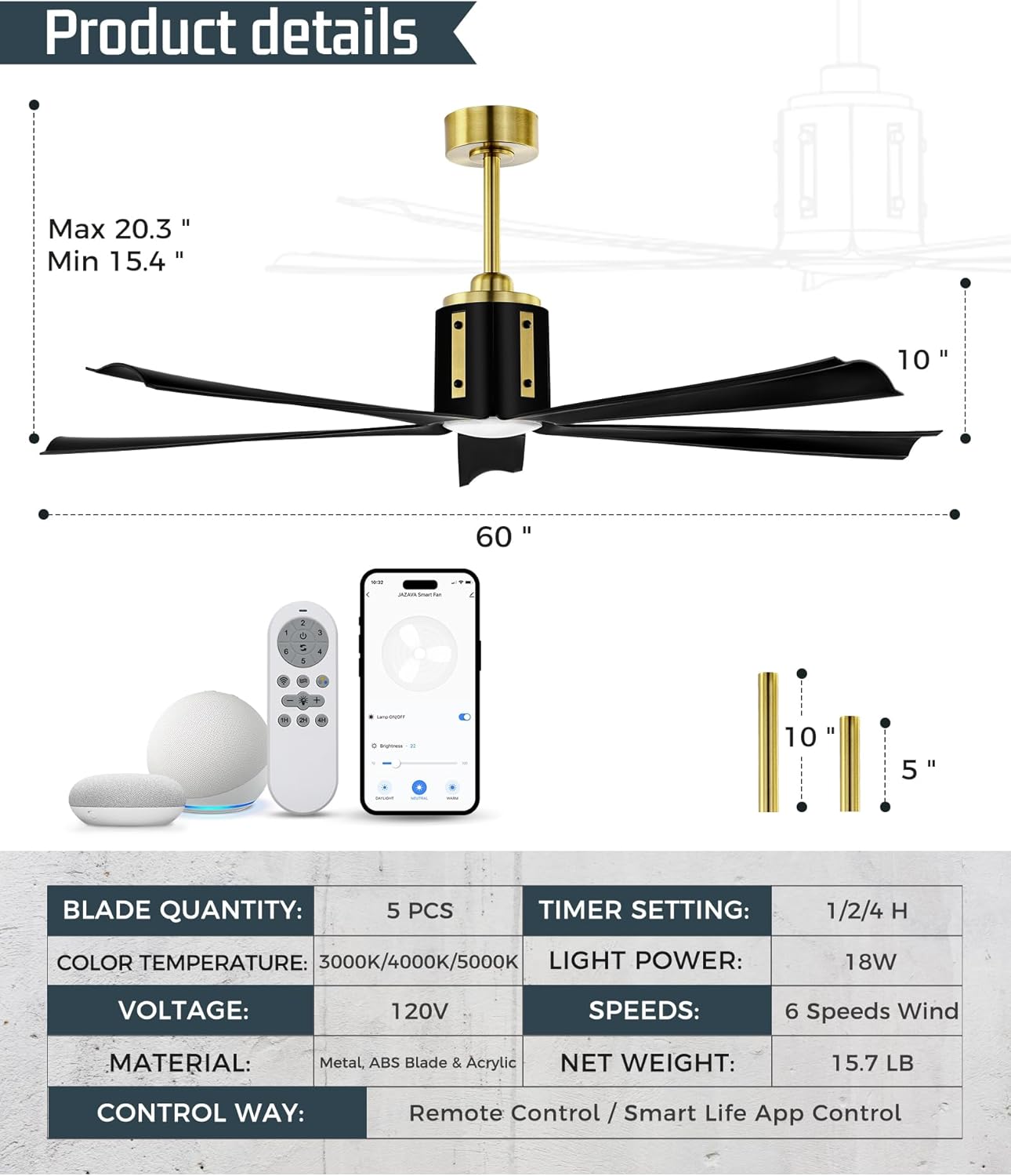
| Dimensions | 60"D x 60"W x 20.3"H |
| Blade Quantity | 5 |
| Motor Type | DC Reversible Motor |
| Fan Speeds | 6 |
| Light Kit | 18W Dimmable LED |
| Color Temperature | 3000K-5000K |
| Control Methods | Remote Control, Smart TUYA App, Voice Control |
| Voltage | 120 Volts (DC) |
| Item Weight | 15.7 Pounds |
Setup and Installation
The JAZAVA smart ceiling fan is designed for straightforward installation. Comprehensive instructions and all necessary accessories are included.
Ceiling Compatibility

This diagram illustrates that the fan is compatible with both flat ceilings and sloped ceilings up to 15 degrees.
Downrod Selection

The fan comes with both 5-inch and 10-inch downrods, allowing for adjustable heights of 15.4 inches or 20.3 inches from the ceiling to the bottom of the fan.
Wiring Connections
Follow the detailed wiring diagram provided in the included installation guide. Ensure all connections are secure and comply with local electrical codes.
This image shows the process of connecting the fan's wires to the household electrical wiring. Always match wire colors for proper connection.
Operating Instructions
Control Methods
Your JAZAVA smart ceiling fan can be controlled via remote control, the Smart TUYA App, or voice control.

This image demonstrates the three convenient ways to control your fan: through the dedicated smartphone app, the included remote control, or via voice commands using compatible smart home devices.
Fan Speed Control
The fan offers 6 adjustable wind speeds to suit your comfort needs.

This graphic illustrates the six wind speed settings, ranging from a gentle soft wind for sleeping to a powerful cool wind for active cooling.
Dimmable LED Light and Color Temperature
The integrated 18W LED light kit provides dimmable brightness from 10% to 100% and adjustable color temperatures from 3000K (Warm Light) to 5000K (Cool Light).

This image demonstrates the three color temperature options (Warm, Natural, Cool) and the dimmable brightness feature of the integrated LED light.
Reversible DC Motor
The reversible DC motor allows for year-round use. In summer, the fan rotates counter-clockwise to create a cooling downdraft. In winter, it rotates clockwise to circulate warm air.
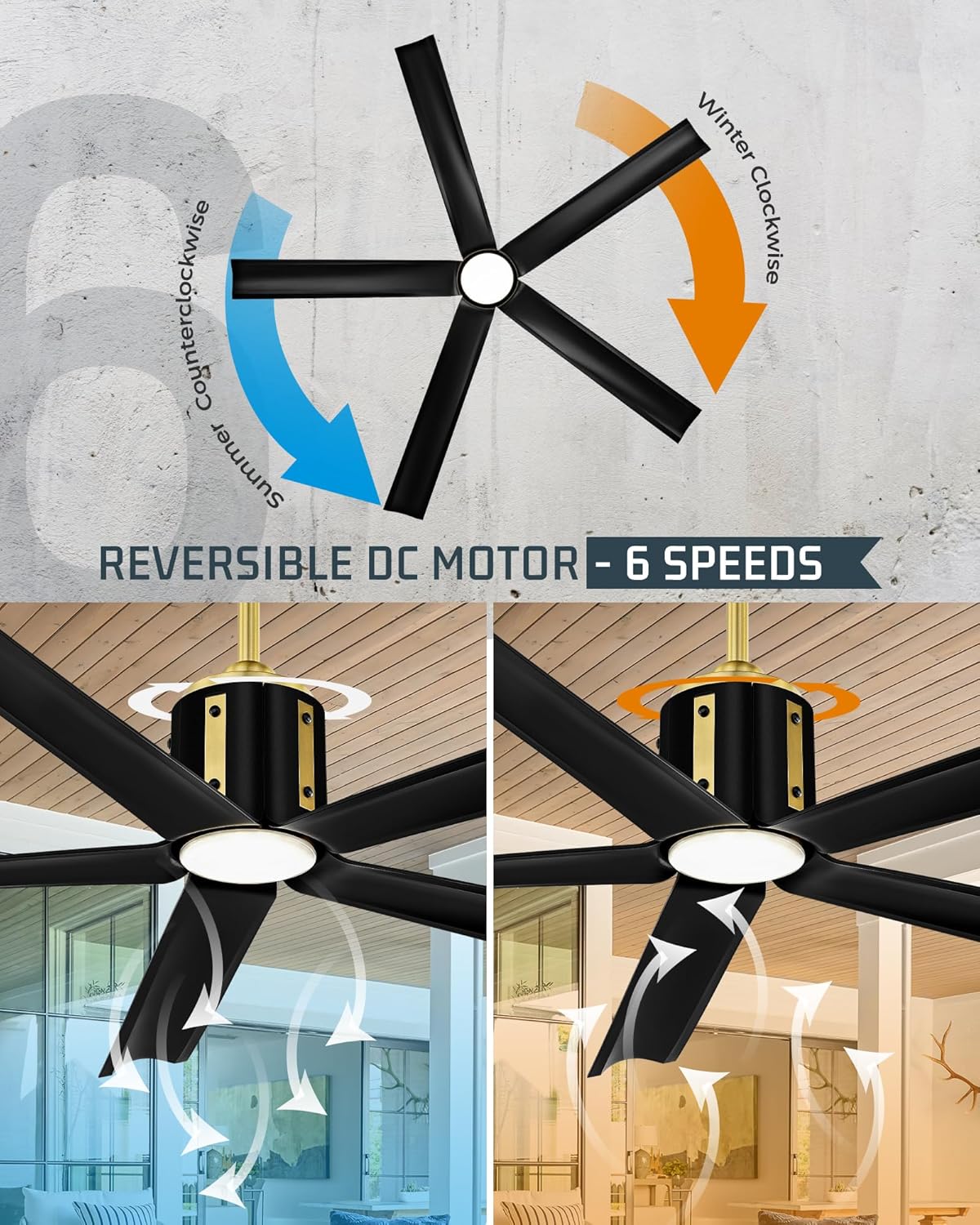
This graphic explains the reversible function of the fan, showing how different rotation directions optimize air circulation for both summer cooling and winter warmth.
Timer Settings
Customize timing settings for 1, 2, or 4 hours using the remote control or app.
Maintenance
- Cleaning: To clean the fan, wipe with a soft, damp cloth. Do not use abrasive cleaners or solvents.
- Blade Care: The ABS blades are durable and easy to clean. Periodically check for dust accumulation.
- Motor Care: The DC motor is designed for long-term, quiet operation and requires no special maintenance.
- Light Source: The LED light kit is designed for long life and is not user-replaceable.
Troubleshooting
For common issues, refer to the video guide below or contact JAZAVA customer support.
Fan or LED Light Not Working After Installation
This video addresses common issues such as the fan or LED light not working after installation. It provides guidance on checking connections and ensuring proper setup.
Remote Not Controlling Fan After Receiver Replacement
This video provides instructions on how to re-pair the remote control with the fan's receiver if control is lost after replacing the receiver unit.
Light Color Temperature Not Changing
This video explains how to ensure all necessary wires are correctly connected to enable the light color temperature change function.
General Troubleshooting Tips:
- No Power: Check circuit breaker and wall switch.
- Remote Not Working: Ensure batteries are correctly installed and charged. Try re-pairing the remote with the receiver (refer to video).
- Fan Wobble: Ensure all blade screws are tightened and the mounting bracket is securely installed.
- Noise: Check for loose screws or components. Ensure blades are clean and free of obstructions.
Warranty and Support
JAZAVA ceiling fans come with professional after-sales support. If you encounter any problems, please contact our after-sales team through email.
For further assistance, visit the official JAZAVA Store: JAZAVA Store on Amazon.
Ask a question about this manual
Ask about setup, troubleshooting, compatibility, parts, safety, or missing instructions. Manuals+ will review the question and use this page’s manual context to help answer it.